1. บทนำ
This manual provides essential information for the safe and efficient operation of your AUXUS iRis AX32LSP01-SM 32-inch Smart Android LED TV. Please read these instructions thoroughly before using the product and retain them for future reference.
The AUXUS iRis AX32LSP01-SM features a 32-inch HD Ready LED display, integrated Android operating system for smart functionality, wireless display capabilities, and multiple connectivity options. It is designed to provide an immersive viewing and interactive experience.

รูปที่ 1.1 : ด้านหน้า view of the AUXUS iRis 32-inch Smart Android LED TV, showcasing การแสดงผลของมัน
2. ข้อมูลด้านความปลอดภัย
โปรดปฏิบัติตามข้อควรระวังด้านความปลอดภัยต่อไปนี้เพื่อป้องกันความเสียหายต่อโทรทัศน์และเพื่อความปลอดภัยส่วนบุคคล:
- อย่านำโทรทัศน์ไปวางไว้กลางฝนหรือความชื้น เพื่อป้องกันไฟไหม้หรือไฟฟ้าช็อต
- อย่าเปิดทีวีasinก. ส่งต่อการบริการทั้งหมดให้กับบุคลากรที่มีคุณสมบัติเหมาะสม
- ตรวจสอบให้แน่ใจว่ามีการระบายอากาศที่เหมาะสม อย่าปิดกั้นช่องระบายอากาศ
- วางทีวีบนพื้นผิวที่มั่นคงและเรียบเพื่อป้องกันไม่ให้ทีวีล้ม
- ปกป้องสายไฟจากการถูกเหยียบหรือถูกหนีบ
- ถอดปลั๊กทีวีในระหว่างที่มีพายุฝนฟ้าคะนองหรือเมื่อไม่ได้ใช้งานเป็นเวลานาน
3. เนื้อหาบรรจุภัณฑ์
ตรวจสอบว่ามีรายการทั้งหมดอยู่ในแพ็คเกจ:
- 1 x AUXUS iRis 32-inch LED TV
- 1 x ขาตั้งตั้งโต๊ะ (ชุด)
- 1 x คู่มือผู้ใช้ (เอกสารนี้)
- ใบรับประกัน 1 ใบ
- 1 x รีโมทคอนโทรล
4. การตั้งค่า
4.1 การแกะกล่อง
Carefully remove the TV and all accessories from the packaging. Retain the packaging materials for future transport or servicing.
4.2 การติดตั้งขาตั้ง
If using the table-top stand, attach the stand bases to the bottom of the TV using the provided screws. Ensure the stand is securely fastened before placing the TV on a flat, stable surface.
4.3 การติดตั้งบนผนัง
The TV supports VESA-compatible wall mounts (not included). Consult a professional for wall mounting to ensure proper installation and safety.
4.4 การเชื่อมต่ออุปกรณ์ต่อพ่วง
Refer to the back panel diagram for port locations. Ensure the TV is powered off before making any connections.
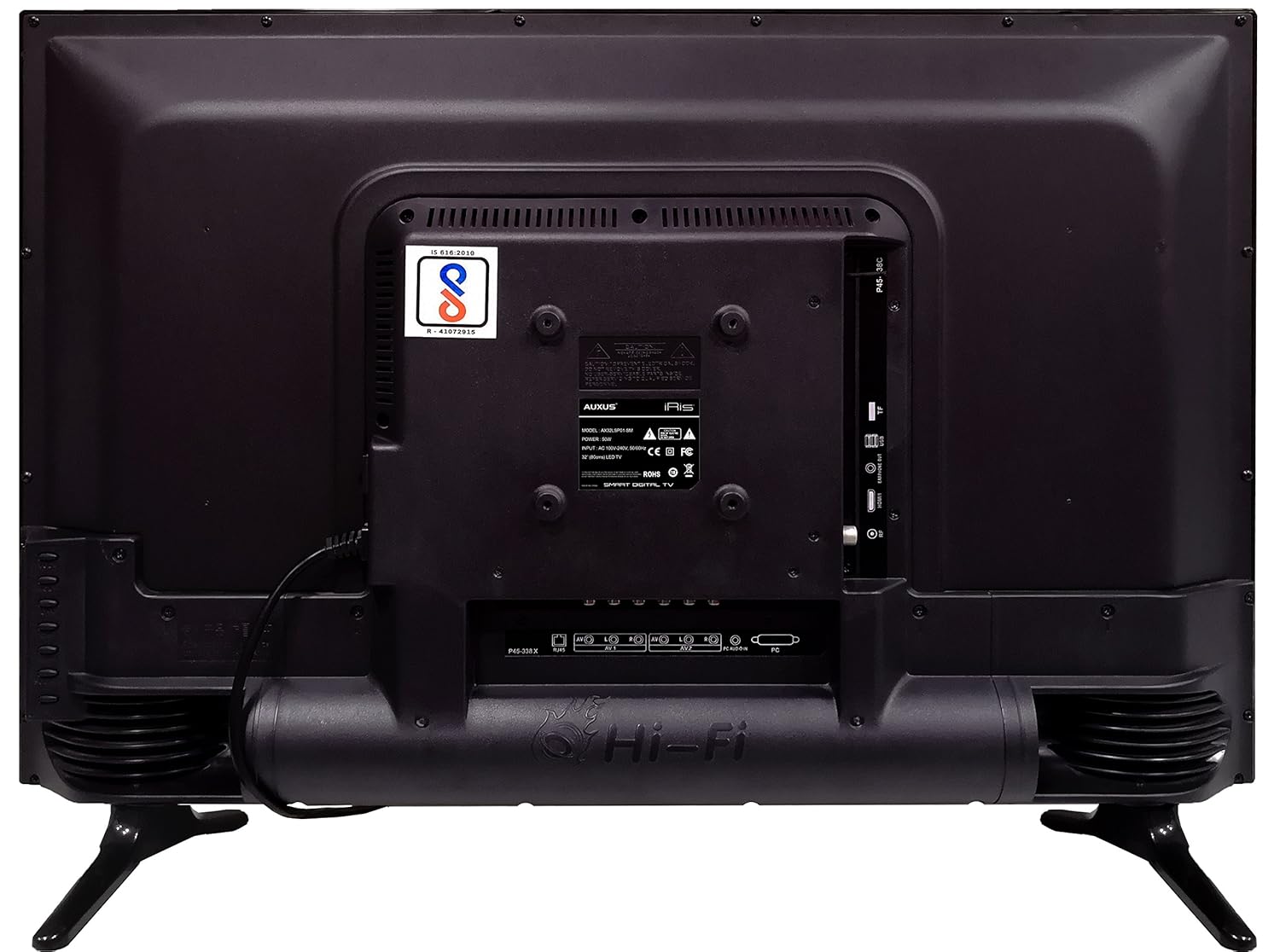
รูปที่ 4.1: แผงด้านหลังของทีวีพร้อมพอร์ตอินพุต/เอาต์พุตต่างๆ

รูปที่ 4.2: รายละเอียด view of the bottom interface ports.

Figure 4.3: Icons representing multiple connectivity options.
- พลัง: เชื่อมต่อสายไฟเข้ากับทีวีแล้วจึงเสียบเข้ากับเต้ารับที่ผนัง
- เสาอากาศ/สายเคเบิล: Connect an antenna or cable TV signal to the RF port.
- ยูเอสบี: Insert USB drives for media playback or software updates into the USB ports. The TV has 2 USB ports.
- อีเธอร์เน็ต (RJ45): เชื่อมต่อสายเคเบิลอีเทอร์เน็ตสำหรับการเชื่อมต่ออินเทอร์เน็ตแบบใช้สาย
- AV (เสียง/วิดีโอ): Use RCA cables for older devices. The TV has AV1 and AV2 inputs.
- PC IN (VGA): Connect a computer using a VGA cable for video and a 3.5mm audio cable for sound (PC AUDIO IN).
- หูฟัง: เชื่อมต่อหูฟังเข้ากับแจ็ค 3.5 มม. เพื่อการฟังแบบส่วนตัว
5. การใช้งานทีวี
5.1 การตั้งค่าครั้งแรก
- After connecting the power, press the Power button on the remote control or TV.
- ทำตามคำแนะนำบนหน้าจอเพื่อเลือกภาษา ประเทศ และเขตเวลาของคุณ
- Connect to your network: Choose Wi-Fi and enter your password, or ensure an Ethernet cable is connected.
- Complete the channel scan if connecting an antenna/cable.
5.2 การควบคุมระยะไกล
The remote control allows you to navigate menus, adjust volume, change channels, and access smart features. Familiarize yourself with its buttons for optimal use.
5.3 คุณสมบัติของสมาร์ททีวี (ระบบปฏิบัติการ Android)
Your TV runs on the Android operating system, providing access to a variety of applications and internet services.

Figure 5.1: TV displaying a smart interface, such as Netflix.
- การนำทาง: Use the directional pad and 'OK' button on the remote to browse the Android interface.
- จอแสดงผลแบบไร้สาย: Utilize the built-in wireless display feature to mirror content from compatible smartphones or tablets to your TV.
- Internet Browsing & Apps: Connect to the internet to browse websites or download and use applications from the app store.
- การเล่นเกม: The Android platform supports various games, offering an adrenaline-pumping gaming experience.
5.4 การตั้งค่าภาพและเสียง
เข้าสู่เมนูการตั้งค่าของทีวีเพื่อปรับแต่งภาพและเสียงตามต้องการ
- รูปภาพ: ปรับความสว่าง ความคมชัด สี ความละเอียด และเลือกโหมดภาพ (เช่น มาตรฐาน ไดนามิก ภาพยนตร์)
- เสียง: Optimize audio with settings for volume, balance, equalizer, and sound modes. The TV features 'Boomr Speakers' for enhanced audio output.
5.5 การเลือกแหล่งที่มาของอินพุต
Press the 'Source' or 'Input' button on your remote to switch between connected devices (HDMI 1, HDMI 2, AV 1, AV 2, PC, TV).
6. การบำรุงรักษา
6.1 การทำความสะอาดทีวี
- ควรถอดปลั๊กทีวีทุกครั้งก่อนทำความสะอาด
- Use a soft, dry cloth to wipe the screen and TV casing.
- For stubborn marks on the screen, use a screen cleaner specifically designed for LED displays, applied to the cloth, not directly to the screen.
- หลีกเลี่ยงการใช้สารทำความสะอาดที่มีฤทธิ์กัดกร่อน ขี้ผึ้งหรือตัวทำละลาย
6.2 การอัปเดตซอฟต์แวร์
ตรวจสอบการอัปเดตซอฟต์แวร์เป็นระยะผ่านเมนูการตั้งค่าของทีวี เพื่อให้มั่นใจได้ถึงประสิทธิภาพสูงสุดและการเข้าถึงคุณสมบัติล่าสุด
7 การแก้ไขปัญหา
หากคุณประสบปัญหาเกี่ยวกับทีวี โปรดดูปัญหาทั่วไปและวิธีแก้ไขต่อไปนี้:
| ปัญหา | วิธีแก้ปัญหาที่เป็นไปได้ |
|---|---|
| ไม่มีไฟฟ้า | Check if the power cord is securely connected and the power outlet is working. |
| ไม่มีภาพแต่มีเสียง | ตรวจสอบให้แน่ใจว่าได้เลือกแหล่งสัญญาณเข้าที่ถูกต้อง ตรวจสอบการเชื่อมต่อสายเคเบิลกับอุปกรณ์ภายนอก |
| ไม่มีเสียงแต่มีภาพ | ตรวจสอบระดับเสียงและสถานะปิดเสียง ตรวจสอบการเชื่อมต่อสายสัญญาณเสียง |
| รีโมตคอนโทรลไม่ทำงาน | เปลี่ยนแบตเตอรี่ ตรวจสอบให้แน่ใจว่าไม่มีสิ่งกีดขวางระหว่างรีโมทและทีวี |
| Android system hangs or is slow | Restart the TV by unplugging it for a few minutes. Close unused applications. |
| ปัญหาการเชื่อมต่อเครือข่าย | Check Wi-Fi password or Ethernet cable connection. Restart your router. |
8. ข้อมูลจำเพาะ
| คุณสมบัติ | ข้อมูลจำเพาะ |
|---|---|
| ยี่ห้อ | ออกัส |
| ชื่อรุ่น | AX32LSP01-SM |
| ขนาดหน้าจอ | 32 นิ้ว (82 ซม.) |
| เทคโนโลยีการแสดงผล | จอ LED, แผง IPS |
| ปณิธาน | HD Ready (1366 x 768p) |
| Viewอิงแองเกิล | 178 องศา |
| ระบบปฏิบัติการ | แอนดรอยด์ |
| ความจุในการเก็บข้อมูลแบบดิจิตอล | 8GB |
| แรม | 1GB |
| โหมดเอาต์พุตเสียง | Surround (Boomr Speakers) |
| พอร์ต HDMI | หลายรายการ |
| พอร์ต USB | 2 |
| เทคโนโลยีการเชื่อมต่อ | Ethernet, Wi-Fi (Wireless Display) |
| พอร์ตอื่น ๆ | AV (RCA), PC IN (VGA), PC Audio In, Headphone (3.5mm), RF (Antenna) |
| ประเภทการติดตั้ง | Wall Mount / Table Top Stand |
| ขนาดสินค้า (กxยxส) | 84 x 13 x 59 ซม. |
| น้ำหนักสินค้า | 6.5 กก. |
9. การรับประกันและการสนับสนุน
Your AUXUS iRis AX32LSP01-SM TV comes with a warranty. Please refer to the included Warranty Card for specific terms, conditions, and duration of the warranty coverage.
For technical support, service requests, or further inquiries, please contact AUXUS customer service. Contact details can typically be found on the warranty card or the official AUXUS webเว็บไซต์.


