1. บทนำ
This manual provides detailed instructions for the installation, operation, and maintenance of the Novastar MCTRL300 Synchronous LED Sender Box. Please read this manual thoroughly before using the device to ensure proper functionality and to prevent damage.
The Novastar MCTRL300 is a high-performance LED display controller designed for full-color LED screens, offering reliable and stable operation for various indoor and outdoor applications.
2. สินค้าหมดview และคุณสมบัติ
The Novastar MCTRL300 is a full-color sending card and LED display accessory. It is engineered to manage LED displays with high efficiency and precision.
คุณสมบัติหลัก:
- อินพุต DVI: One (1) DVI input for video signal connection.
- อินพุตเสียง: รองรับการรับสัญญาณเสียงภายนอก
- ข้อมูลออก: Two (2) RJ45 ports for data output, supporting hot backup functionality for enhanced reliability.
- อินเทอร์เฟซการควบคุม: USB control interface, allowing for cascading multiple units.
- ความจุพิกเซล: รองรับความละเอียดสูงสุด 1.3 ล้านพิกเซล
- ความละเอียดที่รองรับ: Includes 1280×1024, 1024×1200, 1600×848, 1920×712, 2048×668, and custom resolutions.
- Light Sensor Interface: One (1) interface for automatic brightness adjustment based on ambient light conditions.
- แอปพลิเคชัน: Suitable for both indoor and outdoor full-color RGB LED display control.
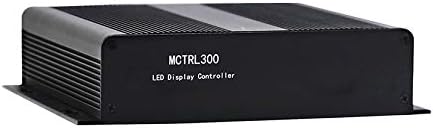
รูปที่ 2.1 : ด้านหน้า view of the Novastar MCTRL300 LED Sender Box, showing the model name.
3. การตั้งค่าและการเชื่อมต่อ
This section details the physical connections required to set up your Novastar MCTRL300 LED Sender Box.
3.1 แผงด้านหลัง Overview

Figure 3.1: Rear panel of the MCTRL300, illustrating power input, DVI, USB, audio, UART, and RJ45 data output ports.
- Power Input (AC 100-240V ~ 50/60Hz): Connect the provided power cable to this port and to a suitable power outlet. The power switch is located next to this port.
- อินพุต DVI: Connect your video source (e.g., PC graphics card) to this port using a DVI cable.
- พอร์ต USB: Connect a USB cable from your control PC to this port for device configuration and control.
- อินพุตเสียง: Connect an external audio source if audio transmission is required.
- RJ45 Data Output (OUT1, OUT2): Connect standard Ethernet cables from these ports to the receiving cards of your LED display. OUT1 and OUT2 support hot backup.
- UART IN/OUT: Used for cascading multiple sender boxes or for specific control scenarios.
- เซ็นเซอร์แสง: Connect an external light sensor for automatic brightness adjustment.
3.2 แผนภาพการเชื่อมต่อ
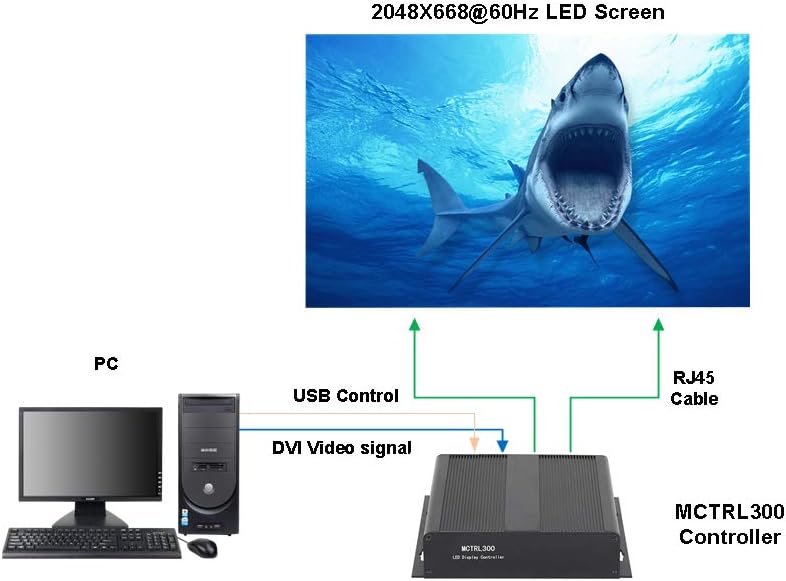
Figure 3.2: Typical connection setup for the MCTRL300, illustrating DVI video signal, USB control, and RJ45 data output to an LED screen.
- Connect the DVI output from your PC's graphics card to the DVI input port on the MCTRL300.
- Connect a USB cable from your PC to the USB port on the MCTRL300. This enables software control and configuration.
- Connect one or more RJ45 Ethernet cables from the MCTRL300's OUT1/OUT2 ports to the input ports of the first receiving card in your LED display panel chain. Ensure proper cabling for the entire LED screen.
- Connect the power cable to the MCTRL300 and a power source.
- Turn on the power switch on the rear panel of the MCTRL300. The "RUN" and "STATUS" indicators will illuminate.
4. คู่มือการใช้งาน
After completing the physical connections, the MCTRL300 is ready for operation. Configuration and content management are typically performed using dedicated software on the connected PC.
- เปิดเครื่อง: Ensure all connections are secure, then switch on the power to the MCTRL300 using the rear panel switch.
- การกำหนดค่าซอฟต์แวร์: Use the Novastar control software on your PC to detect the MCTRL300. Configure the LED display parameters, including resolution, screen mapping, and brightness settings. Refer to the software's user guide for detailed instructions.
- การเล่นเนื้อหา: Once configured, the MCTRL300 will transmit the video signal from your PC to the LED display. Ensure your PC's display settings match the configured resolution for optimal output.
- การปรับความสว่าง: If a light sensor is connected, the display brightness can be automatically adjusted. Manual adjustment is also possible via the control software.
5. การบำรุงรักษา
Proper maintenance ensures the longevity and reliable performance of your MCTRL300 LED Sender Box.
- การทำความสะอาด: Regularly clean the exterior of the device with a soft, dry cloth. Avoid using liquid cleaners or solvents. Ensure ventilation openings are free from dust and debris.
- สภาพแวดล้อม : Operate the device within its specified temperature and humidity ranges. Avoid exposure to extreme temperatures, direct sunlight, or high moisture environments.
- การจัดการสายเคเบิล: Ensure all cables are securely connected and not under strain. Periodically check for any signs of wear or damage to cables.
- การอัปเดตซอฟต์แวร์: Keep the Novastar control software and device firmware updated to the latest versions for optimal performance and compatibility.
6 การแก้ไขปัญหา
This section provides solutions to common issues you might encounter with the MCTRL300.
| ปัญหา | สาเหตุที่เป็นไปได้ | สารละลาย |
|---|---|---|
| No display on LED screen. |
|
|
| "RUN" or "STATUS" indicator not lit. |
|
|
| Display shows abnormal colors or flickering. |
|
|
If the problem persists after attempting these solutions, please contact Novastar technical support.
7. ข้อมูลจำเพาะ
Technical specifications for the Novastar MCTRL300 LED Sender Box.
| คุณสมบัติ | รายละเอียด |
|---|---|
| ยี่ห้อ | โนวาสตาร์ |
| แบบอย่าง | เอ็มซีทีแอล300 |
| อินเตอร์เฟซการป้อนข้อมูล | 1 x DVI, External Audio |
| อินเทอร์เฟซเอาท์พุต | 2 x RJ45 (Data Output, Hot Backup), UART OUT |
| อินเทอร์เฟซการควบคุม | 1 x USB, UART IN |
| ความจุพิกเซล | 1.3 ล้านพิกเซล |
| ความละเอียดที่รองรับ | 1280×1024, 1024×1200, 1600×848, 1920×712, 2048×668, or custom |
| คุณสมบัติพิเศษ | Light Sensor Interface for auto brightness adjustment, Cascading support via USB |
| แหล่งจ่ายไฟ | ไฟฟ้ากระแสสลับ 100-240V ~ 50/60Hz |
| น้ำหนักสินค้า | 3.88 ปอนด์ (ประมาณ 1.76 กก.) |
| ขนาดแพ็คเกจ | 11.1 x 8.54 x 4.57 นิ้ว (ประมาณ 28.2 x 21.7 x 11.6 ซม.) |

Figure 7.1: MCTRL300 package contents, including the sender box and necessary cables.
8. การสนับสนุน
For further assistance, technical support, or warranty inquiries, please refer to the official Novastar webไซต์หรือติดต่อตัวแทนจำหน่ายที่ได้รับอนุญาตของคุณ
Always ensure you have your product model number (MCTRL300) and purchase details available when contacting support.


