1. บทนำ
This manual provides comprehensive instructions for the BENFEI Mini DisplayPort to VGA Adapter, Model 000171. This adapter is designed to facilitate the connection of a Mini DisplayPort (Thunderbolt compatible) enabled computer or device to a display device equipped with a VGA port, such as an HDTV, monitor, or projector. It supports video transmission only and does not transmit audio.
2. คำแนะนำในการตั้งค่า
Follow these steps to correctly set up your BENFEI Mini DisplayPort to VGA Adapter:
- เตรียมอุปกรณ์ของคุณให้พร้อม: Ensure your Mini DisplayPort source device (e.g., laptop, desktop PC) and your VGA display device (e.g., monitor, projector) are powered off.
- Connect VGA Cable: Obtain a standard VGA cable (not included). Connect one end of the VGA cable to the VGA port on your display device.
- Connect Adapter to VGA Cable: Connect the other end of the VGA cable to the VGA female port on the BENFEI Mini DisplayPort to VGA Adapter. Secure the connection if your VGA cable has screws.
- Connect Adapter to Source Device: Plug the Mini DisplayPort male connector of the adapter into the Mini DisplayPort (or Thunderbolt port) on your computer or source device.
- เปิดอุปกรณ์: Power on your display device first, then power on your computer or source device.
- กำหนดการตั้งค่าการแสดงผล: Your computer should automatically detect the connected display. If not, navigate to your operating system's display settings to configure the external monitor (e.g., extend display, duplicate display).

Figure 2.1: Connection Diagram. The adapter transmits signals only from Mini DP source to VGA monitor.
3. คู่มือการใช้งาน
The BENFEI Mini DisplayPort to VGA Adapter provides a straightforward solution for video output. Once connected as described in the Setup section, the adapter will transmit video signals from your Mini DisplayPort source to your VGA display.
- ความละเอียดวิดีโอ: The adapter supports video resolutions up to 1920x1200 / 1080P Full HD at 60Hz, providing clear and crisp visuals.
- ไม่มีเอาต์พุตเสียง: Please note that this adapter is designed for video transmission only. Audio will not be transmitted through the VGA connection. You will need a separate audio cable for sound if your display device has speakers.
- โหมดการแสดงผล: Your operating system's display settings will allow you to choose between different display modes:
- โหมดมิเรอร์: Duplicates your computer's screen onto the external display.
- โหมดขยาย: Extends your desktop across both your computer's screen and the external display, allowing for more workspace.

Figure 3.1: Mirror Mode and Extended Mode display configurations.

รูปที่ 3.2: อดีตample of 1080P@60Hz resolution output on an external display.
4. ความเข้ากันได้
This adapter is designed for specific Mini DisplayPort and Thunderbolt-enabled devices. Please review ข้อมูลความเข้ากันได้มีดังต่อไปนี้:
Compatible Devices (Mini DisplayPort / Thunderbolt Host):
- แอปเปิล: iMac, Mac Mini, Mac Pro, MacBook Air, MacBook Pro (13-inch, 15-inch, 17-inch), MacBook Air 2010-2017, MacBook Pro Mid 2010, MacBook Pro 2010-2015, iMac 2009-2015 (cannot be used as a monitor), Mac mini 2010-2014, Mac Pro 2009-2013.
- ไมโครซอฟต์ ซีเซิร์เวอร์: Surface Pro/Pro2/Pro3/Pro4/Pro5/Pro6, Surface Laptop/Laptop2/Laptop 3, Surface Book/Surface Studio.
- เลอโนโว : Thinkpad T440/T440p/T450/T460, ThinkPad Helix/X230/L430/L530, ThinkPad T430s/T430/T530/W530.
- เดลล์ : Dell XPS (Before 2016).
- อื่น: Cyberpower Zeusbook Edge X6-100/X6-200, Toshiba Satellite Pro S500, Tecra M11/A11/S11.
อุปกรณ์ที่ไม่เข้ากัน:
- แอปเปิล: MacBook 2009 and introduced in 2015 or later, MacBook Pro 2016 or later, MacBook Air 2015 or later, iMac 2017 or later, Mac Mini 2018 or later, Mac Pro 2019 or later.
- ไมโครซอฟต์ ซีเซิร์เวอร์: Surface Book 2/Surface Pro 7/Pro X/Surface Laptop3, Surface Go/Surface dock/Surface/Surface 2/Surface Studio 2.
- เลอโนโว : Thinkpad x1 carbon/L540/E595/X240/Lenovo yoga 720.
- เอชพี: 14b-ca0000/Chromebook x360/ENVY x360 15-ds000/G60.
- เดลล์ : Inspiron 14 5000/XPS 12/latitude d630.
- อื่น: iPhone/iPad Air/iPad pro/PS3/PS4Pro/Huawei/Mate 20 pro, Amazon Fire HD, Kindle, Amazon Firestick, Nintendo Switch, Xbox.
Note: If your laptop is not listed, please consult the manufacturer for compatibility or consider a USB-C to HDMI adapter if your device supports it.

Figure 4.1: Detailed list of compatible and incompatible devices.
5. การบำรุงรักษา
To ensure the longevity and optimal performance of your BENFEI Mini DisplayPort to VGA Adapter, follow these maintenance guidelines:
- จัดการด้วยความระมัดระวัง: Avoid bending or twisting the cable excessively, especially near the connectors.
- รักษาความสะอาด: Use a soft, dry cloth to gently wipe the adapter and connectors. Avoid using liquid cleaners or solvents.
- พื้นที่จัดเก็บ: เก็บอะแดปเตอร์ไว้ในที่แห้งและเย็น หลีกเลี่ยงแสงแดดโดยตรงและอุณหภูมิที่สูงหรือต่ำมากเมื่อไม่ได้ใช้งาน
- ป้องกันขั้วต่อ: The adapter features gold-plated connectors for enhanced signal transmission and corrosion resistance. Keep the connectors free from dust and debris.
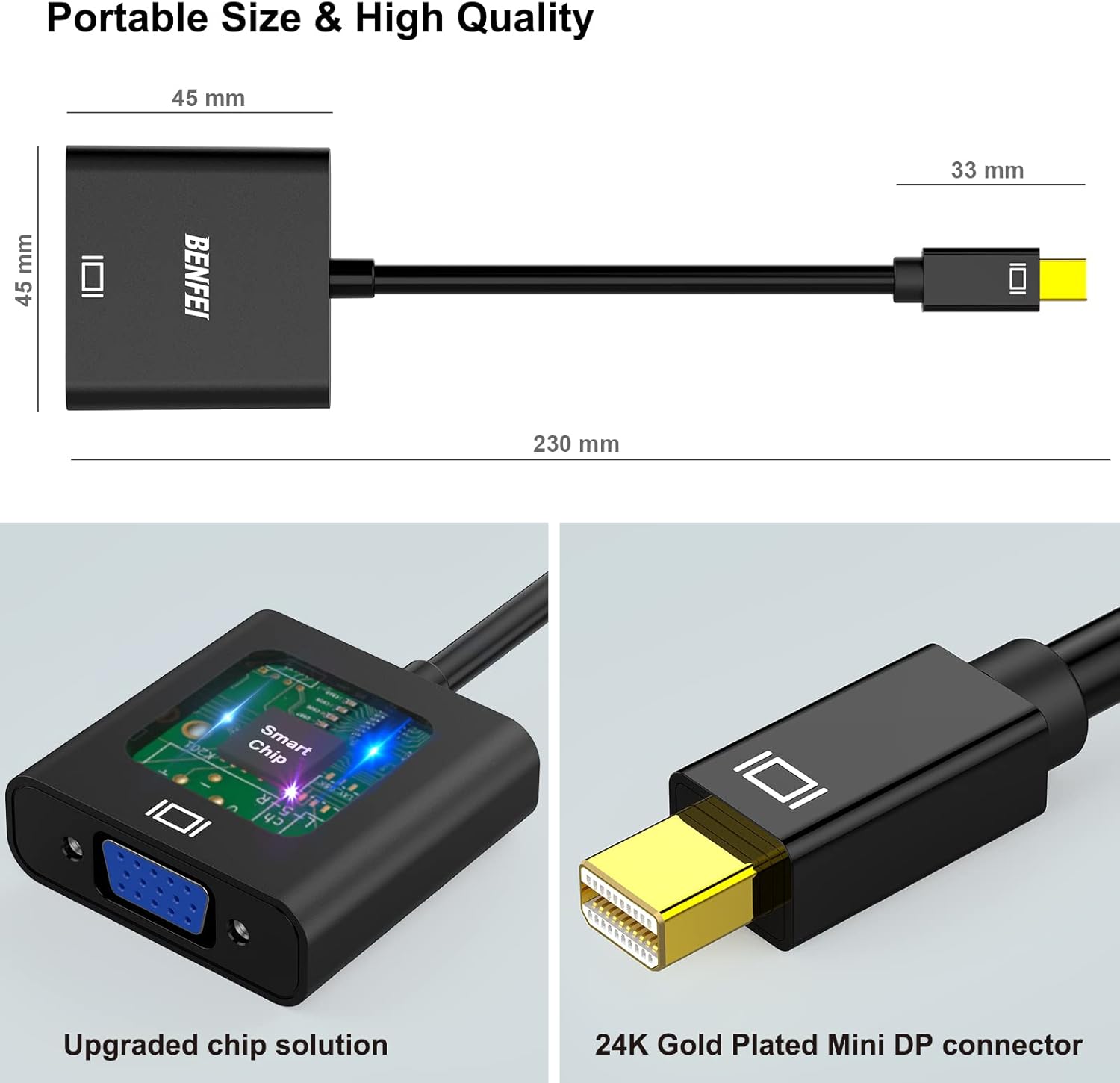
Figure 5.1: Adapter features including compact size, smart chip, and gold-plated connector.
6 การแก้ไขปัญหา
If you encounter issues while using your BENFEI Mini DisplayPort to VGA Adapter, refer to the following troubleshooting tips:
- ไม่มีการแสดงผลบนจอภาพ:
- Ensure all connections are secure. Unplug and re-plug both the Mini DisplayPort and VGA ends.
- Verify that the VGA cable is functioning correctly by testing it with another device if possible.
- Check your computer's display settings to ensure the external monitor is detected and configured (e.g., extended or duplicated).
- Confirm that your source device's Mini DisplayPort is active and outputting a signal.
- ภาพกระพริบหรือไม่นิ่ง:
- ตรวจสอบการเชื่อมต่อที่หลวม
- Ensure the resolution and refresh rate settings on your computer are compatible with your VGA display. Try lowering the resolution if issues persist.
- ลดการรบกวนจากอุปกรณ์อิเล็กทรอนิกส์อื่นๆ
- ไม่มีเสียง:
- This adapter transmits video signals only. It does not support audio output. For audio, connect a separate audio cable from your source device to your display or external speakers.
- Adapter Not Working with USB/DP/DVI:
- This adapter is specifically designed for Mini DisplayPort to VGA conversion. It is not compatible with USB, standard DisplayPort, or DVI ports. Ensure your source device has a Mini DisplayPort or Thunderbolt port.

Figure 6.1: Adapter directionality and incompatible port types.
7. ข้อมูลจำเพาะ
| คุณสมบัติ | ข้อมูลจำเพาะ |
|---|---|
| หมายเลขรุ่น | 000171 |
| ประเภทขั้วต่อ | Mini DisplayPort Male to VGA Female |
| ความละเอียดสูงสุด | 1920x1200 / 1080P Full HD @ 60Hz |
| การสนับสนุนด้านเสียง | No (Video only) |
| ขนาดสินค้า (กว้าง x ยาว x สูง) | 0.39 x 0.39 x 0.39 นิ้ว (ประมาณ 1 x 1 x 1 ซม.) |
| น้ำหนักสินค้า | 1 ounce (approx. 28 grams) |
| สี | Black (Mini DP to VGA) |
| วัสดุ | Gold-plated connectors for durability and signal integrity |
| การใช้งานเฉพาะ | Monitor, Projector, TV connection |
8. การรับประกันและการสนับสนุน
BENFEI provides the following warranty and support for this product:
- การรับประกันคืนเงิน: 45 วัน
- การรับประกันอย่างไร้กังวล: 18 เดือน.
- การสนับสนุนลูกค้า: For technical assistance, warranty claims, or any product-related inquiries, please contact BENFEI customer support through the retailer's platform or the official BENFEI webเว็บไซต์.


