1. บทนำ
This user manual provides comprehensive instructions for the installation, operation, and maintenance of the Secukey SK4-W Standalone Access Control System. Please read this manual carefully before installation and use to ensure proper functionality and safety.
The Secukey SK4-W is a robust, IP66-rated access control device designed for outdoor use, featuring RFID card and PIN code access. It is an ideal solution for securing doors, gates, and other entry points.
2. สินค้าหมดview
2.1 คุณสมบัติหลัก
- IP66 Waterproof and Anti-Vandal Design: Suitable for harsh outdoor environments.
- โหมดการเข้าถึงหลายโหมด: Supports RFID card only, PIN code only, or Card + PIN for enhanced security.
- ความจุผู้ใช้สูง: Manages up to 1000 users.
- รีเลย์แบบบูรณาการ: Built-in NO, NC, Com relay for direct door lock control.
- Adjustable Output Times: Programmable lock output time (1-99 seconds) and alarm output time (1-3 minutes).
- Wiegand 26-bit Interface: Supports external Wiegand readers, exit buttons, and alarms.
- Latch Mode: Allows the door or gate to remain open.
- ฉบับกว้างtagอี ช่วง: Operates on 12~28V AC/DC.
- ปุ่มกดเรืองแสง: ช่วยให้มองเห็นได้ชัดเจนในสภาพแสงน้อย
- โครงสร้างทนทาน: Zinc alloy casing with powder coating.
2.2 ส่วนประกอบที่รวมอยู่
- 1 x Secukey SK4-W Standalone Access Control Device (RFID/PIN)
- 1 x Master Add Card
- 1 x Master Delete Card
- 1 x คู่มือผู้ใช้
2.3 ผลิตภัณฑ์ Views

รูปที่ 1 : ด้านหน้า view of the SK4-W unit, highlighting the keypad and Secukey branding.

รูปที่ 2: มุม view of the SK4-W, providing a perspective of its slim profile.

รูปที่ 3: ด้านข้าง view of the SK4-W unit.
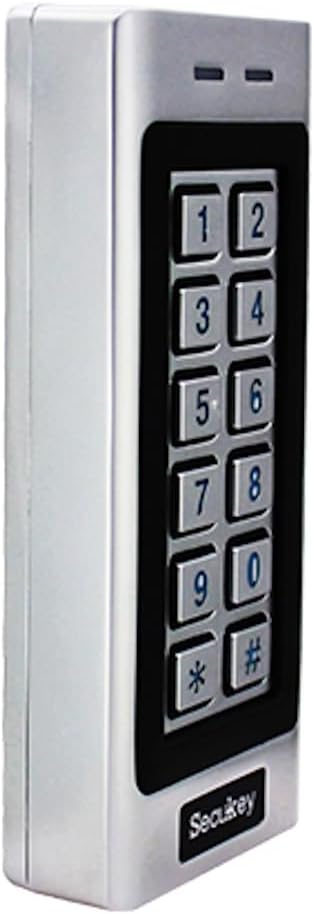
รูปที่ 4: อีกด้านหนึ่ง view of the SK4-W unit.

รูปที่ 5: ย้อนกลับ view of the SK4-W unit, displaying the integrated wiring for installation.
3. การตั้งค่าและการติดตั้ง
3.1 การติดตั้งอุปกรณ์
The SK4-W is designed for surface mounting. Choose a secure location near the door or gate, ensuring it is within reach for users and protected from direct impact. Use appropriate screws and wall plugs for the mounting surface.
3.2 แผนผังการเดินสายไฟ
The device requires a 12~28V AC/DC power supply (not included). Connect the wires according to the diagram provided in the full manual. Ensure all connections are secure and insulated to prevent short circuits.
- กำลังไฟเข้า: Connect to 12~28V AC/DC power source.
- Lock Output (NO/NC/COM): Connect to your electric lock.
- เอาต์พุตแจ้งเตือน: Connect to an external alarm system (if applicable).
- Wiegand In/Out: For connecting external Wiegand readers or other Wiegand devices.
- ปุ่มออก: Connect a push-to-exit button for convenient egress.
For detailed wiring schematics, please refer to the comprehensive wiring diagram included in the product packaging.
4. คู่มือการใช้งาน
4.1 Initial Setup and Master Cards
Upon first power-up, the device will be in factory default mode. Use the included Master Add Card and Master Delete Card to manage user access.
- การเพิ่มผู้ใช้: Present the Master Add Card, then present the new user's RFID card or enter their PIN.
- การลบผู้ใช้: Present the Master Delete Card, then present the user's RFID card or enter their PIN to be deleted.
4.2 Access Modes
The SK4-W supports three primary access modes:
- Card Only Mode: Users gain access by presenting a valid RFID card.
- PIN Only Mode: Users gain access by entering a valid 4-6 digit PIN code.
- Card + PIN Mode: Users must present a valid RFID card and then enter their corresponding PIN code for access. This mode offers the highest security.
Refer to the full programming guide for instructions on how to switch between access modes and manage user PINs.
4.3 Visitor PINs
The SK4-W supports up to 10 visitor PINs, which can be set to be valid for 1 to 10 uses. This feature is useful for temporary access for guests or service personnel.

Figure 6: The SK4-W supports visitor PINs and is IP66 waterproof, suitable for outdoor installation.
4.4 Latch Mode
The latch mode allows the door or gate to remain unlocked for an extended period, which can be useful during peak hours or for maintenance. Consult the programming manual for activation and deactivation procedures.
5. การบำรุงรักษา
The Secukey SK4-W is designed for minimal maintenance due to its robust construction and IP66 rating. However, regular checks can prolong its lifespan and ensure optimal performance.
- การทำความสะอาด: Wipe the keypad and casing กับ d อ่อนamp ผ้า หลีกเลี่ยงน้ำยาทำความสะอาดหรือตัวทำละลายที่มีฤทธิ์กัดกร่อน
- ตรวจสอบการเชื่อมต่อ: Periodically inspect wiring connections for any signs of wear, corrosion, or loosening.
- อัพเดตเฟิร์มแวร์: ตรวจสอบของผู้ผลิต webเข้าชมเว็บไซต์เพื่อตรวจสอบการอัปเดตเฟิร์มแวร์ที่มีให้ใช้งาน

Figure 7: The SK4-W is designed to withstand extreme operating temperatures, from -40°C to 60°C.
6 การแก้ไขปัญหา
| ปัญหา | สาเหตุที่เป็นไปได้ | สารละลาย |
|---|---|---|
| เครื่องเปิดไม่ติด | ไม่มีแหล่งจ่ายไฟ; แรงดันไฟฟ้าไม่ถูกต้องtage; loose wiring. | Check power connections and ensure correct 12~28V AC/DC supply. Verify wiring. |
| ไม่รู้จักการ์ด RFID | Card not enrolled; incorrect card type (not 125 KHz EM); damaged card. | Ensure the card is properly enrolled. Verify it is a 125 KHz EM card. Try another card. |
| รหัส PIN ไม่ทำงาน | Incorrect PIN; PIN not enrolled; device in card-only mode. | Double-check the PIN. Ensure the PIN is enrolled. Verify the access mode setting. |
| Door lock not activating. | Incorrect lock wiring (NO/NC); lock power issue; relay output time too short. | Check lock wiring and power. Adjust the lock output time in settings. |
| Wiegand output issues. | Incorrect Wiegand wiring; incompatible Wiegand device. | Verify Wiegand 26-bit wiring. Ensure external device compatibility. |
If the problem persists, please contact Secukey technical support for assistance.

Figure 8: Wiegand 26-bit input and output signal timing diagram.
7. ข้อมูลจำเพาะ
| คุณลักษณะ | ค่า |
|---|---|
| หมายเลขรุ่น | SK4-W |
| ยี่ห้อ | เซคูคกี้ |
| ขนาด (กว้าง x ยาว x สูง) | 13.0 x 5.6 x 2.3 ซม. |
| น้ำหนัก | 500 กรัม |
| สี | เงิน |
| แหล่งจ่ายไฟ | 12~28V เอซี/ดีซี |
| ระดับการป้องกันน้ำเข้า (IP) | IP66 (Waterproof, Anti-Vandal) |
| ความจุของผู้ใช้ | รองรับผู้ใช้งานสูงสุด 1000 คน |
| ความยาวรหัส PIN | 4 ถึง 6 หลัก |
| ประเภทบัตร | 125 KHz EM Card |
| อินเตอร์เฟส Wiegand | Wiegand 26-bit Input & Output |
| ล็อคเอาต์พุตโหลด | สูงสุด 3A |
| โหลดเอาต์พุตแจ้งเตือน | สูงสุด 3A |
| อุณหภูมิในการทำงาน | -40 °C ถึง 60 °C (-40 F ถึง 140 F) |
| ความชื้นในการทำงาน | 10% ถึง 90% (ไม่ควบแน่น) |
| Casinวัสดุ g | Zinc Alloy with Powder Coating |
8. การรับประกันและการสนับสนุน
Secukey products are manufactured to high quality standards. For warranty information and technical support, please refer to the warranty card included with your product or visit the official Secukey webเว็บไซต์.
ข้อมูลติดต่อ:
- ผู้ผลิต: เซคูคกี้
- Webเว็บไซต์: www.secukey.com (อดีตampลิงค์จริงอาจแตกต่างกัน)
- บริการลูกค้า: โปรดดูที่บรรจุภัณฑ์ของผลิตภัณฑ์ หรือ webเว็บไซต์สำหรับรวบรวมข้อมูลการติดต่อเพื่อขอรับการสนับสนุนในระดับภูมิภาค
โปรดเก็บหลักฐานการซื้อของคุณไว้เพื่อเรียกร้องการรับประกัน


