1. บทนำและเรื่องอื่นๆview
The DJI Mavic Air is a compact, foldable drone designed for portability and advanced aerial photography. It features a 3-axis gimbal with a 4K camera, 32 MP sphere panoramas, and intelligent flight modes for an enhanced user experience. This manual provides essential information for setting up, operating, and maintaining your Mavic Air drone.

Figure 1: DJI Mavic Air drone in Arctic White.
2. เนื้อหาบรรจุภัณฑ์
The DJI Mavic Air Fly More Combo package includes the following items:
- MAVIC AIR Aircraft
- MAVIC AIR Remote Controller
- Three Intelligent Flight Batteries
- MAVIC AIR Gimbal Protector
- Six pairs of Quick-Release Propellers
- Two Control Sticks
- MAVIC AIR Carrying Case
- ชุดการ์ดใบพัด
- MAVIC AIR Travel Bag
- MAVIC AIR Battery Charging Hub
- MAVIC AIR Battery to Power Bank Adapter
- สาย RC (ขั้วต่อ Lightning)
- สาย RC (ขั้วต่อ Micro USB มาตรฐาน)
- สาย RC (ขั้วต่อ USB Type-C)
- Communication Cable (USB 3.0 Type-C)
- อะแดปเตอร์ USB
- Two RC Cable Sliders (large)
- Two RC Cable Sliders (small)
- อุปกรณ์เสริมอื่นๆ
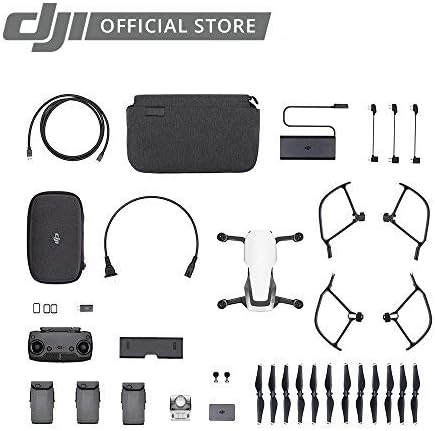
Figure 2: Contents of the DJI Mavic Air Fly More Combo.
3. การตั้งค่า
3.1 การกางเครื่องบินออก
- Gently unfold the front arms of the drone.
- Unfold the rear arms. Ensure all arms click into place securely.
Video 1: Demonstrating the folding and unfolding of the DJI Mavic Air drone arms.
3.2 การติดตั้งแบตเตอรี่
- ตรวจสอบให้แน่ใจว่าแบตเตอรี่เที่ยวบินอัจฉริยะชาร์จเต็มแล้ว
- Slide the battery into the battery compartment on the top of the aircraft until it clicks into place.
3.3 การตั้งค่ารีโมทคอนโทรล
- แฉอุปกรณ์มือถือ clampกดปุ่มบนรีโมทคอนโทรล
- Attach your smartphone to the remote controller using the appropriate RC cable (Lightning, Micro USB, or USB Type-C).
- Ensure the control sticks are securely screwed into place.
Video 2: Attaching a smartphone to the DJI Mavic Air remote controller.
3.4 DJI GO 4 App
Download and install the DJI GO 4 app on your mobile device. This app is essential for controlling the drone, accessing flight modes, and viewตรวจสอบฟีดกล้อง
4. คู่มือการใช้งาน
4.1 การเปิด/ปิดเครื่อง
- To power on the aircraft and remote controller, press the power button once, then press and hold it for two seconds.
- To power off, repeat the same procedure.
4.2 การขึ้นและลงจอด
- ระบบบินขึ้นอัตโนมัติ: In the DJI GO 4 app, tap the auto-takeoff icon and confirm. The drone will ascend to a preset height.
- การบินขึ้นด้วยมือ: Push both control sticks to the bottom inner or outer corners to start the motors. Then, push the left stick up to ascend.
- ระบบลงจอดอัตโนมัติ: In the DJI GO 4 app, tap the auto-landing icon and confirm. The drone will descend and land automatically.
- การลงจอดด้วยตนเอง: Pull the left control stick down slowly to descend. Once landed, hold the stick down for a few seconds to stop the motors.
4.3 โหมดการบิน
The Mavic Air offers various flight modes:
- P-Mode (Positioning): Provides GPS and vision positioning for stable flight and obstacle avoidance.
- S-Mode (Sport): Increases flight speed and agility, disabling obstacle avoidance. Use with caution.
- T-Mode (Tripod): Limits flight speed for precise control and stable shots.
4.4 โหมดการบินอัจฉริยะ
Access these modes via the DJI GO 4 app:
- ควิกช็อต: Pre-programmed flight paths for cinematic shots (Rocket, Dronie, Circle, Helix, Asteroid, Boomerang).
- ติดตามการใช้งาน: ติดตามหัวข้อที่เลือกโดยอัตโนมัติ
- TapFly: Tap a point on your screen, and the drone will fly to it while avoiding obstacles.
- SmartCapture: Control the drone with hand gestures for intuitive photo and video capture.
5. คุณสมบัติ
- 32 MP Sphere Panoramas: Stitches 25 photos in eight seconds for crystal clear sphere panoramas.
- Lightweight and Compact Foldable Design: ง่ายต่อการพกพาและจัดเก็บ
- 3-Axis Gimbal & 4K Camera: Supports 4K video at 30 fps and 12 MP stills with Adobe DNG RAW support. The gimbal stabilizes the camera for smooth footage.
- ช่วงควบคุมที่ขยายกว้างขึ้น: Control your drone from up to 6562 feet away.
- แบตเตอรี่อัจฉริยะเที่ยวบิน: Provides up to 21 minutes of flight time per charge.
- Dedicated Remote Controller: Features a foldable, ergonomic design with detachable control sticks.
- 3-Directional Environment Sensing: Equipped with five vision sensors, GPS, GLONASS, ultrasonic range finders, and redundant sensors for safe flight and obstacle avoidance.
- พื้นที่เก็บข้อมูลภายใน 8GB: Allows for direct storage of photos and videos, expandable via microSD card.

Figure 3: The DJI Mavic Air in its folded, compact state.
วิดีโอ 3: จบview of the DJI Mavic Air drone's features, including its compact size and camera capabilities.
6. การบำรุงรักษา
6.1 การดูแลรักษาใบพัด
- ตรวจสอบใบพัดอย่างสม่ำเสมอเพื่อหาการแตกร้าว การงอ หรือความเสียหาย เปลี่ยนใบพัดที่ชำรุดทันที
- ตรวจสอบให้แน่ใจว่าใบพัดได้รับการติดอย่างแน่นหนาก่อนการบินแต่ละครั้ง
6.2 การบำรุงรักษาแบตเตอรี่
- เก็บแบตเตอรี่ไว้ในที่แห้งและเย็น
- ห้ามชาร์จแบตเตอรี่มากเกินไปหรือปล่อยประจุมากเกินไป
- หากเก็บรักษาแบตเตอรี่เป็นเวลานาน ควรปล่อยประจุแบตเตอรี่ให้เหลือ 50-60% ของความจุ
6.3 การป้องกันกิมบอล
Always attach the gimbal protector when transporting the drone to prevent damage to the camera and gimbal system.
Video 4: Demonstrating the installation and removal of the gimbal protector on the DJI Mavic Air drone.
7 การแก้ไขปัญหา
- ไม่มีสัญญาณ GPS: Ensure you are flying in an open area away from tall buildings or interference.
- แอปตัดการเชื่อมต่อ: Check the connection cable between your smartphone and the remote controller. Restart the app or drone if necessary.
- ระบบหลีกเลี่ยงสิ่งกีดขวางใช้งานไม่ได้: Ensure vision sensors are clean and unobstructed. Obstacle avoidance may be limited in certain lighting conditions or flight modes (e.g., Sport Mode).
- ระยะเวลาบินสั้น: Ensure batteries are fully charged. Cold weather can reduce battery performance.
8. ข้อมูลจำเพาะ
| คุณสมบัติ | ข้อมูลจำเพาะ |
|---|---|
| ยี่ห้อ | ดีเจไอ |
| ชื่อรุ่น | มาวิคแอร์ |
| สี | สีขาว |
| ความละเอียดในการจับภาพวิดีโอ | 1080p (up to 4K at 30 fps) |
| ความละเอียดของภาพนิ่งที่มีประสิทธิภาพ | 12 MP |
| เทคโนโลยีการเชื่อมต่อ | USB 3.0 Type-C port, Wi-Fi |
| น้ำหนักสินค้า | 15.2 ออนซ์ (0.95 ปอนด์) |
| รูปแบบการจับภาพวิดีโอ | MP4/MOV (H.264/MPEG-4 AVC) |
| ระยะสูงสุด | 6562 ฟุต |
| ส่วนประกอบของเซลล์แบตเตอรี่ | ลิเธียมไอออน |
| แบตเตอรี่ที่จำเป็น | แบตเตอรี่ลิเธียมโพลิเมอร์ 3 ก้อน (รวมอยู่ด้วย) |
| ขนาดสินค้า | 6.5 x 1.57 x 3.24 นิ้ว |
9. การรับประกันและการสนับสนุน
สำหรับข้อมูลการรับประกันโดยละเอียดและการสนับสนุนทางเทคนิค โปรดดูที่เว็บไซต์อย่างเป็นทางการของ DJI webเยี่ยมชมเว็บไซต์หรือติดต่อฝ่ายบริการลูกค้าของ DJI เก็บหลักฐานการซื้อไว้เพื่อใช้ในการเคลมประกัน
Video 5: Demonstrating the DJI Mavic Air carrying case, highlighting its hard shell for protection during travel.
Video 6: Demonstrating the DJI Mavic Air shoulder bag, showing its compartments for accessories and drone storage.


