1. บทนำ
ขอบคุณสำหรับการซื้อasing the Lenco DIR-150 Internet Radio. This manual provides essential information for setting up, operating, and maintaining your device. Please read it thoroughly before use and retain it for future reference.
2. ข้อมูลด้านความปลอดภัย
- อย่าวางอุปกรณ์ไว้ในที่ที่มีฝนหรือความชื้น เพื่อป้องกันไฟไหม้หรือไฟฟ้าช็อต
- อย่าเปิดcasinก. ส่งต่อการบริการทั้งหมดให้กับบุคลากรที่มีคุณสมบัติเหมาะสม
- ตรวจสอบให้แน่ใจว่ามีการระบายอากาศที่เหมาะสมรอบ ๆ เครื่อง อย่าปิดกั้นช่องระบายอากาศ
- ใช้เฉพาะอะแดปเตอร์แปลงไฟที่ให้มากับเครื่องเท่านั้น
- Keep the device away from direct sunlight, heat sources, and strong magnetic fields.
- ทำความสะอาดอุปกรณ์ด้วยผ้าแห้งนุ่มเท่านั้น
3. เนื้อหาบรรจุภัณฑ์
ตรวจสอบว่ามีรายการทั้งหมดอยู่ในแพ็คเกจ:
- Lenco DIR-150 Internet Radio
- รีโมทคอนโทรล
- อะแดปเตอร์แปลงไฟ
- คู่มือการใช้งาน (เอกสารนี้)
4. สินค้าหมดview
4.1 แผงด้านหน้า
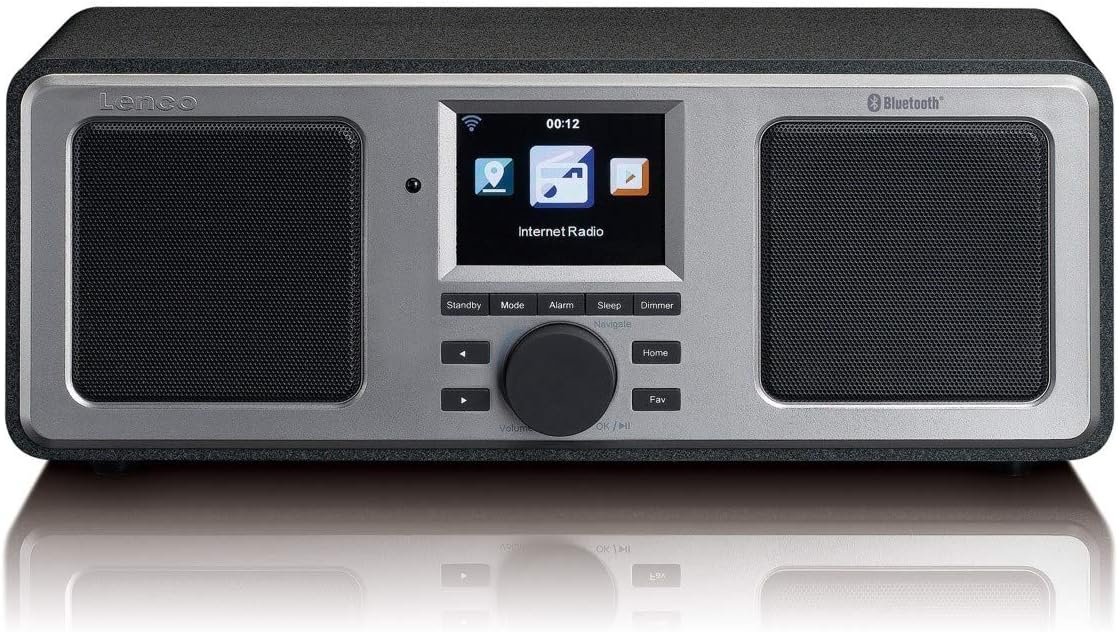
The front panel features a central color display, two integrated speakers, and control buttons. The display shows current mode, station information, time, and menu options. Control buttons include Standby, Mode, Alarm, Sleep, Dimmer, navigation arrows, a rotary knob for volume and selection, Home, and Fav (Favorites).
4.2 แผงด้านหลัง

The rear panel includes the power switch, DC IN port, Line Out, AUX In, and a USB port. An extendable telescopic antenna for FM reception is also located on the rear.
5. การตั้งค่า
5.1 การต่อสายไฟ
- Connect the supplied power adapter to the DC IN port on the rear of the DIR-150.
- เสียบอะแดปเตอร์ไฟฟ้าเข้ากับเต้ารับไฟฟ้าที่ผนัง
- พลิกสวิตช์ไฟบนแผงด้านหลังไปที่ตำแหน่ง 'เปิด'
5.2 การจัดวางเสาอากาศ
For optimal FM radio reception, fully extend the telescopic antenna located on the rear of the unit. Adjust its position for the best signal quality.
5.3 Initial Network Configuration (Wi-Fi)
Upon first power-on, the device will guide you through the initial setup wizard:
- Select your preferred language using the rotary knob and press to confirm.
- วิทยุจะสแกนหาเครือข่าย Wi-Fi ที่พร้อมใช้งาน
- เลือกเครือข่าย Wi-Fi ที่บ้านของคุณจากรายการ
- Enter your Wi-Fi password using the rotary knob to select characters and navigation buttons to move. Press the knob to confirm each character and then the final password.
- เมื่อเชื่อมต่อเสร็จแล้ว วิทยุจะแสดงข้อความยืนยัน
6. คู่มือการใช้งาน
6.1 การทำงานพื้นฐาน
- เปิด/ปิดเครื่อง: กดปุ่ม สแตนด์บาย button to switch the unit between standby and operational mode.
- การควบคุมระดับเสียง: หมุนปุ่มตรงกลางเพื่อปรับระดับเสียง
- การนำทาง: Use the navigation arrows and the rotary knob to browse menus and select options. Press the rotary knob to confirm a selection.
- โหมด: กดปุ่ม โหมด button to cycle through available modes (Internet Radio, FM, Bluetooth, USB, AUX).
- บ้าน: กดปุ่ม บ้าน ปุ่มเพื่อกลับไปยังเมนูหลัก
- Fav (Favorites): กดปุ่ม รายการโปรด button to access your saved favorite stations.
6.2 วิทยุอินเทอร์เน็ต
Access thousands of internet radio stations worldwide.
- Select 'Internet Radio' from the main menu.
- Browse stations by location, genre, or search by name.
- Select a station using the rotary knob and press to start playback.
- To save a station as a favorite, navigate to the station and press the รายการโปรด ปุ่ม.
6.3 วิทยุ FM
Listen to local FM broadcasts.
- กดปุ่ม โหมด button until 'FM Radio' is selected.
- The radio will automatically scan for available FM stations.
- Use the navigation arrows to manually tune or select a scanned station.
- The display will show RDS information (station name, program type) if available.
6.4 การเล่นบลูทูธ
สตรีมเสียงแบบไร้สายจากอุปกรณ์ที่รองรับบลูทูธของคุณ
- กดปุ่ม โหมด button until 'Bluetooth' is selected. The radio will enter pairing mode.
- On your mobile device, enable Bluetooth and search for 'Lenco DIR-150'.
- Select 'Lenco DIR-150' to pair. Once connected, you can play audio from your device through the radio.
6.5 การเล่น USB
เล่นเสียง fileโดยตรงจากแฟลชไดรฟ์ USB
- เสียบแฟลชไดรฟ์ USB เข้ากับพอร์ต USB ที่แผงด้านหลัง
- กดปุ่ม โหมด button until 'USB' is selected.
- Browse your audio files (MP3, WAV, AAC formats supported) and select one to play.
อินพุต AUX 6.6 ช่อง
เชื่อมต่ออุปกรณ์เสียงภายนอกโดยใช้สายสัญญาณเสียงขนาด 3.5 มม.
- Connect one end of a 3.5mm audio cable to the AUX IN port on the rear of the DIR-150.
- ต่อปลายอีกด้านหนึ่งเข้ากับช่องเสียบหูฟังหรือช่องสัญญาณเสียงออกของอุปกรณ์ภายนอกของคุณ
- กดปุ่ม โหมด button until 'AUX' is selected.
- ควบคุมการเล่นและระดับเสียงจากอุปกรณ์ภายนอกของคุณ
6.7 Media Streaming (UPnP)
Stream music from a PC or NAS (Network Attached Storage) device on your home network.
- Ensure your PC or NAS is configured as a UPnP media server and is on the same Wi-Fi network as the DIR-150.
- Navigate to the 'Media Player' or 'UPnP' option in the radio's menu.
- Select your media server from the list and browse your music library.
7. คุณสมบัติเพิ่มเติม
7.1 นาฬิกาปลุก
Set up to two independent alarms.
- กดปุ่ม เตือน ปุ่ม.
- Select 'Alarm 1' or 'Alarm 2' and configure the time, alarm source (buzzer or radio), and frequency (daily, once, weekends, weekdays).
- Press the rotary knob to confirm settings.
- To snooze an active alarm, press the งีบหลับ button (usually the rotary knob).
7.2 ตัวตั้งเวลาปิดเครื่อง
ตั้งค่าวิทยุให้ปิดอัตโนมัติหลังจากช่วงเวลาที่กำหนด
- กดปุ่ม นอน ปุ่ม.
- Select the desired sleep duration (e.g., 15, 30, 60 minutes).
- The radio will count down and enter standby mode when the timer expires.
7.3 พยากรณ์อากาศ
View local weather forecasts for the next 5 days.
- Navigate to the 'Weather' option in the main menu.
- Select your location to view การพยากรณ์อากาศ
8. การบำรุงรักษา
- การทำความสะอาด: Disconnect the power before cleaning. Use a soft, dry, lint-free cloth to wipe the exterior. Do not use abrasive cleaners or solvents.
- พื้นที่จัดเก็บ: If not used for an extended period, unplug the device and store it in a cool, dry place.
9 การแก้ไขปัญหา
| ปัญหา | สาเหตุที่เป็นไปได้ | สารละลาย |
|---|---|---|
| ไม่มีไฟฟ้า | ไม่ได้เสียบอะแดปเตอร์แปลงไฟ ปิดสวิตช์ไฟ | Ensure adapter is securely connected and power switch is ON. |
| ไม่มีการเชื่อมต่ออินเตอร์เน็ต | Incorrect Wi-Fi password; Router issue; Out of range | Re-enter Wi-Fi password; Restart router; Move radio closer to router. |
| การรับสัญญาณ FM ไม่ดี | Antenna not extended or positioned correctly | ยืดและปรับเสาอากาศแบบยืดหดได้จนสุด |
| การจับคู่บลูทูธล้มเหลว | Device not in pairing mode; Other device already connected | Ensure radio is in Bluetooth mode; Disconnect from other devices; Restart both devices. |
| การเล่น USB ไม่ทำงาน | ไม่ได้รับการสนับสนุน file format; USB drive not recognized | ทำให้มั่นใจ files are MP3, WAV, or AAC; Try a different USB drive. |
10. ข้อมูลจำเพาะ
- แบบอย่าง: DIR-150
- กำลังขับ: 16 วัตต์ (RMS)
- แสดง: จอแสดงผลสีขนาด 2.8 นิ้ว
- การเชื่อมต่อ: Wi-Fi, Bluetooth, USB, AUX (3.5mm), Line-Out
- วงวิทยุ: Internet Radio, FM (PLL Tuner)
- รูปแบบเสียงที่รองรับ: MP3, WAV, AAC (for USB/Streaming)
- แหล่งจ่ายไฟ: อะแดปเตอร์ AC (รวมอยู่ด้วย)
- ขนาด (กว้าง x ลึก x สูง): 310 x 126 x 116 มม.
- น้ำหนัก: 1.52 กก.
- คุณสมบัติ: Alarm Clock (2 alarms), Snooze, Sleep Timer, Weather Forecast, UPnP Streaming
11. การรับประกันและการสนับสนุน
Lenco products are manufactured to high quality standards. In the unlikely event of a defect, Lenco provides a warranty in accordance with the laws of the country of purchase. For specific warranty terms and conditions, please refer to the warranty card included with your product or visit the official Lenco website. For technical support or service inquiries, please contact your retailer or the Lenco customer service department.


