1. บทนำ
This user manual provides detailed instructions for the proper setup, operation, maintenance, and troubleshooting of your Apera Instruments PH700 Benchtop Lab pH Meter and the accompanying pH Calibration Buffer Solution Kit. This system is designed for accurate and reliable pH measurements in laboratory environments.
2. ข้อควรระวังเพื่อความปลอดภัย
- Always wear appropriate personal protective equipment (PPE), such as safety glasses and gloves, when handling chemicals, especially calibration solutions.
- Do not ingest calibration solutions. In case of accidental ingestion, seek immediate medical attention.
- Ensure the pH meter is connected to a power source with the correct voltage and frequency as specified.
- Avoid exposing the meter to extreme temperatures, direct sunlight, or corrosive environments.
- Handle the pH electrode with care. The glass bulb is fragile.
- Keep all solutions and the meter out of reach of children and pets.
3. เนื้อหาบรรจุภัณฑ์
ตรวจสอบว่าสินค้าทั้งหมดอยู่ครบถ้วนและไม่ได้รับความเสียหายเมื่อแกะกล่อง:
- Apera Instruments PH700 Benchtop Lab pH Meter (Model: LLC-AI501)
- 201T-F 3-in-1 Combination pH Electrode
- ที่จับอิเล็กโทรด
- Apera Instruments 8oz. pH Calibration Buffer Solution Kit (Model: LLC-AI1109) including:
- pH 4.00 Buffer Solution (8oz)
- pH 7.00 Buffer Solution (8oz)
- pH 10.01 Buffer Solution (8oz)
- Apera Instruments 3M KCL Storage Solution (4oz)
- อะแดปเตอร์แปลงไฟ
- คู่มือการใช้งาน (เอกสารนี้)

This image displays the complete Apera Instruments PH700 Benchtop Lab pH Meter setup, including the meter unit, electrode, electrode holder, and the accompanying pH calibration buffer solutions (pH 4.00, 7.00, 10.01) and 3M KCL storage solution.
4. การตั้งค่า
- แกะส่วนประกอบ: นำส่วนประกอบทั้งหมดออกจากบรรจุภัณฑ์อย่างระมัดระวัง
- Assemble Electrode Holder: Attach the electrode holder to the meter unit according to the provided diagram in the quick start guide (if applicable).
- Connect Electrode: Connect the 201T-F combination pH electrode to the designated BNC connector on the back of the PH700 meter. Ensure a secure connection.
- เชื่อมต่อพลังงาน: Plug the power adapter into the meter's power input and then into a standard electrical outlet.
- Initial Electrode Preparation: Before first use, remove the protective cap from the electrode. Rinse the electrode thoroughly with distilled water. If the electrode has been stored dry, soak it in 3M KCL storage solution for at least 30 minutes to rehydrate the glass membrane.
5. คู่มือการใช้งาน
5.1. การสอบเทียบ
The PH700 meter features advanced auto-calibration with a self-diagnosis function. Regular calibration is crucial for accurate measurements.
- Prepare Buffer Solutions: Pour small amounts of pH 4.00, pH 7.00, and pH 10.01 buffer solutions into separate, clean beakers. Ensure the solutions are at room temperature.
- Rinse Electrode: Rinse the electrode with distilled water and gently blot dry with a lint-free tissue.
- เริ่มการสอบเทียบ: Turn on the meter. Follow the on-screen prompts or refer to the meter's specific button functions to enter calibration mode.
- Calibrate with pH 7.00: Immerse the electrode into the pH 7.00 buffer solution. Stir gently and wait for the reading to stabilize. The meter will automatically recognize the buffer and complete the calibration point.
- Calibrate with pH 4.00 or pH 10.01: Rinse the electrode with distilled water. Immerse it into either the pH 4.00 or pH 10.01 buffer solution (depending on your expected sample range). The meter will guide you through the process. For optimal accuracy, perform a 3-point calibration (4.00, 7.00, 10.01).
- Exit Calibration: Once all desired points are calibrated, exit calibration mode. The meter is now ready for measurement.
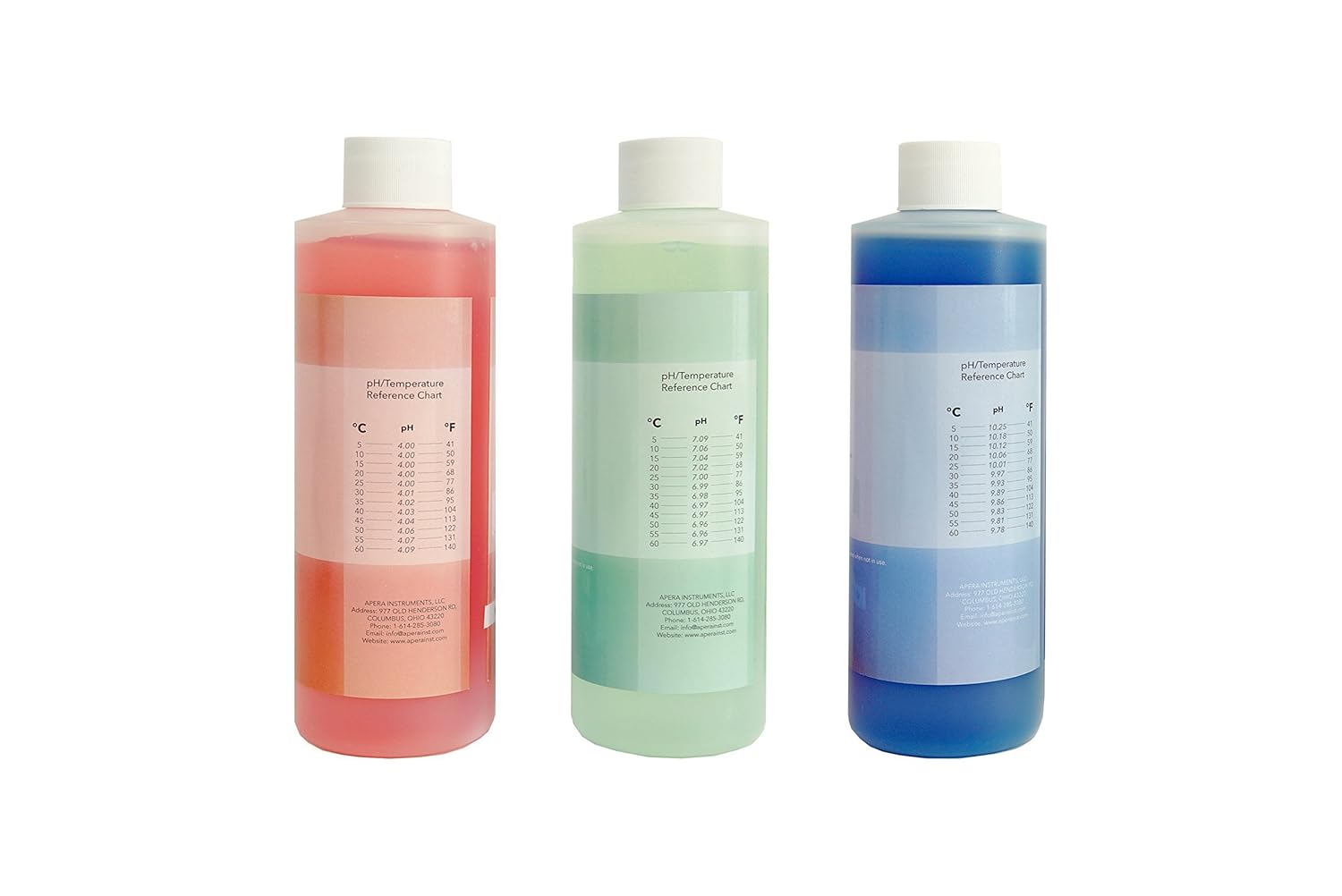
ภาพระยะใกล้ view of the three primary pH calibration buffer solutions provided with the kit, color-coded for easy identification and labeled with their respective pH values.
5.2. การวัด
- เตรียมสampเลอ: เทเอสของคุณample solution into a clean beaker.
- Rinse Electrode: ล้างอิเล็กโทรดด้วยน้ำกลั่นแล้วซับให้แห้งเบาๆ
- Immerse Electrode: จุ่มอิเล็กโทรดลงในสารละลายampวิธีแก้ปัญหาดังกล่าว คือการตรวจสอบให้แน่ใจว่าหลอดตรวจจับและจุดเชื่อมต่ออ้างอิงจมอยู่ในน้ำอย่างสมบูรณ์
- Stir and Stabilize: Gently stir the solution to ensure homogeneity and wait for the reading on the meter to stabilize. The PH700's advanced digital processing technology helps generate quick and stable readings.
- การอ่านบันทึก: Once stable, record the pH and temperature readings displayed on the meter.
- ทำความสะอาดหลังการใช้งาน: After each measurement, rinse the electrode thoroughly with distilled water.
6. การบำรุงรักษา
6.1. การดูแลรักษาและการจัดเก็บอิเล็กโทรด
- การเก็บข้อมูลรายวัน: For short-term storage (up to a week), keep the electrode cap filled with 3M KCL storage solution. Ensure the electrode bulb is immersed.
- การจัดเก็บระยะยาว: For longer periods, ensure the electrode cap is securely filled with 3M KCL storage solution. Store the electrode upright. Never store the electrode in distilled water, as this will deplete the reference electrolyte and damage the electrode.
- การทำความสะอาด: If the electrode becomes dirty or readings are sluggish, clean it by soaking in a mild cleaning solution (e.g., Apera Instruments electrode cleaning solution) for 15-30 minutes, then rinse thoroughly with distilled water and re-calibrate.

This image shows the 4 oz bottle of 3M KCL storage solution, essential for maintaining the pH electrode's performance and extending its lifespan.
6.2. Buffer Solution Storage
- Keep buffer solutions in their original, double-sealed bottles when not in use.
- Store solutions in a cool, dark place, away from direct sunlight and extreme temperatures.
- Do not return used buffer solution to the original bottle to prevent contamination.
- Note the 2-year expiration from manufacture for an unopened bottle. Discard expired solutions.
6.3. การทำความสะอาดมิเตอร์
- Wipe the meter's exterior with a clean, damp ผ้า ห้ามใช้สารทำความสะอาดที่มีฤทธิ์กัดกร่อนหรือตัวทำละลาย
- Ensure no liquid enters the meter's connectors or internal components.
7 การแก้ไขปัญหา
| ปัญหา | สาเหตุที่เป็นไปได้ | สารละลาย |
|---|---|---|
| Unstable readings / Drifting pH | Dirty electrode; Electrode not properly hydrated; Contaminated buffer solutions; Air bubbles on electrode bulb. | Clean electrode; Soak electrode in 3M KCL solution; Use fresh buffer solutions; Gently tap electrode to remove bubbles. |
| Calibration error / Fails to calibrate | Expired or contaminated buffer solutions; Damaged electrode; Incorrect calibration procedure. | Use fresh, unexpired buffer solutions; Inspect electrode for damage; Review calibration steps in manual. |
| No display / Meter not turning on | Power adapter issue; Loose connection. | Check power adapter and cable connections; Try a different power outlet. |
| เวลาตอบสนองช้า | Electrode aging; Electrode not clean. | Clean electrode; Rehydrate electrode; Consider electrode replacement if issue persists. |
8. ข้อมูลจำเพาะ
| คุณสมบัติ | คำอธิบาย |
|---|---|
| ความแม่นยำของ pH | +/- 0.01 pH at 25 °C (traceable to NIST SRMs) |
| อิเล็กโทรด | 201T-F 3-in-1 Combination pH Electrode (measures pH and temperature simultaneously) |
| การชดเชยอุณหภูมิ | การชดเชยอุณหภูมิอัตโนมัติ (ATC) |
| การสอบเทียบ | Advanced Auto. calibration mode with calibration guide and self-diagnosis (1-3 points) |
| เทคโนโลยี | Advanced digital processing technology for quick and stable readings |
| Buffer Solutions | pH 4.00, 7.00, 10.01 (8oz each), color-coded, double-sealed, 2-year expiration from manufacture for unopened bottle |
| โซลูชันการจัดเก็บข้อมูล | 3M KCL Storage Solution (4oz) for pH/ORP Electrodes |
| การผลิต | Produced in an ISO 9001:2015 certified facility using high-purity reagents and deionized water |
9. การรับประกันและการสนับสนุน
Apera Instruments products are designed for reliability and performance. For specific warranty information, please refer to the warranty card included with your product or visit the official Apera Instruments website. For technical support, troubleshooting assistance, or to inquire about replacement parts, please contact Apera Instruments customer service directly.
Apera Instruments, LLC
Webเว็บไซต์: www.aperainst.com
Contact Information: Refer to product packaging or webเว็บไซต์นี้ใช้สำหรับตรวจสอบรายละเอียดการติดต่อล่าสุด


