การแนะนำ
The MXR M76 Studio Compressor is an analog guitar effect pedal designed to provide precise control over guitar dynamics. This pedal features dedicated controls for Attack, Release, Ratio, Input, and Output, enabling users to fine-tune compression levels from subtle to pronounced. A bright LED gain-reduction status meter offers visual feedback on the compression activity. Built with Constant Headroom Technology (CHT), the M76 ensures clear and transparent audio performance with ample headroom. Its durable, lightweight aluminum housing is designed for seamless integration into any pedalboard setup.

ด้านหน้า view of the MXR M76 Studio Compressor pedal, showcasing its control knobs and LED meter.
มีอะไรอยู่ในกล่อง
Your MXR M76 Studio Compressor package includes the following items:
- MXR M76 Studio Compressor Pedal
- แหล่งจ่ายไฟฟ้า 9 โวลต์
- สายแพทช์ 2 เส้น
- 6 assorted Dunlop picks

The included 9-volt power supply.

One of the two included patch cables.

The set of six assorted Dunlop guitar picks.
การตั้งค่า
Follow these steps to connect your MXR M76 Studio Compressor:
- เชื่อมต่อกีตาร์ของคุณกับ ป้อนข้อมูล jack, typically located on the right side of the pedal.
- เชื่อมต่อ เอาท์พุต jack, typically located on the left side of the pedal, to your amplifier or the input of the next effect pedal in your signal chain.
- Connect the included 9-volt power supply to the power input jack, usually found at the top or side of the pedal.
- Ensure all cable connections are secure before powering on your amplifier and engaging the pedal.
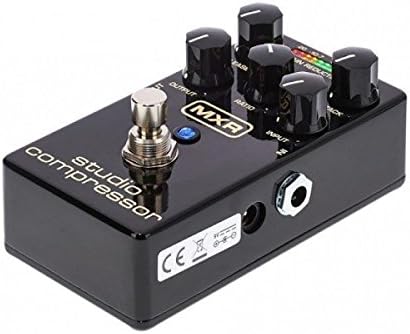
มุม view of the pedal, highlighting the input, output, and power connections.
การควบคุมการทำงาน
The MXR M76 Studio Compressor features the following controls for precise dynamic shaping:
- อินพุต: This knob adjusts the input level of your guitar signal entering the compressor circuit. Proper setting ensures the signal is strong enough to trigger compression without clipping.
- เอาท์พุท: Controls the overall output volume of the effect. Use this to match the compressed signal level with your bypassed signal or to boost the signal.
- จู่โจม: Determines how quickly the compressor reacts to signals that exceed the set threshold. Faster attack times (lower settings) will compress the initial transient of a note more aggressively, while slower attack times (higher settings) allow more of the initial transient to pass through uncompressed.
- ปล่อย: Sets the duration for the compressor to return to its uncompressed state after the input signal drops below the threshold. Shorter release times (lower settings) can make the compression more noticeable, while longer release times (higher settings) result in a smoother, more sustained sound.
- อัตราส่วน: Defines the amount of compression applied once the signal exceeds the threshold. For example, a ratio of 4:1 means that for every 4dB the input signal goes over the threshold, the output signal will only increase by 1dB. Higher ratios result in more aggressive compression.
- GAIN REDUCTION LED METER: This 10-segment LED display provides a visual indication of the amount of gain reduction being applied in real-time. More illuminated LEDs signify greater compression.

The MXR M76 Studio Compressor with its gain reduction LED meter active, indicating compression.
การซ่อมบำรุง
To ensure optimal performance and longevity of your MXR M76 Studio Compressor, follow these maintenance guidelines:
- Clean the pedal periodically with a soft, dry cloth. Avoid using abrasive cleaners, solvents, or harsh chemicals, as these can damage the finish or internal components.
- เก็บแป้นเหยียบไว้ในที่แห้ง หลีกเลี่ยงอุณหภูมิที่สูงหรือต่ำเกินไป แสงแดดโดยตรง และความชื้นสูง
- Disconnect the power supply when the pedal is not in use for extended periods to prevent unnecessary wear and tear.
- Handle the pedal with care to avoid physical damage to the enclosure, knobs, or jacks.
การแก้ไขปัญหา
If you encounter any issues with your MXR M76 Studio Compressor, consider the following troubleshooting steps:
- ไม่มีเสียง:
- Check all cable connections (input, output, and power supply) to ensure they are securely plugged in.
- Verify that the 9-volt power supply is correctly connected and functional.
- Ensure the pedal is engaged (footswitch pressed).
- สัญญาณอ่อนหรือผิดเพี้ยน:
- ปรับแต่ง เอาท์พุต knob to increase the volume.
- ตรวจสอบ ป้อนข้อมูล knob to ensure the signal is not being excessively attenuated or overdriven.
- Inspect all cables for damage or faulty connections.
- Unwanted Noise (Hum, Hiss):
- ตรวจสอบให้แน่ใจว่าสายเคเบิลทั้งหมดอยู่ในสภาพดีและมีฉนวนหุ้มอย่างเหมาะสม
- Try isolating the pedal from other effects pedals and power sources to identify if the noise originates from another component in your signal chain.
- Verify that the power supply is providing clean, stable 9V DC power.
- No Compression Effect:
- ตรวจสอบว่า อัตราส่วน, จู่โจม, และ ปล่อย knobs are set appropriately for the desired compression.
- ให้แน่ใจว่า ป้อนข้อมูล level is sufficient to trigger compression, as indicated by the Gain Reduction LED Meter.
ข้อมูลจำเพาะ
Key product specifications for the MXR M76 Studio Compressor:
| คุณสมบัติ | รายละเอียด |
|---|---|
| หมายเลขรุ่น | M76 |
| น้ำหนักสินค้า | 1 ปอนด์ (0.45 กก.) |
| ขนาดสินค้า | 6 x 3 x 3 นิ้ว (15.24 x 7.62 x 7.62 ซม.) |
| ประเภทวัสดุ | อลูมิเนียม |
| แหล่งพลังงาน | ไฟฟ้า |
| เล่มที่tage | กระแสตรง 9 โวลต์ |
| ประเภทขั้วต่อ | ขั้วต่อไฟ DC 9V |
| รูปแบบสัญญาณ | อนาล็อก |
| บายพาสจริง | ใช่ |
การรับประกันและการสนับสนุน
For detailed warranty information, product registration, and technical support, please visit the official MXR webโปรดตรวจสอบเว็บไซต์หรือติดต่อฝ่ายบริการลูกค้าโดยตรง แนะนำให้เก็บใบเสร็จรับเงินไว้เป็นหลักฐานการซื้อสำหรับกรณีที่มีการเรียกร้องการรับประกัน


