1. สินค้าหมดview
The TTEC 2KM102S Tone Bluetooth Headset is designed for wireless communication, offering convenience and clear audio. This manual provides instructions for setting up, operating, and maintaining your headset.
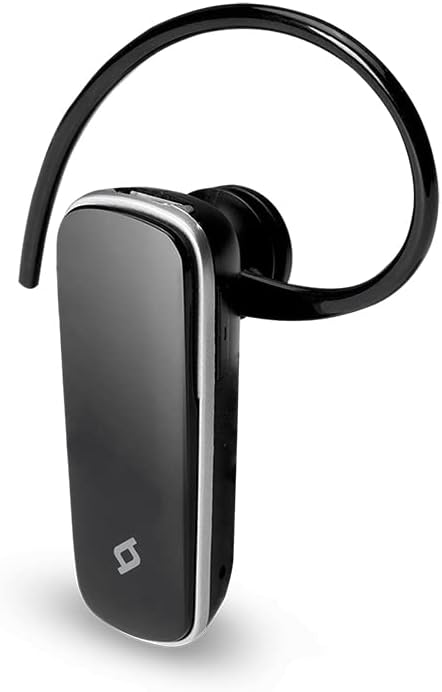
รูปที่ 1 : ด้านหน้า view of the TTEC 2KM102S Tone Bluetooth Headset.
2. เนื้อหาบรรจุภัณฑ์
ตรวจสอบให้แน่ใจว่ามีรายการทั้งหมดอยู่ในบรรจุภัณฑ์:
- TTEC 2KM102S Tone Bluetooth Headset
- ที่เกี่ยวหู
- สายชาร์จ USB
3. คู่มือการติดตั้ง
3.1 การชาร์จชุดหูฟัง
Before first use, fully charge the headset. Use the provided USB charging cable.
- เสียบปลายสายชาร์จ USB ด้านเล็กเข้ากับพอร์ตชาร์จบนหูฟัง
- ต่อปลายสาย USB ด้านที่ใหญ่กว่าเข้ากับแหล่งจ่ายไฟ USB (เช่น พอร์ต USB ของคอมพิวเตอร์ อะแดปเตอร์ติดผนัง USB)
- The LED indicator on the headset will show the charging status. Refer to the "LED Indicator" section for details.
- เมื่อชาร์จเต็มแล้ว ให้ถอดสายชาร์จออก
บันทึก: The headset features an integrated rechargeable battery. Charging time may vary.
3.2 การจับคู่กับอุปกรณ์
To use the headset wirelessly, it must be paired with a Bluetooth-enabled device.
- ตรวจสอบให้แน่ใจว่าชุดหูฟังปิดอยู่
- Press and hold the multi-function button on the headset until the LED indicator flashes red and blue alternately. This indicates pairing mode.
- บนอุปกรณ์ของคุณ (สมาร์ทโฟน แท็บเล็ต ฯลฯ) เปิดใช้งานบลูทูธและค้นหาอุปกรณ์ที่มีอยู่
- Select "TTEC Tone" or "2KM102S" from the list of found devices.
- Once paired, the LED indicator will flash blue periodically, and you may hear a confirmation tone.
เคล็ดลับ: For iPhone and iPad users, the battery status of the headset can be monitored on your device's screen.
3.3 การจับคู่อุปกรณ์หลายเครื่อง
The TTEC Tone headset supports simultaneous connection with two different Bluetooth devices.
- Pair the headset with the first device as described in section 3.2.
- ปิดใช้งานบลูทูธบนอุปกรณ์ตัวแรก
- Put the headset back into pairing mode (LED flashes red and blue).
- จับคู่ชุดหูฟังกับอุปกรณ์ที่สอง
- เปิดใช้งานบลูทูธบนอุปกรณ์เครื่องแรกอีกครั้ง ชุดหูฟังควรเชื่อมต่อกับอุปกรณ์ทั้งสองโดยอัตโนมัติ
The headset will manage audio from both connected devices, prioritizing incoming calls.
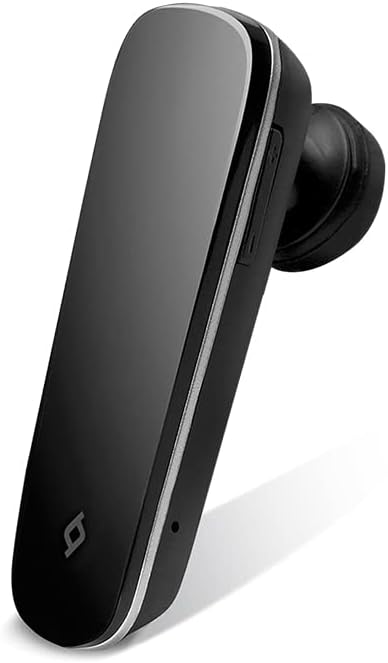
รูปที่ 2: ด้านข้าง view of the TTEC 2KM102S Tone Bluetooth Headset, showing control buttons.
4. คู่มือการใช้งาน
4.1 เปิด/ปิดเครื่อง
- เปิดเครื่อง: กดปุ่มมัลติฟังก์ชั่นค้างไว้ประมาณ 3 วินาที จนกว่าไฟ LED จะกะพริบเป็นสีน้ำเงิน
- หมดแรง: กดปุ่มมัลติฟังก์ชั่นค้างไว้ประมาณ 5 วินาที จนกระทั่งไฟ LED กระพริบเป็นสีแดงแล้วดับลง
4.2 การจัดการการโทร
The multi-function button controls call functions:
- รับสาย: Press the multi-function button once when a call comes in.
- วางสาย: กดปุ่มมัลติฟังก์ชันหนึ่งครั้งระหว่างการโทร
- ปฏิเสธสาย: เมื่อมีสายเรียกเข้า ให้กดปุ่มมัลติฟังก์ชันค้างไว้ประมาณ 2 วินาที
- โทรซ้ำหมายเลขล่าสุด: กดปุ่มมัลติฟังก์ชันสองครั้งเมื่อไม่ได้อยู่ในระหว่างการสนทนา
4.3 การควบคุมระดับเสียง
Use the dedicated volume buttons on the headset:
- เพิ่มปริมาณ: Press the Volume Up button (+).
- ลดระดับเสียง: Press the Volume Down button (-).
4.4 ไฟ LED แสดงสถานะ
The LED indicator provides visual cues for the headset's status:
- Flashing Red & Blue: โหมดจับคู่
- Flashing Blue (slowly): Connected/Standby.
- สีแดงทึบ: การชาร์จไฟ
- LED Off (after solid red): ชาร์จเต็มแล้ว
- ไฟกระพริบสีแดง (รวดเร็ว): แบตเตอรี่อ่อน
5. การบำรุงรักษา
Proper care ensures the longevity of your headset.
- การทำความสะอาด: Use a soft, dry cloth to clean the headset. Do not use abrasive cleaners or immerse in water.
- พื้นที่จัดเก็บ: เก็บหูฟังไว้ในที่แห้งและเย็น หลีกเลี่ยงแสงแดดโดยตรงและอุณหภูมิที่สูงหรือต่ำเกินไป
- การดูแลแบตเตอรี่ เพื่อรักษาอายุการใช้งานของแบตเตอรี่ ควรหลีกเลี่ยงการปล่อยให้แบตเตอรี่หมดจนเกลี้ยงบ่อยๆ ควรชาร์จแบตเตอรี่เป็นประจำ แม้ว่าจะไม่ได้ใช้งานเป็นเวลานานก็ตาม
6 การแก้ไขปัญหา
| ปัญหา | วิธีแก้ปัญหาที่เป็นไปได้ |
|---|---|
| หูฟังไม่เปิดใช้งาน | Ensure the headset is charged. Connect it to a power source using the USB cable. |
| ไม่สามารถจับคู่กับอุปกรณ์ได้ |
|
| ไม่มีเสียงหรือคุณภาพเสียงไม่ดี |
|
| Headset disconnects frequently. |
|
7. ข้อมูลจำเพาะผลิตภัณฑ์
| ชื่อรุ่น : | โทนสี |
| หมายเลขรุ่น: | 2KM102S |
| ยี่ห้อ: | TTEC |
| การเชื่อมต่อ: | บลูทูธ |
| ประเภทอุปกรณ์: | หูฟังบลูทูธ |
| เวลาสนทนา: | นานถึง 4 ชั่วโมง |
| เวลาสแตนด์บาย: | นานถึง 100 ชั่วโมง |
| การเชื่อมต่อหลายจุด: | Yes, connect to 2 devices simultaneously |
| ขนาด (ยาว x กว้าง x สูง): | 4.5 x 1.7 x 2 ซม. |
| สี: | สีดำ |
| พอร์ตชาร์จ: | ยูเอสบี |
8. การรับประกันและการสนับสนุน
For warranty information and customer support, please refer to the warranty card included with your product or visit the official TTEC webไซต์ โปรดเก็บใบเสร็จรับเงินไว้เป็นหลักฐานการซื้อ
ผู้ผลิต: เทค


