การแนะนำ
Thank you for choosing the Sephia A11 Portable Bluetooth Speaker. This manual provides essential information for setting up, operating, and maintaining your speaker to ensure optimal performance and longevity. The Sephia A11 offers versatile connectivity options, including Bluetooth, USB, Micro SD, and AUX input, delivering clear and powerful audio in a compact design.
มีอะไรอยู่ในกล่อง
- Sephia A11 Bluetooth Speaker
- สายชาร์จ
- สาย Aux
- คู่มือการใช้งาน (เอกสารนี้)

Image: The Sephia A11 Portable Bluetooth Speaker, showcasing its sleek black design and front grille.
สินค้าเกินview
Familiarize yourself with the buttons and ports on your Sephia A11 speaker.
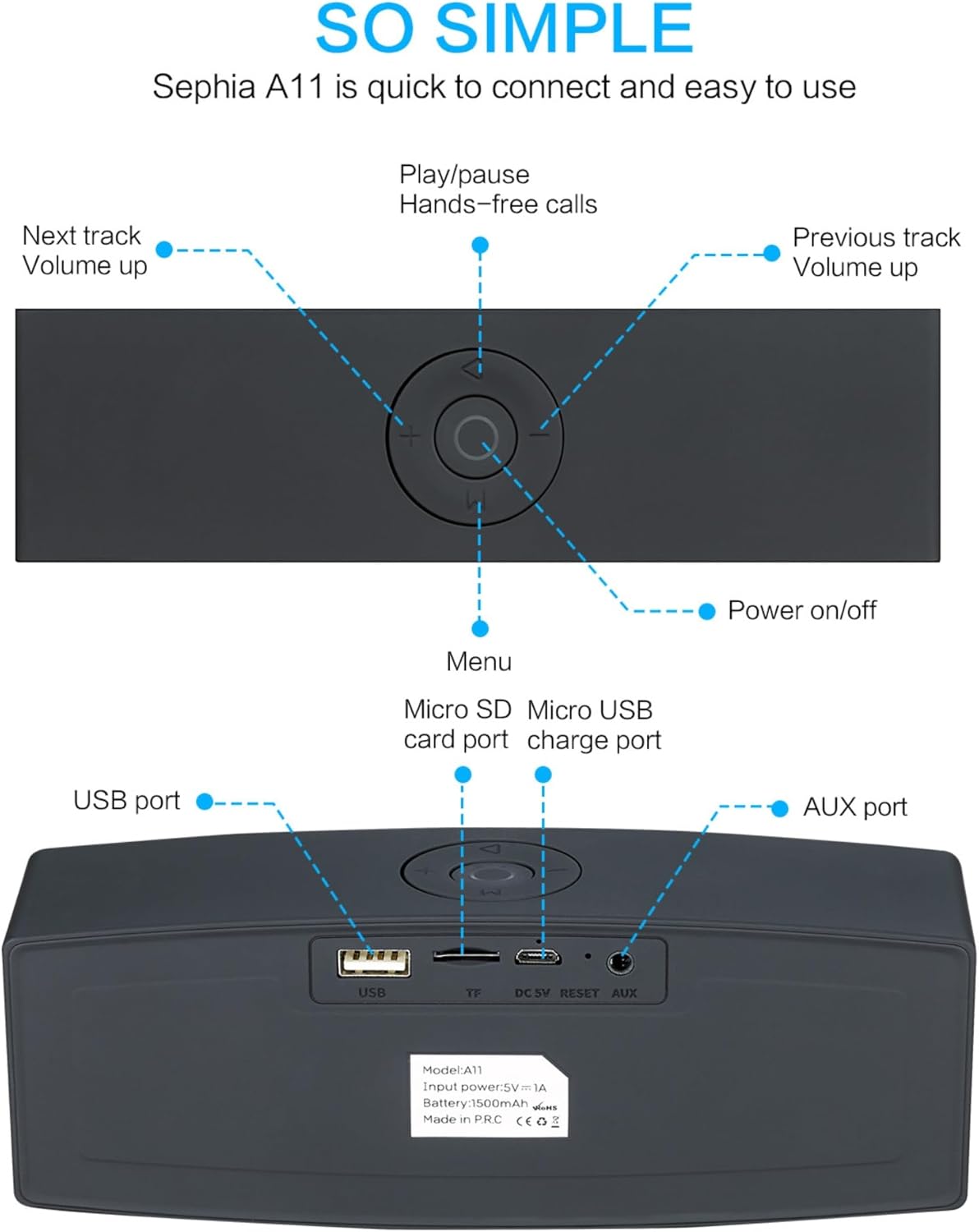
Image: Detailed diagram illustrating the top control panel and rear input/output ports of the Sephia A11 speaker.
ปุ่มควบคุมด้านบน:
- ปุ่มเปิด/ปิด: กดค้างไว้เพื่อเปิดหรือปิดลำโพง
- ปุ่มเล่น/หยุดชั่วคราว: Press to play or pause audio. Also used for hands-free calls (answer/end).
- Previous Track / Volume Down Button (-): กดสั้นๆ เพื่อเล่นเพลงก่อนหน้า กดค้างเพื่อลดระดับเสียง
- Next Track / Volume Up Button (+): กดสั้นๆ เพื่อเล่นเพลงถัดไป กดค้างเพื่อเพิ่มระดับเสียง
- ปุ่มเมนู (M): Press to switch between input modes (Bluetooth, USB, Micro SD, AUX).
พอร์ตด้านหลัง:
- พอร์ต USB: For playing audio from a USB drive or charging external devices.
- Micro SD Card Slot (TF): สำหรับเล่นไฟล์เสียงจาก Micro SD การ์ด
- Micro USB Charge Port (DC 5V): สำหรับชาร์จลำโพง
- ปุ่มรีเซ็ต: มีรูเล็กๆ สำหรับรีเซ็ตอุปกรณ์หากจำเป็น
- พอร์ต AUX: For wired audio connection using the provided 3.5mm AUX cable.
การตั้งค่า
1. ชาร์จลำโพง
- Connect the supplied charging cable to the Micro USB Charge Port (DC 5V) on the rear of the speaker.
- เชื่อมต่อปลายอีกด้านหนึ่งของสายชาร์จเข้ากับอะแดปเตอร์ไฟ USB (ไม่รวมอยู่ด้วย) หรือพอร์ต USB ของคอมพิวเตอร์
- The charging indicator light will illuminate. Once fully charged, the light will change or turn off (refer to specific model behavior if indicated by LED). A full charge provides up to 8 hours of playtime.
2. การเปิด/ปิดเครื่อง
- To power on, press and hold the Power On/Off button on the top panel until you hear an audible prompt or see an indicator light.
- To power off, press and hold the Power On/Off button again until the speaker shuts down.
3. การจับคู่บลูทู ธ
- Ensure the speaker is powered on and in Bluetooth mode. If not, press the 'M' (Menu) button to switch to Bluetooth mode. The speaker will enter pairing mode, indicated by a flashing LED light and an audible prompt.
- บนอุปกรณ์พกพาของคุณ (สมาร์ทโฟน แท็บเล็ต แล็ปท็อป) เปิดใช้งานบลูทูธและค้นหาอุปกรณ์ที่ใช้งานได้
- Select "Sephia A11" from the list of found devices.
- Once successfully paired, the speaker will provide an audible confirmation, and the LED indicator will stop flashing.
- ลำโพงนี้มีระยะการเชื่อมต่อบลูทูธได้ไกลถึง 10 เมตร (33 ฟุต)
4. Wired Connections (AUX, USB, Micro SD)
- อินพุต AUX: Connect one end of the supplied 3.5mm AUX cable to the AUX port on the speaker and the other end to the audio output of your device (e.g., MP3 player, computer). The speaker will automatically switch to AUX mode or can be selected using the 'M' button.
- การเล่น USB: ใส่แฟลชไดรฟ์ USB ที่มีเสียง files into the USB port. The speaker will automatically detect and play the audio files.
- การเล่นการ์ด Micro SD: ใส่การ์ด Micro SD ที่มีเสียง files into the Micro SD (TF) slot. The speaker will automatically detect and play the audio files.
การใช้งานลำโพง
การเล่นเสียง
- เล่น/หยุดชั่วคราว: Press the Play/Pause button to toggle between playing and pausing audio.
- การปรับระดับเสียง: Long press the '+' button to increase volume, and long press the '-' button to decrease volume.
- เพลงถัดไป / ก่อนหน้า: Short press the '+' button for the next track, and short press the '-' button for the previous track.

Image: A hand demonstrating how to interact with the top control buttons of the Sephia A11 speaker.
การโทรแบบแฮนด์ฟรี
- When a call comes in while connected via Bluetooth, press the Play/Pause button to answer the call.
- กดปุ่มเล่น/หยุดชั่วคราวอีกครั้งเพื่อวางสาย
- ไมโครโฟนในตัวช่วยให้การสื่อสารชัดเจน
การซ่อมบำรุง
- การทำความสะอาด: ใช้ผ้าแห้งเนื้อนุ่มเช็ดทำความสะอาดพื้นผิวลำโพง ห้ามใช้สารทำความสะอาดที่มีฤทธิ์กัดกร่อน แอลกอฮอล์ หรือสารเคมีอื่นๆ เพราะอาจทำให้พื้นผิวเสียหายได้
- พื้นที่จัดเก็บ: เก็บลำโพงไว้ในที่แห้งและเย็น หลีกเลี่ยงแสงแดดโดยตรงและอุณหภูมิที่สูงหรือต่ำเกินไป
- การดูแลแบตเตอรี่ เพื่อยืดอายุการใช้งานแบตเตอรี่ ควรหลีกเลี่ยงการปล่อยให้แบตเตอรี่หมดจนเกลี้ยงบ่อยๆ ควรชาร์จลำโพงเป็นประจำ แม้ว่าจะไม่ได้ใช้งานเป็นเวลานานก็ตาม
- ความต้านทานน้ำ: ลำโพงนี้ไม่กันน้ำ โปรดหลีกเลี่ยงการสัมผัสน้ำหรือความชื้นมากเกินไป
การแก้ไขปัญหา
| ปัญหา | สาเหตุที่เป็นไปได้ | สารละลาย |
|---|---|---|
| ลําโพงไม่เปิดขึ้น | แบตเตอรี่อ่อน ปุ่มเปิดปิดค้างนานพอ | ชาร์จลำโพงให้เต็ม กดปุ่มเปิด/ปิดค้างไว้ 3-5 วินาที |
| ไม่มีเสียงจากลำโพง | ระดับเสียงต่ำเกินไป โหมดอินพุตไม่ถูกต้อง อุปกรณ์ไม่ได้เชื่อมต่ออย่างถูกต้อง | Increase speaker and device volume. Press 'M' button to select correct input mode. Re-pair Bluetooth or re-connect AUX/USB/SD. |
| การจับคู่บลูทูธล้มเหลว | ลำโพงไม่ได้อยู่ในโหมดจับคู่ อุปกรณ์อยู่ไกลเกินไป มีสัญญาณรบกวน | Ensure speaker is in Bluetooth pairing mode (flashing LED). Move speaker closer to device. Turn off other Bluetooth devices. Try forgetting "Sephia A11" on your device and re-pairing. |
| คุณภาพเสียงไม่ดี | Low battery; Device volume too high (distortion); Interference. | Charge the speaker. Adjust volume on both speaker and device. Move away from sources of interference. |
ข้อมูลจำเพาะ
| ชื่อรุ่น | เอ11 |
| ขนาด | 18 x 7 x 5 ซม. |
| น้ำหนัก | 426 กรัม |
| เทคโนโลยีการเชื่อมต่อ | บลูทูธ, USB, ไมโคร SD, AUX |
| กำลังขับของลำโพง | 6 Watts (2 x 3W drivers) |
| การตอบสนองความถี่ | 20 เฮิรตซ์ - 20 กิโลเฮิรตซ์ |
| ประเภทแบตเตอรี่ | ลิเธียมไอออน |
| เวลาเล่น | นานถึง 8 ชั่วโมง |
| ช่วงบลูทูธ | สูงถึง 10 เมตร (33 ฟุต) |
| คุณสมบัติพิเศษ | Bass Boost, Portable, Hi-Res Audio, Built-in Microphone, Shockproof |

Image: Visual representation of the Sephia A11 speaker's dimensions.
การรับประกันและการสนับสนุน
The Sephia A11 Portable Bluetooth Speaker comes with a รับประกัน 12 เดือน นับจากวันที่ซื้อ โดยครอบคลุมถึงข้อบกพร่องจากการผลิต โปรดเก็บหลักฐานการซื้อไว้เพื่อขอรับสิทธิ์การรับประกัน
For technical support, warranty inquiries, or further assistance, please refer to the contact information provided with your purchase or visit the official Sephia webเว็บไซต์.


