การแนะนำ
This manual provides essential instructions for the safe and effective installation, operation, and maintenance of the IDEC HW2B-M111B Push Button Switch. Please read this manual thoroughly before using the product and retain it for future reference.
หมายเหตุด้านความปลอดภัย: Always ensure power is disconnected before installation or maintenance to prevent electric shock or equipment damage. Follow all local and national electrical codes.
สินค้าเกินview
The IDEC HW2B-M111B is a 22mm momentary push button switch designed for industrial control applications. It features a flat, square actuator and is part of the robust HW Series.
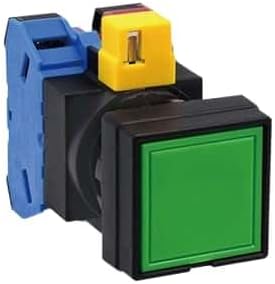
รูปที่ 1: An IDEC HW2B-M111B Push Button Switch. This image displays the switch assembly, including a green square button actuator, a black mounting base, and blue and yellow contact block components at the rear.
การติดตั้งและการตั้งค่า
Ensure all power is off before proceeding with installation. This switch requires a 22mm panel cut-out.
- การติดตั้งแผง: Insert the switch actuator through the 22mm diameter hole in the control panel. Secure it from the rear using the provided mounting ring, tightening it firmly but without excessive force.
- Contact Block Attachment: Align the contact block(s) with the rear of the switch actuator assembly. Push the contact block(s) onto the actuator assembly until they click securely into place. Ensure proper orientation.
- การเดินสายไฟ: Connect the control circuit wires to the terminals on the contact block(s). Refer to your system's wiring diagram for correct terminal assignments (e.g., Normally Open (NO) or Normally Closed (NC) contacts). Ensure all connections are secure and insulated.
- การตรวจสอบ: After installation, visually inspect all connections and ensure the switch is securely mounted. Restore power and test the switch functionality.
การดำเนินการ
The HW2B-M111B is a momentary action switch. This means the switch contacts change state only while the button is being pressed. Once the button is released, it returns to its original position, and the contacts revert to their initial state.
- To activate the switch, press the button firmly.
- To deactivate, release the button.
การซ่อมบำรุง
Regular maintenance ensures optimal performance and longevity of the switch.
- การทำความสะอาด: Periodically clean the surface of the button and surrounding areas with a soft, dry cloth. For stubborn dirt, a slightly damp cloth with mild detergent can be used, ensuring no liquid enters the switch mechanism. Do not use abrasive cleaners or solvents.
- การตรวจสอบ: Regularly inspect the switch for any signs of physical damage, loose connections, or excessive wear. Ensure the button operates smoothly without sticking. If any issues are found, disconnect power and address them promptly.
การแก้ไขปัญหา
If you encounter issues with your IDEC HW2B-M111B switch, refer to the table below for common problems and solutions.
| ปัญหา | สาเหตุที่เป็นไปได้ | สารละลาย |
|---|---|---|
| Switch does not respond when pressed. | No power to the circuit; Loose or incorrect wiring; Damaged contact block; Faulty switch actuator. | Check power supply; Verify wiring connections against diagram; Inspect contact block for damage and replace if necessary; Replace the switch assembly if actuator is faulty. |
| การดำเนินการเป็นระยะ | Loose wiring connections; Contamination in switch mechanism; Worn contacts. | Tighten all wiring connections; Clean the switch mechanism (ensure power is off); Replace contact block or entire switch if contacts are worn. |
| Button sticks or is difficult to press. | Accumulated dirt or debris; Misalignment during installation; Mechanical damage. | Clean the button and surrounding area; Re-check mounting for proper alignment; Replace the switch if mechanical damage is present. |
ข้อมูลจำเพาะทางเทคนิค
| คุณสมบัติ | รายละเอียด |
|---|---|
| ยี่ห้อ | ไอดีอีซี |
| หมายเลขรุ่น | HW2B-M111B |
| ชุด | HW ซีรีส์ |
| พิมพ์ | สวิตซ์ปุ่มกด |
| เส้นผ่าศูนย์กลางการติดตั้ง | 22 มิลลิเมตร (0.9 นิ้ว) |
| การกระทำ | ชั่วขณะหนึ่ง |
| Button Color (Specified) | สีดำ (บี) |
| น้ำหนัก | 0.1 กิโลกรัม |
| ผู้ผลิต | ไอดีอีซี |
ข้อมูลด้านความปลอดภัย
- Always disconnect power before installing, wiring, or performing maintenance on the switch.
- Ensure installation is performed by qualified personnel in accordance with all applicable electrical codes and standards.
- Do not exceed the specified electrical ratings of the switch.
- Protect the switch from excessive moisture, dust, and corrosive environments unless specifically rated for such conditions.
- Do not modify the switch or its components. Use only genuine IDEC replacement parts if needed.


