การแนะนำ
The Beats Studio3 Wireless Noise Cancelling Over-Ear Headphones are designed to provide a premium listening experience with advanced features. This manual will guide you through the setup, operation, and maintenance of your headphones.
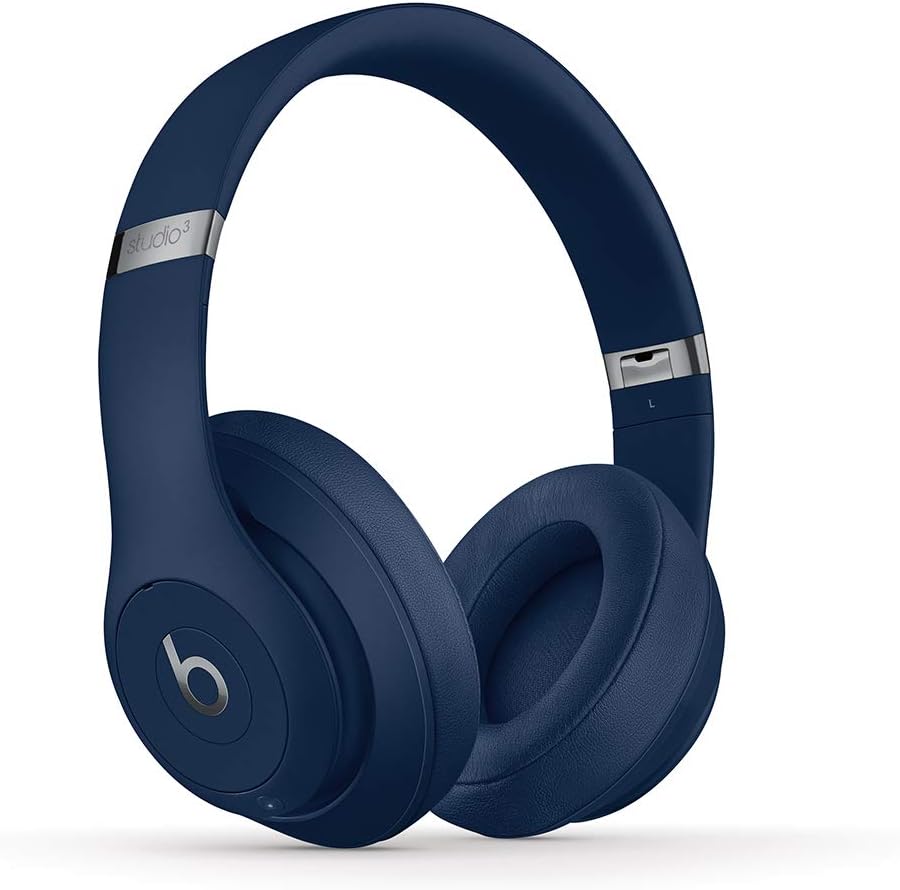
Image: Beats Studio3 Wireless Noise Cancelling Over-Ear Headphones in Blue.
มีอะไรอยู่ในกล่อง
- Beats Studio3 Wireless Noise Canceling Over-Ear Headphones - Blue
- สายชาร์จไมโคร USB
- 3.5mm RemoteTalk Cable
- กระเป๋าใส่อุปกรณ์
- คู่มือเริ่มต้นอย่างรวดเร็ว
- บัตรรับประกัน

Image: Contents of the Beats Studio3 Wireless Headphones box, including headphones, cables, and carrying case.
การตั้งค่า
1. การชาร์จหูฟังของคุณ
Before first use, fully charge your Beats Studio3 Wireless headphones. Use the provided Micro USB cable to connect the headphones to a power source. The Fuel Gauge LEDs on the right ear cup will indicate the battery level.
- เชื้อเพลิงเร็ว: A 10-minute charge provides 3 hours of playback.
- Full charge provides up to 22 hours of battery life with Pure ANC on, or up to 40 hours with Pure ANC off.
2. การจับคู่กับอุปกรณ์ของคุณ
Your Beats Studio3 Wireless headphones utilize the Apple W1 chip for seamless pairing with Apple devices and Class 1 Bluetooth for other devices.
สำหรับอุปกรณ์ Apple (iOS):
- Ensure your iOS device is unlocked and Bluetooth is enabled.
- Hold your Beats Studio3 headphones near your unlocked iOS device.
- Follow the on-screen instructions to connect.
For Other Devices (Android, etc.):
- Press and hold the power button on your headphones for 5 seconds until the Fuel Gauge flashes.
- On your device, go to Bluetooth settings and select "Beats Studio3" from the list of available devices.
การใช้งานหูฟังของคุณ
เปิด/ปิดเครื่อง
Press and hold the power button on the right ear cup for 1 second to turn the headphones on or off.
Pure Adaptive Noise Canceling (เพียว ANC)
Pure ANC actively blocks external noise and uses real-time audio calibration to preserve a premium listening experience. Pure ANC is enabled by default when you power on the headphones.
- To toggle Pure ANC on/off, double-press the power button.
การควบคุมบนหูฟัง
The 'b' button on the left ear cup and the volume rockers provide control over your audio and calls.
- เล่น/หยุดชั่วคราว: Press the 'b' button once.
- ข้ามแทร็ก: Press the 'b' button twice for next, three times for previous.
- การควบคุมระดับเสียง: Use the volume up/down buttons above and below the 'b' button.
- รับ/วางสาย: Press the 'b' button once.
- เปิดใช้งาน Voice Assistant: Press and hold the 'b' button.

ภาพ: รายละเอียด view of the on-ear controls for music and calls.
การซ่อมบำรุง
การทำความสะอาด
Regularly clean your headphones with a soft, dry, lint-free cloth. Avoid using harsh chemicals or abrasive materials. Keep the charging port free of debris.
Ear Cup Replacement
Over time, ear cup cushions may show signs of wear, especially with frequent use or exposure to sweat. Replacement ear cups are available and can be easily installed. Refer to official Beats support for replacement instructions and parts.
Video Description: This video demonstrates the process of replacing ear cup covers on Beats headphones, highlighting the adhesive nature of the covers and the ease of replacement.
ข้อมูลจำเพาะ
| คุณสมบัติ | รายละเอียด |
|---|---|
| ชื่อรุ่น | Beats Studio3 Wireless Noise Canceling Over-Ear Headphones - Blue |
| เทคโนโลยีการเชื่อมต่อ | Bluetooth (Apple W1 chip, Class 1 Wireless Bluetooth) |
| การควบคุมเสียงรบกวน | Active Noise Cancellation (Pure ANC) |
| อายุการใช้งานแบตเตอรี่ | Up to 22 hours (with ANC), Up to 40 hours (without ANC) |
| เชื้อเพลิงเร็ว | 10-minute charge provides 3 hours of playback |
| On-Ear Control | Audio playback, volume, phone call controls |
| ไมโครโฟน | Internal and external microphones |
| ฟอร์มแฟกเตอร์ | ครอบหู |
| แจ็คหูฟัง | หัวแจ็ค 3.5 มม. (สำหรับใช้งานแบบมีสาย) |
| พอร์ตชาร์จ | ไมโคร USB |
| น้ำหนักสินค้า | 9.17 oz / 260 g (Product), 2.2 pounds (Shipping) |
| ขนาดสินค้า | 6.3 x 4.7 x 8.9 นิ้ว |
| ผู้ผลิต | แอปเปิล |
การแก้ไขปัญหา
ปัญหาทั่วไปและแนวทางแก้ไข
- ไม่มีไฟฟ้า: Ensure headphones are charged. Connect to a power source using the Micro USB cable.
- ปัญหาการจับคู่: Ensure Bluetooth is enabled on your device and headphones are in pairing mode (flashing Fuel Gauge). Try restarting both devices.
- ปัญหาคุณภาพเสียง: Check the audio source. Ensure ear cups are properly seated. If using wired connection, ensure the 3.5mm cable is fully inserted.
- ระบบตัดเสียงรบกวนใช้งานไม่ได้: Double-press the power button to toggle Pure ANC. Ensure ear cups form a good seal around your ears.
การรับประกันและการสนับสนุน
Your Beats Studio3 Wireless headphones are manufactured by Apple and come with a standard limited warranty. For detailed warranty information, product registration, or technical support, please visit the official Beats or Apple support webเว็บไซต์.
เก็บหลักฐานการซื้อของคุณไว้เพื่อเรียกร้องการรับประกัน


