การแนะนำ
The KLIM Pulse Bluetooth 4.1 In-Ear Earphones are designed to provide a high-quality audio experience with wireless convenience. Featuring Bluetooth 4.1 connectivity, noise insulation, and a comfortable fit, these earphones are suitable for various activities including sports, music listening, and making calls. The magnetic tips offer easy storage, and the included memory foam ear tips ensure a secure and comfortable fit for extended use.

Image: The KLIM Pulse Bluetooth 4.1 In-Ear Earphones, showcasing their sleek black design and magnetic earbud feature.
เนื้อหาแพ็คเกจ
Upon opening your KLIM Pulse earphone package, you should find the following items:
- KLIM Pulse Bluetooth 4.1 In-Ear Earphones
- สายชาร์จ USB
- คู่มือการใช้งาน
- Various sizes and types of ear tips (including memory foam), totaling 12 pieces.
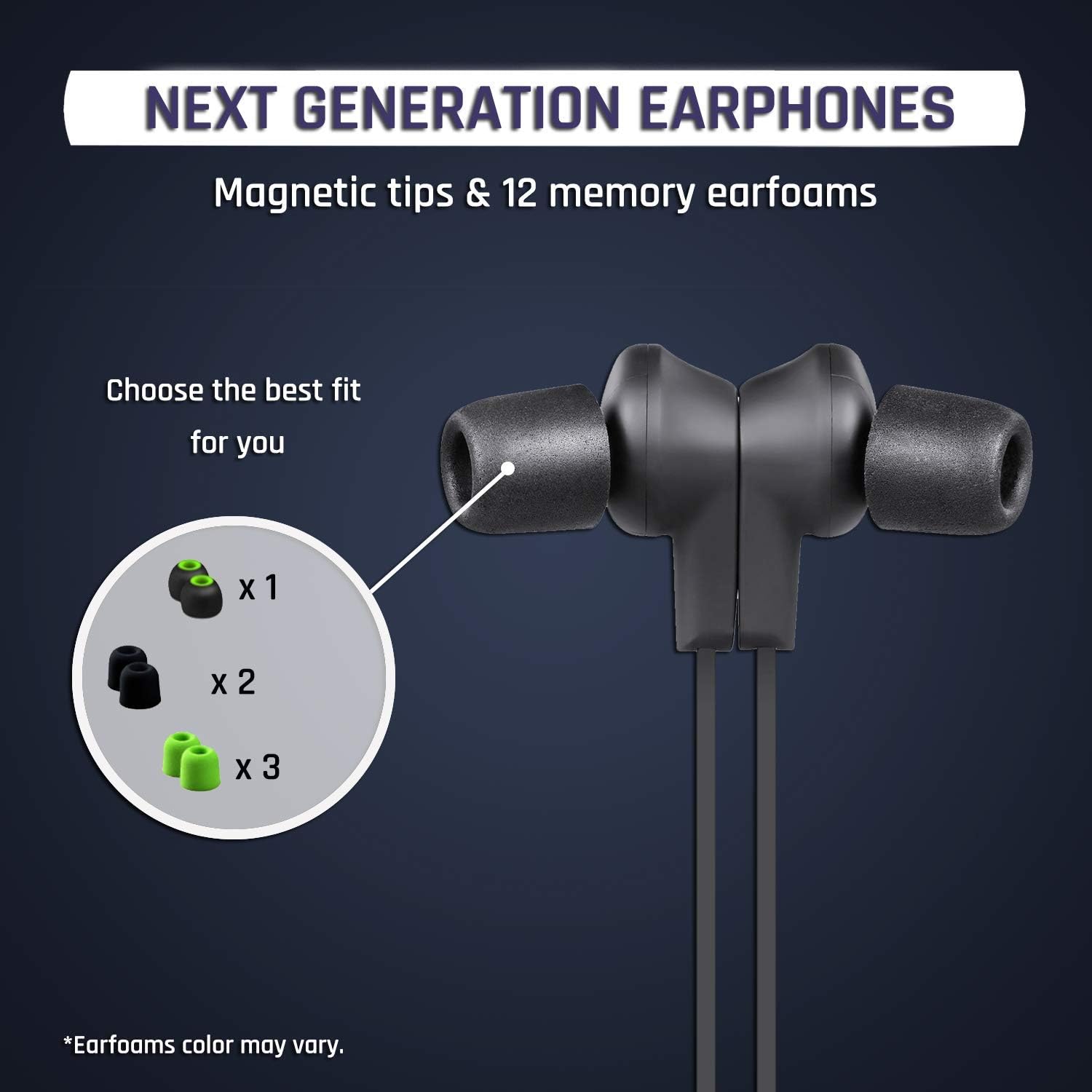
ภาพ: ภาพระยะใกล้ view of the KLIM Pulse earphones with various ear tip options, highlighting the magnetic tips and different earfoam colors.
การตั้งค่า
1. การชาร์จหูฟัง
Before initial use, fully charge your KLIM Pulse earphones. A full charge typically takes approximately 2 hours and provides up to 6 hours of uninterrupted listening time.
- Connect the micro-USB end of the charging cable to the charging port on the earphone control unit.
- เชื่อมต่อปลาย USB-A ของสายชาร์จเข้ากับแหล่งจ่ายไฟ USB ที่ใช้งานร่วมกันได้ (เช่น พอร์ต USB ของคอมพิวเตอร์ อะแดปเตอร์ติดผนัง USB)
- The LED indicator on the control unit will illuminate during charging and change color or turn off when charging is complete.

Image: The KLIM Pulse earphones with glowing blue circles, illustrating the charging process and battery life.
2. การเลือกจุกหูฟัง
The KLIM Pulse earphones come with 12 different ear tips, including memory foam options, to ensure a comfortable and secure fit. Experiment with different sizes and materials to find the best fit for your ears. A proper fit is crucial for optimal sound quality and noise insulation.
- ถอดจุกหูฟังที่ติดตั้งไว้ล่วงหน้าออกอย่างเบามือ
- เลือกจุกหูฟังที่ใส่สบายและแนบสนิทกับช่องหูของคุณ
- ติดจุกหูฟังที่เลือกไว้เข้ากับท่อหูฟังให้แน่นสนิท
3. การจับคู่บลูทู ธ
The KLIM Pulse earphones are compatible with all Bluetooth-enabled devices (phones, laptops, tablets, etc.).
- ตรวจสอบให้แน่ใจว่าหูฟังได้รับการชาร์จและปิดอยู่
- Press and hold the multi-function button (usually the power button) on the control unit until the LED indicator flashes red and blue, indicating pairing mode.
- บนอุปกรณ์ของคุณ เปิดใช้งานบลูทูธและค้นหาอุปกรณ์ที่มีอยู่
- Select "KLIM Pulse" from the list of found devices.
- Once paired, the LED indicator will typically flash blue slowly or turn solid blue.

Image: The KLIM Pulse earphones alongside icons for a laptop, phone, and tablet, illustrating their broad compatibility with Bluetooth devices.
คำแนะนำการใช้งาน
การควบคุมพื้นฐาน
The control unit on your KLIM Pulse earphones allows for easy management of audio playback and calls.
| ปุ่ม/การดำเนินการ | การทำงาน |
|---|---|
| ปุ่มเปิดปิด (มัลติฟังก์ชัน) |
|
| เพิ่มระดับเสียง (+) |
|
| ลดเสียงลง (-) |
|
การโทรออกและรับสาย
- รับสาย: กดปุ่มเปิด / ปิดหนึ่งครั้ง
- การวางสาย: Press the Power Button once during a call.
- การปฏิเสธสาย: กดปุ่มเปิดปิดค้างไว้ 2 วินาที
- โทรซ้ำ: Double-press the Power Button to redial the last number.
คุณสมบัติแม่เหล็ก
The KLIM Pulse earphones feature magnetic tips. When not in use, you can snap the earbuds together around your neck to prevent them from falling off and for convenient storage.

Image: A woman wearing KLIM Pulse earphones, demonstrating their comfortable fit and suitability for active use.
การซ่อมบำรุง
To ensure the longevity and optimal performance of your KLIM Pulse earphones, follow these maintenance guidelines:
- การทำความสะอาด: Regularly wipe the earphones and ear tips with a soft, dry, lint-free cloth. For ear tips, you can gently clean them with a damp cloth and mild soap, ensuring they are completely dry before reattaching.
- พื้นที่จัดเก็บ: When not in use, store the earphones in a clean, dry place, away from extreme temperatures and direct sunlight. The magnetic tips help keep them tangle-free.
- หลีกเลี่ยงความชื้น: While the earphones have some water resistance, avoid submerging them in water or exposing them to heavy rain.
- จัดการด้วยความระมัดระวัง: Do not pull on the cable excessively or apply undue force to the earbuds or control unit.
การแก้ไขปัญหา
If you encounter issues with your KLIM Pulse earphones, refer to the following common solutions:
| ปัญหา | วิธีแก้ปัญหาที่เป็นไปได้ |
|---|---|
| หูฟังไม่เปิด | Ensure the earphones are fully charged. Connect them to a power source and check the charging indicator. |
| ไม่สามารถจับคู่กับอุปกรณ์ได้ |
|
| ไม่มีเสียงหรือคุณภาพเสียงไม่ดี |
|
| Earphones keep disconnecting. |
|
ข้อมูลจำเพาะ
| คุณสมบัติ | รายละเอียด |
|---|---|
| ชื่อรุ่น | KLPB |
| ยี่ห้อ | คลิม |
| เทคโนโลยีการเชื่อมต่อ | ไร้สาย (บลูทูธ 4.1) |
| ฟอร์มแฟกเตอร์ | ในหู |
| สี | สีดำ |
| วัสดุ | Memory Foam (ear tips) |
| น้ำหนักสินค้า | 18.1 กรัม (0.04 ปอนด์) |
| ขนาดสินค้า | 60 x 1.9 x 2.3 ซม. |
| ช่วงความถี่ | 20 เฮิรตซ์ - 20,000 เฮิรตซ์ |
| อายุการใช้งานแบตเตอรี่ | สูงสุด 6 ชั่วโมง (โดยประมาณ) |
| เวลาในการชาร์จ | ประมาณ 2 ชั่วโมง |
| อุปกรณ์ที่รองรับ | Mobile Phones, Laptops, Tablets, Smart Speakers, TVs, Car Audio Systems, Game Consoles, Music Production Equipment, Motorcycles |

Image: An infographic displaying various features of the KLIM Pulse earphones, including Bluetooth dual connectivity, magnetic design, voice calls, Hi-Fi sound quality, and compatibility with multiple operating systems.
ข้อมูลการรับประกัน
The KLIM Pulse earphones come with a รับประกัน 2 ปี from the date of purchase. This warranty covers manufacturing defects and ensures reliable performance. Please retain your proof of purchase for warranty claims.
For any warranty-related inquiries or issues, please contact KLIM customer support.
การสนับสนุนลูกค้า
If you require further assistance or have questions not covered in this manual, please contact KLIM customer support. Our European team aims to provide a response within 24 hours.
- อีเมล: contact@klimtechs.com
- Webเว็บไซต์: www.klimtechs.com


