1. บทนำ
This manual provides essential instructions for the proper use and care of your Casio Enticer Analog Dial Watch, Model MTP-1384BUL. Please read this manual thoroughly to ensure optimal performance and longevity of your timepiece.
เนื้อหาแพ็คเกจ
- Casio Enticer Analog Dial Watch (MTP-1384BUL)
- คู่มือการใช้งาน
- บัตรรับประกัน

ภาพที่ 1.1: ด้านหน้า view of the Casio Enticer Analog Dial Watch.

Image 1.2: Casio Enticer Analog Dial Watch on a wrist.
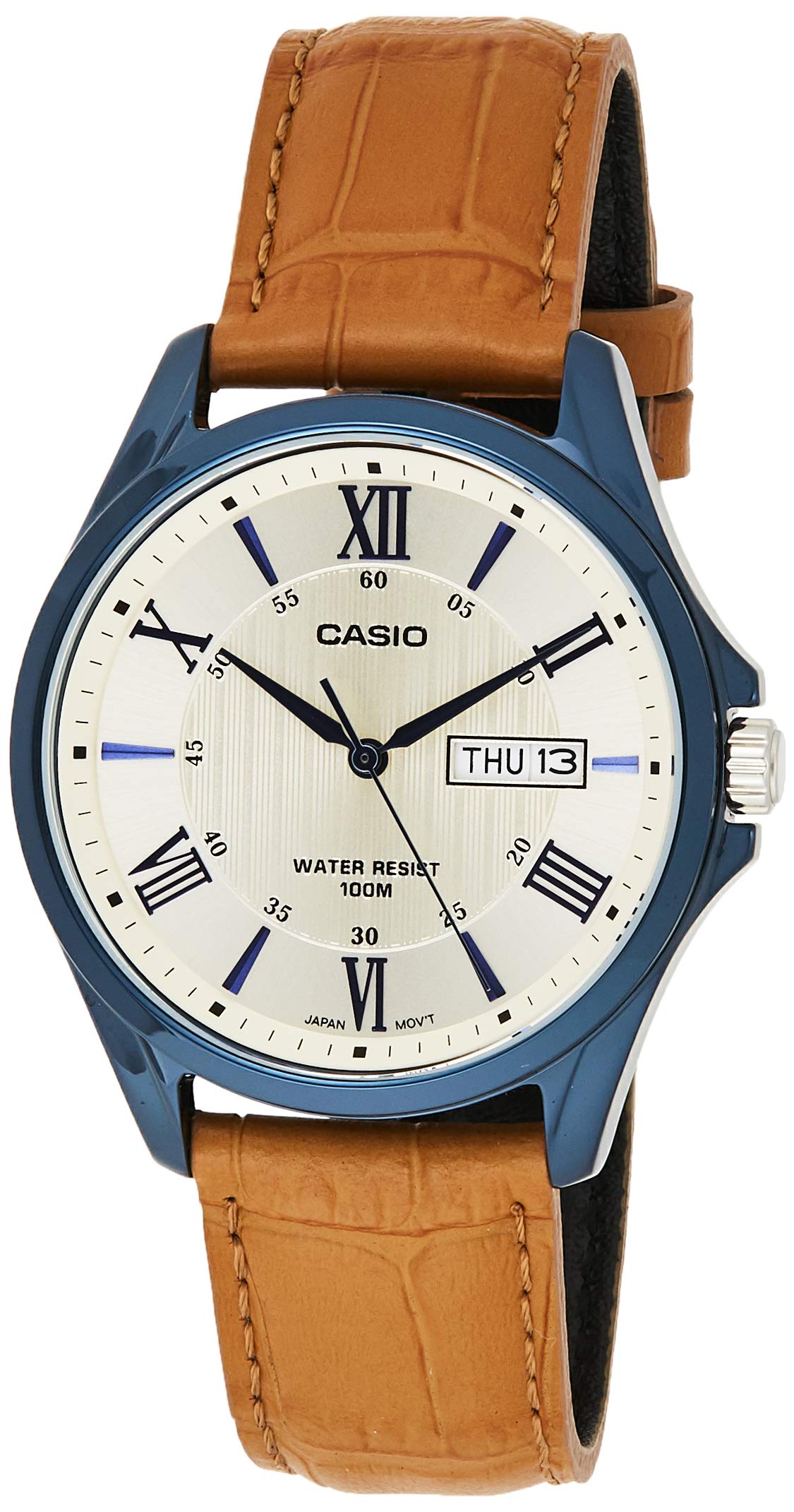
Image 1.3: Retail packaging for the Casio Enticer Analog Dial Watch.
2. การตั้งค่า
การตั้งเวลา
- ดึงเม็ดมะยมออกมาในคลิกที่สอง
- หมุนเม็ดมะยมเพื่อเลื่อนเข็มชั่วโมงและเข็มนาทีไปยังเวลาที่ต้องการ
- Push the crown back in to the normal position to start timekeeping.

ภาพที่ 2.1: ด้านข้าง view of the watch showing the crown.
การตั้งวันที่และวัน
- ดึงเม็ดมะยมออกในคลิกแรก
- Rotate the crown to set the desired date and day. Rotating in one direction adjusts the date, and the other direction adjusts the day.
- ดันเม็ดมะยมกลับเข้าที่ตามปกติ
บันทึก: หลีกเลี่ยงการตั้งวันที่และวันระหว่าง 21.00 น. ถึง 01.00 น. เนื่องจากอาจรบกวนกลไกการเปลี่ยนวันที่อัตโนมัติ
3. การใช้งานนาฬิกา
การจับเวลา
The watch features analog timekeeping with three hands (hour, minute, second) for precise display of time.
Day and Date Display
The watch automatically updates the day and date display. Ensure these are set correctly during initial setup.
ความต้านทานต่อน้ำ
This watch is designed with 100-meter water resistance. This means it is suitable for everyday use and can withstand splashes, rain, and even swimming. However, it is not recommended for diving or prolonged underwater activities. Do not operate the crown while the watch is wet or submerged.
4. การบำรุงรักษา
ทำความสะอาดนาฬิกา
- เช็ดตัวเรือนและสายนาฬิกาด้วยผ้าแห้งนุ่มๆ เพื่อขจัดสิ่งสกปรกและความชื้น
- For the leather band, avoid excessive moisture and direct sunlight to prevent damage and discoloration.
การเปลี่ยนแบตเตอรี่
The approximate battery life is 3 years on an SR920SW battery. When the watch stops or the second hand moves erratically, it indicates a low battery. Battery replacement should be performed by an authorized Casio service center to ensure proper sealing and water resistance.

ภาพที่ 4.1: ด้านหลัง view ภาพของนาฬิกา โดยแสดงให้เห็นฝาหลังและสายนาฬิกา
5 การแก้ไขปัญหา
นาฬิกาไม่ทำงาน
- Check if the crown is pushed in completely to the normal position.
- If the watch still does not run, the battery may need replacement. Refer to the 'Battery Replacement' section.
เวลาหรือวันที่ไม่ถูกต้อง
- Follow the 'Setting the Time' and 'Setting the Date and Day' instructions to readjust.
- Ensure the crown is pushed back in after adjustment.
6. ข้อมูลจำเพาะ
| คุณสมบัติ | คำอธิบาย |
|---|---|
| หมายเลขรุ่น | MTP-1384BUL (A1225) |
| วัสดุตัวเรือน/ขอบหน้าปัด | สแตนเลส |
| วัสดุของวงดนตรี | หนังแท้ |
| กระจก | กระจกมิเนอรัล |
| ความต้านทานต่อน้ำ | 100 เมตร (10 ATM) |
| ประเภทจอภาพ | Analog (3 hands: hour, minute, second) |
| ประเภทการเคลื่อนไหว | ควอตซ์ |
| ความแม่นยำ | ±20 วินาทีต่อเดือน |
| อายุการใช้งานแบตเตอรี่โดยประมาณ | 3 years on SR920SW |
| ขนาดเคส (สูง×กว้าง×ลึก) | 47 × 41 × 10 มม. |
| น้ำหนักรวม | 53 กรัม |
| ประเภทการปิด | หัวเข็มขัด |
7. การรับประกันและการสนับสนุน
ข้อมูลการรับประกัน
Your Casio Enticer Analog Dial Watch comes with a 2-year manufacturer warranty from the date of purchase. An additional 6 months warranty is provided for products registered online.
To avail warranty, produce the original bill copy/invoice at an authorized Casio service center. The warranty card and stamp are not mandatory for online purchases.
การลงทะเบียนผลิตภัณฑ์
ลงทะเบียนผลิตภัณฑ์ของคุณออนไลน์ได้ที่ https://register.casio.in/ to receive an additional 6 months warranty.
การสนับสนุนลูกค้า
For any service-related inquiries or feedback, please contact Casio India Customer Care:
- หมายเลขสายด่วน: 011-66999200
- อีเมล: casiocare@casio.co.in


