1. บทนำ
The DMP 716 Output Expansion Module is designed to extend the output capabilities of compatible DMP control panels. It provides additional programmable relays and annunciator outputs, facilitating integration with various external devices and systems. This manual provides essential information for the proper installation, operation, and maintenance of the 716 module.
2. คุณสมบัติของผลิตภัณฑ์
- Four programmable Form C (SPDT) relays for versatile control applications.
- Four open collector annunciator outputs for signaling and status indication.
- Designed for seamless integration with all LX-Bus circuits, ensuring reliable communication.
- Compact and durable design suitable for various installation environments.
3. การตั้งค่าและการติดตั้ง
Before beginning installation, ensure all power to the control panel and associated devices is disconnected. Refer to the control panel's installation guide for specific wiring diagrams and power requirements.
3.1 การติดตั้ง
The 716 module should be mounted securely within the control panel enclosure or a suitable auxiliary enclosure. Use the provided mounting holes to fasten the module to a flat surface, ensuring adequate ventilation.
3.2 การเดินสายไฟ
Connect the 716 module to the control panel's LX-Bus terminals. Observe proper polarity for power connections. Connect external devices to the Form C relays and open collector annunciator outputs as required by your system design. Ensure all connections are secure and insulated.
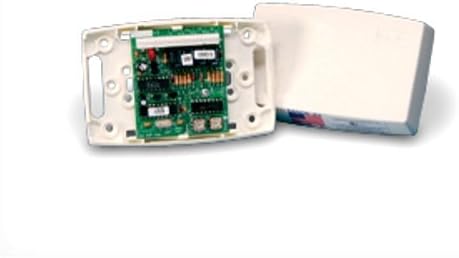
This image displays the DMP 716 Output Expansion Module. The main component is a green circuit board populated with various electronic components, including relays and integrated circuits, mounted within a white plastic housing. To the right, the module's white plastic cover is shown detached, indicating the internal view ของอุปกรณ์
3.3 การกำหนดค่า
After physical installation, configure the 716 module's outputs through the control panel's programming interface. Refer to your control panel's programming manual for detailed instructions on assigning functions to the relays and annunciator outputs.
4. การใช้งานโมดูล
The DMP 716 module operates under the control of the connected DMP control panel. Its relays and annunciator outputs will activate or deactivate based on the programming and events within the security or automation system.
- เอาท์พุทรีเลย์: The four Form C (SPDT) relays can be programmed to switch external circuits (e.g., lights, sirens, door locks) based on system events like alarms, arming status, or specific zone conditions.
- Annunciator Outputs: The four open collector outputs provide low-current signaling for devices such as LEDs or small buzzers, indicating system status or specific event occurrences.
Always ensure that the connected devices' power requirements do not exceed the module's output specifications.
5. การบำรุงรักษา
The DMP 716 module is designed for reliable, long-term operation with minimal maintenance. Regular inspection is recommended to ensure optimal performance.
- การตรวจสอบภาพ: Periodically inspect the module for any signs of physical damage, loose connections, or corrosion.
- การทำความสะอาด: หากจำเป็น ให้ทำความสะอาดภายนอกโมดูลอย่างเบามือด้วยผ้านุ่มและแห้ง ห้ามใช้น้ำยาทำความสะอาดหรือตัวทำละลาย
- อัพเดตเฟิร์มแวร์: Consult DMP technical support or your installer for information regarding any available firmware updates for your control panel that may affect module operation.
6 การแก้ไขปัญหา
If you experience issues with the DMP 716 module, consider the following troubleshooting steps:
- โมดูลไม่ตอบสนอง:
- Verify that the LX-Bus connections are secure and correctly polarized.
- Check the control panel's power supply.
- Ensure the module is properly addressed or recognized by the control panel in its programming.
- เอาต์พุตไม่ทำงาน:
- Confirm the output is correctly programmed in the control panel for the desired event.
- Check the wiring to the external device connected to the output.
- Verify the external device is functioning correctly and its power requirements are met.
- Ensure the load connected to the relay does not exceed its maximum current rating.
- การทำงานเป็นระยะ:
- Inspect all wiring for loose connections or damaged insulation.
- Check for potential electrical interference from nearby equipment.
If problems persist after attempting these steps, contact your installer or DMP technical support.
7. ข้อมูลจำเพาะ
| คุณลักษณะ | ค่า |
|---|---|
| ผู้ผลิต | ดีเอ็มพี |
| หมายเลขรุ่นผลิตภัณฑ์ | 716 |
| ขนาด (กว้าง x ยาว x สูง) | 20.32 x 15.24 x 5.08 ซม. |
| น้ำหนัก | 453.59 กรัม |
| รีเลย์เอาต์พุต | 4 x Form C (SPDT) programmable |
| ผลลัพธ์ของผู้ประกาศ | 4 x Open Collector |
| ความเข้ากันได้ของบัส | LX-รถบัส |
8. การรับประกันและการสนับสนุน
For warranty information regarding your DMP 716 Output Expansion Module, please refer to the documentation provided at the time of purchase or contact your authorized DMP dealer. DMP products are typically covered by a limited warranty against defects in materials and workmanship.
For technical support, installation assistance, or advanced troubleshooting, please contact your security system installer or visit the official DMP webไซต์สำหรับทรัพยากรสนับสนุนและข้อมูลการติดต่อ


