1. บทนำ
This manual provides essential information for the safe and efficient operation of your AXESS SPBT1074 Portable Bluetooth Media Speaker. Please read this manual thoroughly before using the device and retain it for future reference. The AXESS SPBT1074 is designed for portable audio playback, featuring Bluetooth connectivity, FM radio, USB and Micro SD card support, and an AUX input. Its built-in rechargeable battery allows for extended use in various indoor and outdoor environments.
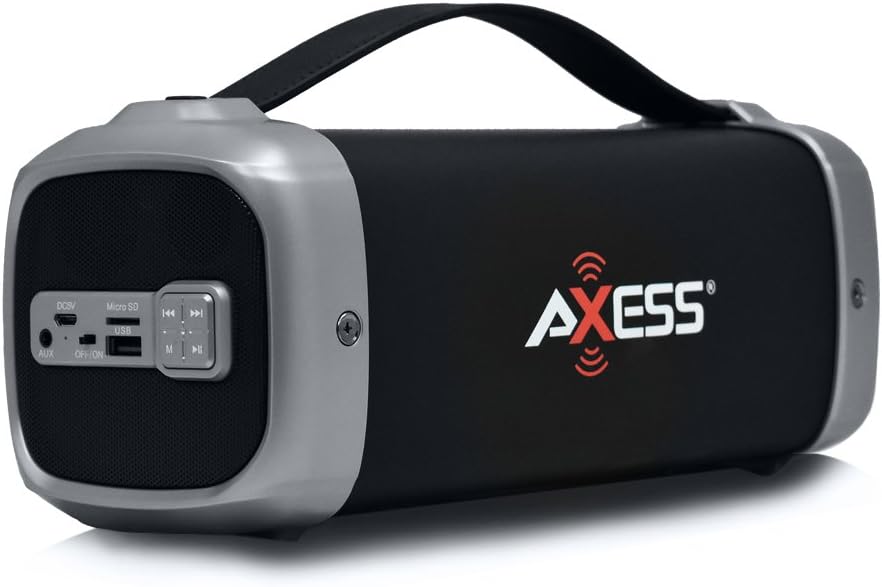
Image 1.1: The AXESS SPBT1074 Portable Bluetooth Media Speaker in silver.
2. ข้อมูลด้านความปลอดภัย
- อย่าให้เครื่องสัมผัสกับอุณหภูมิที่สูงหรือต่ำเกินไป แสงแดดโดยตรง หรือความชื้นสูง
- หลีกเลี่ยงการทำตกหรือให้ลำโพงได้รับแรงกระแทกรุนแรง
- ห้ามถอดประกอบหรือพยายามซ่อมแซมอุปกรณ์ด้วยตนเอง แนะนำให้ส่งช่างผู้ชำนาญเข้ารับบริการทั้งหมด
- เก็บลำโพงให้ห่างจากน้ำและของเหลวอื่นๆ ผลิตภัณฑ์นี้ไม่กันน้ำ
- Use only the specified charging cable and power adapter (if applicable) to prevent damage.
- ทำความสะอาดอุปกรณ์ด้วยผ้านุ่มและแห้ง ห้ามใช้น้ำยาทำความสะอาดหรือสารละลายที่มีฤทธิ์กัดกร่อน
- กำจัดแบตเตอรี่และอุปกรณ์ตามระเบียบข้อบังคับท้องถิ่น
3. เนื้อหาบรรจุภัณฑ์
เมื่อแกะกล่องแล้ว โปรดตรวจสอบให้แน่ใจว่าสินค้าทั้งหมดที่ระบุไว้ด้านล่างนี้มีอยู่และอยู่ในสภาพดี:
- ลำโพงมัลติมีเดียบลูทูธพกพา AXESS SPBT1074
- สายชาร์จ USB
- คู่มือการใช้งาน (เอกสารนี้)
4. สินค้าหมดview และการควบคุม
Familiarize yourself with the various parts and controls of your AXESS SPBT1074 speaker.

ภาพที่ 4.1: รายละเอียด view of the SPBT1074 control panel and ports.
- ช่องเสียบชาร์จ DC5V: Connect the USB charge cord here to recharge the speaker.
- สล็อตไมโคร SD: Insert a Micro SD card for direct audio playback.
- พอร์ต USB: เสียบแฟลชไดรฟ์ USB เพื่อเล่นเสียงโดยตรง
- พอร์ต AUX: เชื่อมต่ออุปกรณ์เสียงภายนอกโดยใช้สายสัญญาณเสียงขนาด 3.5 มม.
- สวิตช์เปิด/ปิด: เปิดหรือปิดลำโพง
- ปุ่มโหมด (M): Switches between Bluetooth, FM Radio, USB, Micro SD, and AUX input modes.
- ปุ่มเล่น/หยุดชั่วคราว (►▮▮): Plays or pauses audio playback. In FM mode, press and hold to auto-scan and save stations.
- Rewind/Previous Track Button (◀◀): Short press for previous track/station. Long press to decrease volume.
- Fast-Forward/Next Track Button (►►): Short press for next track/station. Long press to increase volume.

Image 4.2: Close-up of the speaker's control panel.
5. การตั้งค่า
5.1. ชาร์จลำโพง
Before initial use, fully charge the speaker for approximately 3-4 hours.
- Connect the supplied USB charge cord to the DC5V charging port on the speaker.
- Connect the other end of the USB charge cord to a USB power adapter (not included) or a computer's USB port.
- ไฟแสดงสถานะการชาร์จ (ถ้ามี) จะสว่างขึ้นขณะชาร์จและจะดับลงเมื่อชาร์จเต็มแล้ว
5.2. การเปิด/ปิดเครื่อง
ในการเปิดลำโพง ให้เลื่อนสวิตช์เปิด/ปิดไปที่ตำแหน่ง "เปิด" ในการปิด ให้เลื่อนไปที่ตำแหน่ง "ปิด"
6. คู่มือการใช้งาน
6.1. โหมดบลูทู ธ
- Power on the speaker. It will automatically enter Bluetooth pairing mode, indicated by a flashing LED light (if present) and an audible prompt.
- เปิดใช้งานบลูทูธบนอุปกรณ์เคลื่อนที่ของคุณ (สมาร์ทโฟน แท็บเล็ต ฯลฯ)
- ค้นหา available Bluetooth devices and select "AXESS SPBT1074" from the list.
- เมื่อจับคู่สำเร็จแล้ว ลำโพงจะส่งเสียงยืนยัน และไฟ LED จะหยุดกะพริบ
- You can now play audio from your device through the speaker. Use the speaker's controls or your device's controls to adjust volume and navigate tracks.
6.2. โหมดวิทยุ FM
- เปิดลำโพง กดปุ่ม โหมด (M) กดปุ่มซ้ำๆ จนกว่าคุณจะได้ยินเสียงแจ้งเตือนวิทยุ FM
- To auto-scan and save available FM stations, press and hold the เล่น/หยุดชั่วคราว (►▮▮) button. The speaker will scan and store stations automatically.
- เมื่อการสแกนเสร็จสิ้น ให้ใช้ ก่อนหน้า (◀◀) และ Next (►►) ปุ่มสำหรับนำทางระหว่างสถานีที่บันทึกไว้
- Adjust volume using the long press function of the ก่อนหน้า (◀◀) และ Next (►►) ปุ่ม
6.3. การเล่นไฟล์ผ่าน USB / การ์ด Micro SD
- เปิดลำโพง
- Insert a USB flash drive into the USB port or a Micro SD card into the Micro SD slot.
- ลำโพงจะตรวจจับอุปกรณ์จัดเก็บข้อมูลโดยอัตโนมัติและเริ่มเล่นเสียง fileถ้าไม่ ให้กดปุ่ม โหมด (M) button to switch to the correct input.
- ใช้ เล่น/หยุดชั่วคราว (►▮▮), ก่อนหน้า (◀◀), และ Next (►►) ปุ่มเพื่อควบคุมการเล่น
6.4. โหมดอินพุต AUX
- เปิดลำโพง
- เชื่อมต่อปลายด้านหนึ่งของสายสัญญาณเสียงขนาด 3.5 มม. (ไม่ได้รวมอยู่ในชุด) เข้ากับพอร์ต AUX บนลำโพง
- ต่อปลายอีกด้านของสายสัญญาณเสียงเข้ากับช่องเสียบหูฟังหรือช่องสัญญาณเสียงออกของอุปกรณ์ภายนอกของคุณ
- กดปุ่ม โหมด (M) button repeatedly until you hear the AUX input prompt.
- Control audio playback from your external device. Volume can be adjusted on both the speaker and the external device.
7. การบำรุงรักษา
- การทำความสะอาด: Wipe the speaker's exterior with a soft, dry, lint-free cloth. Do not use liquid cleaners or sprays.
- พื้นที่จัดเก็บ: เมื่อไม่ได้ใช้งานเป็นเวลานาน ควรเก็บลำโพงไว้ในที่แห้งและเย็น หลีกเลี่ยงแสงแดดโดยตรง
- การดูแลแบตเตอรี่ เพื่อยืดอายุการใช้งานแบตเตอรี่ ควรหลีกเลี่ยงการปล่อยให้แบตเตอรี่หมดจนเกลี้ยงบ่อยๆ ชาร์จลำโพงเป็นประจำ แม้ว่าจะไม่ได้ใช้งาน เพื่อรักษาสภาพแบตเตอรี่ให้ดีอยู่เสมอ
8 การแก้ไขปัญหา
| ปัญหา | สาเหตุที่เป็นไปได้ | สารละลาย |
|---|---|---|
| ลำโพงไม่เปิดเครื่อง | แบตเตอรี่หมดประจุ | ชาร์จลำโพงโดยใช้สาย USB ที่ให้มา |
| ไม่มีเสียงจากลำโพง | ระดับเสียงเบาเกินไป; เลือกโหมดไม่ถูกต้อง; อุปกรณ์ไม่ได้เชื่อมต่ออย่างถูกต้อง | Increase volume on both the speaker and the connected device. Ensure the correct input mode (Bluetooth, FM, USB, Micro SD, AUX) is selected. Reconnect the device. |
| การจับคู่บลูทูธล้มเหลว | ลำโพงไม่ได้อยู่ในโหมดจับคู่ อุปกรณ์อยู่ไกลเกินไป มีสัญญาณรบกวน | Ensure the speaker is in Bluetooth mode and flashing. Move your device closer to the speaker. Turn off other Bluetooth devices to reduce interference. |
| การรับสัญญาณวิทยุ FM ไม่ดี | สัญญาณอ่อน; มีสัญญาณรบกวนจากสภาพแวดล้อม | Relocate the speaker to an area with better reception. Perform an auto-scan again. |
9. ข้อมูลจำเพาะ
| คุณสมบัติ | รายละเอียด |
|---|---|
| หมายเลขรุ่น | SPBT1074SL |
| การเชื่อมต่อ | บลูทูธ, USB, ไมโคร SD, AUX |
| คุณสมบัติพิเศษ | Portable, Built-in FM Radio |
| เส้นผ่านศูนย์กลางซับวูฟเฟอร์ | 3 นิ้ว |
| ฮอร์นเอาท์พุต | 2 วัตต์ x 1 |
| เอาท์พุตซับวูฟเฟอร์ | 8 วัตต์ |
| Total Speaker Output | 10 วัตต์ (RMS) |
| ช่วงบลูทูธ | สูงถึง 30 ฟุต (9 เมตร) |
| ประเภทแบตเตอรี่ | 1500 mAh Lithium Rechargeable Battery |
| เวลาเล่น | 4-6 ชั่วโมง (โดยประมาณ) |
| เวลาในการชาร์จ | 3-4 ชั่วโมง (โดยประมาณ) |
| ขนาดสินค้า | 10.3 x 3.8 x 3.5 นิ้ว (26.16 x 9.65 x 8.89 ซม.) |
| น้ำหนักสินค้า | 1.4 ปอนด์ (0.64 กก.) |
| ส่วนประกอบที่รวมอยู่ | Speaker, USB charge cord |
10. การรับประกันและการสนับสนุน
For warranty information and technical support, please refer to the documentation provided with your purchase or visit the official Axess webไซต์นี้ โปรดเก็บหลักฐานการซื้อไว้เพื่อใช้ยืนยันการรับประกัน
ขวาน Webเว็บไซต์: www.axessproducts.com


