
1. บทนำ
This manual provides essential instructions for the safe and efficient installation, operation, and maintenance of your CTOUCH Wallom 10080250 Electric Wall Mount. This electric wall mount is designed to provide a flexible mounting solution for interactive displays ranging from 139.7 cm (55 inches) to 218.4 cm (86 inches).
Please read this manual thoroughly before installation and use, and retain it for future reference. Improper installation or operation may result in damage to the product, display, or personal injury.
2. คำแนะนำในการตั้งค่า
The CTOUCH Wallom 10080250 electric wall mount is designed for straightforward installation. It comes largely pre-assembled in its packaging, allowing for installation by a single person in approximately 20 minutes.
2.1 การแกะกล่องและการตรวจสอบส่วนประกอบ
นำชิ้นส่วนทั้งหมดออกจากบรรจุภัณฑ์อย่างระมัดระวัง ตรวจสอบว่าชิ้นส่วนทั้งหมดครบถ้วนและไม่เสียหาย โปรดดูรายการชิ้นส่วนบนบรรจุภัณฑ์เพื่อตรวจสอบรายการชิ้นส่วนทั้งหมด
2.2 การติดตั้งเครื่อง
Select a suitable wall location capable of supporting the combined weight of the mount and your display. Ensure the wall material is appropriate for secure fastening. Use appropriate wall anchors and screws (not included, unless specified in packaging) for your wall type.
- Position the pre-assembled wall mount against the desired wall location.
- Mark the drilling points accurately.
- Drill pilot holes as required for your chosen fasteners.
- Securely attach the wall mount to the wall. Ensure it is level and firmly fixed.
- Attach your CTOUCH display (139.7 cm to 218.4 cm) to the mount according to the display's specific mounting instructions.
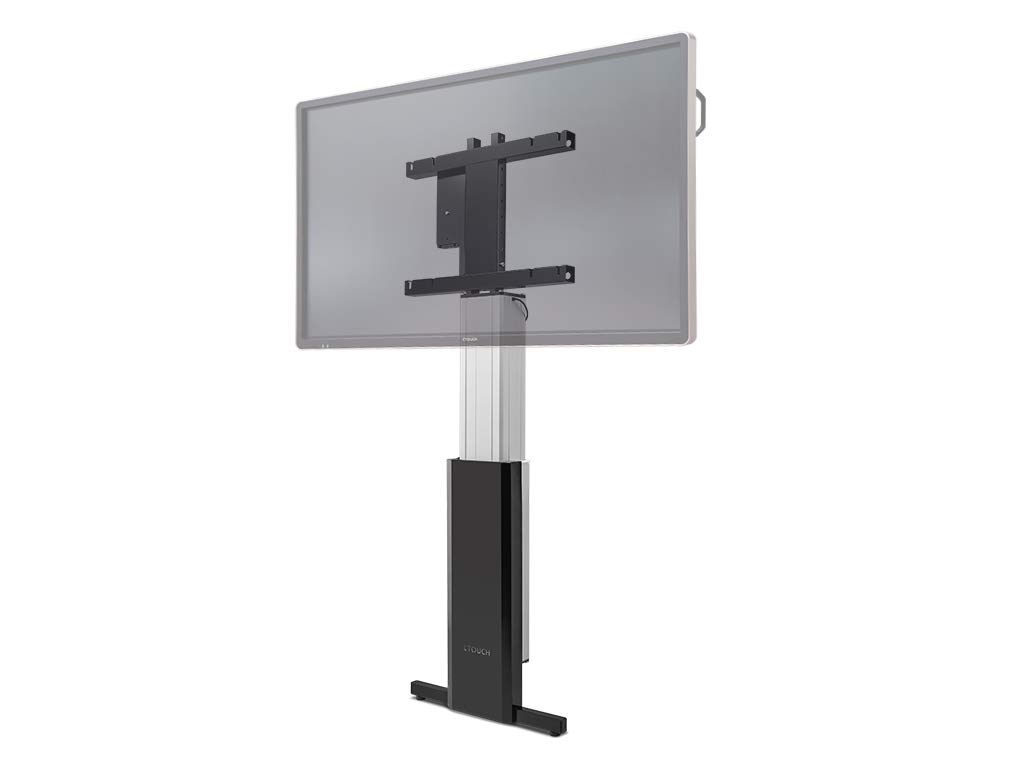
Figure 1: The CTOUCH Wallom 10080250 Electric Wall Mount supporting an interactive display. This image illustrates the product's appearance when installed.
3. คู่มือการใช้งาน
The electric wall mount is operated using a three-button remote control, allowing for precise height adjustments.
3.1 ฟังก์ชั่นการควบคุมระยะไกล
- ปุ่มขึ้น: Press to raise the display.
- ปุ่มลง: Press to lower the display.
- ปุ่มหน่วยความจำ: Use this button to set and recall preferred height positions. Consult the remote control's specific instructions for programming memory settings.
3.2 Adjusting Display Height
The mount allows for significant vertical travel, from a low position of 30 cm (bottom edge of an 86-inch screen) to a maximum height that optimizes reach for various users and applications.
- Ensure the power cable is securely connected to a power outlet.
- Use the Up or Down buttons on the remote control to move the display to your desired height.
- Release the button when the display reaches the desired position.
- To save a frequently used height, follow the instructions provided with your remote control for setting memory presets.
4. การบำรุงรักษา
Regular maintenance ensures the longevity and safe operation of your electric wall mount.
- การทำความสะอาด: Use a soft, dry cloth to clean the exterior surfaces of the mount. Avoid abrasive cleaners or solvents.
- การตรวจสอบ: Periodically check all mounting screws and connections to ensure they remain tight and secure.
- การจัดการสายเคเบิล: Ensure all cables are neatly routed and not pinched or strained during height adjustments.
- การหล่อลื่น: The moving parts are factory-lubricated and generally do not require additional lubrication. If unusual noises occur, contact support.
5 การแก้ไขปัญหา
This section addresses common issues you might encounter with your CTOUCH Wallom 10080250 electric wall mount.
| ปัญหา | สาเหตุที่เป็นไปได้ | สารละลาย |
|---|---|---|
| ฐานยึดไม่ขยับ | No power supply. Remote control batteries are dead. Overload protection activated. | Check power connection. Replace remote control batteries. Disconnect power for 10 minutes to reset overload protection. |
| เสียงรบกวนที่ผิดปกติระหว่างการทำงาน | Loose components. Obstruction in the movement path. | Inspect for loose screws or obstructions. Ensure cables are not interfering. If noise persists, contact support. |
| รีโมทคอนโทรลไม่ตอบสนอง | Batteries are dead or incorrectly inserted. Remote control out of range. | Replace batteries. Ensure line of sight to the mount's receiver. |
If you encounter issues not listed here or if problems persist after attempting the suggested solutions, please contact CTOUCH customer support.
6. ข้อมูลจำเพาะ
| คุณสมบัติ | รายละเอียด |
|---|---|
| ยี่ห้อ | ซีทัช |
| หมายเลขรุ่น | 10080250 |
| ขนาดหน้าจอที่เข้ากันได้ | 139.7 cm (55 inches) to 218.4 cm (86 inches) |
| ช่วงการปรับความสูง | From 30 cm (bottom edge of 86-inch screen) to maximum reach |
| วิธีการควบคุม | Three-button remote control |
| การประกอบ | ประกอบล่วงหน้าเพื่อการติดตั้งที่รวดเร็ว |
| ประเทศต้นกำเนิด | เนเธอร์แลนด์ |
7. การรับประกันและการสนับสนุน
For warranty information, please refer to the documentation provided with your purchase or visit the official CTOUCH webไซต์ เงื่อนไขการรับประกันเฉพาะอาจแตกต่างกันไปตามภูมิภาคและผู้ค้าปลีก
- อะไหล่: ขณะนี้ยังไม่มีข้อมูลเกี่ยวกับความพร้อมของอะไหล่
- การอัปเดตซอฟต์แวร์: ขณะนี้ยังไม่มีข้อมูลเกี่ยวกับการรับประกันการอัปเดตซอฟต์แวร์
- การสนับสนุนลูกค้า: For technical assistance, troubleshooting beyond this manual, or warranty claims, please contact CTOUCH customer support directly. Contact details can typically be found on the manufacturer's webเว็บไซต์.