1. บทนำ
This manual provides essential information for the safe and efficient use of your Nexans millimat/100 N-HEAT electric underfloor heating system, including the CDFR-003 thermostat. Electric underfloor heating offers a comfortable and energy-efficient way to heat your living spaces. Please read this manual thoroughly before installation and operation to ensure proper functionality and longevity of your system.
2. สินค้าหมดview และคุณสมบัติ
The Nexans millimat/100 N-HEAT system is designed for easy installation and provides consistent, comfortable warmth. It is a complete electric underfloor heating kit, featuring a high-quality heating mat and a digital thermostat.
ประโยชน์หลัก:
- Low installation cost.
- ใช้งานได้โดยไม่ต้องบำรุงรักษา
- Easy handling and adjustment.
- Reduced energy consumption.
- Long lifespan, contributing to a comfortable indoor climate.
Heating Mat Structure:
- Conductor: Double resistance wire.
- Insulation: FEP.
- Earth Conductor: Solid copper.
- Reinforcement: Fiberglass mesh.
- Outer Sheath: PVC.
- Shielding: Aluminum coating.
- Total Thickness: 4.5 mm.
- ความกว้าง : 50 ซม.

Image 2.1: A person enjoying a comfortable bathroom environment, illustrating the benefit of the Nexans underfloor heating system. The heating mat is visible beneath the floor surface.

ภาพที่ 2.2: ภาพตัดขวาง view illustrating the installation of the Nexans underfloor heating mat beneath the floor finish in a bathroom setting.
3. ข้อมูลจำเพาะทางเทคนิค
The following specifications apply to the Nexans millimat/100 N-HEAT electric underfloor heating system:
- Heating Power: 100 W/m² or 150 W/m² (depending on model).
- Element Values: From 100 W to 1800 W.
- Max. Continuous Operating Temperature (Outer Sheath): 65 °C.
- Conductor Resistance Tolerance: -5% / +10%.
- เล่มที่กำหนดtagอี: 230 โวลต์
Mat Dimensions and Power Output:
| Mat Area (m²) | Heating Power 100W (W) | Heating Power 150W (W) | Mat Length (m) | Mat Width (m) | พื้นที่ห้องขั้นต่ำ (ตร.ม.) |
|---|---|---|---|---|---|
| 1.0 | 100* | 150* | 2.0 | 0.5 | 1.2 |
| 1.5 | 150* | 225* | 3.0 | 0.5 | 1.8 |
| 2.0 | 200* | 300* | 4.0 | 0.5 | 2.3 |
| 2.5 | 250* | 375 | 5.0 | 0.5 | 2.8 |
| 3.0 | 300* | 450 | 6.0 | 0.5 | 3.4 |
| 3.5 | 350 | 525 | 7.0 | 0.5 | 3.9 |
| 4.0 | 400 | 600 | 8.0 | 0.5 | 4.5 |
| 5.0 | 500 | 750 | 10.0 | 0.5 | 5.6 |
| 6.0 | 600 | 900 | 12.0 | 0.5 | 6.7 |
| 7.0 | 700 | 1050 | 14.0 | 0.5 | 7.8 |
| 8.0 | 800 | 1200 | 16.0 | 0.5 | 8.9 |
| 10.0 | 1000 | 1500 | 20.0 | 0.5 | 11.1 |
| 12.0 | 1200 | 1800 | 24.0 | 0.5 | 13.3 |
*These mat sizes are not supplied with a hidden splice joint.
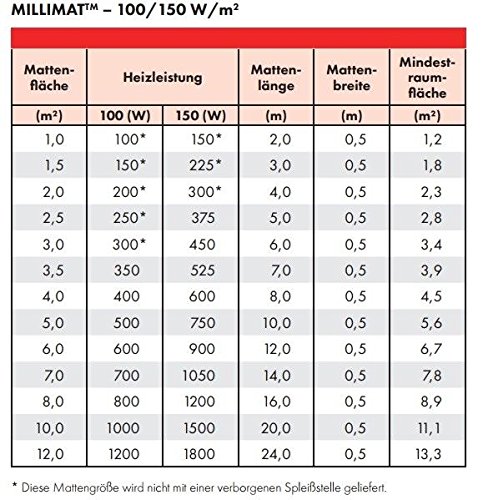
Image 3.1: Detailed table outlining the mat area, heating power, length, width, and minimum room area for various millimat/100 models.
4 ส่วนประกอบ
4.1. Heating Mat (millimat/100 N-HEAT)
The heating mat consists of a thin heating cable pre-attached to a fiberglass mesh, designed for easy unrolling and installation. It provides uniform heat distribution across the floor surface.

Image 4.1: The Nexans millimat/100 N-HEAT heating mat unrolled, showing the heating cables attached to the mesh.
4.2. Thermostat (CDFR-003)
The CDFR-003 thermostat controls the underfloor heating system, allowing you to set and maintain your desired floor temperature. Modern thermostats offer advanced energy-saving functions, such as temperature reduction for day and night savings.

Image 4.2: The Nexans CDFR-003 thermostat with a rotary dial for temperature control and a power button.

Image 4.3: An alternative Nexans digital programmable thermostat, offering precise temperature control and scheduling options.
5. การตั้งค่าและการติดตั้ง
Installation of the Nexans millimat/100 N-HEAT electric underfloor heating system should be performed by a qualified electrician or heating professional in accordance with local building codes and electrical regulations.
General Installation Steps (Consult full installation guide for details):
- เตรียมพื้นด้านล่าง: Ensure the subfloor is clean, dry, level, and free from debris. Apply a suitable primer if necessary.
- Plan Mat Layout: Determine the optimal placement of the heating mat, avoiding permanent fixtures and ensuring even heat distribution.
- ติดตั้งเซ็นเซอร์ตรวจจับพื้น: Place the floor temperature sensor in a conduit between two heating cables, ensuring it is centered and accessible for future maintenance.
- วางแผ่นทำความร้อน: Unroll the mat onto the prepared subfloor. The mesh can be cut and turned to fit the room shape, but never cut the heating cable itself.
- การเชื่อมต่อไฟฟ้า: Connect the cold lead of the heating mat and the floor sensor to the thermostat. The thermostat must be connected to the main power supply by a qualified electrician.
- ติดตั้งวัสดุปูพื้น: Once the mat and sensor are installed and tested, apply a suitable leveling compound or tile adhesive over the mat before installing the final floor covering.
6. คู่มือการใช้งาน
The CDFR-003 thermostat allows you to control your underfloor heating system. Refer to the specific thermostat manual for detailed programming instructions.
Basic Operation (CDFR-003 Rotary Thermostat):
- เปิด/ปิดเครื่อง: Press the power button (usually marked with a circle and a vertical line) to turn the heating system on or off.
- การปรับอุณหภูมิ: Rotate the dial to set your desired floor temperature. The numbers on the dial correspond to temperature levels.
- การประหยัดพลังงาน: To optimize energy consumption, consider lowering the temperature setting during periods when the room is unoccupied or overnight.
For digital programmable thermostats (like the one shown in Image 4.3), consult its dedicated manual for setting schedules, modes, and advanced features.
7. การบำรุงรักษา
The Nexans millimat/100 N-HEAT electric underfloor heating system is designed to be maintenance-free once installed. There are no moving parts or fluids to replenish.
การดูแลทั่วไป:
- Keep the thermostat clean and free from dust. Wipe with a dry cloth.
- Avoid placing heavy, insulated objects directly on the heated floor for extended periods, as this can lead to localized overheating.
- Do not attempt to repair the heating mat or thermostat yourself.
8 การแก้ไขปัญหา
If you experience issues with your underfloor heating system, consider the following basic troubleshooting steps. For complex problems, always contact a qualified technician.
ปัญหาทั่วไป:
- ไม่มีความร้อน:
- Check if the thermostat is powered on and set to a temperature above the current room/floor temperature.
- Verify the circuit breaker for the heating system has not tripped.
- Ensure the floor sensor is correctly connected and functioning (if applicable).
- ความร้อนไม่สม่ำเสมอ:
- Ensure no large, heat-insulating objects are covering parts of the floor.
- Check thermostat settings for any programmed schedules that might be causing temperature fluctuations.
- Thermostat Display Not Working:
- Check power supply to the thermostat.
- If the thermostat is battery-powered, check or replace batteries.
If these steps do not resolve the issue, contact a certified electrician or Nexans customer support.
9. การรับประกันและการสนับสนุน
For warranty information regarding your Nexans millimat/100 N-HEAT electric underfloor heating system and CDFR-003 thermostat, please refer to the documentation provided at the time of purchase or contact your retailer. Specific warranty terms and conditions may vary.
การสนับสนุนลูกค้า:
If you require technical assistance, have questions about installation, or need to report a fault, please contact your authorized Nexans dealer or visit the official Nexans webไซต์สำหรับรายละเอียดการติดต่อฝ่ายสนับสนุน


