การแนะนำ
ขอบคุณสำหรับการซื้อasing the Edifier DA5100 5.1 multimedia speaker system. This manual provides detailed instructions to help you set up, operate, and maintain your speakers for optimal performance and longevity. Please read this manual thoroughly before using the product.
เนื้อหาแพ็คเกจ
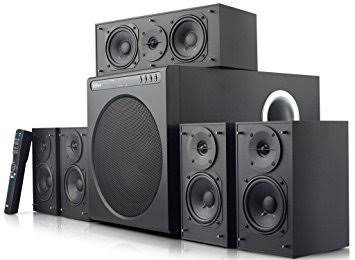
ก่อนดำเนินการต่อ โปรดตรวจสอบให้แน่ใจว่ามีส่วนประกอบทั้งหมดอยู่ในกล่องของคุณ:
- หน่วยซับวูฟเฟอร์
- ลำโพงกลาง
- Front satellite speakers (2)
- Rear satellite speakers (2)
- รีโมทคอนโทรล
- Audio input cables (RCA to RCA, 3.5mm to RCA)
- Speaker connection cables
- คู่มือการใช้งาน (เอกสารนี้)
ข้อควรระวังเพื่อความปลอดภัยที่สำคัญ
เพื่อให้มั่นใจถึงความปลอดภัยในการใช้งานและป้องกันความเสียหาย โปรดปฏิบัติตามสิ่งต่อไปนี้:
- อย่าให้เครื่องโดนฝนหรือความชื้น
- Do not open the speaker enclosures; there are no user-serviceable parts inside.
- วางเครื่องบนพื้นผิวที่มั่นคงและเรียบเพื่อป้องกันการพลิคว่ำ
- Ensure adequate ventilation around the speakers and subwoofer.
- ถอดปลั๊กไฟออกขณะเกิดพายุฝนฟ้าคะนอง หรือเมื่อไม่ได้ใช้งานเป็นเวลานาน
- เก็บให้ห่างจากแหล่งความร้อนและแสงแดดโดยตรง
- ใช้เฉพาะแหล่งจ่ายไฟและอุปกรณ์เสริมที่ระบุเท่านั้น
คู่มือการติดตั้ง
1. การวางตำแหน่งลำโพง
Proper speaker placement is crucial for optimal 5.1 surround sound experience.
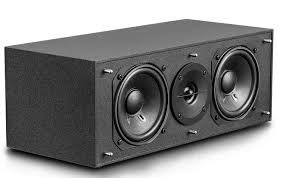
- ลำโพงกลาง: Place directly in front of the listening position, typically above or below your display.
- ลำโพงด้านหน้า (ซ้าย/ขวา): Position equidistant from the listening position, forming an equilateral triangle with the listener.
- Rear Speakers (Left/Right): Place behind the listening position, slightly to the sides, at ear level or slightly above.
- ซับวูฟเฟอร์: Can be placed anywhere in the room, but corner placement often enhances bass. Experiment for best results.
2. การเชื่อมต่อลำโพง
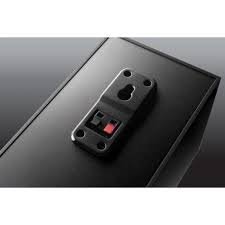
Connect the satellite speakers to the subwoofer unit using the provided speaker cables. Ensure correct polarity (red to red, black to black) for each connection.
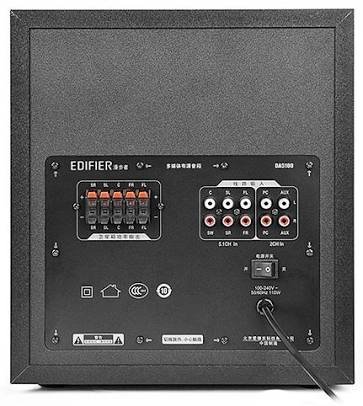
- Identify the speaker output terminals on the rear of the subwoofer. These are typically labeled for Front Left (FL), Front Right (FR), Center (C), Surround Left (SL), and Surround Right (SR).
- Connect each satellite speaker to its corresponding terminal on the subwoofer.
3. การเชื่อมต่อแหล่งเสียง
The DA5100 offers multiple input options. Choose the one that best suits your audio source.
- 5.1 ช่องอินพุต: For true 5.1 surround sound, connect your DVD player, Blu-ray player, or sound card's 5.1 analog outputs to the corresponding 5.1 input jacks on the subwoofer (FL, FR, C, SL, SR, SW).
- อินพุตพีซี: Use the 3.5mm to RCA cable to connect your computer's audio output to the "PC" input jacks.
- อินพุต AUX: Use the RCA to RCA cable to connect other stereo audio devices (e.g., TV, game console) to the "AUX" input jacks.
4. การเชื่อมต่อไฟฟ้า
After all audio and speaker connections are made, connect the power cord to the subwoofer and then to a wall outlet. Ensure the power switch on the rear of the subwoofer is in the "OFF" position before plugging in.
คำแนะนำการใช้งาน
1. การเปิด/ปิดเครื่อง
Locate the power switch on the rear panel of the subwoofer. Flip it to the "ON" position to power on the system. Flip it to "OFF" to power off.
2. การเลือกอินพุต
Use the "Input" button on the remote control or the control panel on the subwoofer to cycle through the available audio inputs: 5.1, PC, AUX.
3. การควบคุมระดับเสียง
Use the "Volume +" and "Volume -" buttons on the remote control or the main volume knob on the subwoofer to adjust the overall system volume.
4. Individual Channel Volume Adjustment
The remote control allows for individual adjustment of the center, surround, and subwoofer volumes to fine-tune your sound experience.
- Press the "Center", "Surround", or "Subwoofer" button on the remote.
- Use the "Volume +" or "Volume -" buttons to adjust the level for that specific channel.
5. ฟังก์ชั่นปิดเสียง
Press the "Mute" button on the remote control to temporarily silence the audio. Press it again to restore the sound.
การบำรุงรักษาและการดูแล
To keep your Edifier DA5100 speakers in optimal condition:
- การทำความสะอาด: Use a soft, dry cloth to wipe down the speaker surfaces. Do not use liquid cleaners or abrasive materials.
- การระบายอากาศ : Ensure that the subwoofer's heat sink and ventilation ports are not obstructed.
- พื้นที่จัดเก็บ: หากต้องเก็บรักษาลำโพงเป็นเวลานาน ควรตัดการเชื่อมต่อจากแหล่งจ่ายไฟและเก็บไว้ในที่แห้งและเย็น
- การจัดการสายเคเบิล: Keep cables tidy and avoid sharp bends or kinks to prevent damage.
การแก้ไขปัญหา
If you encounter issues with your Edifier DA5100 system, refer to the table below for common problems and solutions.
| ปัญหา | สาเหตุที่เป็นไปได้ | สารละลาย |
|---|---|---|
| ไม่มีเสียง | Power off; incorrect input selected; loose cables; muted. | Check power switch; select correct input; re-connect all cables securely; un-mute. |
| เสียงเพี้ยน | Volume too high; poor audio source quality; incorrect cable connection. | Reduce volume; try a different audio source; check cable connections and polarity. |
| รีโมตคอนโทรลไม่ทำงาน | Dead batteries; obstruction between remote and sensor. | Replace batteries; ensure clear line of sight to the subwoofer's IR sensor. |
| Only some speakers producing sound | Incorrect 5.1 setup; loose speaker cables; audio source not 5.1. | Verify 5.1 input connections; check individual speaker cables; ensure audio source is outputting 5.1. |
หากปัญหายังคงมีอยู่ โปรดติดต่อฝ่ายสนับสนุนลูกค้า Edifier
ข้อมูลจำเพาะ
The following are the general specifications for the Edifier DA5100 5.1 speaker system. Specifications are subject to change without notice.
- กำลังขับ: RMS 8W x 5 + 38W (THD+N=10%)
- การตอบสนองความถี่: R/L/C/SL/SR: 150Hz-20KHz | SW: 20Hz-130Hz
- ความไวในการอินพุต: 5.1CH: L/R: 450mV+/-50mV; SW: 150mV+/-50mV | PC: 700mV+/-50mV | AUX: 350mV+/-50mV
- ประเภทอินพุต: 5.1 Channel, PC, AUX
- หน่วยเบส: 8 นิ้ว (210mm)
- Mid-range Unit: 3 นิ้ว (78mm)
- หน่วยเสียงแหลม: 1 นิ้ว (25mm)
- ขนาด (ซับวูฟเฟอร์): 270 มม. x 300 มม. x 435 มม. (กว้าง x สูง x ลึก)
- Dimensions (Satellite): 130 มม. x 160 มม. x 100 มม. (กว้าง x สูง x ลึก)
ข้อมูลการรับประกัน
Edifier products come with a limited warranty. Please refer to the warranty card included with your product or visit the official Edifier webดูรายละเอียดข้อกำหนดและเงื่อนไขการรับประกันสำหรับภูมิภาคของคุณได้ที่นี่ โปรดเก็บใบเสร็จรับเงินไว้เป็นหลักฐานการซื้อสำหรับการเรียกร้องการรับประกัน
การสนับสนุนลูกค้า
For further assistance, technical support, or service inquiries, please contact Edifier customer support through their official webไซต์หรือข้อมูลการติดต่อที่ให้ไว้ในบรรจุภัณฑ์ผลิตภัณฑ์ของคุณ
Edifier Official Webเว็บไซต์: www.edifier.com


