1. บทนำ
ขอบคุณสำหรับการซื้อasing the SMART SENSOR Digital Anemometer AS806. This compact and lightweight device is designed for accurate measurement of wind speed and wind temperature. It features multiple functions including current, maximum, minimum, and average value display, data hold, manual/auto power off, low battery indication, and backlight. Please read this manual thoroughly before use to ensure proper operation and to extend the life of your device.
2. ข้อมูลด้านความปลอดภัย
- อย่าพยายามถอดประกอบหรือดัดแปลงอุปกรณ์
- เก็บอุปกรณ์ให้ห่างจากน้ำและสภาพแวดล้อมที่มีความชื้นสูง
- หลีกเลี่ยงการวางอุปกรณ์ไว้ในอุณหภูมิที่สูงหรือต่ำเกินไปหรือถูกแสงแดดโดยตรงเป็นเวลานาน
- หากไม่ได้ใช้งานอุปกรณ์เป็นเวลานาน ควรถอดแบตเตอรี่ออกเพื่อป้องกันการรั่วไหล
- Handle the impeller carefully to prevent damage.
3. สินค้าหมดview
3.1 ส่วนประกอบ
The SMART SENSOR AS806 Digital Anemometer consists of a main body with an LCD display and an integrated impeller for wind speed measurement.
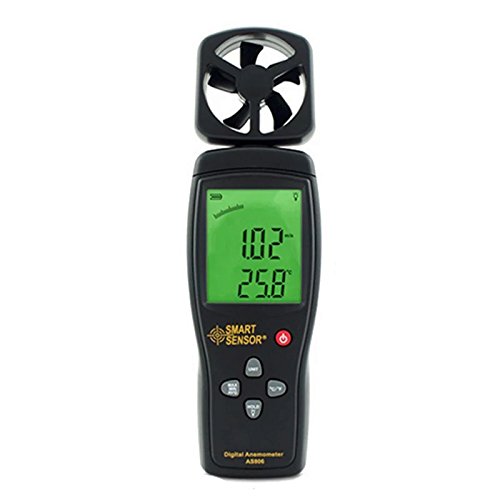
รูปที่ 1 : ด้านหน้า view of the SMART SENSOR AS806 Digital Anemometer.
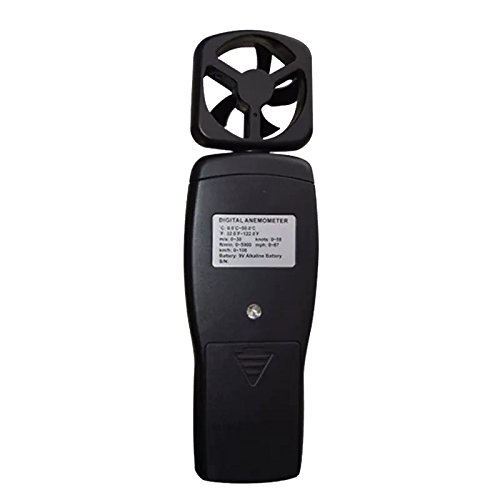
รูปที่ 2: ย้อนกลับ view of the device, showing the battery compartment.
3.2 การแสดงผลและปุ่มต่างๆ
The device features an LCD display that shows measurement readings and various indicators. Control buttons allow for mode selection, unit conversion, data hold, and backlight activation.
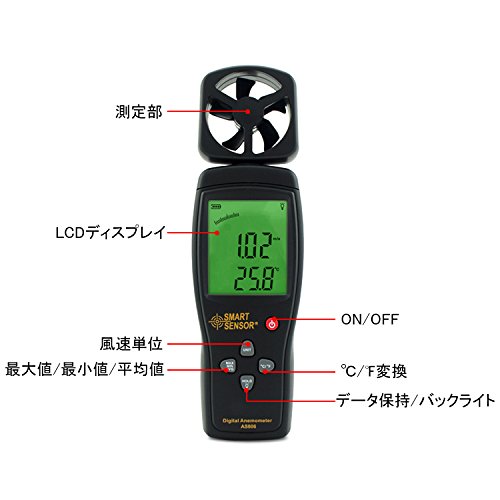
รูปที่ 3: รายละเอียด view of the LCD display and control buttons. Key elements include the measurement section (impeller), LCD display, ON/OFF button, wind unit selection, Max/Min/Avg function, °C/°F conversion, and Data Hold/Backlight button.
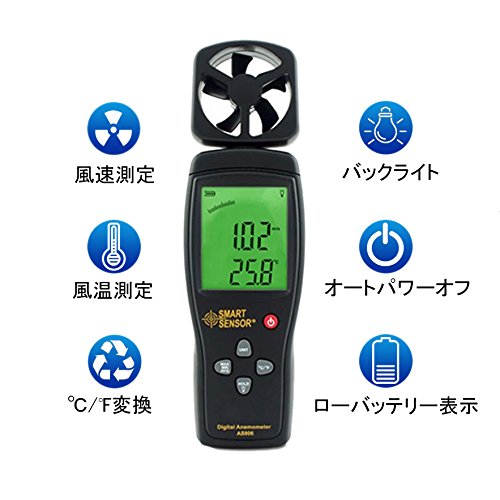
รูปที่ 4: เกินview of key features: Wind Speed Measurement, Wind Temperature Measurement, °C/°F Conversion, Backlight, Auto Power Off, and Low Battery Indicator.
4. ข้อมูลจำเพาะ
4.1 พารามิเตอร์ทางเทคนิค
| พารามิเตอร์ | ค่า |
|---|---|
| ช่วงความเร็วลม | 0.3 ~ 45 ม |
| ความแม่นยำของความเร็วลม | ±3% + 0.1 |
| หน่วยความเร็วลม | m/s, Ft/min, Knots, km/h, Mph |
| ช่วงอุณหภูมิลม | 0 ~ 45 องศาเซลเซียส |
| ความแม่นยำของอุณหภูมิลม | ±2 องศาเซลเซียส |
| ปณิธาน | 0.001 ม./วินาที |
| Max/Min/Average Value | ใช่ |
| การแปลง °C/°F | ใช่ |
| แสงไฟแบ็คไลท์ | ใช่ |
| ปิดเครื่องเอง/อัตโนมัติ | ใช่ |
| จอแสดงผลแบบอนาล็อก | ใช่ |
| ฟังก์ชันเก็บข้อมูล | ใช่ |
4.2 ข้อกำหนดทั่วไป
- แหล่งจ่ายไฟ: แบตเตอรี่ 9V
- น้ำหนัก: 170กรัม
- ขนาด : 220 x 65 x 30 มม.
- วัสดุ: Plastic PCB
- ยูพีซี: 799789670206
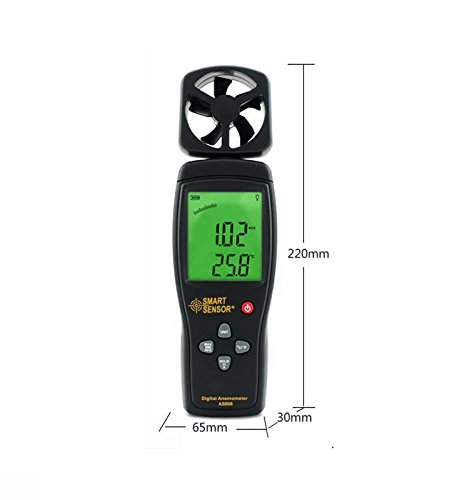
Figure 5: Device dimensions: 220mm (height), 65mm (width), 30mm (depth).
5. การตั้งค่า
5.1 การติดตั้งแบตเตอรี่
- หาฝาปิดช่องใส่แบตเตอรี่ที่ด้านหลังของอุปกรณ์ (ดูรูปที่ 2)
- เลื่อนฝาลงเพื่อเปิดช่อง
- Insert a 9V battery, ensuring the correct polarity (+/-).
- ปิดฝาช่องใส่แบตเตอรี่โดยเลื่อนขึ้นด้านบนจนกระทั่งล็อคเข้าที่
บันทึก: เมื่อแบตเตอรี่เหลือน้อย หน้าจอจะแสดงสัญญาณเตือนให้เปลี่ยนแบตเตอรี่
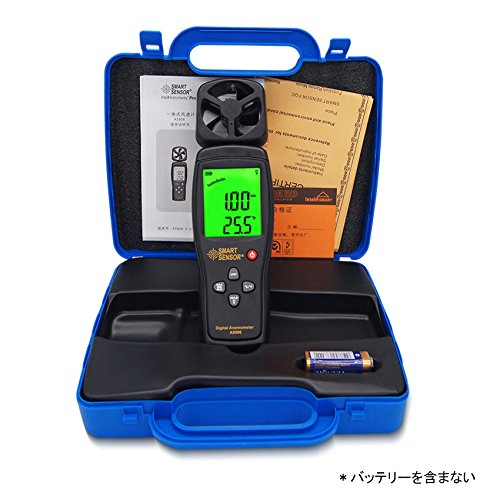
Figure 6: Package contents, including the anemometer and user manual. Note: Battery is not included.
6. คู่มือการใช้งาน
6.1 เปิด/ปิดเครื่อง
- หากต้องการเปิดเครื่อง ให้กดปุ่ม เปิด/ปิด ปุ่ม.
- หากต้องการปิดอุปกรณ์ ให้กดปุ่ม เปิด/ปิด กดปุ่มนี้สักสองสามวินาที
- The device also features an auto power-off function to conserve battery life. It will automatically shut down after a period of inactivity.
6.2 Wind Speed and Temperature Measurement
Once powered on, the device will immediately begin measuring wind speed and temperature. Hold the device so that the impeller faces the wind source for accurate readings. The current wind speed and temperature will be displayed on the LCD.
6.3 การแปลงหน่วย
- Wind Speed Units: กดปุ่ม หน่วย button to cycle through available wind speed units: m/s, Ft/min, Knots, km/h, Mph.
- หน่วยอุณหภูมิ: กดปุ่ม ° C / ° F button to switch between Celsius and Fahrenheit for temperature display.
6.4 ฟังก์ชั่นการเก็บข้อมูล
หากต้องการหยุดการแสดงค่าปัจจุบันบนหน้าจอ ให้กดปุ่ม ถือ ปุ่มนี้ กดอีกครั้งเพื่อยกเลิกการล็อกและกลับไปทำการวัดแบบเรียลไทม์
6.5 แสงพื้นหลัง
To activate the display backlight for better visibility in low-light conditions, press the แสงสว่าง button (often combined with HOLD). Press it again to turn off the backlight.
6.6 Max/Min/Average Measurement
The device can display the maximum, minimum, and average wind speed values recorded during a measurement session. Refer to the specific button labeled for these functions (e.g., สูงสุด / นาที / เฉลี่ย or similar) and press it to cycle through these modes.
7. การบำรุงรักษา
- การทำความสะอาด: เช็ดอุปกรณ์ด้วยผ้านุ่มและแห้ง ห้ามใช้น้ำยาทำความสะอาดที่มีฤทธิ์กัดกร่อนหรือตัวทำละลาย
- พื้นที่จัดเก็บ: Store the device in a cool, dry place when not in use. Remove the battery for long-term storage.
- การดูแลรักษาใบพัด: Ensure the impeller is free from dust and debris for accurate readings. Avoid touching the impeller blades directly.
8 การแก้ไขปัญหา
| ปัญหา | สาเหตุที่เป็นไปได้ | สารละลาย |
|---|---|---|
| อุปกรณ์ไม่เปิดเครื่อง | แบตเตอรี่ต่ำหรือหมด, ติดตั้งแบตเตอรี่ไม่ถูกต้อง | เปลี่ยนแบตเตอรี่ 9V ตรวจสอบให้แน่ใจว่าขั้วถูกต้อง |
| การอ่านที่ไม่ถูกต้อง | Impeller obstructed; device not positioned correctly. | Clear any obstructions from the impeller; ensure impeller faces the wind directly. |
| จอแสดงผลมืดหรือว่างเปล่า | แบตเตอรี่ต่ำ ปิดไฟแบ็คไลท์ | Replace battery; press the backlight button. |
9. การรับประกันและการสนับสนุน
This product comes with a manufacturer's warranty. Please refer to the warranty card included in the package for details regarding coverage and duration. For technical support or warranty claims, please contact your retailer or the manufacturer directly.


