การแนะนำ
The Pure Siesta S6 is a sophisticated DAB/DAB+ and FM alarm clock radio designed to enhance your bedside experience. It features a large, ultra-clear CrystalVue display, impressive audio quality via Bluetooth, and a convenient USB port for charging your devices. This manual provides comprehensive instructions for setting up, operating, and maintaining your Siesta S6.
คุณสมบัติหลัก
- การสตรีมเสียงแบบไร้สาย: Use Siesta S6 as a wireless speaker to stream audio content from your smartphone, laptop, or tablet via Bluetooth.
- CrystalVue+ Display: Large, ultra-clear display for optimal readability, with adaptive brightness.
- Siesta Timer: Program a short nap with a single button press.
- Integrated USB Power Port: Keep your phone, tablet, or other devices fully charged by connecting them to the built-in USB port.
- DAB/DAB+ and FM Radio: สามารถเข้าถึงสถานีวิทยุดิจิทัลและอนาล็อกได้หลากหลาย
- สัญญาณเตือนหลายรายการ: Set up to three independent alarms with customizable days, sources (tone, last station, preset), and volume.
คู่มือการติดตั้ง
Follow these steps to set up your Pure Siesta S6 for the first time.
- แกะอุปกรณ์ออกจากกล่อง: Carefully remove the Siesta S6 from its packaging.
- เชื่อมต่อพลังงาน: Insert the supplied mains adapter into the DC IN port on the back of the unit. Plug the adapter into a wall outlet.
- วางตำแหน่งเสาอากาศ: Uncoil the wire antenna fully for optimal DAB/DAB+ and FM reception. Position it away from other electronic devices.
- การสแกนเบื้องต้น: Upon first power-up, the Siesta S6 will automatically scan for available DAB/DAB+ radio stations and set the clock. This process may take a few minutes.
- Adjust Display Brightness (Optional): The display brightness adjusts automatically. If desired, you can manually adjust this setting via the "Menu" section.

ภาพ: ด้านหลัง view of the Siesta S6, highlighting the USB charging port and the power input.

ภาพ: ด้านหน้าเอียง view of the Pure Siesta S6, displaying the time and alarm indicators.
คำแนะนำการใช้งาน
This section details the various functions and controls of your Siesta S6.
ควบคุมมากกว่าview
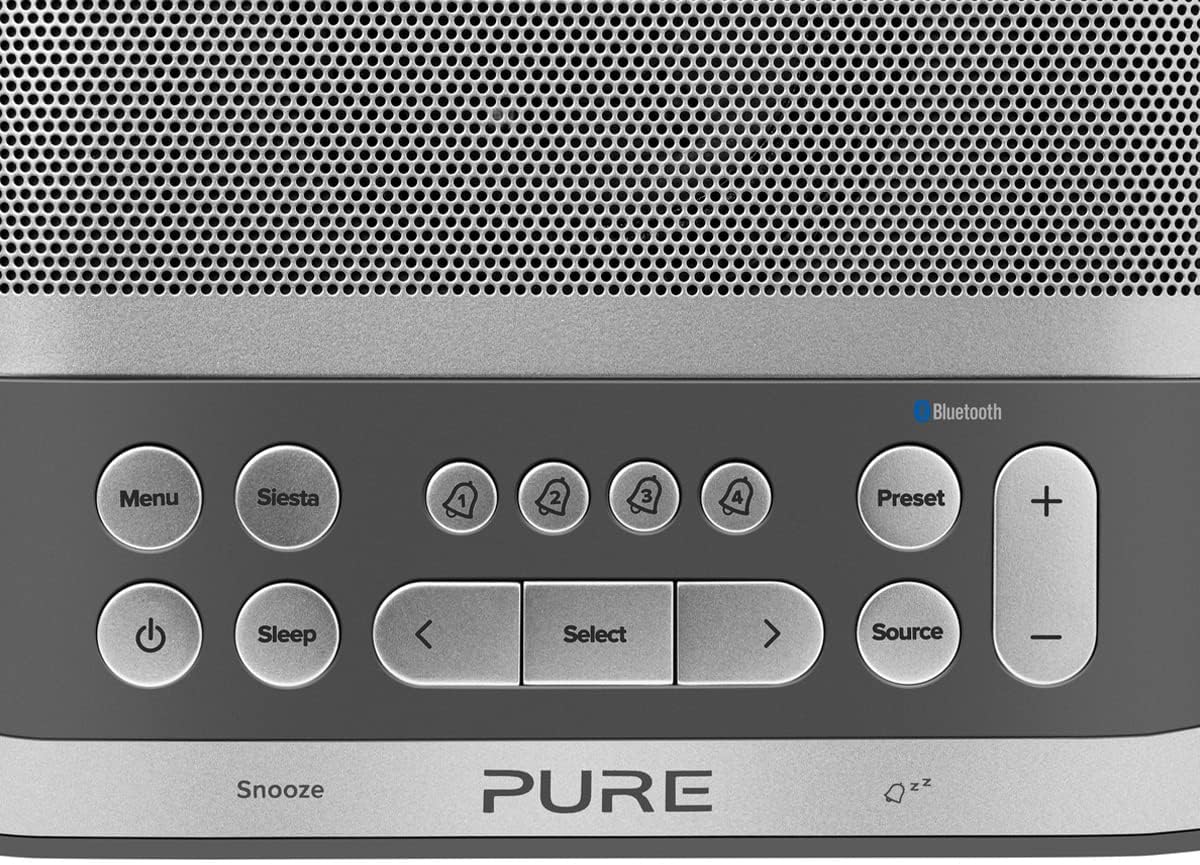
Image: Close-up of the top panel buttons, including Menu, Siesta, Alarm 1-4, Preset, Volume, Power, Sleep, Source, and Navigation buttons.
- ปุ่มเพาเวอร์ (●): กดเพื่อเปิดหรือปิดเครื่อง
- ปุ่มเมนู: เข้าถึงการตั้งค่าและตัวเลือกของระบบ
- Siesta Button: Activates the Siesta timer for short naps.
- Alarm Buttons (1, 2, 3, 4): Press to activate/deactivate or configure individual alarms.
- ปุ่มพรีเซ็ต: Save and recall your favorite radio stations.
- ปุ่มปรับระดับเสียง (+/-): ปรับระดับเสียง
- ปุ่มนอน: Set a sleep timer for the radio to turn off automatically.
- ปุ่มต้นทาง: สลับระหว่างโหมด DAB, FM และบลูทูธ
- ปุ่มนำทาง (< Select >): เลื่อนดูเมนูและเลือกตัวเลือกต่างๆ
- Snooze Bar: Press to temporarily silence an active alarm.
Radio Operation (DAB/DAB+ and FM)
- เลือกโหมด: กดปุ่ม แหล่งที่มา button to cycle between DAB and FM radio modes.
- สถานีจูน:
- แต้ม: ในโหมด DAB ให้ใช้ < และ > buttons to browse available stations. Press เลือก เพื่อปรับหาสถานี
- เอฟเอ็ม: ในโหมด FM ให้กด เลือก to auto-scan for the next available station. Use < และ > เพื่อการปรับแต่งอย่างละเอียด
- บันทึกการตั้งค่าล่วงหน้า: หากต้องการบันทึกสถานี ให้กดปุ่มค้างไว้ พรีเซ็ต ปุ่ม. ใช้ < และ > to choose a preset number, then press เลือก เพื่อยืนยัน.
- เรียกคืนการตั้งค่าล่วงหน้า: กดปุ่มสั้นๆ พรีเซ็ต ปุ่ม. ใช้ < และ > to select a preset, then press เลือก.
Bluetooth Pairing and Streaming
- เข้าสู่โหมดบลูทูธ: กดปุ่ม แหล่งที่มา button until "Bluetooth" is displayed. The Siesta S6 will enter pairing mode, indicated by a flashing Bluetooth icon.
- จับคู่อุปกรณ์ของคุณ: On your smartphone, tablet, or computer, enable Bluetooth and search for "Pure Siesta S6" in the list of available devices. Select it to pair.
- เริ่มการสตรีม: Once paired, you can play audio from your device, and it will stream wirelessly to the Siesta S6.
การตั้งค่าสัญญาณเตือน

Image: A hand interacting with the top controls of the Siesta S6, demonstrating alarm setting.
- เลือกสัญญาณเตือน: กดหนึ่งใน of Alarm (1, 2, 3, or 4) buttons to select an alarm to configure.
- กำหนดค่าการตั้งค่า: ใช้ < และ > buttons to adjust the time, alarm source (DAB, FM, Tone, Last Station), volume, and days of the week (Everyday, Weekdays, Weekends, Once). Press เลือก เพื่อยืนยันการตั้งค่าแต่ละรายการ
- เปิดใช้งาน/ปิดใช้งาน: กดปุ่มที่เกี่ยวข้องสั้นๆ เตือน button to toggle the alarm on or off. An active alarm will show its indicator on the display.
- ปิดเสียงเตือนชั่วคราว: เมื่อสัญญาณเตือนดังขึ้น ให้กดปุ่ม งีบหลับ bar to temporarily silence it. The alarm will sound again after the snooze period.
- หยุดปลุก: To turn off a sounding alarm completely, press the พลัง ปุ่ม.
Using the Siesta Timer
The Siesta timer allows you to set a short nap timer.
- เปิดใช้งาน: กดปุ่ม การนอนกลางวัน ปุ่ม.
- กำหนดระยะเวลา: ใช้ < และ > buttons to set the desired nap duration (e.g., 5, 10, 15 minutes).
- ยืนยัน: กด เลือก to start the Siesta timer. The display will show the countdown.
การชาร์จ USB
The USB port on the back of the Siesta S6 can be used to charge your mobile devices.
- Connect your device's USB charging cable to the USB port on the Siesta S6.
- Ensure the Siesta S6 is powered on and connected to mains electricity.
- การชาร์จจะเริ่มโดยอัตโนมัติ
การซ่อมบำรุง
Proper care will ensure the longevity of your Siesta S6.
- การทำความสะอาด: เช็ดทำความสะอาดตัวเครื่องด้วยผ้าแห้งเนื้อนุ่มที่ไม่เป็นขุย ห้ามใช้สารทำความสะอาดที่มีฤทธิ์กัดกร่อน แว็กซ์ หรือตัวทำละลาย
- การจัดวาง: Avoid placing the unit in direct sunlight, near heat sources, or in environments with high humidity or dust.
- การระบายอากาศ : ตรวจสอบให้แน่ใจว่ามีการระบายอากาศรอบ ๆ เครื่องอย่างเพียงพอเพื่อป้องกันความร้อนสูงเกินไป อย่าปิดกั้นช่องระบายอากาศ
การแก้ไขปัญหา
If you encounter issues with your Siesta S6, refer to the following common problems and solutions.
| ปัญหา | สารละลาย |
|---|---|
| ไม่มีไฟฟ้า | ตรวจสอบให้แน่ใจว่าได้เสียบอะแดปเตอร์แปลงไฟเข้ากับตัวเครื่องและเต้ารับไฟฟ้าที่ใช้งานได้สนิทแล้ว |
| การรับสัญญาณวิทยุไม่ดี | Fully extend and reposition the wire antenna. Try moving the unit to a different location, away from other electronic devices that may cause interference. Perform a full scan for DAB stations. |
| ไม่ได้เชื่อมต่อบลูทูธ | Ensure the Siesta S6 is in Bluetooth pairing mode (flashing icon). Make sure Bluetooth is enabled on your device and it is within range. Try unpairing and re-pairing the device. |
| สัญญาณเตือนไม่ส่งเสียง | Verify that the alarm is activated (indicator on display). Check the alarm volume setting. Ensure the alarm time is correctly set. |
| Display Too Dim/Bright | Access the Menu settings to adjust the display brightness or toggle the automatic brightness feature. |
ข้อมูลจำเพาะ
| คุณสมบัติ | รายละเอียด |
|---|---|
| ยี่ห้อ | บริสุทธิ์ |
| หมายเลขรุ่น | P149584 |
| สี | นัวร์ (สีดำ) |
| ประเภทสินค้า | วิทยุนาฬิกาปลุกดิจิตอล |
| ขนาดจอแสดงผล | 3.9 นิ้ว |
| การเชื่อมต่อ | บลูทูธ |
| คุณสมบัติพิเศษ | Alarm, Siesta Timer, USB Charging Port |
| อุปกรณ์ที่รองรับ | โทรศัพท์มือถือ, แท็บเล็ต |
| แหล่งพลังงาน | แหล่งจ่ายไฟหลัก |
| ขนาดสินค้า | 14.6L x 7H centimeters |
การรับประกันและการสนับสนุน
Pure products are designed and manufactured to the highest standards. For warranty information and technical support, please refer to the warranty card included with your product or visit the official Pure webไซต์นี้ โปรดเก็บหลักฐานการซื้อไว้เพื่อใช้ยืนยันการรับประกัน
For further assistance, you may also contact Pure customer service through their official channels.


