1. บทนำ
The OWON XSA1015-TG is a high-performance spectrum analyzer designed for precise measurement and analysis of electrical signals. This instrument features a 10.4-inch TFT LCD touch screen, a frequency range from 9 kHz to 1.5 GHz, and an integrated tracking generator. It is suitable for various applications including signal distortion analysis, modulation analysis, spectral purity assessment, and EMI pre-compliance testing. This manual provides essential information for the safe and efficient operation of your device.
Key features of the XSA1015-TG include:
- ช่วงความถี่: 9 kHz ถึง 1.5 GHz
- Displayed Average Noise Level (DANL): -150 dBm
- Phase Noise: -85 dBc/Hz @1 GHz and 10 KHz offset
- ทั้งหมด Ampความแม่นยำของระดับเสียง: <1.5 dB
- Minimum Resolution Bandwidth (RBW): 10 Hz
- Integrated 1.5 GHz Tracking Generator
- 10.4-inch TFT LCD Display for clear visualization

รูปที่ 1 : ด้านหน้า view of the OWON XSA1015-TG Spectrum Analyzer, highlighting its display and control panel.
2. การตั้งค่า
2.1 การแกะบรรจุภัณฑ์และการตรวจสอบ
Carefully remove the spectrum analyzer from its packaging. Inspect the device for any signs of physical damage that may have occurred during transit. Retain the packaging materials for future transportation or storage.
2.2 การเชื่อมต่อสายไฟ
Connect the provided power cord to the AC input on the rear panel of the device. Ensure the power source meets the specified requirements: 100V - 240V AC, 50/60Hz. The power input is located on the rear of the unit, typically near the fuse holder.

รูปที่ 2: ด้านหลังและด้านข้าง views of the spectrum analyzer, illustrating the power input and ventilation.
2.3 Connecting RF Input and Tracking Generator Output
The front panel features the RF Input and Tracking Generator Output connectors. Both are N-type female connectors with a 50 Ω impedance.
- อินพุต RF: Connect the signal to be analyzed to the RF Input connector. Observe the maximum safe reverse level of +30 dBm / 50 VDC.
- Tracking Generator Output: Use this connector to output a tracking signal for characterization of devices under test. The maximum safe reverse level is +20 dBm / 50 VDC.

รูปที่ 3: รายละเอียด view of the RF Input and Tracking Generator Output connectors on the front panel.
2.4 พอร์ตสื่อสาร
The rear panel provides various communication ports for external connectivity:
- โฮสต์ USB: For connecting USB storage devices to save data.
- อุปกรณ์ USB: สำหรับเชื่อมต่อเครื่องวิเคราะห์เข้ากับคอมพิวเตอร์
- LAN: สำหรับการเชื่อมต่อเครือข่ายและการควบคุมระยะไกล
- VGA: สำหรับเชื่อมต่อจอแสดงผลภายนอก
- พอร์ตหูฟัง: สำหรับเอาต์พุตเสียง
- 10 M Reference Input: 50 Ω, N-type female connector for an external 10 MHz reference clock.

Figure 4: Rear panel of the spectrum analyzer, displaying the communication and reference input ports.
3. คู่มือการใช้งาน
3.1 Powering On and Basic Interface
Press the 'On/Off' button on the front panel to power on the device. The 10.4-inch TFT LCD will display the main measurement interface. The interface is designed with clear color, size, and shape distinctions for buttons and function areas, facilitating quick adjustments.
3.2 Setting Frequency Parameters
To set the frequency range for your measurement:
- กดปุ่ม ความถี่ ปุ่มบนแผงควบคุม
- Use the soft keys on the display or the numeric keypad to enter values for:
- Center Freq: Sets the center frequency of the displayed span.
- Start Freq: Sets the lowest frequency of the displayed span.
- Stop Freq: Sets the highest frequency of the displayed span.
- ช่วง: Sets the frequency range displayed on the screen.
- Adjust the Resolution Bandwidth (RBW) by pressing the BW button and selecting the desired value. The minimum RBW is 10 Hz.
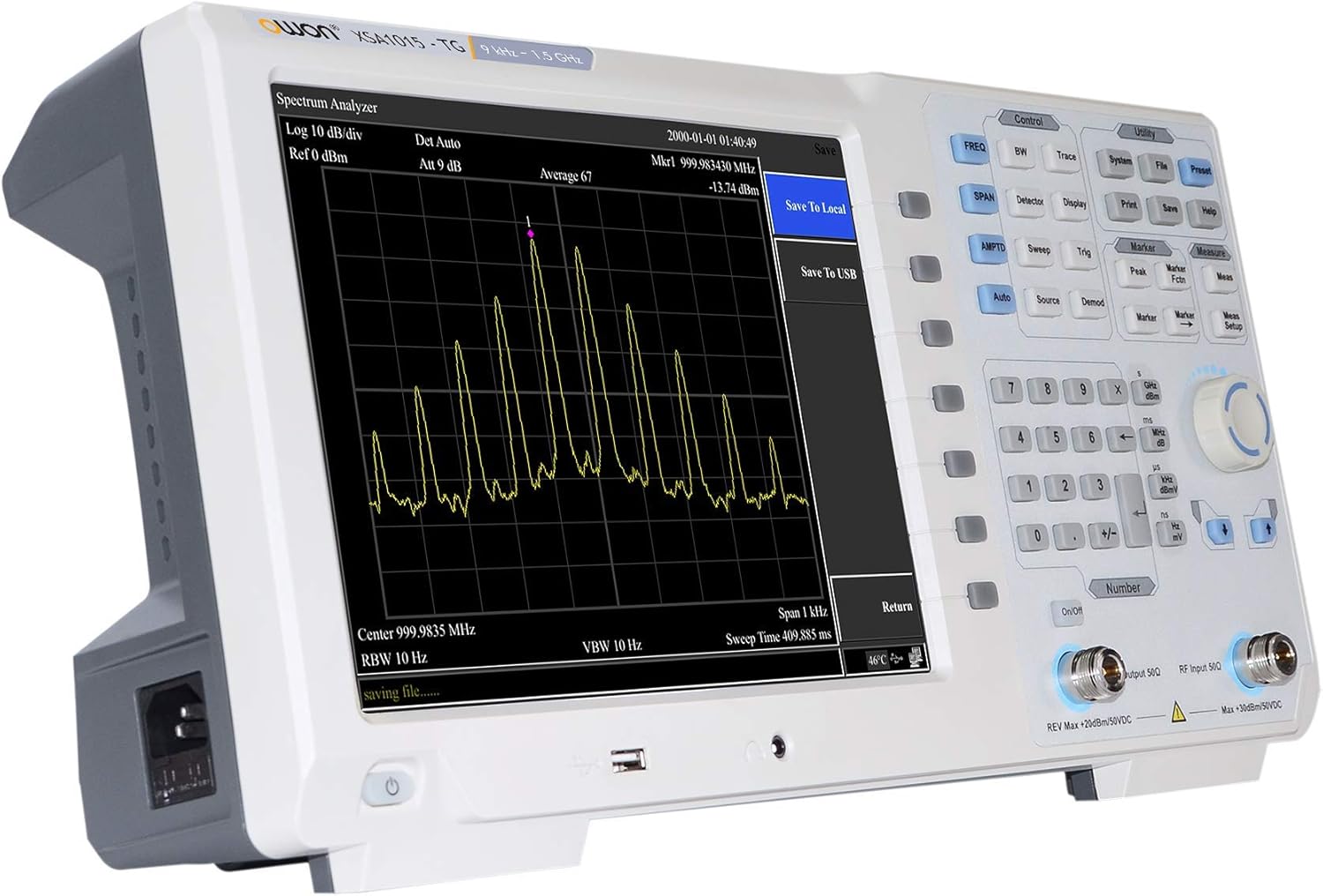
Figure 5: The spectrum analyzer display showing a typical signal measurement with frequency and ampการตั้งค่าแสงสว่าง
3.3 การตั้งค่า Amplitude Parameters
To control the vertical scale of the display:
- กดปุ่ม AMPTD ปุ่ม.
- ปรับแต่ง ระดับอ้างอิง to set the top line of the display in dBm.
- ปรับแต่ง การลดทอน to prevent input overload and optimize the signal-to-noise ratio.
3.4 Using the Tracking Generator
The integrated tracking generator can be used to characterize the frequency response of filters, amplifiers, and other RF components.
- Connect the Tracking Generator Output to the input of the device under test (DUT).
- Connect the output of the DUT to the RF Input of the spectrum analyzer.
- Enable the tracking generator function through the menu.
- Set the desired output power level (range: -30 dBm to 0 dBm).
- The spectrum analyzer will sweep synchronously with the tracking generator, displaying the DUT's frequency response.
3.5 การบันทึกและการเรียกคืนข้อมูล
To save measurement data or instrument settings:
- Insert a USB storage device into the USB HOST port on the front panel.
- กดปุ่ม บันทึก ปุ่มบนแผงควบคุม
- Follow the on-screen prompts to save the current trace, screenshot, or instrument settings to the USB device.
- To recall saved data, press the การเรียกคืน กดปุ่มและเลือกสิ่งที่ต้องการ file from the USB device.
4. การบำรุงรักษา
4.1 การทำความสะอาด
To clean the instrument, use a soft, damp cloth. Do not use abrasive cleaners or solvents that could damage the display or casing. Ensure the device is powered off and disconnected from the power source before cleaning.
4.2 สภาพแวดล้อม
For optimal performance and longevity, operate the OWON XSA1015-TG within the following environmental conditions:
- อุณหภูมิในการทำงาน: 0°C ถึง 40°C
- อุณหภูมิในการจัดเก็บ: -20°C ถึง 60°C
- Ensure adequate ventilation around the device. The rear panel includes heat vents to facilitate rapid heat dissipation during prolonged use.
4.3 ข้อควรระวังเพื่อความปลอดภัย
ปฏิบัติตามข้อควรระวังเพื่อความปลอดภัยต่อไปนี้:
- Do not exceed the maximum safe input levels for the RF Input (+30 dBm / 50 VDC) and Tracking Generator Output (+20 dBm / 50 VDC).
- The instrument contains no user-serviceable components inside. Refer all servicing to qualified personnel.
- ตรวจสอบให้แน่ใจว่ามีการต่อสายดินของอุปกรณ์อย่างเหมาะสม
5 การแก้ไขปัญหา
This section addresses common issues you might encounter with the OWON XSA1015-TG Spectrum Analyzer.
| ปัญหา | สาเหตุที่เป็นไปได้ | สารละลาย |
|---|---|---|
| อุปกรณ์ไม่เปิดเครื่อง | No power supply; Power cord not connected; Blown fuse | Check power cord connection; Verify power outlet; Inspect and replace fuse if necessary (refer to qualified personnel). |
| ไม่มีสัญญาณแสดง | Input signal too low; Incorrect frequency settings; RF input not connected | Increase input signal level; Adjust Reference Level; Verify frequency span and center frequency; Ensure RF input is securely connected. |
| Display is frozen or unresponsive | Software error; Temporary glitch | Restart the device by powering it off and on. If the issue persists, contact support. |
| Cannot save data to USB | USB drive not recognized; USB drive full or corrupted | Ensure USB drive is properly inserted; Try a different USB drive; Format the USB drive (this will erase all data). |
If you encounter issues not listed here or if the suggested solutions do not resolve the problem, please contact OWON customer support for further assistance.
6. ข้อมูลจำเพาะ
The following table details the technical specifications of the OWON XSA1015-TG Spectrum Analyzer.
| พารามิเตอร์ | ข้อมูลจำเพาะ |
|---|---|
| แบบอย่าง | XSA1015-TG |
| ช่วงความถี่ | 9 kHz - 1.5 GHz |
| ระดับเสียงรบกวนเฉลี่ยที่แสดง (DANL) | -150 เดซิเบลม |
| เสียงเฟส | -85 dBc/Hz @1 GHz, 10 KHz offset |
| ทั้งหมด Ampความถูกต้องแม่นยำ | <1.5 เดซิเบล |
| แบนด์วิดท์ความละเอียดขั้นต่ำ (RBW) | 10 เฮิรตซ์ |
| Tracking Generator Output Frequency Range | 100 kHz - 1.5 GHz |
| Tracking Generator Output Power Level Range | -30 dBm - 0 dBm |
| แสดง | 10.4 นิ้ว TFT LCD |
| ขั้วต่ออินพุต RF | 50 Ω, N-type female |
| Tracking Generator Output Connector | 50 Ω, N-type female |
| 10 M Reference Input | 50 Ω, N-type female |
| พอร์ตการสื่อสาร | USB HOST, USB DEVICE, LAN, earphone port, VGA |
| แหล่งจ่ายไฟ | 100V - 240V AC, 50/60Hz |
| น้ำหนัก | 5 กก. (ประมาณ 11 ปอนด์) |
| อุณหภูมิในการทำงาน | 0 องศาเซลเซียส - 40 องศาเซลเซียส |
| อุณหภูมิในการจัดเก็บ | -20 °C - 60 °C |
| การรับรอง | EMC, IEC 61010-1:2000-1 |
7. การรับประกันและการสนับสนุน
7.1 ข้อมูลการรับประกัน
OWON products are typically covered by a limited warranty against defects in materials and workmanship. The specific terms and duration of your warranty may vary based on your region and point of purchase. Please refer to the warranty card included with your product or contact your local OWON distributor for detailed warranty information.
7.2 การสนับสนุนด้านเทคนิค
For technical assistance, troubleshooting, or service inquiries, please contact OWON customer support. You can typically find contact information on the official OWON website or through your product's documentation. When contacting support, please have your product model number (XSA1015-TG) and serial number ready.
คุณยังสามารถเยี่ยมชม ร้าน OWON บน Amazon สำหรับข้อมูลผลิตภัณฑ์และทรัพยากรเพิ่มเติม


