1. บทนำ
This manual provides detailed instructions for the setup, operation, and maintenance of your Grundig Auto Design M5 GPS Navigation System. Please read this manual thoroughly before using the device to ensure proper functionality and to maximize your navigation experience. Keep this manual for future reference.
2. สินค้าหมดview
The Grundig Auto Design M5 is a portable GPS navigation system designed for automotive use. It features a 5-inch (12.7 cm) touchscreen display, pre-installed map material for 46 European countries, and offers free map updates. Key functionalities include 2D and 3D map views, a speed assistant, and intuitive navigation controls.

ภาพที่ 2.1: The packaging for the Grundig Auto Design M5 GPS Navigation System, showing the brand logo, model name, and key features like free updates.
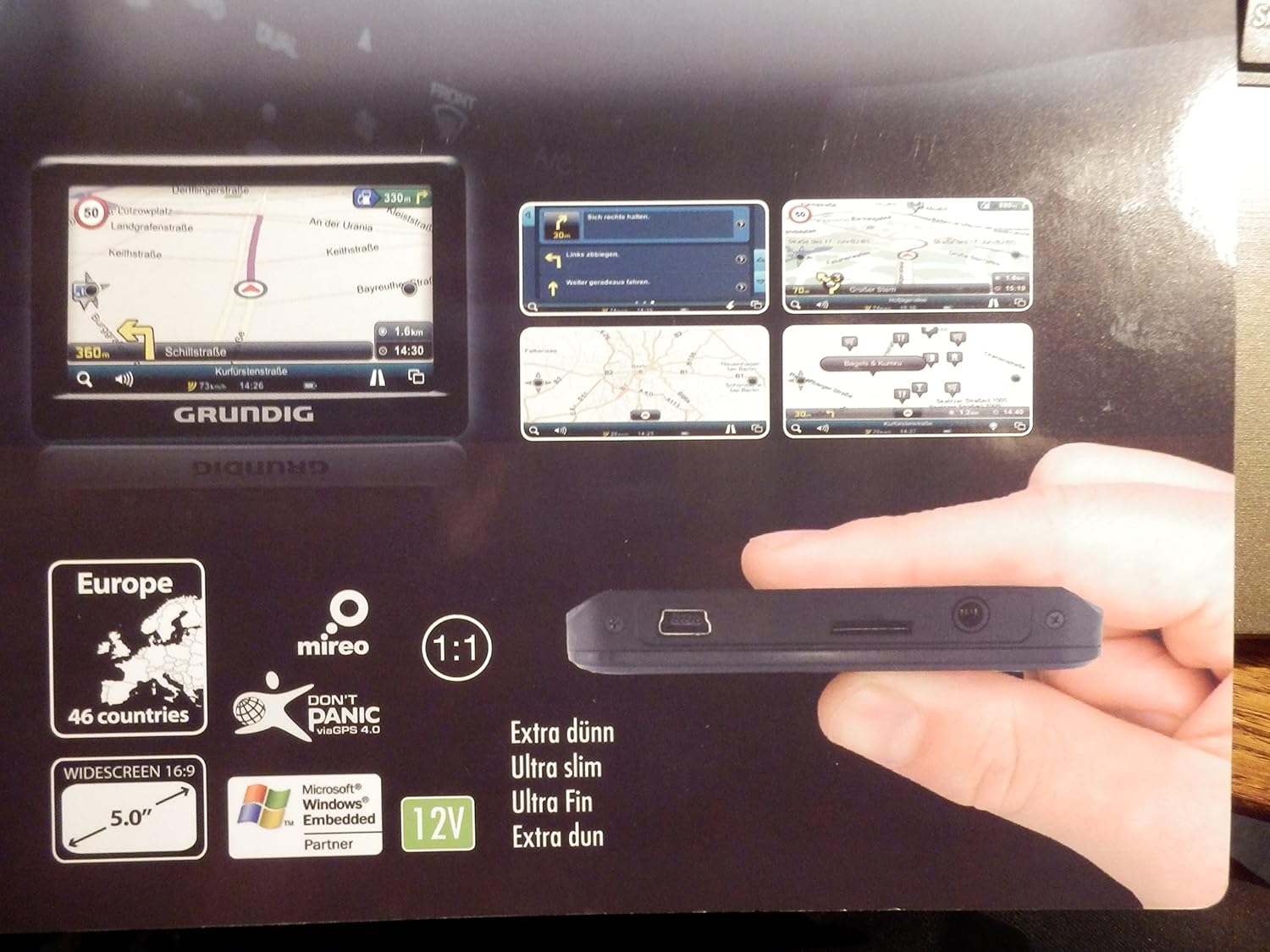
ภาพที่ 2.2: The Grundig M5 GPS navigation device, highlighting its slim profile and various ports, including a USB port and a Micro SD card slot. The screen displays example navigation views.

ภาพที่ 2.3: The main menu screen of the Grundig M5 GPS navigation system, showing options for Navigation, Multimedia, System, and Applications.
3. การตั้งค่า
3.1 การแกะกล่องและตรวจสอบเนื้อหา
แกะสิ่งของทั้งหมดออกจากกล่องอย่างระมัดระวัง ตรวจสอบให้แน่ใจว่ามีส่วนประกอบต่อไปนี้ครบถ้วน:
- Grundig M5 GPS Navigation Device
- GPS Navigation Holder
- สายชาร์จรถยนต์
- คู่มือเริ่มต้นอย่างรวดเร็ว
3.2 การชาร์จเริ่มต้น
Before first use, fully charge the device using the provided car charging cable. Connect the cable to the device and your vehicle's 12V power outlet. The charging indicator will typically show the charging status.
3.3 การติดตั้งอุปกรณ์
Attach the GPS navigation holder to your vehicle's dashboard or windshield according to the instructions in the Quick Start Guide. Ensure the mount is securely fastened and does not obstruct your view of the road. Insert the Grundig M5 device into the holder until it clicks into place.
3.4 การเปิดเครื่องครั้งแรก
Press and hold the power button (usually located on the side or top of the device) until the Grundig logo appears on the screen. Follow any on-screen prompts for initial setup, such as language selection and time zone settings.
4. คู่มือการใช้งาน
4.1 การนำทางพื้นฐาน
From the main menu (refer to Image 2.3), tap on 'Navigation' to access the map interface. You can enter a destination by:
- Address Search: Enter street name, house number, city, and country.
- Point of Interest (POI) Search: ค้นหา gas stations, restaurants, hotels, etc.
- Recent Destinations: Select from previously entered locations.
Once a destination is set, the device will calculate the route and provide turn-by-turn voice guidance and visual instructions.
4.2 แผนที่ Views
The Grundig M5 supports both 2D and 3D map views. You can switch between these views through the map settings menu. The 3D view provides a more realistic representation of the terrain and buildings, while the 2D view offers a top-down perspective.
4.3 Speed Assistant
The integrated speed assistant displays the current speed limit for the road you are on and your current driving speed. It can provide visual or audible warnings if you exceed the speed limit. This feature is designed to assist safe driving and should not replace driver vigilance.
4.4 การอัปเดตแผนที่
The Grundig M5 comes with free map updates for the pre-installed 46 European countries. To update your maps, connect the device to a computer with internet access and follow the instructions provided in the Quick Start Guide or on the official Grundig GPS website (www.grundiggps.com, as seen on packaging).
4.5 Multimedia and System Settings
The main menu also provides access to 'Multimedia' functions (e.g., for playing audio files from an SD card) and 'System' settings, where you can adjust display brightness, volume, language, and other device preferences.
5. การบำรุงรักษา
5.1 การทำความสะอาดเครื่อง
To clean the touchscreen and the device casing. ใช้ผ้าเนื้อนุ่มที่ไม่เป็นขุย สำหรับคราบฝังแน่น ให้เช็ดเบาๆampen the cloth with water or a screen-cleaning solution. Avoid using abrasive cleaners, alcohol, or solvents, as these can damage the device.
5.2 การอัปเดตซอฟต์แวร์และแผนที่
Regularly check for and install available map and software updates to ensure optimal performance and the most current road information. Refer to section 4.4 for map update instructions.
5.3 พื้นที่จัดเก็บ
When not in use, store the device in a cool, dry place, away from direct sunlight and extreme temperatures. If using a Micro SD card, ensure it is properly inserted or removed according to the device's instructions to prevent data loss or damage.
6 การแก้ไขปัญหา
- อุปกรณ์ไม่เปิด: Ensure the battery is charged. Connect the device to the car charger and try again. If the issue persists, perform a soft reset by pressing and holding the power button for an extended period (e.g., 10-15 seconds).
- ไม่มีสัญญาณ GPS: ตรวจสอบให้แน่ใจว่าอุปกรณ์มีความชัดเจน view of the sky. Avoid using it in enclosed spaces or areas with tall buildings that may block the signal. It may take a few minutes to acquire a signal after initial power-on or after being moved a long distance.
- Map updates fail: Verify your internet connection and ensure the correct software is installed on your computer for map updates. Check the Grundig GPS website for specific troubleshooting steps or updated instructions.
- หน้าจอสัมผัสไม่ตอบสนอง: Try restarting the device. If the screen remains unresponsive, ensure it is clean and free of debris.
For further assistance, consult the Quick Start Guide or contact Grundig customer support.
7. ข้อมูลจำเพาะ
| คุณสมบัติ | ข้อมูลจำเพาะ |
|---|---|
| ชื่อรุ่น | M5 |
| หมายเลขรุ่น | 01500 |
| ขนาดจอแสดงผล | 5 นิ้ว (12.7 ซม.) |
| ความละเอียดการแสดงผล | 480 x 272 พิกเซล |
| ประเภทจอภาพ | ทีเอฟที/แอลซีดี |
| โปรเซสเซอร์ | MSB2531, 800 MHz |
| ชิปเซ็ต GPS | เอสอาร์211 |
| หน่วยความจำภายใน | 4GB |
| รองรับการ์ดไมโคร SD | สูงสุด 16GB |
| Pre-installed Maps | 46 European Countries |
| คุณสมบัติพิเศษ | Touchscreen, 2D/3D Map View, Speed Assistant, Free Map Updates |
| เทคโนโลยีการเชื่อมต่อ | จีพีเอส |
| ประเภทการติดตั้ง | แผงหน้าปัด |
| ประเภทบริการยานพาหนะ | รถ |
8. การรับประกันและการสนับสนุน
Warranty information for the Grundig Auto Design M5 GPS Navigation System is typically provided in the Quick Start Guide included with your product or can be found on the official Grundig webไซต์ โปรดเก็บหลักฐานการซื้อไว้เพื่อใช้ในการเรียกร้องการรับประกัน
For customer support, technical assistance, or further inquiries, please refer to the contact information provided in your product documentation or visit the official Grundig website. You can also find more information about Grundig products on their Amazon store: Grundig Store on Amazon.


