1. บทนำ
This manual provides detailed instructions for the installation, operation, and maintenance of your Zebronics H61 Motherboard. Please read this manual thoroughly before proceeding with installation to ensure proper setup and functionality.
The Zebronics H61 Motherboard is designed to support Intel LGA 1155 socket processors (i7/i5/i3/Pentium/Celeron series) and DDR3 dual-channel memory. It features an Intel H61 chipset, providing a stable and efficient platform for your computing needs.
2. ข้อมูลด้านความปลอดภัย
- ควรตัดการเชื่อมต่อแหล่งจ่ายไฟทุกครั้งก่อนติดตั้งหรือถอดส่วนประกอบใดๆ
- จับเมนบอร์ดโดยจับที่ขอบเพื่อป้องกันความเสียหายจากไฟฟ้าสถิต (ESD) ควรใช้สายรัดข้อมือป้องกันไฟฟ้าสถิตหากมี
- ตรวจสอบให้แน่ใจว่ามีการระบายอากาศที่เหมาะสมภายในเคสคอมพิวเตอร์ของคุณเพื่อป้องกันความร้อนสูงเกินไป
- อย่าให้เมนบอร์ดสัมผัสกับความชื้นหรืออุณหภูมิที่สูงหรือสูงเกินไป
- Refer to the component manufacturer's manuals for specific installation instructions for your CPU, RAM, and other peripherals.
3. เนื้อหาบรรจุภัณฑ์
ตรวจสอบว่ามีรายการทั้งหมดอยู่ในแพ็คเกจ:
- Zebronics H61 Motherboard
- I / O Shield
- สายเคเบิลข้อมูล SATA
- Driver CD (for operating systems that do not automatically install drivers)
- คู่มือการใช้งาน (เอกสารนี้)
4. ข้อมูลจำเพาะ
| คุณสมบัติ | คำอธิบาย |
|---|---|
| แบบอย่าง | H61 |
| ชิปเซ็ต | อินเทล H61 เอ็กซ์เพรส |
| ซ็อคเก็ตซีพียู | แอลจีเอ 1155 |
| โปรเซสเซอร์ที่เข้ากันได้ | Intel i7/i5/i3/Pentium/Celeron processors (2nd and 3rd Generation) |
| สล็อตหน่วยความจำ | 2 x DDR3 Dual-channel slots |
| การรองรับหน่วยความจำ | DDR3 1066/1333/1600MHz, up to 16GB |
| อินเทอร์เฟซกราฟิก | 1 x PCI-Express x16 slot |
| ช่องเสียบขยาย | สล็อต PCI Express x1 จำนวน 1 ช่อง |
| พื้นที่จัดเก็บ | 4 x SATA II ports |
| แลน | Realtek 8106E 10/100 Mbps Ethernet |
| เสียง | 6-Channel HD Audio Codec onboard (5.1 surround sound support) |
| พอร์ต I/O ด้านหลัง | 1 x HDMI, 1 x VGA, 6 x USB 2.0, 1 x RJ45, 1 x 3-in-1 Audio Jacks (Line-in, Line-out, Mic-in), PS/2 (Keyboard/Mouse) |
| ฟอร์มแฟกเตอร์ | เอทีเอ็กซ์ |
| ขนาด | 25 x 20 x 3 ซม. |
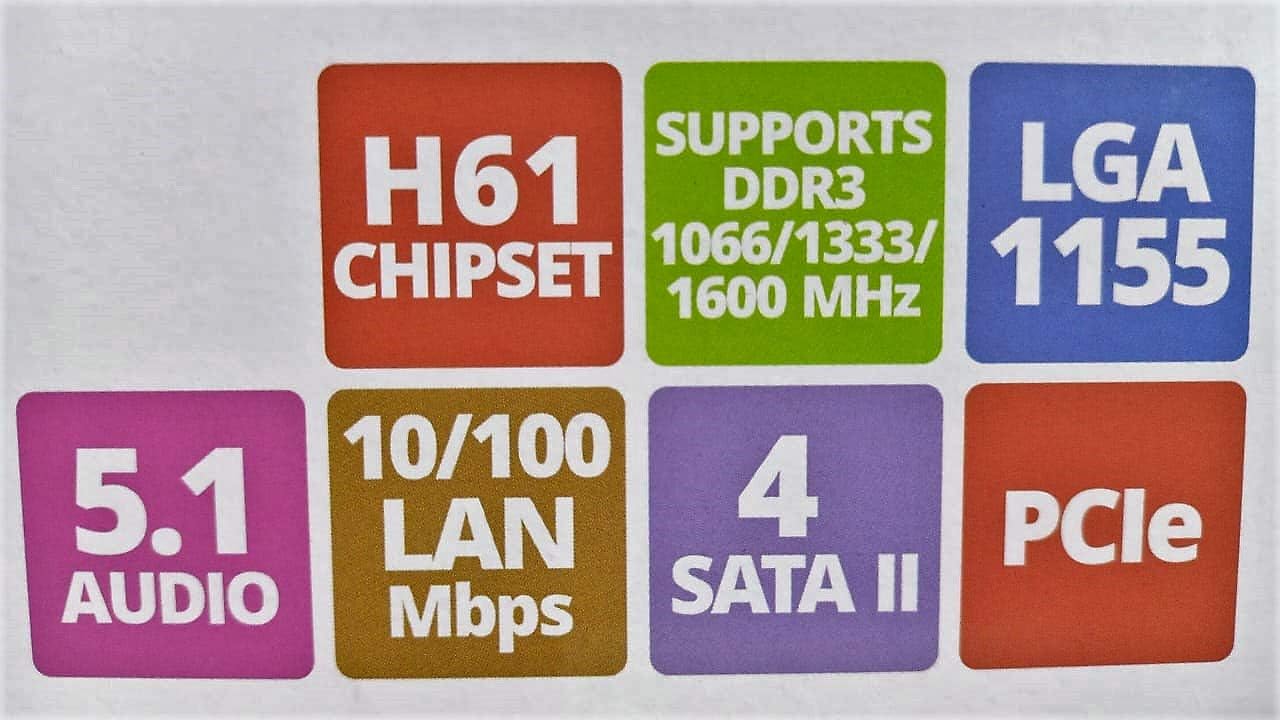
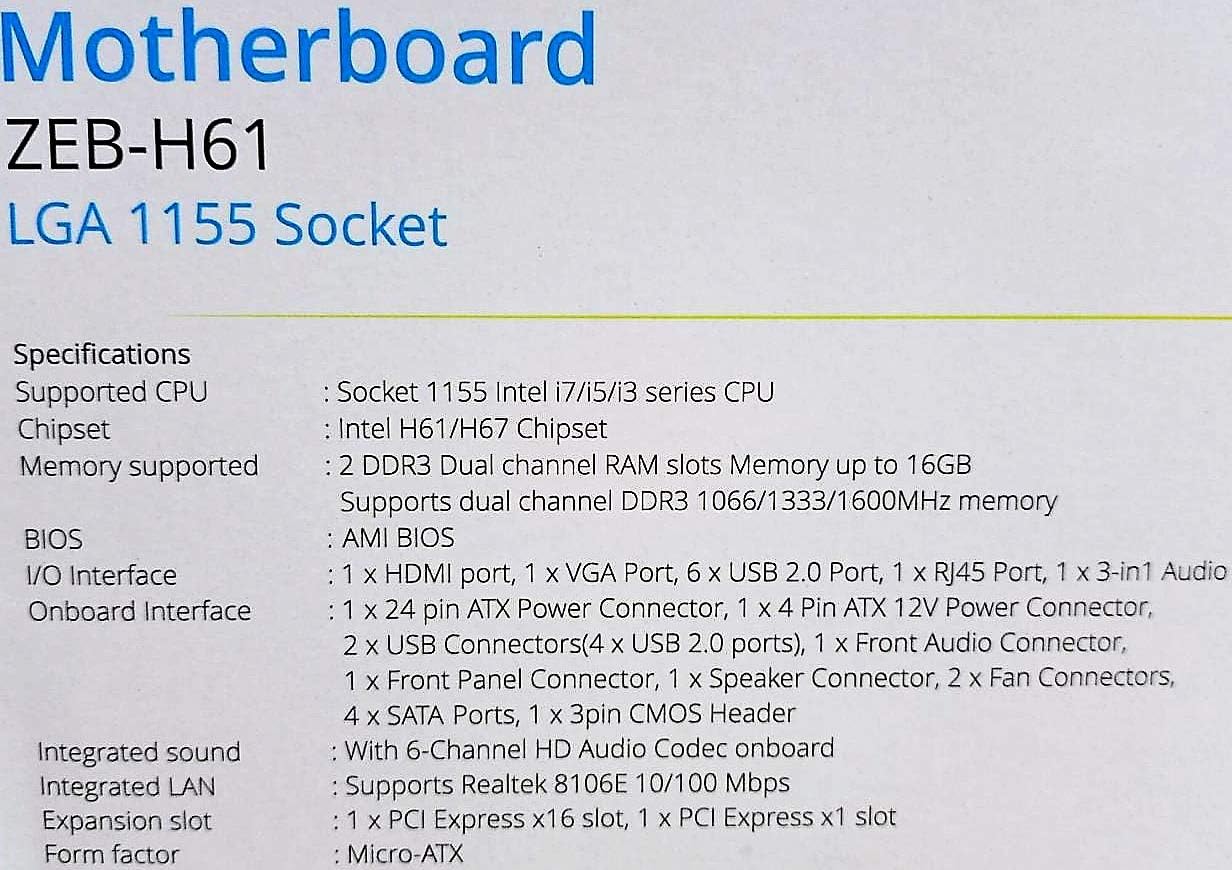
Image: Detailed specifications of the Zebronics H61 Motherboard, including chipset, CPU socket, memory support, and I/O interfaces.

Image: Visual representation of key features such as H61 Chipset, DDR3 support, LGA 1155 socket, 5.1 Audio, 10/100 LAN, 4 SATA II ports, and PCIe.
5. การตั้งค่าและการติดตั้ง
5.1 เค้าโครงเมนบอร์ด
ภาพ: จากบนลงล่าง view of the Zebronics H61 Motherboard, showing the CPU socket, RAM slots, PCIe slot, and various headers.

Image: Another top-down perspective of the Zebronics H61 Motherboard, highlighting component placement.
แผง I/O ด้านหลัง 5.2

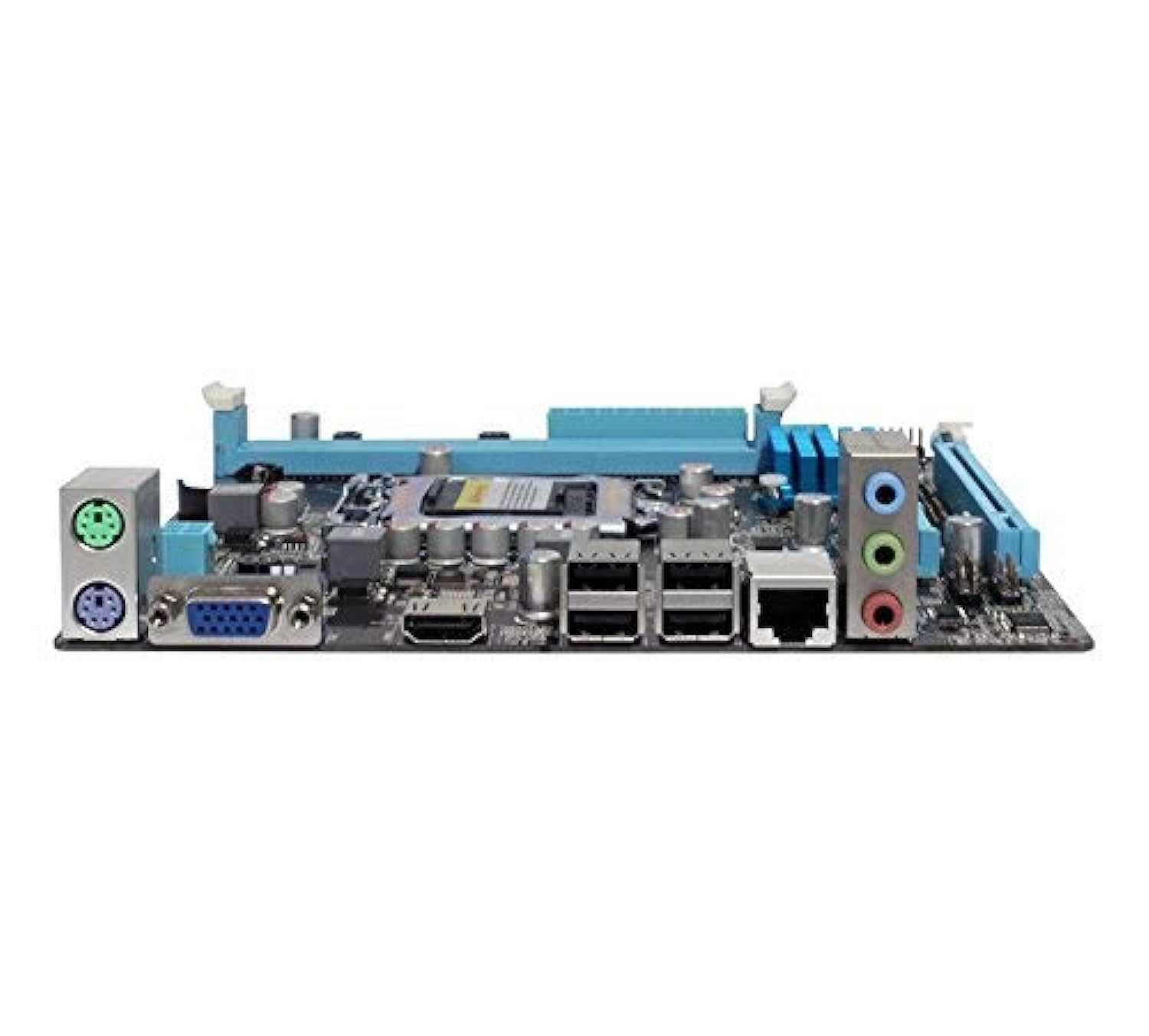
Image: Rear I/O panel of the Zebronics H61 Motherboard, displaying ports for PS/2 keyboard/mouse, VGA, HDMI, USB 2.0, LAN, and audio jacks.
ภาพ: ภาพระยะใกล้ view of the rear I/O ports, detailing the VGA, HDMI, USB, LAN, and audio connections.
5.3 ขั้นตอนการติดตั้งส่วนประกอบ
- ติดตั้งซีพียู:
- เปิดคันโยกซ็อกเก็ต CPU
- Carefully align the CPU with the socket, ensuring the golden triangle on the CPU matches the mark on the socket.
- วาง CPU ลงในซ็อกเก็ตอย่างเบามือโดยไม่ต้องออกแรง
- ปิดคันโยกเพื่อยึดซีพียูให้แน่น
- ทาซิลิโคนระบายความร้อนและติดตั้งพัดลมระบายความร้อน CPU ตามคำแนะนำของผู้ผลิต
- ติดตั้ง RAM:
- คลายคลิปที่ปลายทั้งสองด้านของช่องเสียบหน่วยความจำ DDR3
- จัดตำแหน่งโมดูลหน่วยความจำให้ตรงกับช่อง โดยให้แน่ใจว่ารอยบากบนโมดูลตรงกับกุญแจในช่อง
- กดปลายทั้งสองข้างของโมดูลหน่วยความจำให้แน่นจนกระทั่งคลิปล็อคเข้าที่
- ติดตั้งการ์ดจอ (ไม่จำเป็น):
- Locate the PCI-Express x16 slot.
- ถอดฝาครอบช่องขยายที่สอดคล้องกันออกจากเคสพีซีของคุณ
- Align the graphics card with the slot and press down firmly until it is seated correctly.
- ยึดการ์ดเข้ากับเคสคอมพิวเตอร์ด้วยสกรู
- เชื่อมต่ออุปกรณ์จัดเก็บข้อมูล:
- Connect SATA data cables from the motherboard's SATA ports to your hard drives or SSDs.
- Ensure power cables from the power supply are connected to these devices.
- เชื่อมต่อพาวเวอร์ซัพพลาย:
- เชื่อมต่อขั้วต่อไฟ ATX 24 พินจากพาวเวอร์ซัพพลายเข้ากับเมนบอร์ด
- Connect the 4-pin ATX 12V power connector (CPU power) to the motherboard.
- เชื่อมต่อหัวต่อแผงด้านหน้า:
- Connect the power switch, reset switch, HDD LED, and power LED cables from your PC case to the corresponding pins on the motherboard's front panel header. Refer to the motherboard diagram for pin assignments.
- Connect front USB and audio headers.
6. คู่มือการใช้งาน
6.1 การบูตครั้งแรกและการตั้งค่า BIOS
- หลังจากประกอบส่วนประกอบทั้งหมดแล้ว ให้เชื่อมต่อจอภาพ คีย์บอร์ด และเมาส์ของคุณ
- เปิดเครื่องคอมพิวเตอร์ของคุณ
- Press the designated key (usually เดล or F2กดซ้ำๆ ระหว่างการเริ่มต้นระบบเพื่อเข้าสู่ยูทิลิตี้การตั้งค่า BIOS/UEFI
- ใน BIOS ให้ตรวจสอบว่าส่วนประกอบที่ติดตั้งทั้งหมด (CPU, RAM, หน่วยเก็บข้อมูล) ถูกตรวจพบอย่างถูกต้องหรือไม่
- ตั้งค่าลำดับการบูตเพื่อติดตั้งระบบปฏิบัติการจากไดรฟ์ USB หรือไดรฟ์ออปติคัล
- บันทึกการเปลี่ยนแปลงและออกจาก BIOS ระบบจะรีสตาร์ท
6.2 การติดตั้งไดรเวอร์
After installing your operating system, install the necessary drivers for optimal performance. Drivers can be found on the included driver CD or downloaded from the official Zebronics webเว็บไซต์.
- ไดรเวอร์ชิปเซ็ต
- ไดรเวอร์การ์ดจอ (หากใช้การ์ดจอออนบอร์ดหรือการ์ดจอแยก)
- ไดรเวอร์ LAN
- ไดร์เวอร์เสียง
- USB Drivers (if applicable)
7. การบำรุงรักษา
- รักษาความสะอาด: Regularly clean dust from inside your PC case, especially from fans and heatsinks, to ensure proper airflow and prevent overheating. Use compressed air.
- อัปเดต BIOS: Check the Zebronics website periodically for BIOS updates. BIOS updates can improve system stability, compatibility, and performance. Follow update instructions carefully.
- การอัปเดตไดรเวอร์: โปรดอัปเดตไดรเวอร์ของคุณอยู่เสมอ เพื่อให้มั่นใจได้ถึงความเข้ากันได้และประสิทธิภาพสูงสุดกับระบบปฏิบัติการและแอปพลิเคชันของคุณ
- แบตเตอรี่ CMOS: The motherboard uses a CR2032 battery to retain BIOS settings. If your system frequently loses time or BIOS settings, the battery may need replacement.
8 การแก้ไขปัญหา
- No Power / System Does Not Boot:
- Ensure all power cables (24-pin ATX, 4-pin ATX 12V) are securely connected to the motherboard.
- Check if the power supply unit (PSU) is switched on and functioning.
- ตรวจสอบการเชื่อมต่อสวิตช์ไฟแผงด้านหน้า
- ลองถอดแล้วเสียบแรมและเสียบการ์ดจอใหม่ดู
- ไม่มีการแสดงผลบนจอภาพ:
- Ensure the monitor is connected to the correct video output (either integrated graphics on the motherboard or dedicated graphics card).
- Check monitor power and input selection.
- ถอดและเสียบการ์ดจอ (ถ้าติดตั้งไว้) และโมดูล RAM ใหม่
- ความไม่เสถียรของระบบ / การขัดข้อง:
- ตรวจสอบอุณหภูมิ CPU และ GPU ความร้อนสูงเกินไปอาจทำให้เกิดความไม่เสถียร
- Ensure RAM modules are properly seated and compatible. Test with one RAM stick if multiple are installed.
- อัปเดตไดรเวอร์และ BIOS ให้เป็นเวอร์ชันล่าสุด
- เรียกใช้เครื่องมือวินิจฉัยหน่วยความจำเพื่อตรวจหา RAM ที่ผิดพลาด
- CMOS Battery Issue (Loss of Time/Settings):
- If the system loses time or BIOS settings after being powered off, the CMOS battery (CR2032) may need replacement.
- To reset CMOS: Disconnect power, remove the CMOS battery, short the battery socket's positive and negative terminals for 30 seconds, then reinsert the battery.
9. การรับประกันและการสนับสนุน
For warranty information and technical support, please refer to the official Zebronics webหรือติดต่อฝ่ายบริการลูกค้า เก็บใบเสร็จรับเงินไว้เป็นหลักฐานการซื้อสำหรับการเคลมประกัน
Zebronics Official Webเว็บไซต์: www.zebronics.com


