
การแนะนำ
This manual provides detailed instructions for the setup, operation, maintenance, and troubleshooting of your DIGITNOW! M503 Multi-Function Turntable System. Please read this manual thoroughly before using the product to ensure proper function and longevity.
คุณสมบัติหลัก
- 3-speed turntable (33, 45, and 78 RPM) with Bluetooth connectivity and built-in stereo speakers (3W RMS x 2).
- Integrated CD player, MP3 player, cassette deck, and analog AM/FM stereo tuner.
- USB port, SD/MMC card reader, and Aux-in for versatile audio input.
- Direct recording function (from turntable, CD, USB, SD, MMC) and encoding feature for digital conversion of songs to MP3 format.
เนื้อหาแพ็คเกจ
ตรวจสอบให้แน่ใจว่ามีสิ่งของครบทั้งหมดเมื่อแกะกล่อง:
- DIGITNOW! M503 Multi-Function Turntable System
- สายไฟ
- รีโมทคอนโทรล
- คู่มือการใช้งาน
- External Speakers (if included with your specific model)
สินค้าเกินview
Familiarize yourself with the components and controls of your M503 system.

รูปที่ 1 : ด้านหน้า view of the DIGITNOW! M503 Multi-Function Turntable System, showcasing the turntable, control panel, and CD tray.
การควบคุมและอินพุตที่แผงด้านหน้า

Figure 2: Close-up of the front panel, showing the display, control buttons, USB port, SD/MMC slot, and volume/tuning knobs.
- ช่องรับสัญญาณเสียงเข้า: อินพุต 3.5 มม. สำหรับอุปกรณ์เสียงภายนอก
- พอร์ต USB: For USB flash drives (playback and recording).
- สล็อต SD/MMC: For SD or MMC memory cards (playback and recording).
- แจ็คหูฟัง: เอาต์พุต 3.5 มม. เพื่อการฟังแบบส่วนตัว
- หน้าจอแสดงผล: แสดงโหมดปัจจุบัน ข้อมูลเส้นทาง และความถี่วิทยุ
- ปุ่มควบคุม: Play/Pause, Stop, Skip Forward/Backward, Mode selection, Folder navigation, Delete, Record.
- ปุ่มปรับ: ปรับความถี่วิทยุ
- ปุ่มเปิดปิด/ปรับระดับเสียง: เปิด/ปิดเครื่องและปรับระดับเสียง
- ถาดใส่ซีดี : สำหรับการใส่แผ่นซีดีเพลง
อินพุต/เอาต์พุตเกินview

Figure 3: Visual representation of various input and output options, including Aux In, USB, Headphone, SD Card, CD Tray, and Cassette Holder.
การตั้งค่า
- การแกะกล่อง: นำอุปกรณ์ออกจากบรรจุภัณฑ์อย่างระมัดระวัง เก็บบรรจุภัณฑ์ไว้สำหรับการขนส่งหรือจัดเก็บในอนาคต
- การจัดวาง: Place the system on a stable, level surface away from direct sunlight, heat sources, and excessive dust or moisture. Ensure adequate ventilation around the unit.
- การเชื่อมต่อไฟฟ้า: Connect the power cable to the AC inlet on the rear of the unit and then to a standard wall outlet.
- Speaker Connection (if applicable): If your model includes external speakers, connect them to the speaker output jacks on the rear of the main unit.
- ฝาปิดป้องกันฝุ่น: Ensure the dust cover is properly seated on the turntable.
คำแนะนำการใช้งาน
การทำงานของเครื่องเล่นแผ่นเสียง
- เปิดฝาครอบกันฝุ่น
- วางแผ่นเสียงไวนิลบนแผ่นเสียง
- เลือกความเร็วที่เหมาะสม (33, 45 หรือ 78 รอบต่อนาที) โดยใช้สวิตช์เลือกความเร็ว สำหรับแผ่นเสียง 45 รอบต่อนาที ให้วางอะแดปเตอร์ 45 รอบต่อนาทีที่ให้มาไว้บนแกนกลาง
- ปลดล็อคโทนอาร์ม
- Gently lift the tone arm using the cue lever and position the stylus over the desired track on the record.
- Lower the tone arm slowly using the cue lever. The record will begin to play.
- ปรับระดับเสียงโดยใช้ปุ่มเปิด/ปิดเครื่อง/ระดับเสียง
- To stop playback, lift the tone arm using the cue lever and return it to the tone arm rest. Secure the tone arm lock.
การทำงานของเครื่องเล่นซีดี
- Press the MODE button until "CD" appears on the display.
- กดปุ่ม OPEN/CLOSE เพื่อเปิดถาดใส่ซีดี
- วางซีดีเพลงลงในถาดโดยให้ด้านที่มีฉลากหันขึ้นด้านบน
- Press the OPEN/CLOSE button again to close the tray. The system will read the CD and begin playback automatically.
- Use the Play/Pause, Stop, and Skip buttons to control playback.
การทำงานของเครื่องเล่นเทปคาสเซ็ท
- Insert a cassette tape into the cassette holder on the side of the unit.
- Press the MODE button until "TAPE" appears on the display.
- Press the Play button on the cassette deck to begin playback.
- Use the Fast Forward and Rewind buttons as needed. Note that advanced controls like pause or track skip may not be available on all cassette decks.
การทำงานของวิทยุ AM/FM
- Press the MODE button until "RADIO" appears on the display.
- Select AM or FM band using the band selector switch (if available, otherwise it might cycle through modes).
- Rotate the TUNING knob to search for radio stations.
- ยืดเสาอากาศวิทยุ FM (ถ้ามี) เพื่อการรับสัญญาณที่ดีขึ้น
USB/SD/MMC Playback
- Insert a USB flash drive into the USB port or an SD/MMC card into the corresponding slot.
- Press the MODE button until "USB" or "SD" appears on the display. The system will automatically detect and begin playing compatible audio files (เช่น MP3)
- Use the Play/Pause, Stop, Skip, and Folder buttons to navigate and control playback.
การเชื่อมต่อบลูทูธ

Figure 4: The M503 system wirelessly connected to a smartphone via Bluetooth, enabling audio streaming.
- Press the MODE button until "BLUETOOTH" or "BT" appears on the display. The unit will enter pairing mode.
- บนสมาร์ทโฟนหรืออุปกรณ์ที่รองรับบลูทูธ ให้เปิดใช้งานบลูทูธและค้นหาอุปกรณ์ที่ใช้งานได้
- Select "DIGITNOW M503" (or similar) from the list of devices to pair.
- Once paired, you can stream audio from your device to the M503 system.
การเชื่อมต่อ Aux-In
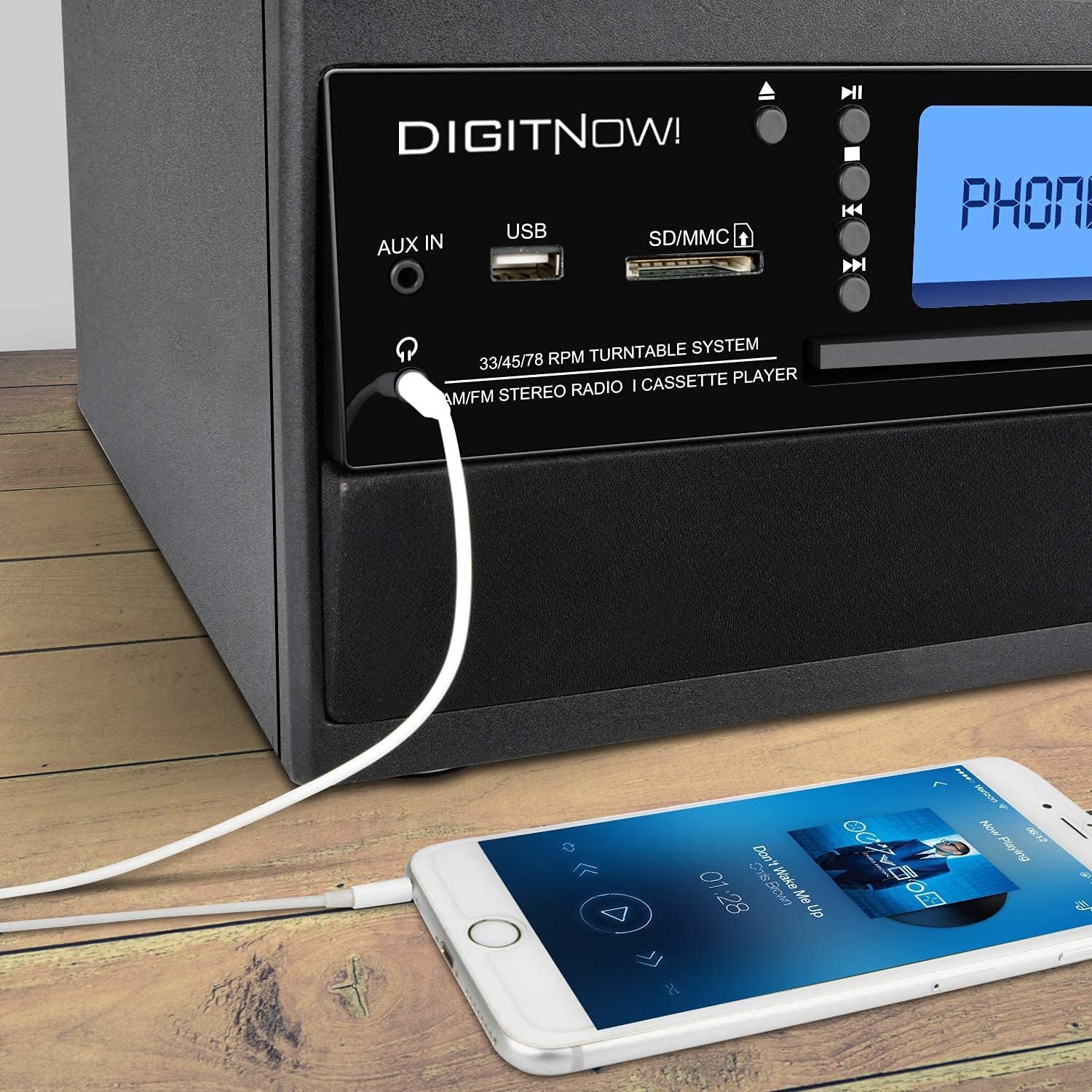
Figure 5: A smartphone connected to the M503 system using a 3.5mm Aux-In cable for wired audio playback.
- Connect one end of a 3.5mm audio cable (not included) to the AUX IN jack on the front panel of the M503.
- Connect the other end of the cable to the headphone jack or audio output of your external device (e.g., smartphone, MP3 player).
- Press the MODE button until "AUX" appears on the display.
- Start playback on your external device and adjust the volume on both the device and the M503.
Direct Recording (Encoding to MP3)
The M503 allows you to record audio from the turntable, CD, or cassette directly to a USB flash drive or SD/MMC card in MP3 format.
- เสียบแฟลชไดรฟ์ USB หรือการ์ด SD/MMC ลงในช่องเสียบที่กำหนด
- Select the desired source (Turntable, CD, or Cassette) using the MODE button and prepare it for playback (e.g., place a record, insert a CD/cassette).
- Press the REC button on the front panel. The display will indicate recording mode.
- Start playback on your chosen source. The system will begin recording the audio to the USB drive or SD/MMC card.
- กดปุ่ม REC อีกครั้งเพื่อหยุดการบันทึก วิดีโอที่บันทึกไว้ file will be saved as an MP3.
การซ่อมบำรุง
- การทำความสะอาดหน่วย: ใช้ผ้าแห้งนุ่มเช็ดทำความสะอาดภายนอกตัวเครื่อง ห้ามใช้สารทำความสะอาดที่มีฤทธิ์กัดกร่อนหรือตัวทำละลาย
- การดูแลสไตลัส: Gently clean the stylus regularly with a soft brush designed for turntable styli. Avoid touching the stylus with your fingers.
- ฝาปิดป้องกันฝุ่น: ควรปิดฝาครอบกันฝุ่นเมื่อไม่ได้ใช้งานเครื่องเล่นแผ่นเสียง เพื่อป้องกันฝุ่นสะสม
- การดูแลรักษาซีดี/เทปคาสเซ็ต: Handle CDs by the edges and store them in their cases. Keep cassette tapes away from magnetic fields.
การแก้ไขปัญหา
| ปัญหา | สาเหตุที่เป็นไปได้ | สารละลาย |
|---|---|---|
| ไม่มีไฟฟ้า | ไม่ได้เสียบสายไฟ ปลั๊กไฟไม่ทำงาน | Ensure power cable is securely connected and the outlet is functional. |
| ไม่มีเสียง | Volume too low; incorrect mode selected; external speakers not connected. | Increase volume; select correct input mode; check speaker connections. |
| Turntable not spinning or playing slowly | Incorrect speed selected; drive belt issue; stylus dirty or damaged. | Verify speed setting (33/45/78 RPM); check drive belt; clean or replace stylus. |
| การจับคู่บลูทูธล้มเหลว | Device too far; Bluetooth not enabled on external device; unit not in pairing mode. | Ensure devices are close; enable Bluetooth on external device; set M503 to Bluetooth mode. |
| CD/USB/SD not reading | Disc/media dirty or damaged; incompatible file รูปแบบ | Clean disc/media; try different media; ensure files are compatible (e.g., MP3). |
ข้อมูลจำเพาะ
| หมายเลขรุ่น | M503 |
| ยี่ห้อ | ดิจิทโนว์ |
| ขนาด (กว้าง x ยาว x สูง) | 31.7 x 20 x 29 ซม. |
| น้ำหนัก | 3.71 กก. |
| แหล่งพลังงาน | Electric Cable (220 Volts) |
| ความเร็วของแผ่นเสียง | 33 / 45 / 78 รอบต่อนาที |
| เอาท์พุตเสียง | Built-in Stereo Speakers (3W RMS x 2), Headphone Jack |
| การเชื่อมต่อ | Bluetooth Receiver, USB, SD/MMC Card Reader, Aux-In |
| สื่อที่รองรับ | Vinyl Records, Audio CDs, Cassette Tapes, USB drives, SD/MMC cards |
| คุณสมบัติพิเศษ | MP3 Encoding (from Vinyl, CD, Cassette to USB/SD) |
การรับประกันและการสนับสนุน
For warranty information, technical support, or service inquiries, please refer to the warranty card included with your product or contact DIGITNOW! customer service directly. Keep your proof of purchase for warranty claims.
This product is designed for home use. Any unauthorized modifications or repairs will void the warranty.