
การแนะนำ
This manual provides detailed instructions for the safe and efficient operation of your Axess SPBL1049 Vidrio Vibe LED Wireless Bluetooth Speaker. Please read this manual thoroughly before using the device and retain it for future reference.
ข้อมูลด้านความปลอดภัย
- ห้ามให้ลำโพงสัมผัสกับอุณหภูมิที่สูงหรือต่ำเกินไป แสงแดดโดยตรง หรือความชื้นสูง
- หลีกเลี่ยงการทำตกหรือให้ลำโพงได้รับแรงกระแทกรุนแรง
- ห้ามถอดประกอบหรือพยายามซ่อมลำโพงด้วยตนเอง การกระทำดังกล่าวจะทำให้การรับประกันเป็นโมฆะ
- เก็บลำโพงให้ห่างจากน้ำหรือของเหลวอื่นๆ
- ใช้เฉพาะสายชาร์จที่ให้มาหรือที่เทียบเท่าที่ได้รับการรับรองเท่านั้น
- เช็ดทำความสะอาดลำโพงด้วยผ้าแห้งเนื้อนุ่ม ห้ามใช้สารทำความสะอาดที่มีฤทธิ์กัดกร่อน
เนื้อหาแพ็คเกจ
- Axess SPBL1049 Vidrio Vibe LED Wireless Bluetooth Speaker
- สายชาร์จ USB
- คู่มือการใช้งาน (เอกสารนี้)
คุณสมบัติผลิตภัณฑ์
- การเชื่อมต่อบลูทูธไร้สายสำหรับการสตรีมเสียง
- Integrated color-changing LED lights.
- ไมโครโฟนในตัวสำหรับการโทรแบบแฮนด์ฟรี
- Supports USB and TF card playback.
- 3.5mm AUX line-in for wired audio connection.
- Rechargeable 1650 mAh Lithium-Ion battery.
- 7W speaker output for clear sound.
การควบคุมและพอร์ต

ภาพ: ด้านหน้า view of the Axess SPBL1049 speaker showing control buttons and ports at the base.
- ปุ่มเปิด/ปิด: กดค้างไว้เพื่อเปิด/ปิดลำโพง
- ปุ่มเล่น/หยุดชั่วคราว: Press to play or pause music. During a call, press to answer/end a call.
- ปุ่มลดเสียง / ปุ่มเล่นเพลงก่อนหน้า (-): กดเพื่อลดระดับเสียง กดค้างไว้เพื่อไปยังแทร็กก่อนหน้า
- ปุ่มเพิ่มเสียง / ปุ่มเล่นเพลงถัดไป (+): กดเพื่อเพิ่มระดับเสียง กดค้างไว้เพื่อไปยังเพลงถัดไป
- ปุ่มโหมด (M): Press to switch between Bluetooth, USB, TF Card, and AUX modes.
- พอร์ตชาร์จ Micro USB: สำหรับชาร์จลำโพง
- พอร์ต USB: สำหรับการเล่นแฟลชไดรฟ์ USB
- ช่องเสียบการ์ด TF: สำหรับการเล่นไฟล์จาก TF (microSD) การ์ด
- พอร์ต AUX-in: สำหรับเชื่อมต่ออุปกรณ์เสียงภายนอกผ่านสายสัญญาณเสียงขนาด 3.5 มม.
การตั้งค่า
1. ชาร์จลำโพง
Before first use, fully charge the speaker. Connect the small end of the included USB charging cable to the Micro USB Charging Port on the speaker and the larger end to a USB power adapter (not included) or a computer's USB port.
- ไฟ LED จะสว่างขึ้นขณะชาร์จ
- The indicator will turn off or change color once charging is complete.
- การชาร์จเต็มโดยทั่วไปจะใช้เวลา 2-3 ชั่วโมง
2. การเปิด/ปิดเครื่อง
- ในการเปิด ให้กด . ค้างไว้ ปุ่มเปิดปิด จนกว่าไฟ LED จะสว่างขึ้นและคุณได้ยินเสียงแจ้งเตือน
- หากต้องการปิดเครื่อง ให้กดปุ่มค้างไว้ ปุ่มเปิดปิด ทำซ้ำไปเรื่อยๆ จนกว่าไฟ LED จะดับลงและคุณได้ยินเสียงแจ้งเตือน
คำแนะนำการใช้งาน
1. การจับคู่บลูทู ธ
- Ensure the speaker is powered ON and in Bluetooth mode. If not, press the ปุ่มโหมด (M) until you hear the Bluetooth pairing prompt. The LED lights will flash, indicating it's ready to pair.
- เปิดใช้งานบลูทูธบนสมาร์ทโฟน แท็บเล็ต หรืออุปกรณ์อื่นๆ ที่รองรับบลูทูธ
- ค้นหา available Bluetooth devices. Select "SPBL1049" from the list.
- Once paired, you will hear a confirmation sound, and the LED lights will stop flashing.
- ตอนนี้คุณสามารถเล่นเพลงจากอุปกรณ์ของคุณผ่านลำโพงได้แล้ว
หมายเหตุ: ลำโพงจะพยายามเชื่อมต่อกับอุปกรณ์ที่จับคู่ไว้ล่าสุดโดยอัตโนมัติเมื่อเปิดเครื่อง
2. การเล่นไฟล์ผ่าน USB และการ์ด TF
- Insert a USB flash drive or a TF (microSD) card with MP3 audio fileเสียบเข้ากับพอร์ตที่เกี่ยวข้อง
- The speaker will automatically switch to USB/TF card mode and begin playing music. If not, press the ปุ่มโหมด (M) เพื่อเลือกโหมดที่ถูกต้อง
- ใช้ เล่น/หยุดชั่วคราว, เพิ่มระดับเสียง (+), และ ลดเสียงลง (-) ปุ่มเพื่อควบคุมการเล่น
3. อินพุต AUX
- Connect one end of a 3.5mm audio cable (not included) to the AUX-in Port on the speaker.
- ต่อปลายอีกด้านหนึ่งเข้ากับช่องเสียบเอาต์พุตเสียงของอุปกรณ์ภายนอกของคุณ (เช่น เครื่องเล่น MP3, คอมพิวเตอร์)
- กดปุ่ม ปุ่มโหมด (M) until you hear the AUX mode prompt.
- ควบคุมการเล่นและระดับเสียงเป็นหลักจากอุปกรณ์ภายนอกของคุณ
4. การโทรแบบแฮนด์ฟรี
- When connected via Bluetooth, if a call comes in, the music will pause.
- กดปุ่ม ปุ่มเล่น/หยุดชั่วคราว ครั้งหนึ่งเพื่อรับสาย
- กดปุ่ม ปุ่มเล่น/หยุดชั่วคราว อีกครั้งเพื่อวางสาย
- กดปุ่มค้างไว้ ปุ่มเล่น/หยุดชั่วคราว เพื่อปฏิเสธสายเรียกเข้า
- Speak clearly towards the speaker's built-in microphone.
5. โหมดไฟ LED
The speaker features dynamic LED lights that change color. The lights are typically active when the speaker is on. There is no specific button mentioned to change light modes, so it's assumed they cycle automatically or are tied to music playback.

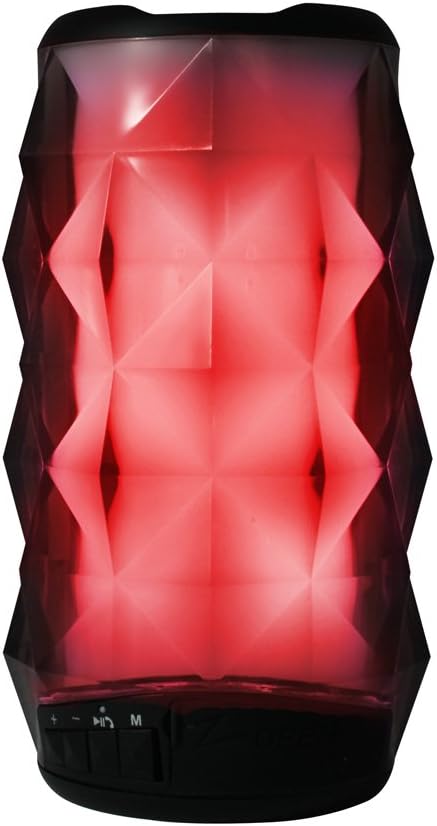
Images: Axess SPBL1049 speaker displaying green and red LED light patterns.
การซ่อมบำรุง
- การทำความสะอาด: ใช้ผ้าแห้งนุ่มๆ ที่ไม่มีขนเช็ดทำความสะอาดภายนอกลำโพง ห้ามใช้น้ำยาทำความสะอาด สเปรย์ หรือตัวทำละลาย
- พื้นที่จัดเก็บ: เมื่อไม่ได้ใช้งานเป็นเวลานาน ควรเก็บลำโพงไว้ในที่แห้งและเย็น หลีกเลี่ยงแสงแดดโดยตรงและอุณหภูมิที่สูงหรือต่ำเกินไป
- การดูแลแบตเตอรี่ เพื่อยืดอายุการใช้งานแบตเตอรี่ ควรหลีกเลี่ยงการใช้แบตเตอรี่จนหมดบ่อยๆ ควรชาร์จลำโพงเป็นประจำ แม้ในขณะที่ไม่ได้ใช้งาน เพื่อรักษาประสิทธิภาพของแบตเตอรี่
การแก้ไขปัญหา
| ปัญหา | วิธีแก้ปัญหาที่เป็นไปได้ |
|---|---|
| ลําโพงไม่เปิดขึ้น | ตรวจสอบให้แน่ใจว่าแบตเตอรี่ชาร์จเต็มแล้ว เชื่อมต่อลำโพงเข้ากับแหล่งจ่ายไฟโดยใช้สายชาร์จ USB |
| ไม่สามารถจับคู่ผ่านบลูทูธได้ |
|
| ไม่มีเสียงจากลำโพง |
|
| คุณภาพเสียงไม่ดี |
|
ข้อมูลจำเพาะ
| ชื่อรุ่น | SPBL1049 |
| ยี่ห้อ | ขวาน |
| เทคโนโลยีการเชื่อมต่อ | Bluetooth, USB, อุปกรณ์เสริม |
| ประเภทลำโพง | ซับวูฟเฟอร์ |
| กำลังขับของลำโพง | 7 วัตต์ |
| อิมพีแดนซ์ | 4 โอห์ม |
| เส้นผ่านศูนย์กลางซับวูฟเฟอร์ | 4 นิ้ว |
| แบตเตอรี่ | 1650 mAh Lithium-Ion (Rechargeable) |
| แหล่งพลังงาน | แบตเตอรี่ |
| ขนาดสินค้า | 7.62 x 15.24 x 7.62 ซม. (3 x 6 x 3 นิ้ว) |
| น้ำหนักผลิตภัณฑ์ | 385.55 กรัม (0.85 ปอนด์) |
ข้อมูลการรับประกัน
Specific warranty details for the Axess SPBL1049 speaker are typically provided with the product packaging or available on the manufacturer's official website. Please refer to the documentation included with your purchase for precise warranty terms and conditions. Generally, Axess products come with a limited manufacturer's warranty covering defects in materials and workmanship for a specified period from the date of purchase.
เก็บหลักฐานการซื้อของคุณไว้เพื่อเรียกร้องการรับประกัน
การสนับสนุนลูกค้า
For technical assistance, troubleshooting not covered in this manual, or warranty inquiries, please contact Axess customer support. Contact information can usually be found on the official Axess webไซต์หรือบนบรรจุภัณฑ์ผลิตภัณฑ์
Webเว็บไซต์: www.axessproducts.com
Please have your model number (SPBL1049) and purchase date ready when contacting support.


