1. บทนำ
The Paradox K32LCD+ is an advanced alphanumeric LCD keypad designed for use with Paradox alarm systems. It features a high-visibility blue backlit display, providing clear information and easy interaction with your security system.
Key features include a 2-line, 16-character display, programmable key protection, adjustable brightness, contrast, and text scroll speed. It connects via a bus system, supporting up to 15 keypads, and includes one zone input. The K32LCD+ is compatible with Paradox SP4000 and SP65 control panels (version 4.90 or higher), as well as MAGELLAN MG5000/MG5050 alarm centers.
2. การตั้งค่าและการติดตั้ง
Before installation, ensure the control panel is powered off. Connect the K32LCD+ keypad to the system bus. The keypad supports a maximum of 15 keypads on the bus. It also features one dedicated zone input for connecting a security device directly to the keypad.
For optimal performance, the keypad's firmware can be upgraded locally using the 307USB interface and WinLoad software. Refer to the WinLoad software manual for detailed instructions on firmware updates.
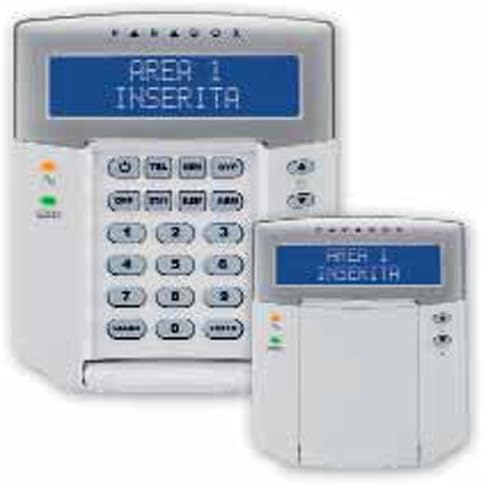
Figure 2.1: Paradox K32LCD+ Keypad. This image displays the main K32LCD+ keypad with its blue alphanumeric LCD screen, showing "AREA 1 ARMED". A smaller, similar keypad is positioned to the right, illustrating the compact design.
3. คู่มือการใช้งาน
The K32LCD+ keypad provides a user-friendly interface for managing your alarm system. Its menu-driven system simplifies programming and daily operations.
3.1 การแสดงผลและการนำทาง
- Alphanumeric LCD: The 2-line, 16-character blue backlit display shows system status, prompts, and menu options.
- Adjustable Display Settings: Brightness, contrast, and text scroll speed can be adjusted to suit user preference.
- Menu-Driven Interface: Navigate through menus using the arrow keys to access programming and user functions.
3.2 ฟังก์ชั่นปุ่มกด
- Programmable Key Protection: Configure settings to prevent unauthorized key presses.
- StayD Mode LED Indicator: A dedicated LED indicates the status of the StayD operating mode.
- Audible Zone Notification: Independent programming allows for distinct audible notifications for different zones.
- คีย์การเข้าถึงโดยตรง: Eight dedicated keys provide quick access to frequently used functions.
- Alarm Trigger Keys: Three dedicated keys are available for triggering emergency alarms (e.g., Panic, Fire, Medical).
4. การบำรุงรักษา
To ensure the longevity and proper functioning of your Paradox K32LCD+ keypad, follow these simple maintenance guidelines:
- การทำความสะอาด: Gently wipe the keypad and display with a soft, dry, lint-free cloth. Avoid using abrasive cleaners, solvents, or aerosol sprays, as these can damage the surface or internal components.
- สิ่งแวดล้อม: Keep the keypad in a dry environment, away from direct sunlight, extreme temperatures, and high humidity.
- พลัง: Do not attempt to open the keypad or perform any internal repairs. All servicing should be performed by qualified personnel.
5 การแก้ไขปัญหา
This section provides solutions to common issues you might encounter with your K32LCD+ keypad. If the problem persists, contact technical support.
| ปัญหา | สาเหตุที่เป็นไปได้ | สารละลาย |
|---|---|---|
| จอแสดงผลว่างเปล่าหรือมืดลง | No power, loose connection, brightness setting too low. | Check power supply to the control panel. Ensure bus wiring is secure. Adjust display brightness and contrast settings via the keypad menu. |
| แป้นพิมพ์ไม่ตอบสนองต่อการกดปุ่ม | Keypad frozen, connection issue, programmable key protection active. | Try power cycling the control panel. Verify bus connections. Check if key protection settings are enabled and disable if necessary. |
| Incorrect system status displayed. | Communication error with control panel, outdated firmware. | Verify bus wiring integrity. Ensure the control panel is functioning correctly. Consider updating keypad firmware if available. |
6. ข้อมูลจำเพาะ
- แบบอย่าง: K32LCD+
- แสดง: Alphanumeric LCD, 2 lines x 16 characters, blue backlight, high visibility
- การเชื่อมต่อ: Bus connection (max. 15 keypads), 1 zone input
- ความเข้ากันได้:
- Paradox SP4000 and SP65 control panels (version 4.90 or higher)
- MAGELLAN MG5000/MG5050 alarm centers
- คุณสมบัติ:
- Firmware upgradeable locally via 307USB interface and WinLoad software
- Menu-driven programming and user interface
- LED indicator for StayD operating mode
- Audible zone notification with independent programming
- 8 direct access keys
- 3 alarm trigger keys
- การปฏิบัติตาม: EN50131 Level 2
- แบตเตอรี่: Not required, not included
- ผู้ผลิต: ความขัดแย้ง
- วันที่พร้อมใช้งานครั้งแรก: 25 กรกฎาคม 2017
7. การรับประกันและการสนับสนุน
Paradox products are manufactured to high-quality standards. For specific warranty information, please refer to the warranty card included with your product or visit the official Paradox webไซต์ โปรดเก็บใบเสร็จรับเงินไว้เป็นหลักฐานการซื้อสำหรับการเรียกร้องการรับประกัน
For technical support, troubleshooting assistance beyond this manual, or service inquiries, please contact your authorized Paradox dealer or the Paradox customer support team. Contact details can typically be found on the manufacturer's webไซต์หรือผ่านจุดซื้อของคุณ


