
การแนะนำ
This manual provides comprehensive instructions for the installation, operation, and maintenance of your ALC AWF23 SightHD 1080p Full HD Pan and Tilt Indoor Wi-Fi Camera. Designed for indoor surveillance, this camera offers remote monitoring, two-way audio, and motion detection capabilities, all accessible through the ALC SightHD mobile application.
มีอะไรอยู่ในกล่อง
- One (1) ALC AWF23 SightHD 1080p Full HD Pan and Tilt Indoor Wi-Fi Camera
- ชุดติดผนัง
- อะแดปเตอร์ไฟฟ้ากระแสสลับ
- สายไฟต่อ
- คู่มือเริ่มต้นอย่างรวดเร็ว

Image: The ALC AWF23 SightHD camera, a white dome-shaped device with a black camera lens, shown from the front angle.
สินค้าเกินview
The ALC AWF23 SightHD camera offers a range of features for effective indoor surveillance:
- วิดีโอ 1080p ฟูลเอชดี: Provides clear, high-definition video streaming and recording (1920 x 1080 resolution).
- ระยะไกลแพนและเอียง: ควบคุมกล้อง viewing angle horizontally (270°) and vertically (100°) via the ALC SightHD app.
- เสียงสองทาง: Listen to audio from the camera's location and speak through the camera's built-in speaker using your smartphone.
- การมองเห็นตอนกลางคืน: Equipped with 5 surface-mounted, high-power infrared LEDs for clear monitoring up to 35 feet in low-light or complete darkness.
- การตรวจจับการเคลื่อนไหว: Receive instant email alerts and push notifications when motion is detected.
- การจัดเก็บข้อมูลภายในเครื่อง: Supports microSD card recording up to 128 GB (card sold separately).
- Cloud Storage Integration: Option to automatically upload video clips from the camera to your personal Google Drive or Dropbox account.
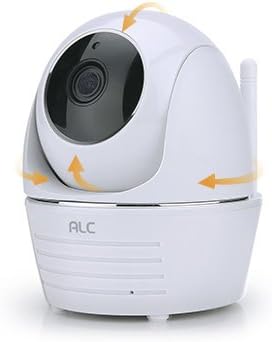
Image: The ALC AWF23 SightHD camera with orange arrows indicating its pan and tilt movement capabilities.
การตั้งค่า
1. Download the ALC SightHD App
ค้นหา "ALC SightHD" on the Apple App Store or Google Play Store and install it on your smartphone or tablet. This app is essential for controlling and monitoring your camera.
2. เปิดกล้อง
Connect the AC power adapter to the camera and plug it into a power outlet. The camera will power on and perform a self-test. Wait for the status indicator light to show it is ready for pairing (refer to the app for specific light indications during setup).
3. เชื่อมต่อกับ Wi-Fi
Open the ALC SightHD app and follow the on-screen instructions to add your new camera. This typically involves scanning a QR code on the camera or manually entering details, then connecting the camera to your home Wi-Fi network. Ensure your Wi-Fi network is 2.4GHz, as 5GHz networks are not supported.
4. การติดตั้งกล้อง (ไม่บังคับ)
If desired, use the included wall mount kit to secure the camera to a wall or ceiling. Ensure the camera is positioned to cover the desired surveillance area. Follow the instructions provided with the wall mount kit for proper installation.

Image: The ALC AWF23 SightHD camera positioned next to a smartphone screen showing the ALC SightHD application interface.
การใช้งานกล้องของคุณ
การควบคุมการแพนและเอียงระยะไกล
Within the ALC SightHD app, use the directional controls to remotely adjust the camera's horizontal (pan) and vertical (tilt) viewing angles. You can also set preset vantage points for quick access to specific areas.
ระบบเสียงสองทาง
To listen to audio from the camera's location, tap the speaker icon in the app's live view. To speak through the camera's built-in speaker, press and hold the microphone icon and speak into your smartphone's microphone. Release the icon to stop speaking.
การตรวจจับการเคลื่อนไหวและการแจ้งเตือน
Configure motion detection sensitivity and alert preferences (email, push notifications) within the app settings. When motion is detected, the camera will record and send alerts according to your settings. You can also define specific motion detection zones.
การมองเห็นตอนกลางคืน
The camera automatically switches to night vision mode in low-light conditions. The infrared LEDs provide illumination for clear black and white video up to 35 feet, ensuring surveillance even in total darkness.
การบันทึกและจัดเก็บวิดีโอ
Insert a microSD card (up to 128 GB, sold separately) into the camera's slot for local recording. Configure recording settings (continuous, motion-triggered) via the app. You can also link your Google Drive or Dropbox account in the app settings to automatically upload recorded video clips to cloud storage.

Image: A graphic illustrating key features of the ALC AWF23 SightHD camera, including 1080p Full HD, pan & tilt, two-way audio, night vision, and motion detection.
การซ่อมบำรุง
- การทำความสะอาด: Gently wipe the camera lens and exterior with a soft, dry cloth. Do not use liquid cleaners, solvents, or abrasive materials, as these can damage the camera.
- การอัปเดตซอฟต์แวร์: Periodically check the ALC SightHD app for firmware updates for your camera. Keeping the firmware updated ensures optimal performance, security, and access to new features.
- วงจรไฟฟ้า: If the camera experiences unexpected issues or becomes unresponsive, try unplugging it from the power source for 10 seconds and then plugging it back in. This can resolve minor software glitches.
การแก้ไขปัญหา
- กล้องไม่เปิดเครื่อง:
- Ensure the AC power adapter is securely connected to the camera and a working power outlet.
- ตรวจสอบว่าเต้ารับไฟฟ้าใช้งานได้โดยเสียบอุปกรณ์อื่น
- ไม่สามารถเชื่อมต่อ Wi-Fi ได้:
- โปรดตรวจสอบให้แน่ใจว่าเครือข่าย Wi-Fi ของคุณเป็น 2.4GHz กล้องไม่รองรับเครือข่าย 5GHz
- Ensure the camera is within effective range of your Wi-Fi router.
- ตรวจสอบรหัสผ่าน Wi-Fi ของคุณอีกครั้งเพื่อให้แน่ใจว่าถูกต้อง
- Try restarting your Wi-Fi router and the camera.
- คุณภาพวิดีโอไม่ดี:
- Check your internet connection speed. A stable and fast connection is required for optimal 1080p streaming.
- ตรวจสอบให้แน่ใจว่าเลนส์กล้องสะอาดและไม่มีสิ่งกีดขวาง
- Motion Detection Not Working or Too Sensitive:
- Adjust the motion detection sensitivity settings within the ALC SightHD app.
- ตรวจสอบให้แน่ใจว่าขอบเขตการมองเห็นของกล้อง view is clear of objects that might cause false alerts (e.g., moving curtains, tree branches).
- ปัญหาเสียงสองทาง:
- Ensure your smartphone's microphone and speaker are working correctly.
- ตรวจสอบการตั้งค่าระดับเสียงบนสมาร์ทโฟนและภายในแอปพลิเคชัน
- Verify a stable internet connection for both the camera and your smartphone.
ข้อมูลจำเพาะ
| คุณสมบัติ | รายละเอียด |
|---|---|
| หมายเลขรุ่น | AWF23 |
| การใช้งานภายใน/ภายนอกอาคาร | ในร่ม |
| ความละเอียดในการจับภาพวิดีโอ | 1080p (1920 x 1080) |
| ช่วงแพน | 270° |
| ช่วงความเอียง | 100° |
| ช่วงการมองเห็นตอนกลางคืน | สูงถึง 35 ฟุต |
| โปรโตคอลการเชื่อมต่อ | Wi-Fi (2.4GHz เท่านั้น) |
| แหล่งพลังงาน | ไฟฟ้ากระแสสลับ/ไฟฟ้ากระแสตรง |
| วัดtage | 5 วัตต์ |
| อุปกรณ์ที่รองรับ | สมาร์ทโฟน, แท็บเล็ต |
| วิธีการควบคุม | App (ALC SightHD) |
| พื้นที่จัดเก็บ | MicroSD card (up to 128 GB, not included) |
| ระบบเสียงสองทาง | ใช่ |
| การตรวจจับการเคลื่อนไหว | ใช่ |
| ขนาด (กว้าง x ยาว x สูง) | 4 x 3 x 4.6 นิ้ว |
| น้ำหนักสินค้า | 2.05 ปอนด์ |
| สี | สีขาว |
ข้อมูลการรับประกัน
For detailed warranty information regarding your ALC AWF23 SightHD camera, please refer to the warranty card included with your product or visit the official ALC website. Warranty terms and conditions may vary by region and purchase date. Please retain your proof of purchase for warranty claims.
สนับสนุน
If you encounter any issues or require further assistance with your ALC AWF23 SightHD camera, please visit the ALC support website or contact their customer service department. Contact information can typically be found in the Quick Start Guide or on the official ALC website. Online resources often include FAQs, troubleshooting guides, and software downloads.