การแนะนำ
ขอบคุณสำหรับการซื้อasing the OontZ Angle 3 Ultra Portable Bluetooth Speaker by Cambridge Soundworks. This manual provides essential information for setting up, operating, maintaining, and troubleshooting your speaker. Designed for superior sound quality and durability, the OontZ Angle 3 Ultra features a 14-watt output, rich bass, IPX7 waterproofing, and an impressive 30-meter Bluetooth range. Enjoy up to 20 hours of playtime on a single charge.

Image: The OontZ Angle 3 Ultra Portable Bluetooth Speaker, showcasing its sleek black, triangular design with control buttons on one end.
การตั้งค่า
1. รายการที่รวม
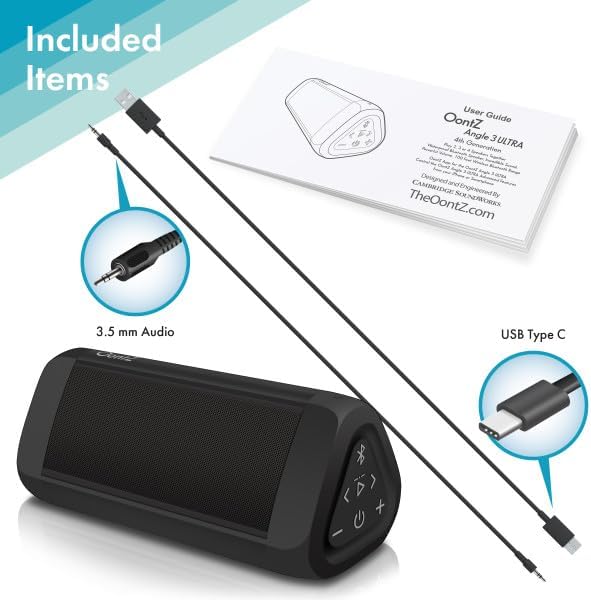
Image: The OontZ Angle 3 Ultra speaker along with its accessories: a Quick Start Guide, a 3.5mm audio cable, and a USB Type-C charging cable.
Before first use, ensure all components are present:
- OontZ Angle 3 Ultra Bluetooth Speaker
- Quick Start Guide (Full manual available online)
- สายสัญญาณเสียงขนาด 3.5 มม.
- สายชาร์จแบบ USB Type-C
2. ชาร์จลำโพง
The speaker comes with a built-in rechargeable Lithium-ion battery. For optimal performance, fully charge the speaker before first use.
- Locate the charging port on the side of the speaker, protected by a rubber flap.
- Connect the supplied USB Type-C charging cable to the speaker's charging port.
- Connect the other end of the USB cable to a USB wall charger (not included) or a computer USB port.
- The charging indicator light will illuminate. A full charge takes approximately 20 hours for the first charge, and subsequent charges will be faster.

ภาพ: ภาพระยะใกล้ view of the speaker's side, showing the 3.5mm AUX input and the USB-C charging port, typically protected by a waterproof flap.
3. การจับคู่บลูทู ธ
Pair your OontZ Angle 3 Ultra with your Bluetooth-enabled device (smartphone, tablet, laptop).
- เปิดลำโพงโดยกดปุ่มเปิด/ปิดค้างไว้ (⏻) until the indicator light flashes blue.
- บนอุปกรณ์ของคุณ ไปที่การตั้งค่าบลูทูธ และตรวจสอบให้แน่ใจว่าได้เปิดใช้งานบลูทูธแล้ว
- Look for "OontZ Angle 3 Ultra" in the list of available devices and select it.
- Once paired, the speaker will emit a confirmation tone, and the indicator light will turn solid blue.
4 การเชื่อมต่อผ่านช่องต่อ AUX
You can connect non-Bluetooth devices using the 3.5mm audio cable.
- Connect one end of the 3.5mm audio cable to the AUX IN port on the speaker.
- ต่อปลายอีกด้านหนึ่งเข้ากับช่องเสียบหูฟังหรือช่องสัญญาณเสียงออกของอุปกรณ์ของคุณ
- ลำโพงจะเปลี่ยนเป็นโหมด AUX โดยอัตโนมัติ
5. Pairing Two Speakers for Stereo Sound (OontZ Dual Wireless Stereo)
Enhance your audio experience by wirelessly connecting two OontZ Angle 3 Ultra speakers for impressive stereo separation.

Image: Two OontZ Angle 3 Ultra speakers positioned to provide stereo sound, with two individuals enjoying music in an outdoor setting.
- Ensure both OontZ Angle 3 Ultra speakers are charged and powered on.
- ถอดการเชื่อมต่อลำโพงทั้งสองตัวออกจากอุปกรณ์บลูทูธที่เคยจับคู่ไว้ก่อนหน้านี้
- On one speaker (this will be the Left Channel), press and hold the Bluetooth button (Ⓑกดค้างไว้ 3 วินาที จนกว่าจะได้ยินเสียงสัญญาณ
- On the second speaker (this will be the Right Channel), press and hold the Bluetooth button (Ⓑกดค้างไว้ 3 วินาที จนกว่าจะได้ยินเสียงสัญญาณ
- The speakers will automatically connect to each other. Once connected, you will hear a confirmation tone, and the indicator lights on both speakers will turn solid blue.
- Now, connect your audio device to the Left Channel speaker via Bluetooth as described in "Bluetooth Pairing" above.
- For video audio, connect your device or TV to the Left Channel speaker using the 3.5mm audio cable.
คำแนะนำการใช้งาน
1. การควบคุมมากกว่าview
| ปุ่ม/ตัวบ่งชี้ | การทำงาน |
|---|---|
| ⏻ (พลัง) | กดค้างไว้เพื่อเปิด/ปิดเครื่อง |
| + (ปรับระดับเสียงขึ้น) | กดเพื่อเพิ่มระดับเสียง |
| - (ลดเสียงลง) | กดเพื่อลดระดับเสียง |
| ▷ (เล่น/หยุดชั่วคราว) | กดเพื่อเล่น/หยุดเพลง |
| < (แทร็กก่อนหน้า) | กดเพื่อไปยังเพลงก่อนหน้า |
| > (เพลงถัดไป) | กดเพื่อไปยังเพลงถัดไป |
| Ⓑ (บลูทู ธ) | Press to disconnect current Bluetooth device and enter pairing mode. Press and hold for 3 seconds to initiate OontZ Dual Wireless Stereo pairing. |
| ไฟแสดงสถานะ | Flashes blue for pairing, solid blue for connected, red for charging. |
2. การโทรแบบแฮนด์ฟรี
The OontZ Angle 3 Ultra has a built-in microphone for hands-free calls.
- When a call comes in, the music will pause. Press the ▷ ปุ่มสำหรับรับสาย
- หากต้องการวางสาย ให้กด ▷ ปุ่มอีกครั้ง
- หากต้องการปฏิเสธสาย ให้กดปุ่มค้างไว้ ▷ กดปุ่มนี้เป็นเวลา 2 วินาที
- To activate Siri or Google Assistant, press and hold the ▷ button for 2 seconds when not on a call.
3. Waterproof Features (IPX7)
The OontZ Angle 3 Ultra is IPX7 certified, meaning it is fully waterproof and can be immersed in water up to 1 meter (3.3 feet) for up to 30 minutes.
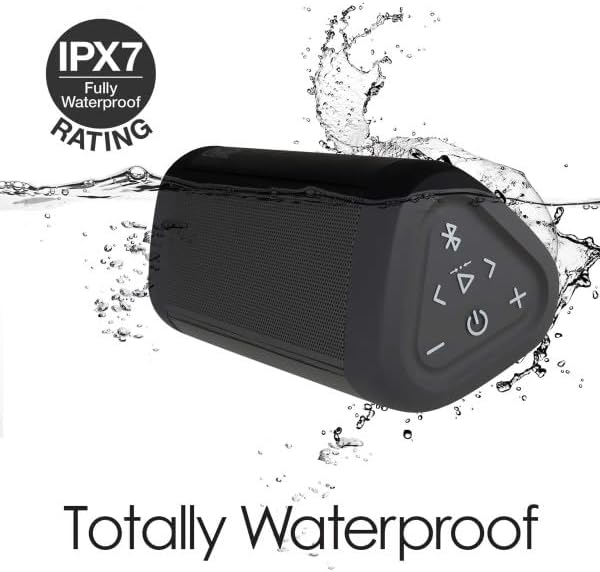
Image: The OontZ Angle 3 Ultra speaker shown partially submerged in water, illustrating its IPX7 waterproof capability.
- Ensure the rubber flap covering the charging and AUX ports is securely closed before exposing the speaker to water.
- Ideal for use by the pool, at the beach, or in the shower.
- Do not expose to salt water or chemicals. Rinse with fresh water after exposure to chlorinated water.
การซ่อมบำรุง
1. การทำความสะอาด
ในการทำความสะอาดลำโพง ให้ใช้ผ้าเนื้อนุ่มและแห้งamp ผ้า ห้ามใช้สารทำความสะอาดที่มีฤทธิ์กัดกร่อนหรือตัวทำละลาย
2. การจัดเก็บ
เก็บลำโพงไว้ในที่แห้งและเย็น หลีกเลี่ยงแสงแดดโดยตรงและอุณหภูมิที่สูงหรือต่ำเกินไป
3. การดูแลแบตเตอรี่
เพื่อยืดอายุแบตเตอรี่:
- หลีกเลี่ยงการปล่อยแบตเตอรี่จนหมดบ่อยครั้ง
- ชาร์จลำโพงเป็นประจำ แม้จะไม่ได้ใช้งาน เพื่อรักษาสุขภาพแบตเตอรี่
- Do not expose the speaker to temperatures above 60°C (140°F).
การแก้ไขปัญหา
| ปัญหา | สารละลาย |
|---|---|
| ลำโพงจะไม่เปิด | ตรวจสอบให้แน่ใจว่าแบตเตอรี่ชาร์จเต็มแล้ว เชื่อมต่อลำโพงเข้ากับแหล่งจ่ายไฟโดยใช้สาย USB-C |
| ไม่มีเสียงหรือเสียงเบา | Check the volume level on both the speaker and your connected device. Ensure the speaker is properly paired via Bluetooth or connected via AUX. |
| ไม่สามารถจับคู่ผ่านบลูทูธได้ | Ensure the speaker is in pairing mode (flashing blue light). Turn off and on Bluetooth on your device. Move the speaker closer to your device. Disconnect from other Bluetooth devices. |
| เสียงผิดเพี้ยนเมื่อเปิดเสียงดังมาก | Reduce the volume on the speaker or your connected device. Ensure the audio source is not distorted. |
| OontZ Dual Wireless Stereo not connecting. | Ensure both speakers are disconnected from other Bluetooth devices. Follow the pairing steps carefully, ensuring both speakers are in pairing mode for stereo connection. |
ข้อมูลจำเพาะ
Key technical specifications for the OontZ Angle 3 Ultra Portable Bluetooth Speaker:
- หมายเลขรุ่น: SWOA3UBLK
- ขนาด (ยาว x กว้าง x สูง): 16.26 x 7.11 x 7.11 ซม. (6.4 x 2.8 x 2.8 นิ้ว)
- น้ำหนัก: 480 กรัม (1.06 ปอนด์)
- กำลังขับของลำโพง: 14 วัตต์
- เวอร์ชันบลูทูธ: 4.2
- ระยะสัญญาณไร้สาย: Up to 30 meters (100 feet) unobstructed
- อายุการใช้งานแบตเตอรี่: สูงสุด 20 ชั่วโมง (ที่ระดับเสียง 2/3)
- ระดับการกันน้ำ: มาตรฐาน IPX7 (กันน้ำได้ลึกถึง 1 เมตร นาน 30 นาที)
- การเชื่อมต่อ: Bluetooth, 3.5mm AUX Input, USB-C Charging
- ส่วนประกอบที่รวมอยู่: Speaker, 3.5mm Audio Cable, USB-C Charging Cable, Quick Start Guide

Image: Diagram showing the dimensions of the OontZ Angle 3 Ultra speaker: 6.5 inches in length, 3 inches in width, and 2.75 inches in height.
การรับประกันและการสนับสนุน
For detailed warranty information and customer support, please visit the official OontZ website. The full localized manual is also available there.
เป็นทางการ Webเว็บไซต์: www.theoontz.com
Cambridge Soundworks is committed to providing high-quality audio products and customer satisfaction.


