1. บทนำ
This manual provides comprehensive instructions for the safe and effective use of the PCE Instruments PCE-170 A Light Meter. This device is designed for measuring illuminance (lux or foot-candles) in various environments, such as offices, factories, and outdoor settings. It features a wide measurement range, fast response time, and a compact design for ease of use.
โปรดอ่านคู่มือนี้อย่างละเอียดก่อนใช้งานอุปกรณ์และเก็บคู่มือนี้ไว้เพื่อใช้อ้างอิงในอนาคต
2. ข้อมูลด้านความปลอดภัย
Observe the following safety precautions to prevent injury and avoid damage to the device:
- อย่าให้อุปกรณ์สัมผัสกับอุณหภูมิ ความชื้น หรือแสงแดดโดยตรง
- หลีกเลี่ยงแรงสั่นสะเทือนหรือแรงกระแทกที่รุนแรง
- ห้ามเปิดหรือดัดแปลงอุปกรณ์ด้วยตนเอง โปรดส่งต่ออุปกรณ์ดังกล่าวให้ช่างผู้ชำนาญการเป็นผู้ดำเนินการซ่อมแซม
- Keep the light sensor clean and free from obstructions to ensure accurate readings.
- หากไม่ได้ใช้งานอุปกรณ์เป็นเวลานาน ควรถอดแบตเตอรี่ออกเพื่อป้องกันการรั่วไหล
- กำจัดแบตเตอรี่และอุปกรณ์ตามกฎระเบียบท้องถิ่น
3. สินค้าหมดview
The PCE-170 A Light Meter consists of a main unit with a display and control buttons, and an integrated light sensor.

รูปที่ 1: ด้านหน้า view of the PCE-170 A Light Meter, showing the display, control buttons, and light sensor at the top.
3.1 ส่วนประกอบ
- เซ็นเซอร์แสง: Located at the top of the device, protected by a white dome. This silicon photodiode measures incident light.
- จอแสดงผล LCD: A 5-digit display showing measurement values, units (lux/fc), and function indicators (e.g., AUTO RANGE, HOLD, MIN, MAX).
- ปุ่มเปิด/ปิด (เปิด/ปิด): เปิดหรือปิดอุปกรณ์
- ปุ่ม CAL: Used for zero adjustment.
- ปุ่มถือ: หยุดการอ่านค่าปัจจุบันบนจอแสดงผล
- fc/lx Button: Toggles between foot-candle (fc) and lux (lx) measurement units.
- ปุ่มช่วง: Manually selects measurement ranges or activates auto-ranging.
- ช่องใส่แบตเตอรี่: Located at the rear, houses the 9V battery.

รูปที่ 2: ภาพระยะใกล้ view of the LCD display, showing a reading of "534 lx" and "AUTO RANGE 4 000".
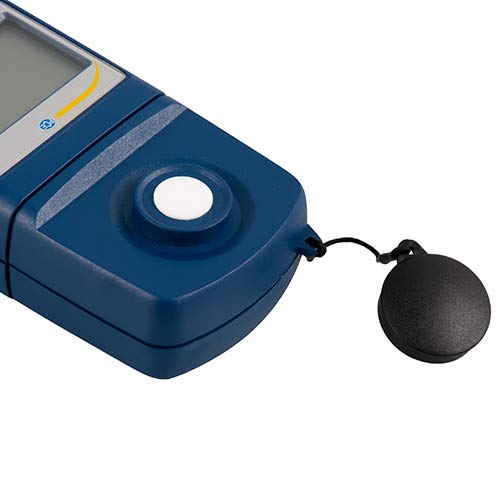
รูปที่ 3: รายละเอียด view of the light sensor at the top of the device, with its protective cap removed.
4. การตั้งค่า
4.1 การติดตั้งแบตเตอรี่
- ค้นหาฝาครอบช่องใส่แบตเตอรี่ที่ด้านหลังของอุปกรณ์
- Slide the cover open or unscrew it, depending on the model.
- ใส่แบตเตอรี่ 9V หนึ่งก้อน โดยสังเกตขั้วให้ถูกต้อง (+/-)
- ใส่ฝาปิดช่องใส่แบตเตอรี่กลับเข้าที่อย่างแน่นหนา
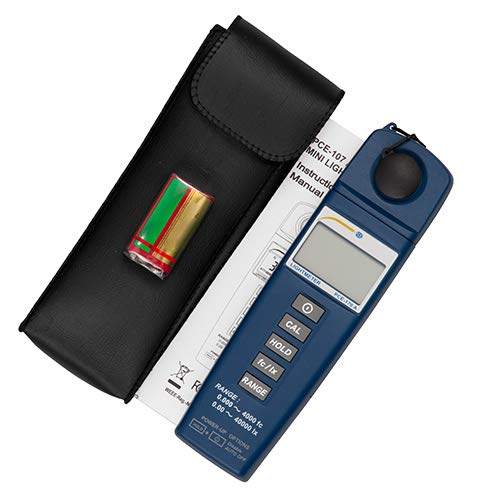
รูปที่ 4: The PCE-170 A Light Meter shown with its carrying case and the included 9V battery, ready for installation.
4.2 การเปิดเครื่องครั้งแรก
กดปุ่ม พลัง button to turn on the device. The display will illuminate and show a reading. If the battery symbol appears, replace the battery.
5. คู่มือการใช้งาน
5.1 การวัดผล
- เปิดใช้งานอุปกรณ์โดยใช้ พลัง ปุ่ม.
- Ensure the light sensor is clean and unobstructed.
- Position the light sensor at the location where illuminance is to be measured. Ensure the sensor is facing the light source directly for accurate readings.
- The current illuminance value will be displayed on the LCD.

รูปที่ 5: A user measuring light levels in an office environment with the PCE-170 A Light Meter.
5.2 Changing Measurement Units (fc/lx)
กดปุ่ม fc/lx button to toggle between foot-candles (fc) and lux (lx) units. The selected unit will be indicated on the display.
5.3 ถือฟังก์ชั่น
กดปุ่ม ถือ กดปุ่มนี้เพื่อหยุดการแสดงค่าปัจจุบันบนหน้าจอ กดอีกครั้งเพื่อยกเลิกการหยุดและเริ่มการวัดแบบเรียลไทม์อีกครั้ง
5.4 Zero Adjustment (CAL)
การดำเนินการปรับเป็นศูนย์:
- Place the light sensor in a completely dark environment (e.g., cover it with the protective cap or place it in a dark box).
- กดปุ่ม แคล button. The display should show "0.00" or a value very close to zero.
- If the display does not show zero, repeat the process.
5.5 การเลือกช่วง
The device typically operates in auto-ranging mode. To manually select a range or cycle through available ranges, press the ประเภท button. The display will indicate the active range. Press and hold the ประเภท button to return to auto-ranging mode.
5.6 Min/Max Function (Power-Up Option)
The PCE-170 A supports Min/Max recording. To activate this feature, refer to the power-up options indicated on the device label (e.g., press and hold a specific button during power-on). This function records the minimum and maximum illuminance values detected during a measurement session.
6. การบำรุงรักษา
6.1 การทำความสะอาด
Wipe the device with a soft, dry cloth. Do not use abrasive cleaners or solvents. Keep the light sensor clean and free of dust or smudges, as this can affect measurement accuracy.
6.2 พื้นที่จัดเก็บ
When not in use, store the PCE-170 A Light Meter in its carrying case in a cool, dry place, away from direct sunlight and extreme temperatures. Remove the battery if storing for extended periods.
7 การแก้ไขปัญหา
| ปัญหา | สาเหตุที่เป็นไปได้ | สารละลาย |
|---|---|---|
| อุปกรณ์ไม่เปิด | แบตเตอรี่เสียหรือติดตั้งไม่ถูกต้อง | ตรวจสอบขั้วแบตเตอรี่ หรือเปลี่ยนแบตเตอรี่ 9V ใหม่ |
| หน้าจอแสดง "OL" (Overload) | Light intensity exceeds the current measurement range. | Switch to a higher measurement range using the ประเภท button, or move to a less intensely lit area. |
| การอ่านที่ไม่ถูกต้อง | Dirty sensor, incorrect zero adjustment, or sensor not facing light source correctly. | Clean the sensor, perform zero adjustment in darkness, and ensure the sensor is properly oriented. |
| หน้าจอว่างเปล่าหรือกะพริบ | แบตเตอรี่อ่อน | เปลี่ยนแบตเตอรี่ 9V |
8. ข้อมูลจำเพาะ
| พารามิเตอร์ | ค่า |
|---|---|
| ช่วงการวัด | 0.00 ... 40,000 lux / 0.000 ... 4000 fc |
| ปณิธาน | 0.01 ลักซ์ / 0.001 เอฟซี |
| ความแม่นยำ | ±3% of measurement value + 5 digits |
| ตัวบ่งชี้การโอเวอร์โหลด | "โอแอล" |
| อัตราการวัด | ทุก ๆ 2 วินาที |
| อุณหภูมิในการทำงาน | 0 ... 40°C / 32 ... 104°F |
| เซ็นเซอร์แสง | Silicon photodiode, corrected cosine angle |
| แสดง | LCD 5 หลัก |
| แหล่งพลังงาน | แบตเตอรี่ 9V (รวมอยู่ด้วย) |
| ขนาด | 33 x 54 x 196 มม. / 1.3 x 2.1 x 7.7 นิ้ว |
| น้ำหนัก | 180 g / <1 lb (approx. 9.17 ounces) |
8.1 ขอบเขตการจัดส่ง
The standard delivery package includes:
- 1 x PCE-170 A Lux Meter
- แบตเตอรี่ 1V 9 ก้อน
- 1 x กระเป๋าใส่ของ
- 1 x คู่มือผู้ใช้ (เอกสารฉบับนี้)
9. การรับประกันและการสนับสนุน
PCE Instruments provides a warranty for this product against defects in materials and workmanship. For specific warranty terms and conditions, please refer to the warranty card included with your purchase or visit the official PCE Instruments website. For technical support, service, or calibration inquiries, please contact PCE Instruments customer service.
PCE Instruments US: เยี่ยมชมร้านค้า