การแนะนำ
The Roland Rubix44 is a 4-in/4-out USB audio interface designed for musicians and producers. It offers high-fidelity sound with support for up to 24-bit/192kHz audio resolution, ensuring clear and defined recordings with extremely low noise. Its robust metal construction provides durability, while its compact size makes it suitable for both studio and portable use. The Rubix44 is compatible with Mac, PC, and iPad, providing versatile connectivity for various music production environments.
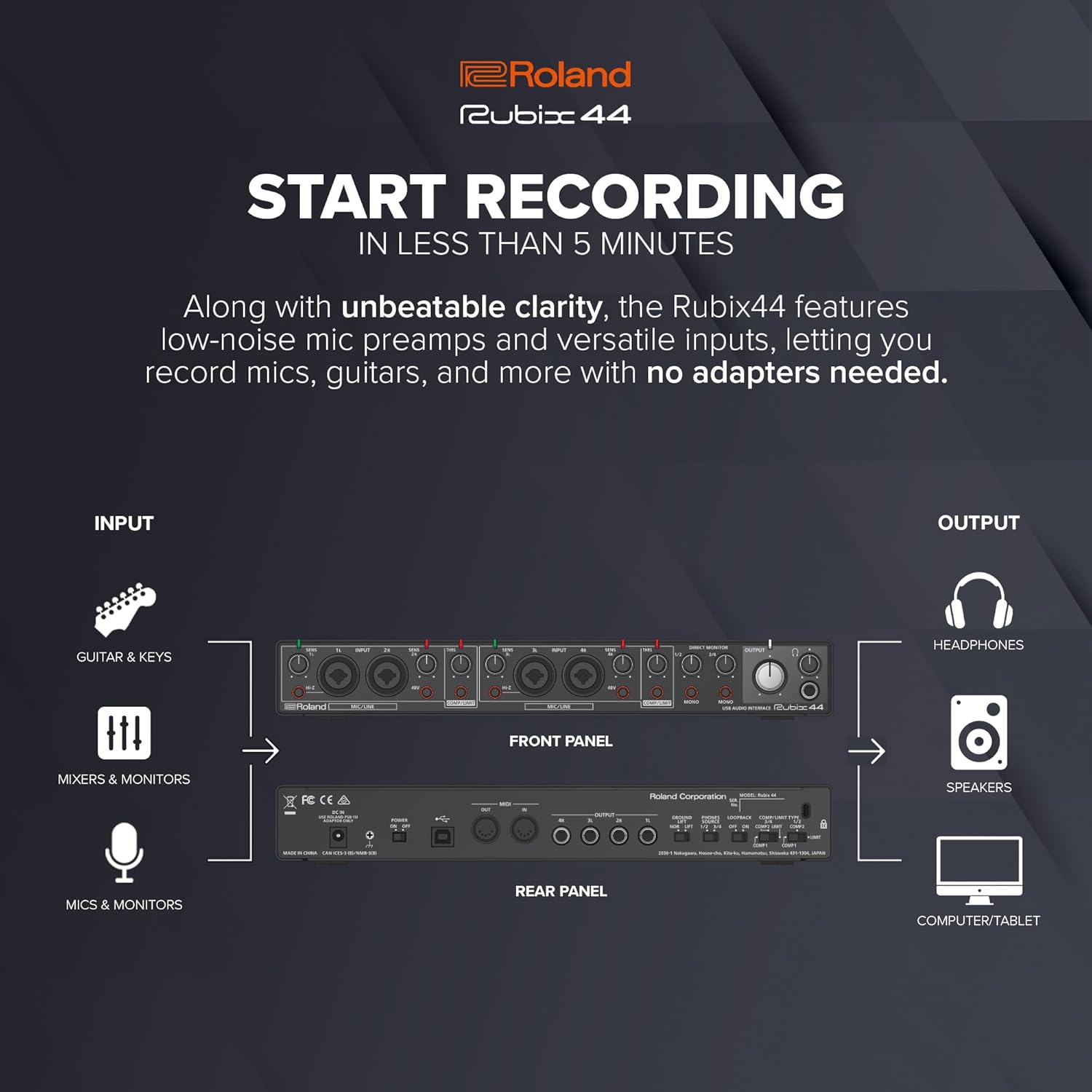
Key features include four low-noise mic preamps with XLR combo jacks, a Hi-Z input for guitars and other high-impedance sources, MIDI In/Out ports, and an onboard hardware compressor/limiter. Ground lifts are included for quiet operation, and large, easy-to-read indicators provide essential information at a glance.

การตั้งค่า
Before connecting your Rubix44, ensure your computer or iPad meets the system requirements. Install the necessary drivers from the Roland website for optimal performance, especially for Windows users. Mac and iPad users may find it class-compliant, but driver installation is still recommended.
Connecting to Your Computer/iPad
- Connect the Rubix44 to your computer using the provided USB cable. The interface can be bus-powered via USB.
- For additional power stability or when connecting to an iPad, use a 5V DC power adapter (not always included, check package contents).
การเชื่อมต่อไมโครโฟนและอุปกรณ์
- ไมโครโฟน: Use XLR cables to connect microphones to the INPUT 1L, 2R, 3L, or 4R combo jacks on the front panel.
- กีต้าร์/เบส: Connect instruments with high impedance (e.g., electric guitars, basses) to INPUT 1L or 2R using a 1/4-inch TS cable. Activate the ไฮ-ซี switch for the corresponding input.
- อุปกรณ์ระดับสาย: Connect keyboards, drum machines, or other line-level devices to any of the combo jacks using 1/4-inch TRS or TS cables.
- อุปกรณ์ MIDI: Connect MIDI keyboards or controllers to the มิดี้อิน และ มิดี้เอาท์ ports on the rear panel using standard 5-pin MIDI cables.

Operating the Rubix44
การควบคุมอินพุต
- SENS (Sensitivity) Knobs: Adjust the input gain for each channel (1L, 2R, 3L, 4R). Turn clockwise to increase sensitivity. Monitor the signal indicators to avoid clipping.
- กำลังไฟ Phantom 48V: กดปุ่ม 48โวลต์ button to supply phantom power to condenser microphones connected to the XLR inputs. An indicator light will illuminate when active.
- สวิตช์ Hi-Z: Engage this switch for INPUT 1L or 2R when connecting high-impedance instruments like electric guitars or basses.
- COMP/LIMIT (Compressor/Limiter): The Rubix44 features a hardware compressor/limiter. Use the ทรอ.อาร์.เอส. (Threshold) knob to set the level at which compression/limiting begins. The คอมมิชชั่น/ลิมิต indicator lights up when active.

การติดตามและผลผลิต
- การตรวจสอบโดยตรง: This switch allows you to hear your input signal directly through the outputs with zero latency. It can be set to โมโน or ระบบเสียงสเตอริโอ.
- OUTPUT Knobs:
- ขนาดใหญ่ เอาท์พุต knob controls the overall volume of the main outputs (1/2 and 3/4).
- A separate knob controls the volume for the headphones output.
- ตัวบ่งชี้สัญญาณ: Bright, easy-to-read indicators show input signal levels, helping you monitor your audio and prevent clipping.
Official Product Video: Roland Rubix Series Overview
Video 1: This official video from Roland US provides an overview of the Rubix series USB Audio Interfaces, including the Rubix44. It highlights key features such as low-noise recordings, precise monitoring indicators, superior stereo experience, and easy setup with various operating systems.
การซ่อมบำรุง
- การทำความสะอาด: ใช้ผ้าแห้งเนื้อนุ่มเช็ดทำความสะอาดภายนอกตัวเครื่อง หลีกเลี่ยงการใช้สารทำความสะอาดที่มีฤทธิ์กัดกร่อนหรือตัวทำละลาย
- พื้นที่จัดเก็บ: Store the Rubix44 in a cool, dry place away from direct sunlight and extreme temperatures.
- การจัดการสายเคเบิล: Ensure cables are not excessively bent or strained to prevent damage to the connectors and the unit.
การแก้ไขปัญหา
- ไม่มีเสียง/สัญญาณอ่อน:
- ตรวจสอบการเชื่อมต่อสายเคเบิลทั้งหมด
- Ensure input เซนส์ knobs are adjusted correctly and not too low.
- ตรวจสอบว่า 48โวลต์ phantom power is engaged for condenser microphones.
- ยืนยันการ ไฮ-ซี switch is active for high-impedance instruments.
- Check your computer's sound settings and DAW (Digital Audio Workstation) to ensure the Rubix44 is selected as the input/output device.
- เสียงฮัมหรือเสียงรบกวน:
- มีส่วนร่วม กราวด์ลิฟท์ switch on the rear panel. This can help eliminate hum caused by ground loops.
- Try connecting the unit to a different USB port or power outlet.
- ตรวจสอบให้แน่ใจว่าสายเคเบิลทั้งหมดได้รับการป้องกันอย่างเหมาะสมและอยู่ในสภาพดี
- ปัญหาไดร์เวอร์:
- Reinstall the latest drivers from the official Roland webเว็บไซต์.
- ลองใช้สายเคเบิลหรือพอร์ต USB อื่น
ข้อมูลจำเพาะ
| น้ำหนักสินค้า | 4 ปอนด์ |
| ขนาดสินค้า | 16 x 9 x 6 นิ้ว |
| หมายเลขรุ่น | RUBIX44 |
| ฮาร์ดแวร์อินเตอร์เฟซ | ยูเอสบี |
| จำนวนช่องสัญญาณ | การ 4 เข้า / การ 4 ออก |
| ความละเอียดเสียง | สูงสุด 24 บิต/192kHz |
| อุปกรณ์ที่รองรับ | Personal Computer (Mac, PC), iPad |
| ข้อมูลอินพุต | 4 x XLR/TRS Combo Jacks (with Hi-Z on 1L/2R) |
| เอาท์พุต | 4 x 1/4-inch TRS (Main Out), 1 x Headphone Out |
| มิดี้ | MIDI In, MIDI Out |
| พลังผี | +48V (selectable) |
| คอมเพรสเซอร์/ลิมิตเตอร์ | Hardware Onboard |

การรับประกันและการสนับสนุน
สำหรับข้อมูลการรับประกันโดยละเอียดและการสนับสนุนทางเทคนิค โปรดดูที่เว็บไซต์อย่างเป็นทางการของ Roland website or contact their customer service. Registering your Rubix audio interface may also qualify you for special offers, such as a six-month Roland Cloud Pro membership.
หากต้องการความช่วยเหลือเพิ่มเติม โปรดไปที่ ร้าน Roland บน Amazon or the official Roland support pages.


