1. การตั้งค่า
1.1 การติดตั้งแบตเตอรี่
The Insignia NS-RC03A-13 remote control requires two AAA batteries for operation. Follow these steps to install them:
- ค้นหาฝาปิดช่องใส่แบตเตอรี่ที่ด้านหลังของรีโมทคอนโทรล
- เลื่อนฝาครอบลงหรือกดที่สลักเพื่อเปิด
- ใส่แบตเตอรี่ AAA สองก้อน โดยตรวจสอบให้แน่ใจว่าขั้วบวก (+) และขั้วลบ (-) ตรงกับเครื่องหมายภายในช่องใส่แบตเตอรี่อย่างถูกต้อง
- เลื่อนฝาปิดช่องใส่แบตเตอรี่กลับเข้าที่จนกระทั่งล็อคเข้าที่อย่างแน่นหนา
ภาพ: ด้านหลัง view of the Insignia NS-RC03A-13 remote control, showing the battery compartment open with two AAA batteries inserted. The remote is black with gray buttons.
2. คู่มือการใช้งาน
This section details the primary functions and usage of your Insignia NS-RC03A-13 remote control.
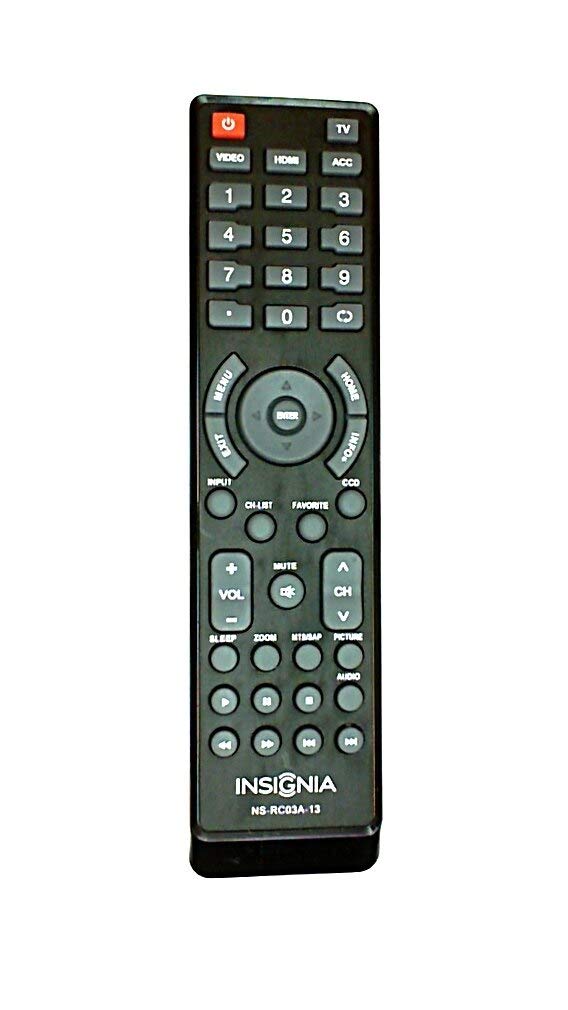
ภาพ: ด้านหน้า view of the Insignia NS-RC03A-13 remote control, displaying all buttons and their labels. The remote is black with gray buttons and white text.
2.1 เปิด/ปิดเครื่อง
กดปุ่ม พลัง button (usually located at the top left) to turn your television on or off.
2.2 การเลือกอินพุต
To switch between different video sources (e.g., HDMI 1, HDMI 2, Video), press the ป้อนข้อมูล button. Continue pressing to cycle through available inputs until your desired source is selected.
2.3 การควบคุมช่องสัญญาณและระดับเสียง
- ปริมาณ: ใช้ โวล+ และ เล่ม - buttons to increase or decrease the audio volume.
- ปิดเสียง: กดปุ่ม MUTE button to instantly silence the television audio. Press it again to restore sound.
- ช่องทางการรับชม: ใช้ ช+ และ CH - buttons to navigate through television channels.
- แป้นตัวเลข: Directly enter channel numbers using the numeric keypad (0-9).
2.4 การนำทางเมนู
Use the directional arrow buttons (Up, Down, Left, Right) around the เข้า button to navigate through on-screen menus. Press เข้า to confirm a selection. The เมนู button typically opens the main menu, and EXIT ปิดมันซะ
3. การบำรุงรักษา
Proper care ensures the longevity and optimal performance of your remote control.
- การทำความสะอาด: Wipe the remote control with a soft, dry cloth. Avoid using liquid cleaners, abrasive materials, or chemical solvents, as these can damage the surface or internal components.
- การเปลี่ยนแบตเตอรี่: Replace batteries when the remote's responsiveness decreases. Always replace both batteries at the same time with new ones of the same type (AAA).
- พื้นที่จัดเก็บ: เก็บรีโมทไว้ในที่แห้ง หลีกเลี่ยงแสงแดดโดยตรง อุณหภูมิที่สูงหรือต่ำเกินไป และความชื้นสูง
- หลีกเลี่ยงการหยด: ควรเก็บรักษารีโมทให้พ้นจากแรงกระแทก เพราะการตกหล่นอาจทำให้วงจรภายในเสียหายได้
4 การแก้ไขปัญหา
หากคุณพบปัญหาเกี่ยวกับรีโมทคอนโทรลของคุณ ให้ลองวิธีแก้ไขต่อไปนี้:
- รีโมตไม่ตอบสนอง:
- ตรวจสอบว่าใส่แบตเตอรี่อย่างถูกต้องและมีขั้วที่เหมาะสมหรือไม่
- เปลี่ยนแบตเตอรี่เก่าด้วยแบตเตอรี่ AAA ใหม่
- Ensure there are no obstructions between the remote control and the TV's infrared (IR) receiver.
- Point the remote directly at the TV's IR receiver.
- ปุ่มเฉพาะไม่ทำงาน:
- Clean around the unresponsive buttons with a soft, slightly damp cloth to remove any debris or stickiness.
- If cleaning does not resolve the issue, the button mechanism may be faulty, and the remote might require replacement.
- TV not responding to input changes:
- Ensure the remote is correctly paired or compatible with your Insignia TV model.
- ลองกดปุ่ม ป้อนข้อมูล button multiple times to cycle through all available sources.
5. ข้อมูลจำเพาะ
| หมายเลขรุ่น | NS-RC03A-13 |
| ยี่ห้อ | INSIGNIA |
| อุปกรณ์ที่รองรับ | โทรทัศน์ |
| จำนวนอุปกรณ์ที่รองรับสูงสุด | 1 |
| แบตเตอรี่ที่จำเป็น | ถ่าน AAA จำนวน 2 ก้อน |
| สี | สีดำ |
| คุณสมบัติพิเศษ | การยศาสตร์ |
| น้ำหนักสินค้า | 2.39 ออนซ์ |
| ขนาดแพ็คเกจ | 7 x 2 x 1 นิ้ว |
6. การรับประกันและการสนับสนุน
For detailed warranty information, product registration, or technical support, please visit the official Insignia webหรือติดต่อฝ่ายบริการลูกค้า โปรดเก็บใบเสร็จรับเงินไว้เป็นหลักฐานการซื้อสำหรับการเรียกร้องการรับประกันใดๆ
การสนับสนุนทางออนไลน์: www.insigniaproducts.com
หมายเหตุ: เงื่อนไขการรับประกันเฉพาะอาจแตกต่างกันไปตามภูมิภาคและผู้ค้าปลีก


