1. บทนำ
Thank you for choosing the PatrolEyes PE-DV5-2 Body Camera. This device is designed for professional use, offering high-definition video recording, advanced night vision capabilities, and integrated GPS for reliable evidence collection. This manual will guide you through the setup, operation, and maintenance of your new body camera to ensure optimal performance and longevity.
2. เนื้อหาบรรจุภัณฑ์
โปรดตรวจสอบว่าสินค้าทั้งหมดมีอยู่ในแพ็คเกจของคุณ:
- PatrolEyes PE-DV5-2 Body Camera
- Battery (Included Components)
- สายชาร์จ USB/ข้อมูล
- ที่ชาร์จผนัง
- คลิปติดตั้ง
- คู่มือการใช้งาน (เอกสารนี้)
3. ชิ้นส่วนและการควบคุม
Familiarize yourself with the various parts and controls of your PatrolEyes PE-DV5-2 body camera.

รูปที่ 3.1: ด้านหน้า view of the PatrolEyes PE-DV5-2 body camera, highlighting the central camera lens, surrounding infrared (IR) lights for night vision, and the PatrolEyes logo at the bottom. The device has a rugged, black casing.

รูปที่ 3.2: Front-side perspective of the PatrolEyes PE-DV5-2 body camera, providing a clearer view of the camera lens and the array of control buttons located on the side panel, including the yellow button at the top.

รูปที่ 3.3: ด้านข้าง view of the PatrolEyes PE-DV5-2 body camera, prominently featuring the red record button and the covered USB port for charging and data transfer.
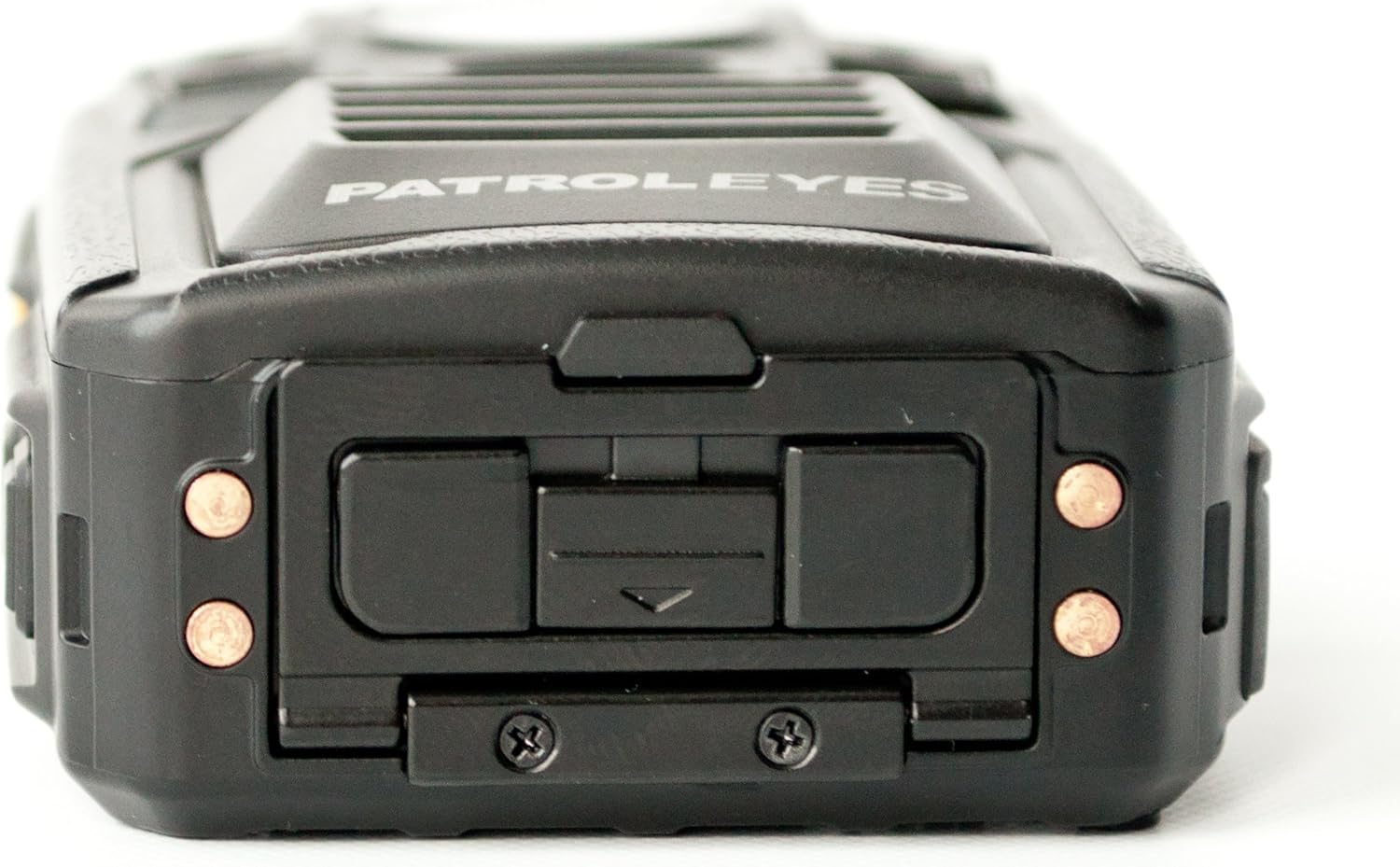
รูปที่ 3.4: สูงสุด view of the PatrolEyes PE-DV5-2 body camera, displaying the GPS indicator light and other top-mounted features.

รูปที่ 3.5: ด้านล่าง view of the PatrolEyes PE-DV5-2 body camera, revealing the charging contacts designed for use with a docking station.
4. การเริ่มต้น
4.1. การชาร์จแบตเตอรี่
Before first use, fully charge the camera's battery. The camera comes with a rechargeable battery.
- Connect the USB charging cable to the camera's USB port.
- Plug the other end of the USB cable into the wall charger and then into a power outlet.
- The charging indicator light will illuminate. It will change color or turn off once charging is complete.
Alternatively, use a compatible docking station (sold separately) for charging.
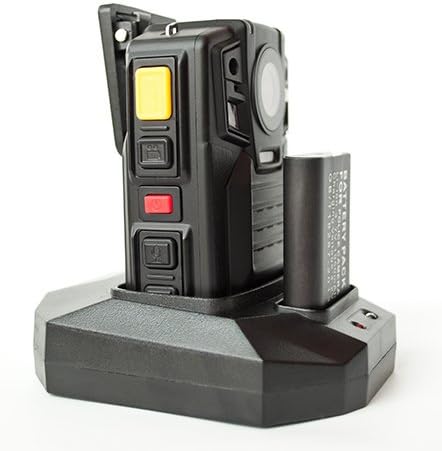
รูปที่ 4.1: The PatrolEyes body camera securely placed in its docking station, which also features a dedicated slot for charging an additional battery pack.

รูปที่ 4.2: หลัง view of the PatrolEyes docking station, clearly showing the power input port and the USB data port for connecting to a computer.
4.2. การเปิด/ปิดเครื่อง
- การเปิดเครื่อง: Press and hold the Power button for a few seconds until the device vibrates and the indicator lights turn on.
- วิธีปิดเครื่อง: Press and hold the Power button until the device vibrates and the indicator lights turn off.
4.3. Attaching the Mounting Clip
Attach the provided mounting clip to the back of the camera. This allows you to securely fasten the camera to your uniform or gear.
5. การใช้งานกล้อง
5.1. การบันทึกวิดีโอ
The camera supports video capture resolutions of 1080p, 480p, and 720p.
- ตรวจสอบให้แน่ใจว่ากล้องเปิดอยู่
- กดปุ่มเฉพาะ ปุ่มบันทึก (often red) once to start video recording. The recording indicator light will flash.
- กดปุ่ม ปุ่มบันทึก again to stop recording. The indicator light will stop flashing.
5.2.การถ่ายภาพ
The camera has an effective still resolution of 33 MP.
- While in standby mode or during video recording, press the ปุ่มรูปภาพ once to capture a still image.
5.3. กล้องมองกลางคืน (อินฟราเรด)
The camera features auto IR night vision with a range of 30 feet, utilizing infrared light sources.
- The camera is equipped with automatic infrared (IR) activation. In low-light conditions, the IR lights will automatically turn on to provide clear night vision footage.
5.4. ฟังก์ชัน GPS
The integrated GPS module automatically records location data with your video footage. Ensure the camera has a clear view ของท้องฟ้าเพื่อการรับสัญญาณ GPS ที่ดีที่สุด
5.5. การเล่น
คุณสามารถกลับมาใหม่ได้view บันทึกวิดีโอและภาพถ่ายโดยตรงบนหน้าจอของกล้อง
- Enter Playback mode via the menu or a dedicated button (refer to on-screen prompts).
- นำทางผ่าน files using the directional buttons.
- Press the OK/Select button to play a video or view รูปภาพ.
5.6. การเชื่อมต่อกับคอมพิวเตอร์
การถ่ายโอน fileเชื่อมต่อกล้องเข้ากับคอมพิวเตอร์โดยใช้สาย USB ที่ให้มา
- เปิดกล้อง
- เชื่อมต่อกล้องเข้ากับคอมพิวเตอร์โดยใช้สาย USB
- กล้องจะปรากฏเป็นไดรฟ์ดิสก์แบบถอดได้บนคอมพิวเตอร์ของคุณ
- You can now access and transfer video and photo files.
6. การบำรุงรักษาและการดูแล
6.1. การทำความสะอาด
- เช็ดตัวกล้องด้วยผ้านุ่มๆamp ผ้า. อย่าใช้สารเคมีที่รุนแรงหรือน้ำยาทำความสะอาดที่มีฤทธิ์กัดกร่อน
- สำหรับเลนส์ ให้ใช้ผ้าเช็ดเลนส์และน้ำยาเฉพาะทางเพื่อป้องกันรอยขีดข่วน
6.2. การจัดเก็บ
- เก็บกล้องไว้ในที่แห้งและเย็น หลีกเลี่ยงแสงแดดโดยตรงและอุณหภูมิที่สูงหรือต่ำเกินไป
- Ensure the battery is partially charged (around 50%) if storing for extended periods to preserve battery life.
6.3. การดูแลแบตเตอรี่
- หลีกเลี่ยงการปล่อยแบตเตอรี่จนหมดบ่อยครั้ง
- Use only the original or approved charging accessories.
7 การแก้ไขปัญหา
| ปัญหา | สาเหตุที่เป็นไปได้ | สารละลาย |
|---|---|---|
| กล้องไม่สามารถเปิดได้ | แบตเตอรี่มีประจุต่ำหรือไม่มีเลย | ชาร์จแบตเตอรี่ให้เต็ม |
| ไม่สามารถบันทึกวีดีโอ/ถ่ายภาพได้ | Storage full. | โอนย้าย files to a computer and delete them from the camera. |
| คุณภาพวิดีโอ/ภาพไม่ดี | Dirty lens; low light conditions. | Clean the lens; ensure IR is active in low light. |
| GPS ไม่สามารถรับสัญญาณได้ | ถูกขัดขวาง view of sky; indoor use. | ย้ายไปยังพื้นที่เปิดโล่งกลางแจ้ง |
| คอมพิวเตอร์ไม่รู้จักกล้อง | Faulty USB cable; driver issue. | Try a different USB port/cable; ensure camera is powered on. |
8. ข้อมูลจำเพาะ
| คุณสมบัติ | รายละเอียด |
|---|---|
| หมายเลขรุ่น | PE-DV5-2 |
| ความละเอียดในการจับภาพวิดีโอ | 1080p, 480p, 720p |
| ความละเอียดของภาพนิ่งที่มีประสิทธิภาพ | 33 MP |
| อัตราเฟรม | 30 เฟรมต่อวินาที |
| ช่วงการมองเห็นตอนกลางคืน | 30 ฟุต |
| เทคโนโลยีการเชื่อมต่อ | ไร้สาย (Wi-Fi) |
| แหล่งพลังงาน | ใช้พลังงานจากแบตเตอรี่ |
| ส่วนประกอบที่รวมอยู่ | แบตเตอรี่ |
| การให้คะแนนการคุ้มครองระหว่างประเทศ | IP54 |
| คุณสมบัติพิเศษ | เซ็นเซอร์ตรวจจับความเคลื่อนไหว, ระบบมองเห็นในเวลากลางคืน |
| การใช้งานภายใน/ภายนอกอาคาร | ในร่ม, กลางแจ้ง |
| ผู้ผลิต | ตระเวนตา |
| วันที่พร้อมใช้งานครั้งแรก | 14 พฤษภาคม 2017 |
9. ข้อมูลการรับประกัน
PatrolEyes products typically come with a limited manufacturer's warranty. Please refer to the warranty card included with your purchase or visit the official PatrolEyes webดูรายละเอียดข้อกำหนดและเงื่อนไขการรับประกันได้ที่เว็บไซต์ เก็บหลักฐานการซื้อไว้เพื่อใช้ในการเรียกร้องการรับประกัน
10. การสนับสนุนลูกค้า
For technical assistance, troubleshooting beyond this manual, or inquiries about your PatrolEyes PE-DV5-2 body camera, please contact PatrolEyes customer support. Contact information can typically be found on the manufacturer's webไซต์หรือบนบรรจุภัณฑ์ผลิตภัณฑ์
แหล่งข้อมูลออนไลน์: Visit the official PatrolEyes webไซต์สำหรับคำถามที่พบบ่อย การอัปเดตซอฟต์แวร์ และเอกสารสนับสนุนเพิ่มเติม


