1. บทนำ
Thank you for choosing the HTC USB Type-C Hi-Res Earphones, Model 99H20317-00. These earphones are designed to provide a high-quality audio experience with their advanced features and ergonomic design. This manual provides essential information for the proper setup, operation, maintenance, and troubleshooting of your new earphones.
คุณสมบัติที่สำคัญ ได้แก่:
- Concert hall design for unparalleled sound.
- Larger 13mm speakers for a fuller sound profile.
- Enhanced port optimization for improved bass reproduction.
- Lighter and thinner aerospace polymer diaphragm to increase sound frequency response.
- Ergonomic design for maximum comfort during extended use.
2. ข้อมูลด้านความปลอดภัย
Please read and follow these safety guidelines to ensure safe and optimal use of your earphones:
- การป้องกันการได้ยิน: หลีกเลี่ยงการฟังในระดับเสียงที่ดังเป็นเวลานานเพื่อป้องกันความเสียหายต่อการได้ยิน
- ความตระหนักด้านสิ่งแวดล้อม: อย่าใช้หูฟังในสถานการณ์ที่การไม่ได้ยินเสียงรอบข้างอาจเป็นอันตราย เช่น ขณะขับรถ ปั่นจักรยาน หรือเดินในที่ที่มีการจราจรหนาแน่น
- การทำความสะอาด: Clean the earphones regularly with a soft, dry cloth. Do not use liquid cleaners or solvents.
- การสัมผัสน้ำ: หูฟังเหล่านี้ไม่กันน้ำ โปรดหลีกเลี่ยงการสัมผัสกับน้ำหรือความชื้นมากเกินไป
- เด็ก: เก็บให้พ้นมือเด็กเล็ก เนื่องจากมีชิ้นส่วนเล็กๆ ที่อาจเป็นอันตรายจากการสำลักได้
3. เนื้อหาบรรจุภัณฑ์
ตรวจสอบว่ามีรายการทั้งหมดอยู่ในแพ็คเกจของคุณ:
- HTC USB Type-C Hi-Res Earphones (Model: 99H20317-00)
- จุกหูฟังสำรอง (หากมีมาให้)
- คู่มือการใช้งาน (เอกสารนี้)
4. การตั้งค่า
These earphones are designed for simple plug-and-play operation.
- เชื่อมต่อ: Insert the USB Type-C connector of the earphones into the USB Type-C port of your compatible device (Smartphone, Laptop, Tablet).
- การรับรู้อุปกรณ์: Your device should automatically recognize the earphones. If prompted, select the earphones as the audio output device.
- ปรับระดับเสียง: Begin playback at a low volume and gradually increase to a comfortable listening level.
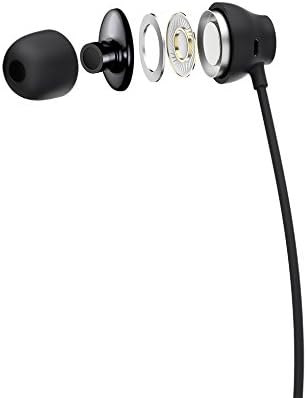
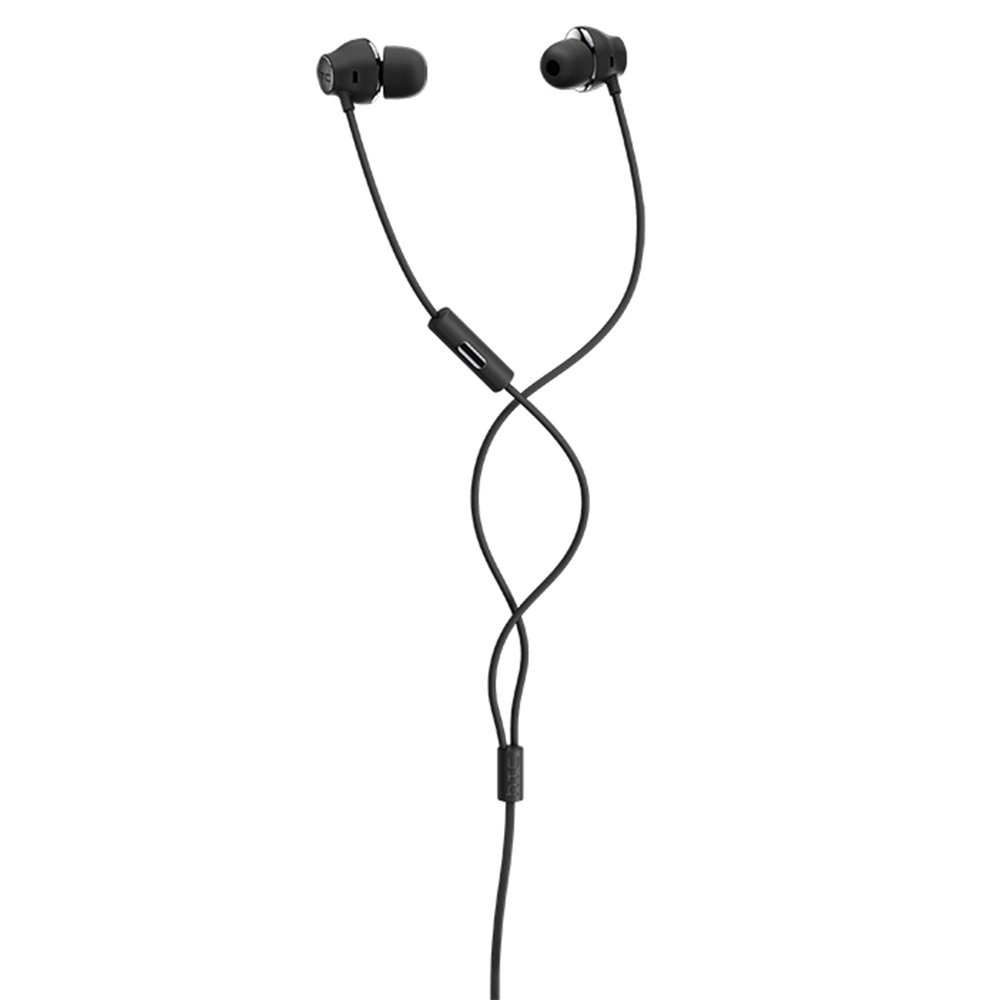
Figure 1: HTC USB Type-C Hi-Res Earphones connected to a device.
5. คู่มือการใช้งาน
Once connected, your earphones are ready for use.
- การเล่นเสียง: Play audio from your connected device. The sound will be routed through the earphones.
- การจัดการการโทร: For devices supporting call functions, you can typically answer/end calls using the device's interface.
- การควบคุมแอพ: This model supports control via an application. Refer to your device's app store for any official HTC audio control applications that may offer additional features or sound customization.
6. การบำรุงรักษาและการดูแล
Proper care extends the lifespan of your earphones:
- การทำความสะอาดจุกหู: Gently remove ear tips and clean them with a mild soap solution and water. Ensure they are completely dry before reattaching.
- การทำความสะอาดตัวหูฟัง: Wipe the earphone body and cable with a soft, dry, lint-free cloth. Do not use abrasive materials or harsh chemicals.
- พื้นที่จัดเก็บ: When not in use, store the earphones in a clean, dry place, preferably in a protective pouch to prevent tangling and damage.
- การจัดการสายเคเบิล: Avoid tightly winding the cable or subjecting it to sharp bends, which can damage internal wires.
รูปที่ 2: ระเบิด view of earphone components, highlighting the 13mm speaker and aerospace polymer diaphragm.
7 การแก้ไขปัญหา
หากคุณพบปัญหา โปรดดูปัญหาทั่วไปและวิธีแก้ไขต่อไปนี้:
| ปัญหา | สาเหตุที่เป็นไปได้ | สารละลาย |
|---|---|---|
| ไม่มีเสียง | Earphones not properly connected; device volume too low; incorrect audio output selected on device. | Ensure the USB Type-C connector is fully inserted. Increase device volume. Check device audio settings to confirm earphones are selected as output. |
| คุณภาพเสียงไม่ดี | Dirty ear tips; damaged cable; low-quality audio source. | Clean ear tips. Inspect the cable for visible damage. Try a different audio source or file. |
| Earphones uncomfortable or fall out | ขนาดจุกหูฟังไม่ถูกต้อง | Try different sized ear tips (if provided) to find the best fit for your ears. |
8. ข้อมูลจำเพาะ
| คุณสมบัติ | รายละเอียด |
|---|---|
| ยี่ห้อ | เอชทีซี |
| หมายเลขรุ่น | 99H20317-00 |
| เทคโนโลยีการเชื่อมต่อ | แบบมีสาย (USB Type-C) |
| ขนาดลำโพง | 13 มม. |
| วัสดุ | Synthetic leather (ear tips/housing accents) |
| น้ำหนัก | 50 กรัม |
| ขนาดสินค้า | 0.1 x 0.1 x 0.1 cm (packaging/shipping dimensions, actual earphone size is compact) |
| วิธีการควบคุม | แอป |
| รองรับบลูทูธ | เลขที่ |
| แบตเตอรี่ที่จำเป็น | เลขที่ |
| อุปกรณ์ที่รองรับ | Smartphone, Laptop, Tablet with USB Type-C audio output |
| สี | สีเทาเข้ม |
| การวางตำแหน่งหู | อินเอียร์ |
9. การรับประกันและการสนับสนุน
For warranty information and technical support, please refer to the documentation provided with your purchase or visit the official HTC support webไซต์นี้ โปรดเก็บหลักฐานการซื้อไว้เพื่อใช้ยืนยันการรับประกัน


