1. บทนำ
Thank you for choosing the Safety 1st Touch LED Nightlight HS-202. This manual provides essential information for the safe and effective use of your nightlight. Please read it thoroughly before use and retain it for future reference.
2. ข้อมูลด้านความปลอดภัย
- สำหรับใช้ภายในอาคารเท่านั้น
- Do not immerse in water or expose to excessive moisture.
- Always plug the nightlight directly into a wall outlet. Do not use with extension cords or power strips.
- เก็บให้ห่างจากวัสดุไวไฟ.
- The LED light source is designed to be long-lasting and energy-efficient. It remains cool to the touch, making it safe for use in children's rooms.
- Do not attempt to disassemble or repair the unit. Contact customer support if service is required.
3. เนื้อหาบรรจุภัณฑ์
- 2 x Safety 1st Touch LED Nightlight HS-202
4. คุณสมบัติของผลิตภัณฑ์
- Auto-Sensor Technology: Automatically turns on at dusk and off at dawn, or when ambient light is detected.
- ไฟ LED ประหยัดพลังงาน: Provides soft illumination with minimal power consumption.
- สัมผัสเย็นสบาย: Safe for use in any room, including nurseries.
- การออกแบบที่กะทัดรัด: Plugs directly into a standard wall outlet without obstructing the second receptacle.
5. การตั้งค่าและการติดตั้ง
- Unpack the nightlight from its packaging.
- Locate a standard 120V AC wall outlet in the desired area.
- Plug the nightlight directly into the wall outlet. Ensure it is securely seated.
- The nightlight will automatically activate when the ambient light level is low.
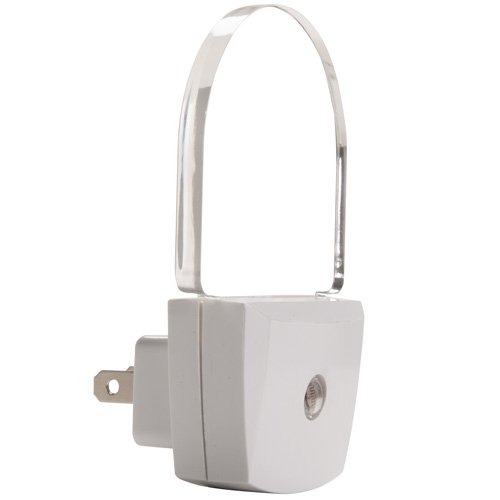
Figure 1: Safety 1st Touch LED Nightlight HS-202 plugged into an outlet. This image shows the compact design of the nightlight, which plugs directly into a standard wall outlet and features a clear, arched light diffuser.
6. การดำเนินการ
The Safety 1st Touch LED Nightlight HS-202 is equipped with an integrated light sensor. It operates automatically:
- The nightlight will turn ON when the surrounding area becomes dark.
- The nightlight will turn ปิด when sufficient ambient light is detected.
No manual switching is required. For optimal performance, ensure the light sensor (small circle on the front of the unit) is not obstructed.
7. การบำรุงรักษา
To clean your nightlight, simply wipe the surface with a soft, dry cloth. Do not use abrasive cleaners or immerse the unit in water.
8 การแก้ไขปัญหา
- Nightlight does not turn on:
- Ensure the nightlight is securely plugged into a working outlet.
- Check if the room is sufficiently dark for the auto-sensor to activate. Cover the sensor briefly to test.
- Verify there are no obstructions covering the light sensor.
- Nightlight stays on during the day:
- Ensure the light sensor is not obstructed or located in a consistently dark area.
If problems persist, please contact Safety 1st customer support.
9. ข้อมูลจำเพาะ
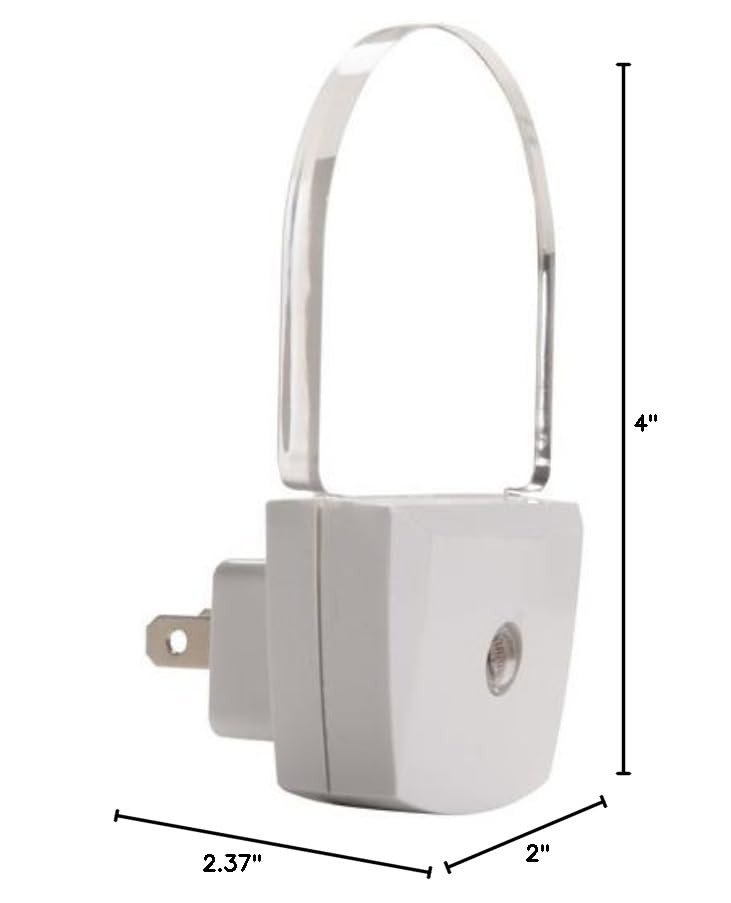
Figure 2: Dimensions of Safety 1st Touch LED Nightlight HS-202. This diagram illustrates the physical measurements of the nightlight, showing its depth, width, and height for proper placement.
| คุณสมบัติ | รายละเอียด |
|---|---|
| ยี่ห้อ | ความปลอดภัยต้องมาก่อน |
| หมายเลขรุ่น | HS202 |
| ประเภทแหล่งกำเนิดแสง | นำ |
| วิธีการควบคุม | Touch (Auto-Sensor) |
| เทคโนโลยีเซ็นเซอร์ | อินฟราเรดแบบพาสซีฟ (PIR) |
| สี | สีขาว |
| วัสดุ | พลาสติก |
| ประเภทการเสร็จสิ้น | แมทต์ |
| ขนาดสินค้า | ลึก 2 นิ้ว x กว้าง 2.37 นิ้ว x สูง 4 นิ้ว |
| น้ำหนักสินค้า | 3.84 ออนซ์ |
| แหล่งพลังงาน | USB (Note: Product plugs into AC outlet, USB likely refers to internal power conversion) |
| เล่มที่tage | 5 โวลต์ (กระแสตรง) |
| จำนวนรายการ | 2 |
| การใช้งานภายใน/ภายนอกอาคาร | ในร่ม |
| ระดับความต้านทานต่อน้ำ | ไม่ทนน้ำ |
| แบตเตอรี่ที่จำเป็น | เลขที่ |
| ส่วนประกอบที่รวมอยู่ | Remote Control (Note: This may be an error in source data as nightlights typically do not include remotes) |
10. การรับประกันและการสนับสนุน
For warranty information or customer support, please refer to the documentation included with your purchase or visit the official Safety 1st website. You can also contact their customer service department for assistance with product inquiries, troubleshooting, or replacement parts.


