สินค้าเกินview
The Zoom AC-2 Acoustic Creator Pedal is a direct box designed to restore the natural tone of your acoustic guitar. It features instrument modeling, a 3-band equalizer, boost function, tuner, and reverb effects. This pedal is engineered to enhance the sound of acoustic-electric guitars, providing a rich and resonant output suitable for various performance and recording environments.
คุณสมบัติที่สำคัญ ได้แก่:
- 16 source guitar type/body presets for accurate tone reproduction.
- ปรีคุณภาพสูงamp and reverb effect.
- Piezo/magnetic input pickup selector.
- 3-band equalizer for precise tone shaping.
- Adjustable input and output gain/sensitivity via a single volume knob.
- Anti-feedback control.
- Built-in chromatic visual-LED tuner.
- Boost switch for up to 9 dB of additional gain.
เนื้อหาแพ็คเกจ
ตรวจสอบว่ามีรายการต่อไปนี้อยู่ในแพ็คเกจของคุณ:
- Zoom AC-2 Acoustic Creator Pedal
- AC Adapter (Zoom AD-16)
- คู่มือการใช้งาน
หากมีสินค้าใดขาดหายหรือเสียหาย โปรดติดต่อผู้ค้าปลีกของคุณ
การควบคุมและฟังก์ชั่น
Familiarize yourself with the various controls and their functions on the AC-2 pedal.
แผงควบคุมด้านบน

ภาพ: ด้านบน view of the Zoom AC-2 Acoustic Creator Pedal, highlighting the main controls and input/output jacks.
- SOURCE GUITAR Knob: Selects one of 16 guitar body types/presets to accurately reproduce the acoustic tone. Rotate to choose between Dreadnought, Round Shoulder, Square Shoulder, Jumbo, Parlor, Single Cutaway, Resonator, Upright Bass, Mold, Nylon Strings, Orchestra, Triple O, Double O, YMH, Silent, and 12 Strings.
- ปุ่ม REVERB: Adjusts the level of the reverb effect applied to the output signal.
- ปุ่มปรับระดับเสียง: Controls the overall output volume of the pedal. This knob also adjusts input gain.
- EQUALIZER (BASS, MIDDLE, TREBLE) Knobs: Adjusts the low, mid, and high frequencies of your guitar's tone.
- PICKUP Switch (PIEZO/OFF/MAGNETIC): Selects the type of pickup connected to the input. Choose PIEZO for piezo pickups, MAGNETIC for magnetic pickups, or OFF to bypass the pickup type processing.
- ปุ่ม BOOST: Controls the amount of gain added when the BOOST footswitch is engaged.
- ANTI F.B. (Anti-Feedback) Button: Activates the anti-feedback function to suppress unwanted feedback.
- TUNER Display: Shows the note being played and indicates whether it is sharp, flat, or in tune.
- ไฟ LED: ระบุสถานะพลังงานของเครื่อง
- TUNER [MUTE] Footswitch: Toggles the tuner on/off. When the tuner is on, the output is muted.
- บูสต์สวิตช์เท้า: Engages or disengages the boost function, providing additional gain for solos or emphasis.
Side and Rear Panel Connections

ภาพ: ด้านซ้าย view of the Zoom AC-2, showing the 1/4" mono output and headphone output.
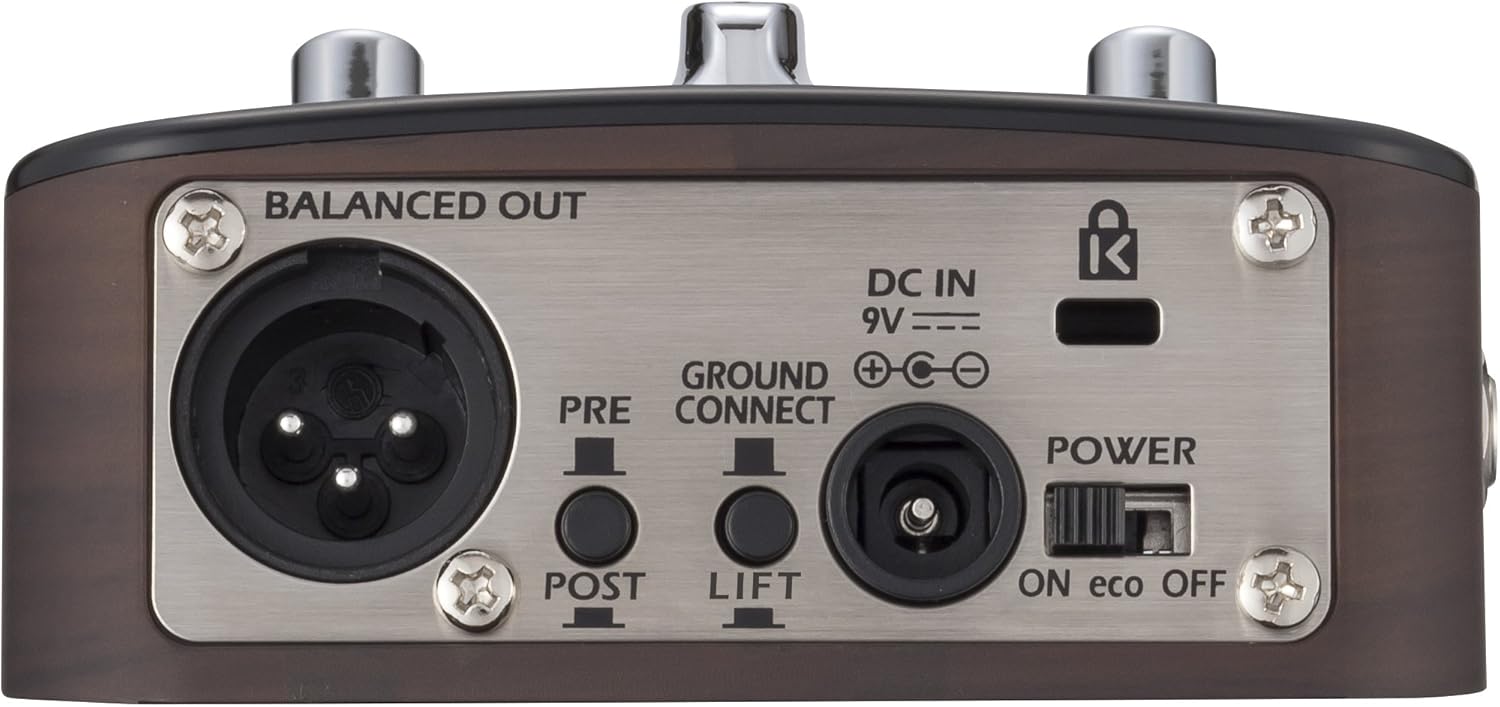
Image: Rear panel of the Zoom AC-2, detailing the balanced XLR output, DC power input, ground lift switch, and power switch.
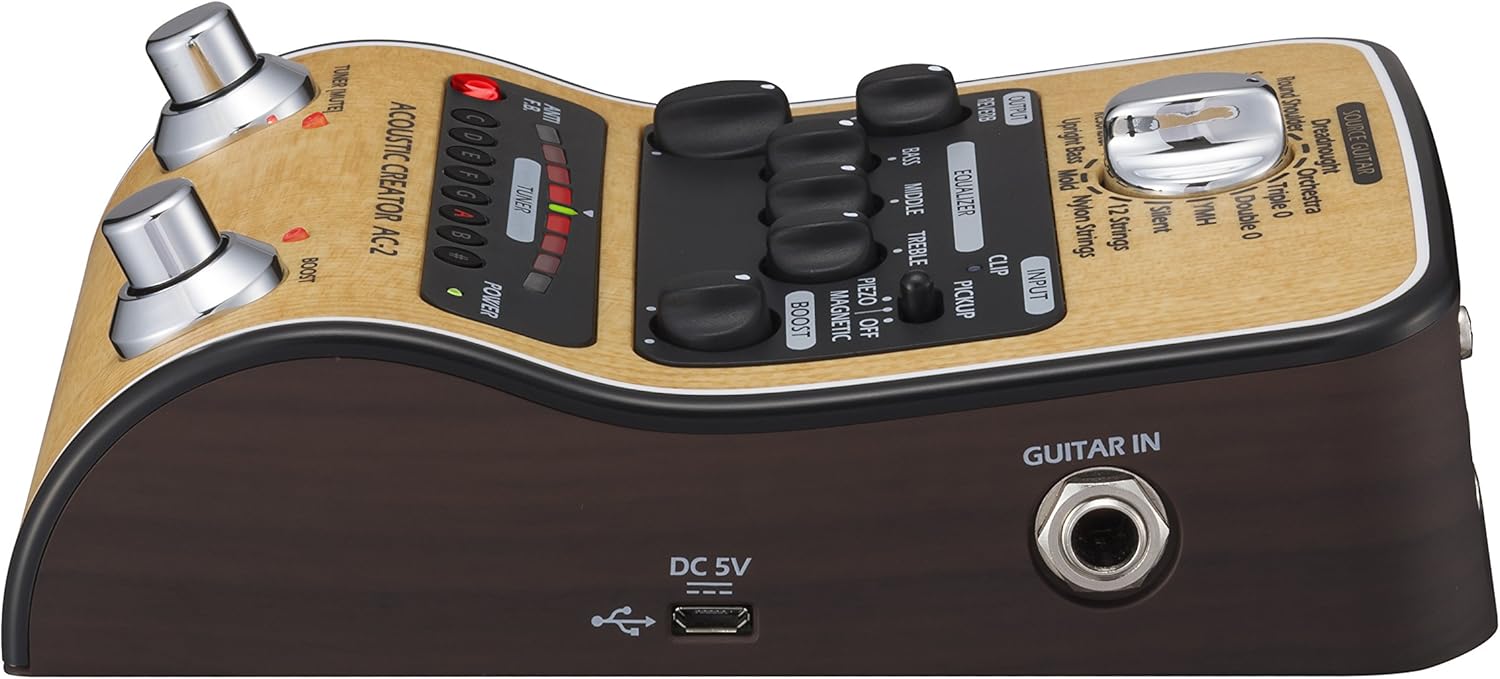
ภาพ: ด้านขวา view of the Zoom AC-2, showing the 1/4" guitar input and micro-USB port.
- GUITAR IN Jack: 1/4" mono input for connecting your acoustic-electric guitar.
- OUTPUT 1/MONO Jack: ช่องต่อเอาต์พุตโมโนขนาด 1/4 นิ้ว สำหรับเชื่อมต่อกับ... ampเครื่องเสียงหรือเครื่องเสียงอื่นๆ
- แจ็คโทรศัพท์: ช่องต่อหูฟังแบบสเตอริโอขนาด 1/4 นิ้ว
- BALANCED OUT (XLR) Jack: Balanced XLR output for connecting to a PA system or mixing console. Includes PRE/POST switch for sending signal before or after effects, and a GROUND LIFT switch to eliminate hum.
- กระแสตรงใน 9V: Power input for the optional Zoom AD-16 AC adapter.
- สวิตช์เพาเวอร์: Turns the unit on or off. The "eco" setting conserves battery life.
- พอร์ต USB: Micro-USB port for firmware updates.
การตั้งค่าและการเชื่อมต่อ
Follow these steps to set up your AC-2 pedal:
- แหล่งจ่ายไฟ: Connect the Zoom AD-16 AC adapter to the DC IN 9V jack. Alternatively, insert 4 AA batteries into the battery compartment on the underside of the unit.
- การเชื่อมต่อกีตาร์: Connect your acoustic-electric guitar to the GUITAR IN jack using a standard 1/4" instrument cable.
- การเชื่อมต่อเอาท์พุต:
- สำหรับ amplifier or other instrument input: Connect the OUTPUT 1/MONO jack to your amplifier using a 1/4" instrument cable.
- For a PA system or mixing console: Connect the BALANCED OUT (XLR) jack to the mixer using an XLR cable. Ensure the PRE/POST switch is set according to your preference (PRE for signal before effects, POST for signal after effects). Use the GROUND LIFT switch if you experience hum.
- For headphones: Connect headphones to the PHONES jack.
- เปิดเครื่อง: Set the POWER switch to the ON position. The POWER LED will illuminate.
การทำงานพื้นฐาน
- Select Pickup Type: Set the PICKUP switch to match your guitar's pickup type (PIEZO or MAGNETIC).
- Select Source Guitar: Rotate the SOURCE GUITAR knob to choose the desired acoustic guitar body type preset. Experiment with different settings to find the best match for your instrument and desired tone.
- ปรับระดับเสียง: Start with the VOLUME knob at a low setting and gradually increase it to a comfortable listening level. This knob also influences the input gain, so adjust it to prevent clipping (indicated by the CLIP LED).
- Shape Your Tone: Use the BASS, MIDDLE, and TREBLE knobs in the EQUALIZER section to fine-tune your sound.
- Add Reverb: Turn the REVERB knob clockwise to add more reverb to your sound.
- Use the Tuner: Press the TUNER [MUTE] footswitch to activate the tuner. The output will be muted. Tune your guitar using the visual display. Press the footswitch again to exit tuner mode and unmute the output.
- Engage Boost: Press the BOOST footswitch to activate the boost function. Adjust the BOOST knob to set the desired gain level for solos or emphasis.
- Anti-Feedback: If you experience feedback, press the ANTI F.B. button. This will engage a feedback suppression circuit.
วิดีโอสาธิต
วิดีโอ: จบแล้วview demonstrating the features and sound capabilities of the Zoom AC-2 and AC-3 Acoustic Creator pedals. This video highlights the various guitar models and effects available.
การซ่อมบำรุง
To ensure the longevity and optimal performance of your AC-2 pedal, follow these maintenance guidelines:
- การทำความสะอาด: ใช้ผ้านุ่มและแห้งเช็ดทำความสะอาดภายนอกตัวเครื่อง ห้ามใช้น้ำยาทำความสะอาดที่มีฤทธิ์กัดกร่อน แว็กซ์ หรือตัวทำละลาย
- พื้นที่จัดเก็บ: เก็บแป้นเหยียบไว้ในที่แห้งและเย็น หลีกเลี่ยงแสงแดดโดยตรง อุณหภูมิที่สูงหรือต่ำเกินไป และความชื้นสูง
- การเปลี่ยนแบตเตอรี่: If using batteries, replace them when the POWER LED dims or the unit stops functioning correctly. Always replace all batteries at the same time with new ones of the same type. Remove batteries if the unit will not be used for an extended period.
- การเชื่อมต่อ: Periodically check all cable connections for wear and tear. Use high-quality cables to prevent signal loss or interference.
การแก้ไขปัญหา
If you encounter issues with your AC-2 pedal, refer to the following common problems and solutions:
| ปัญหา | สาเหตุที่เป็นไปได้ | สารละลาย |
|---|---|---|
| ไม่มีเสียงหรือเสียงเบา |
|
|
| เสียงเพี้ยน |
|
|
| ฮัมหรือเสียงรบกวน |
|
|
| จูนเนอร์ใช้งานไม่ได้ |
|
|
ข้อมูลจำเพาะ
| คุณสมบัติ | รายละเอียด |
|---|---|
| หมายเลขรุ่น | เอซี-2 |
| น้ำหนักสินค้า | 1.35 ปอนด์ |
| ขนาดสินค้า | 6.13 x 1.5 x 4 นิ้ว |
| แบตเตอรี่ | ต้องใช้แบตเตอรี่ AA 4 ก้อน (แนะนำให้ใช้แบตเตอรี่อัลคาไลน์) |
| ฮาร์ดแวร์อินเตอร์เฟซ | ยูเอสบี |
| รูปแบบสัญญาณ | อนาล็อก |
| ประเภทวัสดุ | สแตนเลส |
| แหล่งพลังงาน | Battery Powered / AC Adapter (9V) |
| เล่มที่tage | 9 โวลต์ |
การรับประกันและการสนับสนุน
For warranty information, product registration, and technical support, please visit the official Zoom webดูรายละเอียดเพิ่มเติมได้ที่เว็บไซต์หรือติดต่อตัวแทนจำหน่าย Zoom ในพื้นที่ของคุณ เก็บใบเสร็จรับเงินไว้เป็นหลักฐานการซื้อสำหรับการเคลมประกัน
คุณสามารถค้นหาข้อมูลเพิ่มเติมและทรัพยากรสนับสนุนได้ที่ ร้าน Zoom บน Amazon.


