การแนะนำ
The CHUANGO G5 Plus is an advanced GSM/SMS/RFID Touch Alarm System designed to provide comprehensive security for your home or business. This system builds upon the proven G5 platform with enhanced features, including an anti-jamming function for increased reliability.
This manual provides detailed instructions for setting up, operating, and maintaining your CHUANGO G5 Plus alarm system, ensuring optimal performance and security.

Image: The complete CHUANGO G5 Plus alarm system kit, including the main control panel, power adapter, two RFID tags, two remote controls, two door/window sensors, and one PIR motion sensor.
การตั้งค่า
1. การแกะกล่องและส่วนประกอบ
Carefully unpack all items and verify that all components are present:
- แผงควบคุมหลัก
- อะแดปเตอร์แปลงไฟ
- 2 x อาร์เอฟไอดี Tags
- รีโมทคอนโทรลไร้สาย 2 อัน
- เซ็นเซอร์ประตู/หน้าต่าง 2 ตัว
- เซ็นเซอร์ตรวจจับความเคลื่อนไหว PIR 1 ตัว

Image: The retail packaging box for the CHUANGO G5 Plus alarm system, indicating "Plug & Play Alarm System" and "No Monthly Fees".
2. การติดตั้งซิมการ์ด
The G5 Plus system requires a standard GSM SIM card for SMS notifications and calls. Before inserting, ensure the SIM card's PIN code is disabled. This can typically be done using a mobile phone.
- Locate the SIM card slot on the back of the main control panel.
- Insert the prepared SIM card into the slot until it clicks into place.

ภาพ: ด้านหลัง view of the CHUANGO G5 Plus control panel, showing the power input, mounting holes, and the SIM card slot area. Model: G5 Plus, S/N: G1381314B00139.

ภาพ: อีกภาพหนึ่ง view of the rear of the CHUANGO G5 Plus control panel, highlighting the product label with specifications and a QR code. Model: G5 Plus, S/N: G1380924200219.
3. เปิดเครื่อง
Connect the power adapter to the main control panel and plug it into a wall outlet. The panel will power on and initiate its startup sequence.
4. Sensor and Accessory Pairing
The included sensors, RFID tags, and remote controls are typically pre-paired with the main panel. If you need to add new accessories or re-pair existing ones, follow the instructions in the system's detailed manual (not provided here, but generally involves putting the panel in learning mode and triggering the sensor/accessory).

Image: A white passive infrared (PIR) motion sensor, a common accessory for the alarm system.

Image: Two black RFID key tags with keyrings, used for convenient arming and disarming of the alarm system by tapping them on the control panel.
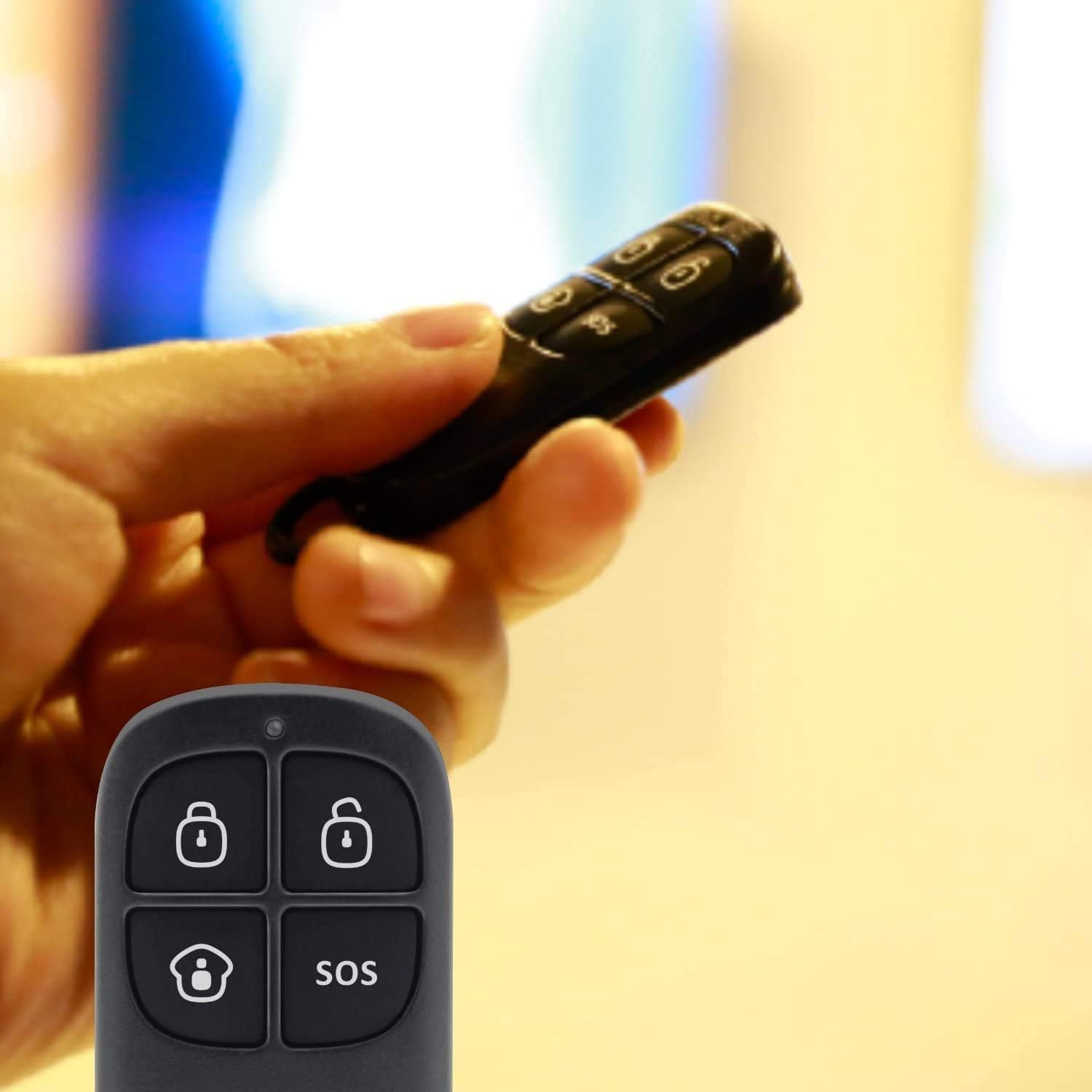
Image: A hand holding one of the black wireless remote controls for the CHUANGO G5 Plus, showing buttons for arming, disarming, home arming, and SOS.
การใช้งานระบบ
ติดอาวุธและปลดอาวุธ
The CHUANGO G5 Plus offers multiple methods for arming and disarming the system:
- ปุ่มกด: Enter your user code on the control panel's touch keypad.
- รีโมทคอนโทรล: Use the dedicated arm/disarm buttons on the wireless remote.
- อาร์เอฟไอดี Tag: Tap a registered RFID tag on the designated area of the control panel.
- คำสั่ง SMS: Send specific SMS commands from a registered phone number to the SIM card in the panel.
- แอปมือถือ: Utilize the dedicated mobile application (available for iOS and Android) which sends SMS commands in the background.

ภาพ: ภาพระยะใกล้ view of the CHUANGO G5 Plus control panel's touch keypad, showing the numerical keys and function icons for arming, disarming, and home mode.
Anti-Jamming Function
The G5 Plus features an anti-jamming function. If the system detects an attempt to disrupt its wireless communication with sensors using interference frequencies, it will automatically trigger an alarm and notify the owner via SMS. This proactive measure helps prevent sophisticated break-ins.
การแจ้งเตือนทาง SMS
The system sends SMS notifications for various events, including:
- Alarm triggers (specifying the zone).
- พลังแห่งโอtagและการบูรณะ
- Low battery warnings for sensors.
- เมื่อมีอาร์เอฟไอดี tag is used (if configured to notify).
การซ่อมบำรุง
การเปลี่ยนแบตเตอรี่
Sensors and remote controls are powered by batteries. When a low battery warning is received via SMS, replace the batteries promptly to ensure continuous protection. Refer to the specific sensor's manual for battery type and replacement instructions.
การทำความสะอาด
Wipe the control panel and sensors with a soft, dry cloth. Avoid using abrasive cleaners or solvents that could damage the surfaces.
การแก้ไขปัญหา
สัญญาณเตือนไม่ทำงาน
- Ensure the system is fully armed (not in partial arm mode if the affected zone is excluded).
- ตรวจสอบแบตเตอรี่ของเซ็นเซอร์
- Verify sensor placement and ensure they are within range of the main panel.
SMS Notifications Not Received
- Confirm the SIM card in the panel has sufficient credit/data and is active.
- Ensure the SIM card's PIN code is disabled.
- Check the GSM signal strength indicator on the control panel.
- Verify that your phone number is correctly registered in the alarm system's settings.
Power Loss Notifications
The system has a backup battery. If you receive a power loss notification, it indicates the main power supply to the panel has been interrupted. The system will continue to operate on its internal battery for approximately 16 hours.
ข้อมูลจำเพาะ
| คุณสมบัติ | รายละเอียด |
|---|---|
| แบบอย่าง | 1 (G5 Plus) |
| ขนาดสินค้า | 14 x 21 x 9 ซม. |
| น้ำหนักสินค้า | 880 กรัม |
| ผู้ผลิต | ชวงโก |
| แบตเตอรี่ | ต้องใช้แบตเตอรี่ลิเธียมไอออน 1 ก้อน (รวมอยู่ด้วย) |
| แหล่งพลังงาน | Electric with cable |
| อุปกรณ์ที่รองรับ | สมาร์ทโฟน |
| สี | สีขาว |
การรับประกันและการสนับสนุน
For warranty information and technical support, please refer to the documentation provided with your purchase or contact your retailer. You may also visit the official Chuango webเว็บไซต์นี้เป็นแหล่งข้อมูลเพิ่มเติมและแหล่งข้อมูลที่อัปเดตแล้ว
Keep your purchase receipt and product serial number (found on the back of the main panel) handy when contacting support.