การแนะนำ
This manual provides instructions for the proper use and care of your Helios 77M-4 50mm F1.8 vintage lens. Designed for Sony E-mount cameras, this manual focus lens offers a classic photographic experience with its distinct optical characteristics. Please read this manual thoroughly before using the lens to ensure optimal performance and longevity.
ส่วนประกอบเลนส์
Familiarize yourself with the main components of your Helios 77M-4 lens.
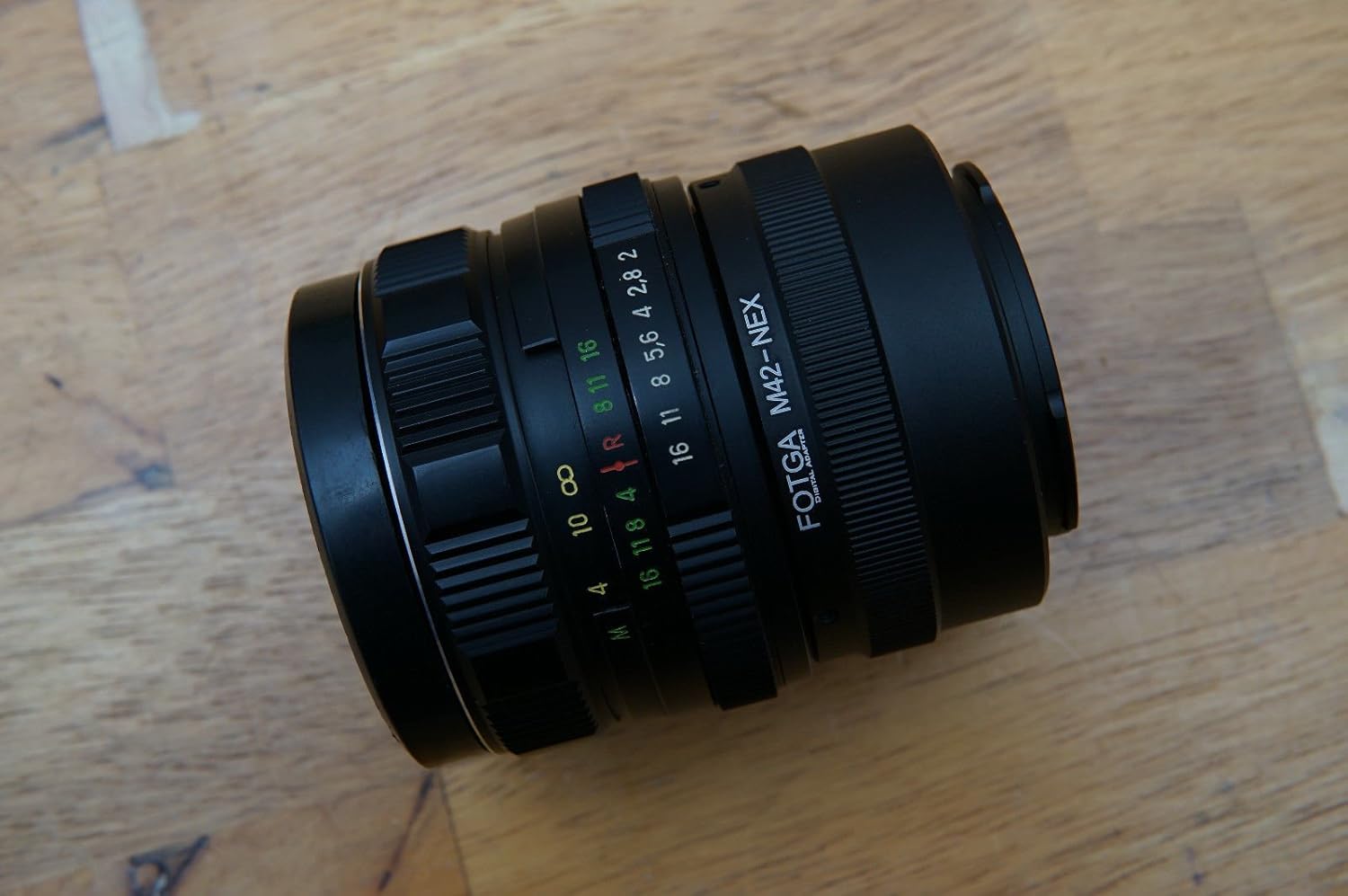
Image: The Helios 77M-4 50mm F1.8 lens, displaying its manual focus ring, aperture ring, and depth of field scale. This view highlights the robust construction and clear markings essential for manual operation.
- วงแหวนโฟกัส: Used to adjust the focus manually.
- วงแหวนรูรับแสง: Used to set the desired aperture (f-stop).
- Depth of Field Scale: Provides an indication of the depth of field at various apertures.
- แหวนยึด: ใช้สำหรับเชื่อมต่อเลนส์เข้ากับตัวกล้อง
การตั้งค่า
การติดตั้งเลนส์
- ตรวจสอบให้แน่ใจว่ากล้องของคุณปิดอยู่
- Remove the rear lens cap from the Helios 77M-4 lens and the body cap from your Sony E-mount camera.
- Align the white index mark on the lens barrel with the corresponding white index mark on the camera body.
- ใส่เลนส์เข้าไปในช่องยึดกล้องแล้วหมุนตามเข็มนาฬิกาจนกระทั่งได้ยินเสียงคลิก อย่าฝืนใส่เลนส์
- Once mounted, remove the front lens cap.

Image: The Helios 77M-4 lens securely attached to a Sony E-mount camera body. This illustrates the correct mounting position, ready for use.
การตั้งค่ากล้อง
Since this is a manual lens, you will need to adjust your camera settings:
- ตั้งกล้องของคุณเป็น คู่มือ (ม) or โหมดปรับรูรับแสงอัตโนมัติ (A) โหมด.
- เปิดใช้งาน "Release without lens" or "Shoot without lens" in your camera's menu, as the camera will not detect an electronic connection to the lens.
- Consider using "Focus Peaking" และ "Magnified View" features on your camera for easier manual focusing. Refer to your camera's manual for specific instructions on these features.
การใช้งานเลนส์
การปรับรูรับแสง
The aperture is controlled directly on the lens using the aperture ring. Rotate the ring to select your desired f-stop. A wider aperture (smaller f-number like F1.8) allows more light and creates a shallower depth of field, ideal for portraits. A narrower aperture (larger f-number) allows less light and creates a deeper depth of field, suitable for landscapes.
โฟกัสแบบแมนนวล
To focus, rotate the focus ring on the lens barrel until your subject appears sharp in the viewfinder or on the LCD screen. Utilize your camera's focus peaking and magnification features for precise focusing, especially at wider apertures.
- การโฟกัสพีค: เน้นบริเวณที่ต้องการโฟกัสด้วยเส้นขอบสี
- ขยายภาพ View: Zooms in on a portion of the image for critical focus assessment.
การซ่อมบำรุง
การทำความสะอาดเลนส์
- Use a soft, lint-free microfiber cloth specifically designed for optical surfaces to clean the front and rear elements.
- สำหรับคราบฝังแน่น ให้ใช้ผลิตภัณฑ์ทำความสะอาดเลนส์ปริมาณเล็กน้อยชุบผ้า ไม่ควรชโลมลงบนเลนส์โดยตรง
- ใช้แปรงเป่าลมเป่าฝุ่นละอองออกก่อนเช็ด เพื่อป้องกันรอยขีดข่วน
- ห้ามใช้วัสดุที่มีฤทธิ์กัดกร่อนหรือสารเคมีรุนแรงเด็ดขาด
พื้นที่จัดเก็บ
- ควรปิดฝาครอบเลนส์ด้านหน้าและด้านหลังทุกครั้งเมื่อไม่ได้ใช้งานเลนส์
- เก็บเลนส์ไว้ในที่แห้งและเย็น หลีกเลี่ยงแสงแดดโดยตรงและอุณหภูมิที่สูงหรือต่ำเกินไป
- If storing for extended periods, consider using a dehumidifying agent to prevent fungus growth.
การแก้ไขปัญหา
| ปัญหา | สาเหตุที่เป็นไปได้ | สารละลาย |
|---|---|---|
| Camera does not recognize lens / Cannot take photos | Manual lens, no electronic contacts. | Enable "Release without lens" or "Shoot without lens" in camera settings. |
| ภาพก็เบลอ | การโฟกัสผิดพลาดหรือกล้องสั่น | Ensure proper manual focus using focus peaking/magnification. Use a faster shutter speed or tripod to prevent camera shake. |
| Images are too dark/bright | Incorrect exposure settings (aperture, shutter speed, ISO). | Adjust aperture on the lens. Adjust shutter speed and ISO on the camera to achieve desired exposure. |
| Dust or smudges on images | ชิ้นเลนส์สกปรก | Clean lens elements carefully using a blower brush and microfiber cloth. |
ข้อมูลจำเพาะ
| คุณสมบัติ | รายละเอียด |
|---|---|
| แบบอย่าง | Helios 77M-4 |
| ระยะโฟกัส | 50 มม. |
| รูรับแสงสูงสุด | เอฟ1.8 |
| ประเภทเลนส์ | เลนส์ไพรม์มาตรฐาน |
| การติดตั้งที่เข้ากันได้ | Sony E-Mount (NEX, A7 series, 6500, a6300, a6000, a5100, a5000, a3000) |
| ประเภทโฟกัส | โฟกัสแบบแมนนวล |
| ผู้ผลิต | 77M-4 (as per product data) |
การรับประกันและการสนับสนุน
This product is a vintage lens. Specific warranty information may vary depending on the seller and purchase conditions. Please refer to your purchase documentation for details regarding any applicable warranty.
For technical support or inquiries, please contact the retailer or the original manufacturer if contact information is available. As a vintage item, direct manufacturer support may be limited.


