การแนะนำ
The RCF M18 is an advanced 18-input digital mixer designed for professional audio applications, integrating a wide array of effects and features for comprehensive sound control. This manual provides essential information for setting up, operating, maintaining, and troubleshooting your M18 digital mixer, ensuring optimal performance and longevity.
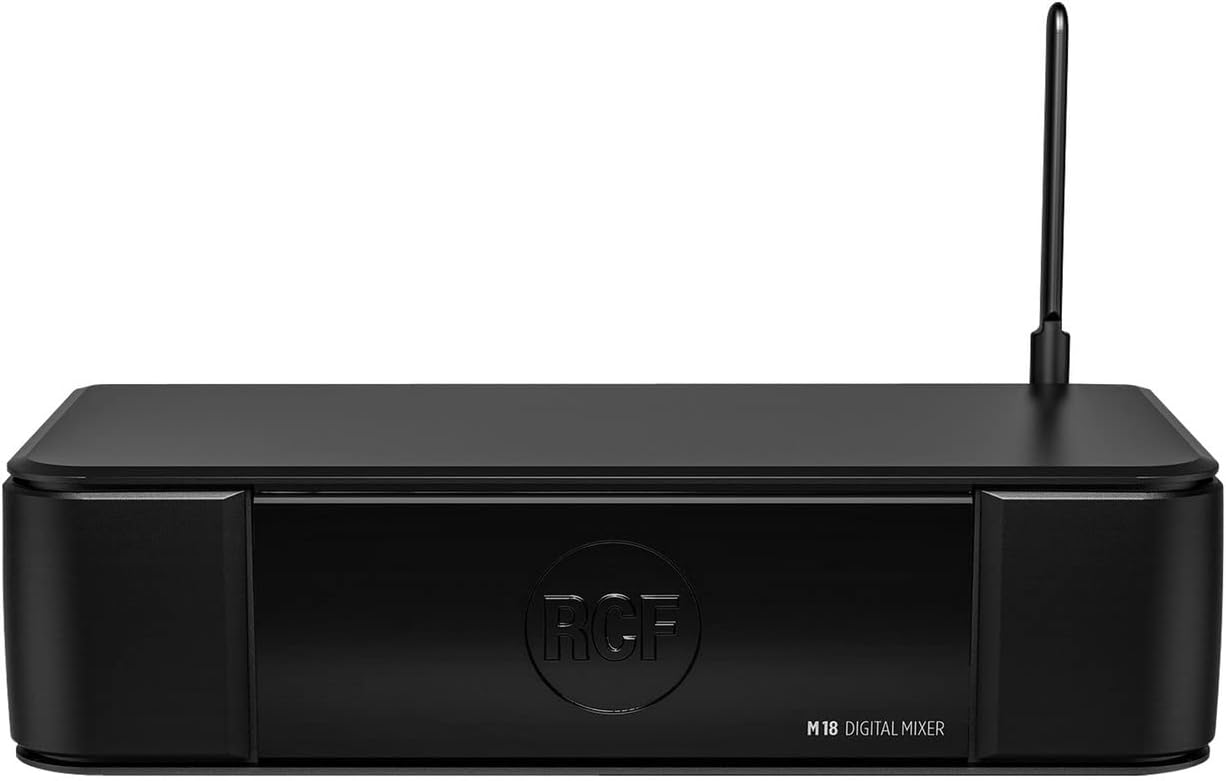
รูปที่ 1 : ด้านหน้า view of the RCF M18 Digital Mixer, showcasinด้วยดีไซน์ที่กะทัดรัดและการสร้างแบรนด์
การตั้งค่า
Before operating the RCF M18, ensure it is placed on a stable, flat surface with adequate ventilation. Connect the power cable to the mixer's power input and then to a suitable power outlet. Avoid placing the mixer near heat sources or in direct sunlight.
การเชื่อมต่ออินพุตและเอาต์พุต
The M18 offers a variety of input and output options for connecting microphones, instruments, and other audio devices. Refer to the rear panel diagram for port identification.
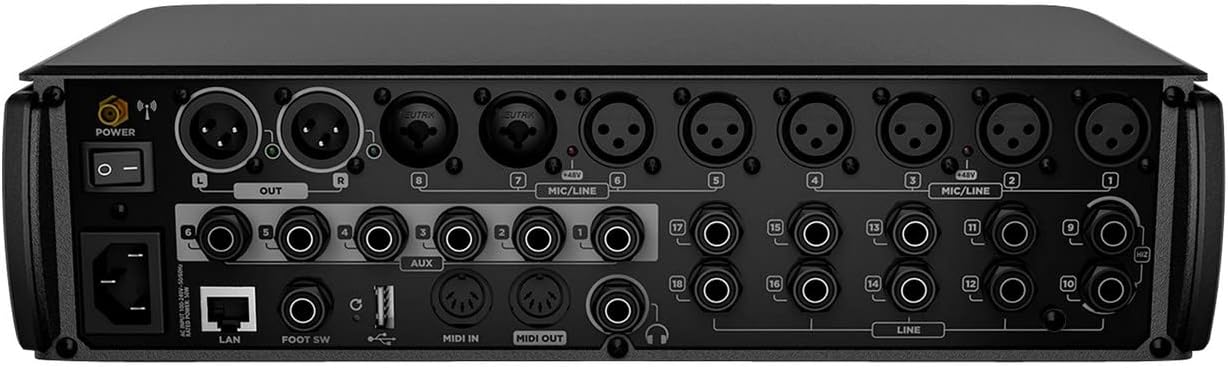
Figure 2: Rear panel of the RCF M18 Digital Mixer, showing XLR, TRS, MIDI, LAN, and USB ports for comprehensive connectivity.
- อินพุต XLR: For microphones and other balanced audio sources.
- TRS/Line Inputs: For instruments, line-level devices, and auxiliary inputs.
- Main Outputs (XLR): เชื่อมต่อกับระบบเสียงหลัก (PA system) หรือมอนิเตอร์สตูดิโอของคุณ
- เอาท์พุทเสริม: For monitor mixes or external effects sends.
- MIDI เข้า/ออก: For connecting MIDI controllers or other MIDI-compatible devices.
- พอร์ต USB 2.0: For recording and playback of WAV, MP3, and AIFF files.
- พอร์ต LAN: สำหรับการเชื่อมต่อเครือข่ายและการควบคุมระยะไกล
- อินพุตสวิตช์เท้า: For connecting a dual footswitch for hands-free control.
คำแนะนำการใช้งาน
The RCF M18 offers extensive control over your audio signals. Familiarize yourself with the mixer's interface and features to optimize your sound.
Input Channels and Buses
- The M18 features 18 input channels, allowing for a wide range of simultaneous audio sources.
- Utilize the 6 buses for routing audio to different destinations, such as monitor mixes or subgroups.
- The stereo main out is provided via XLR connections.
Integrated Effects and EQ
- Access 19 simultaneously usable effects to enhance your audio.
- Apply one of 3 different EQ types on the input channels for precise tonal shaping.
Amp การจำลอง
- Explore 11 integrated realistic amp simulations for guitar and bass, developed by Overloud and Markbass, to achieve diverse instrument tones directly within the mixer.
Internal Audio Player/Recorder
- The internal audio player/recorder supports WAV, MP3, and AIFF formats via the USB 2.0 port, allowing for convenient playback of backing tracks or recording of live performances.
การติดตามและควบคุม
- The headphone jack can be used for personal monitoring, providing a dedicated output for critical listening.
- MIDI input allows for external control of mixer parameters.
- A dual footswitch input provides hands-free control over assignable functions.
การซ่อมบำรุง
Proper maintenance ensures the longevity and reliable operation of your RCF M18 Digital Mixer.
- การทำความสะอาด: Use a soft, dry cloth to clean the exterior of the mixer. Avoid abrasive cleaners or solvents that could damage the finish.
- การระบายอากาศ : ตรวจสอบให้แน่ใจว่าช่องระบายอากาศไม่ถูกปิดกั้นเพื่อป้องกันความร้อนสูงเกินไป
- พื้นที่จัดเก็บ: เมื่อไม่ได้ใช้งาน ให้เก็บเครื่องผสมไว้ในที่แห้งและเย็น หลีกเลี่ยงแสงแดดโดยตรงและอุณหภูมิที่สูงหรือต่ำเกินไป
- การจัดการสายเคเบิล: ตรวจสอบสายเคเบิลทั้งหมดอย่างสม่ำเสมอเพื่อดูว่ามีการสึกหรอหรือไม่ เปลี่ยนสายเคเบิลที่ชำรุดทันทีเพื่อป้องกันปัญหาด้านสัญญาณหรืออันตรายจากไฟฟ้า
การแก้ไขปัญหา
This section addresses common issues you might encounter with your RCF M18 Digital Mixer. If you experience problems not covered here, please contact RCF customer support.
- ไม่มีไฟฟ้า: ตรวจสอบให้แน่ใจว่าสายไฟเชื่อมต่อกับมิกเซอร์และเต้ารับไฟฟ้าที่ใช้งานได้แน่นหนาแล้ว ตรวจสอบตำแหน่งสวิตช์เปิดปิดด้วย
- ไม่มีเสียงออก: Verify that the main output levels are up and not muted. Check all cable connections from the mixer to your PA system or monitors. Ensure input channels are active and their levels are set appropriately.
- เสียงเพี้ยน: Reduce input gain levels to prevent clipping. Check for damaged cables or faulty microphones/instruments.
- Connectivity Issues (LAN/USB): Ensure network cables are properly connected and network settings are correct. For USB, verify the device is recognized and the correct file format is used.
ข้อมูลจำเพาะ
Detailed technical specifications for the RCF M18 Digital Mixer.
| คุณสมบัติ | ค่า |
|---|---|
| น้ำหนักสินค้า | 10 ปอนด์ |
| ขนาดสินค้า | 4 x 6 x 4 นิ้ว |
| ASIN | B0711W1DBW |
| หมายเลขรุ่นสินค้า | M18 |
| วันที่พร้อมใช้งานครั้งแรก | 17 มีนาคม 2017 |
| แหล่งพลังงาน | สายไฟ |
การรับประกันและการสนับสนุน
The RCF M18 Digital Mixer is covered by a manufacturer's warranty. Please refer to the warranty card included with your product for specific terms and conditions, including coverage duration and limitations.
For technical support, service, or warranty claims, please contact RCF customer service. You can find contact information and additional resources on the official RCF webเว็บไซต์: www.rcf.it
When contacting support, please have your product model number (M18) and serial number ready to expedite the process.


