การแนะนำ
The Pioneer Elite VSX-LX302 is an advanced audio/video component receiver designed to deliver immersive sound and high-quality video experiences. It supports DTS:X and Dolby Atmos for multi-dimensional audio, enhanced by Reflex Optimizer for Atmos-enabled speakers. The receiver is compatible with Ultra HD video, HDR10, and Dolby Vision, supporting 4K/60p/4:4:4/24-bit content. Connectivity features include FireConnect, Chromecast built-in, and DTS Play-Fi for multi-room audio streaming. It offers a phono input and six HDMI inputs, providing versatile options for various home entertainment setups.
คุณสมบัติหลัก
- กำลังขับ: 200 W/Ch. (6 ohms, 1 kHz, THD 10 %, 1Ch Driven) / 100 W/Ch. (8 ohms, 20 Hz-20 kHz, THD 0.08 %, 2Ch Driven, FTC)
- รูปแบบเสียง: Multi-dimensional sound processing with Dolby Atmos & DTS:X.
- ความเข้ากันได้ของวิดีโอ: Ultra HD pass-through with HDCP 2.2, Dolby Vision compatible with HDR10 and BT.2020 support (4K/60p/4:4:4/24-bit).
- การสอบเทียบ: MCACC Auto Room Tuning and synchronized sound with Phase Control.
- Speaker Support: Supports 4 Ohm speakers.
- Wireless & Multi-room Audio: Features FireConnect, Chromecast built-in, and DTS Play-Fi Technologies.
การตั้งค่า
การแกะกล่องและเนื้อหา
นำส่วนประกอบทั้งหมดออกจากบรรจุภัณฑ์อย่างระมัดระวัง ตรวจสอบให้แน่ใจว่ามีส่วนประกอบต่อไปนี้:
- Pioneer Elite VSX-LX302 Receiver
- รีโมทคอนโทรล
- ถ่าน AAA (2)
- Room Calibration Microphone
- คู่มือการใช้งาน (เอกสารนี้)
- เสาอากาศเอฟเอ็ม
- AM เสาอากาศ
Connecting Your Receiver
ก่อนที่จะทำการเชื่อมต่อใดๆ โปรดตรวจสอบให้แน่ใจว่าเครื่องรับปิดอยู่และถอดปลั๊กออกจากเต้าเสียบที่ผนัง
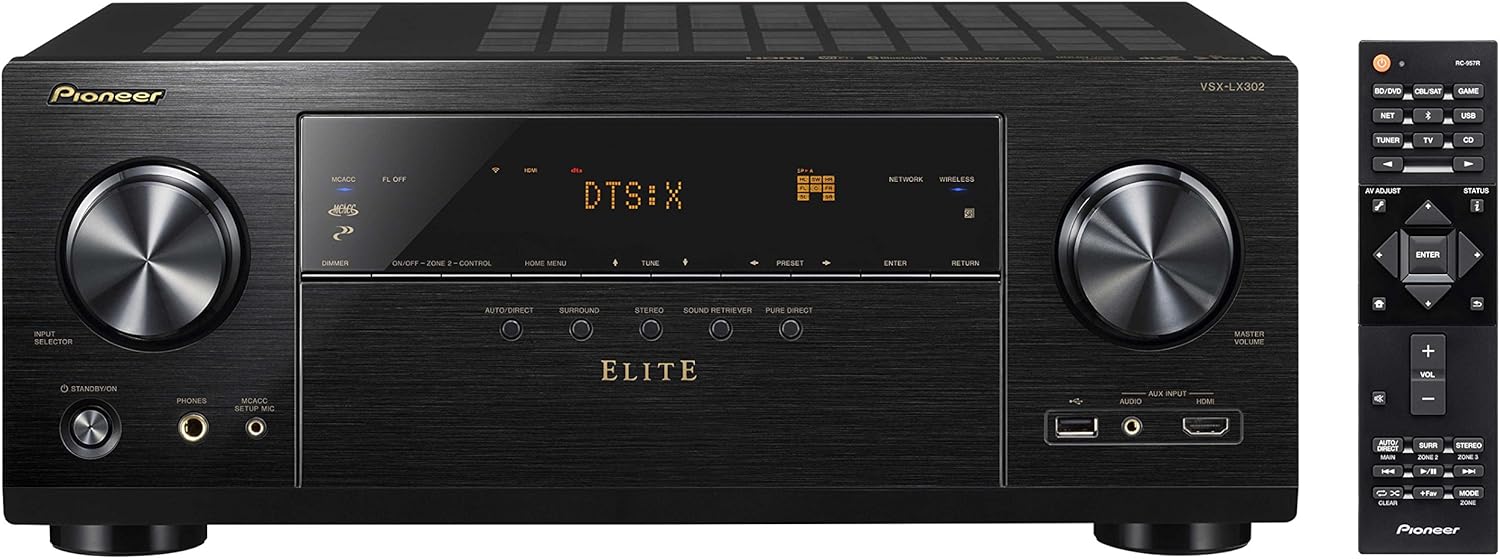
รูปที่ 1 : ด้านหน้า view of the Pioneer Elite VSX-LX302 receiver, showing input selector, display, and volume controls.

รูปที่ 2: ด้านหลัง view of the Pioneer Elite VSX-LX302 receiver, detailing various audio and video input/output ports.
การเชื่อมต่อลำโพง
Connect your speakers to the corresponding terminals on the rear panel (Figure 2). The VSX-LX302 supports a 7.2 channel configuration. Ensure correct polarity (+ to + and - to -) for optimal sound quality. This receiver supports 4 Ohm speakers.
การเชื่อมต่อ HDMI
Connect your video sources (e.g., Blu-ray player, gaming console, streaming device) to the HDMI IN ports on the rear panel. Connect your TV or projector to the HDMI OUT (ARC) port. The receiver features 6 HDMI inputs and 2 HDMI outputs, all supporting HDCP 2.2, Dolby Vision, HDR10, and BT.2020.
การเชื่อมต่อเสียง
Utilize the various audio inputs for other devices. A dedicated PHONO input is available for turntables. Digital audio inputs (optical and coaxial) are also provided.
การเชื่อมต่อเครือข่าย
Connect the receiver to your home network via an Ethernet cable to the NETWORK port or use the built-in Wi-Fi for wireless connectivity. This enables features like Chromecast built-in, DTS Play-Fi, and internet radio.
Automatic Room Calibration (MCACC)
Use the included Room Calibration Microphone and the MCACC (Multi-Channel Acoustic Calibration System) feature to automatically optimize the sound settings for your specific listening environment. Follow the on-screen instructions displayed on your TV.
คำแนะนำการใช้งาน
การเปิด/ปิดเครื่อง
Press the POWER button on the front panel or the remote control to turn the receiver on or off.
การเลือกอินพุต
Use the INPUT SELECTOR knob on the front panel or the corresponding buttons on the remote control to switch between connected audio/video sources (e.g., BD/DVD, GAME, SAT/CATV, CD).
การควบคุมระดับเสียง
Adjust the volume using the MASTER VOLUME knob on the front panel or the VOLUME +/- buttons on the remote control.
โหมดเสียง
Select various sound modes (e.g., Auto Direct, Surround, Stereo, Pure Direct) to optimize audio playback for different content types. The receiver supports Dolby Atmos and DTS:X for immersive surround sound.
คุณสมบัติของเครือข่าย
Access streaming services, internet radio, and multi-room audio functionalities (FireConnect, Chromecast built-in, DTS Play-Fi) through the receiver's network connection. Control these features using the Pioneer Remote App on your smartphone or tablet.
การซ่อมบำรุง
To ensure optimal performance and longevity of your Pioneer Elite VSX-LX302 receiver, follow these maintenance guidelines:
- การทำความสะอาด: Regularly wipe the exterior with a soft, dry cloth. Avoid using abrasive cleaners or solvents.
- การระบายอากาศ : Ensure adequate ventilation around the receiver. Do not block ventilation openings. Allow sufficient space (at least 6 inches) above and around the unit for proper airflow.
- การกำจัดฝุ่น: ควรใช้แปรงขนนุ่มหรือเครื่องดูดฝุ่นที่มีหัวแปรงปัดฝุ่นออกจากช่องระบายอากาศเป็นระยะๆ
- สายไฟ: Inspect the power cord for any damage. If damaged, discontinue use and contact qualified service personnel.
- สภาพแวดล้อม : Avoid exposing the receiver to extreme temperatures, humidity, direct sunlight, or excessive dust.
การแก้ไขปัญหา
หากคุณพบปัญหาเกี่ยวกับเครื่องรับสัญญาณ โปรดดูขั้นตอนการแก้ไขปัญหาทั่วไปต่อไปนี้:
- ไม่มีไฟฟ้า: Ensure the power cord is securely plugged into the receiver and a working wall outlet. Check if the power outlet is active.
- ไม่มีเสียง: Verify that the correct input source is selected. Check all speaker connections for proper polarity and secure fit. Ensure the volume is not muted or set too low. Confirm that the speakers are enabled in the receiver's settings.
- ไม่มีวิดีโอ: Confirm that the correct HDMI input is selected. Check HDMI cable connections between the source, receiver, and TV/projector. Ensure the TV/projector is set to the correct HDMI input.
- ปัญหาการเชื่อมต่อเครือข่าย: Check your router and internet connection. Ensure the receiver is within range of your Wi-Fi network or the Ethernet cable is securely connected. Try restarting the receiver and your network equipment.
- รีโมทคอนโทรลไม่ทำงาน: ตรวจสอบและเปลี่ยนแบตเตอรี่ในรีโมทคอนโทรล ตรวจสอบให้แน่ใจว่าไม่มีสิ่งกีดขวางระหว่างรีโมทและเซ็นเซอร์อินฟราเรดของตัวรับสัญญาณ
- เสียงผิดเพี้ยน: ตรวจสอบความเข้ากันได้ของค่าความต้านทานของลำโพง ตรวจสอบให้แน่ใจว่าสายลำโพงไม่ชำรุดหรือลัดวงจร ลดระดับเสียงลงหากเกิดเสียงผิดเพี้ยนที่ระดับเสียงสูง
For more detailed troubleshooting, consult the full instruction manual or visit the Pioneer support webเว็บไซต์.
ข้อมูลจำเพาะ
| ขนาดสินค้า | 14.6 x 17.1 x 6.8 นิ้ว |
| น้ำหนักสินค้า | 22 ปอนด์ |
| หมายเลขรุ่นสินค้า | VSX-LX302 |
| ยี่ห้อ | ไพโอเนียร์ |
| เทคโนโลยีการเชื่อมต่อ | HDMI |
| ประเภทตัวควบคุม | แอนดรอยด์ |
| คุณสมบัติพิเศษ | หลายห้อง |
| อุปกรณ์ที่รองรับ | ลำโพง |
| พอร์ต HDMI ทั้งหมด | 9 (เข้า 6, ออก 2) |
| ประเภทขั้วต่อ | HDMI |
| การเข้ารหัสเสียง | ดีทีเอส |
| โหมดเอาต์พุตเสียง | ล้อมรอบ |
| การกำหนดค่าช่องเสียงรอบทิศทาง | 7.2 |
| วันที่พร้อมใช้งานครั้งแรก | 12 พฤษภาคม 2017 |
การรับประกันและการสนับสนุน
สำหรับข้อมูลการรับประกันโดยละเอียด โปรดดูบัตรรับประกันที่รวมอยู่ในผลิตภัณฑ์ของคุณหรือเยี่ยมชม Pioneer อย่างเป็นทางการ website. For technical support, product registration, or service inquiries, please visit the Pioneer support section on their official webหรือติดต่อฝ่ายบริการลูกค้าโดยตรง


