1. บทนำ
Thank you for choosing the AUNA Elegance Tower Bluetooth 2.0 HiFi Set. This system combines a powerful stereo amplifier with a versatile CD/MP3 player and radio tuner, offering multiple connectivity options including Bluetooth, USB, and AUX inputs. This manual provides essential information for the safe and efficient operation of your device. Please read it thoroughly before use and retain it for future reference.
2. คำแนะนำด้านความปลอดภัย
เพื่อให้การใช้งานปลอดภัย โปรดปฏิบัติตามข้อควรระวังด้านความปลอดภัยดังต่อไปนี้:
- แหล่งจ่ายไฟ: Connect the unit only to an AC 230V ~ 50Hz power supply.
- การระบายอากาศ : ตรวจสอบให้แน่ใจว่ามีการระบายอากาศที่เพียงพอ อย่าปิดกั้นช่องระบายอากาศ
- ความชื้น: Do not expose the unit to rain, moisture, or dripping/splashing liquids.
- แหล่งความร้อน: ควรอยู่ห่างจากแหล่งความร้อน เช่น เครื่องทำความร้อน ช่องระบายความร้อน เตา หรืออุปกรณ์อื่นๆ ที่ให้ความร้อน
- การบริการ: อย่าพยายามซ่อมบำรุงเครื่องด้วยตนเอง แนะนำให้ช่างผู้ชำนาญการเป็นผู้ซ่อมบำรุงทุกครั้ง
- การทำความสะอาด: ถอดปลั๊กไฟออกก่อนทำความสะอาด ใช้ผ้าแห้งเท่านั้น
- รายการวัตถุ/ของเหลว: Do not insert objects or spill liquids into the unit openings.
3. เนื้อหาบรรจุภัณฑ์
ตรวจสอบว่ารายการทั้งหมดมีอยู่และอยู่ในสภาพดี:
- 1 x HiFi Ampชีวิต
- 1 x MP3 CD Player
- 1 เท่า Amplifier รีโมทคอนโทรล
- 1 x CD Player Remote Control
- 1 x คู่มือผู้ใช้ (ภาษาอังกฤษและภาษาเยอรมัน)
4. สินค้าหมดview
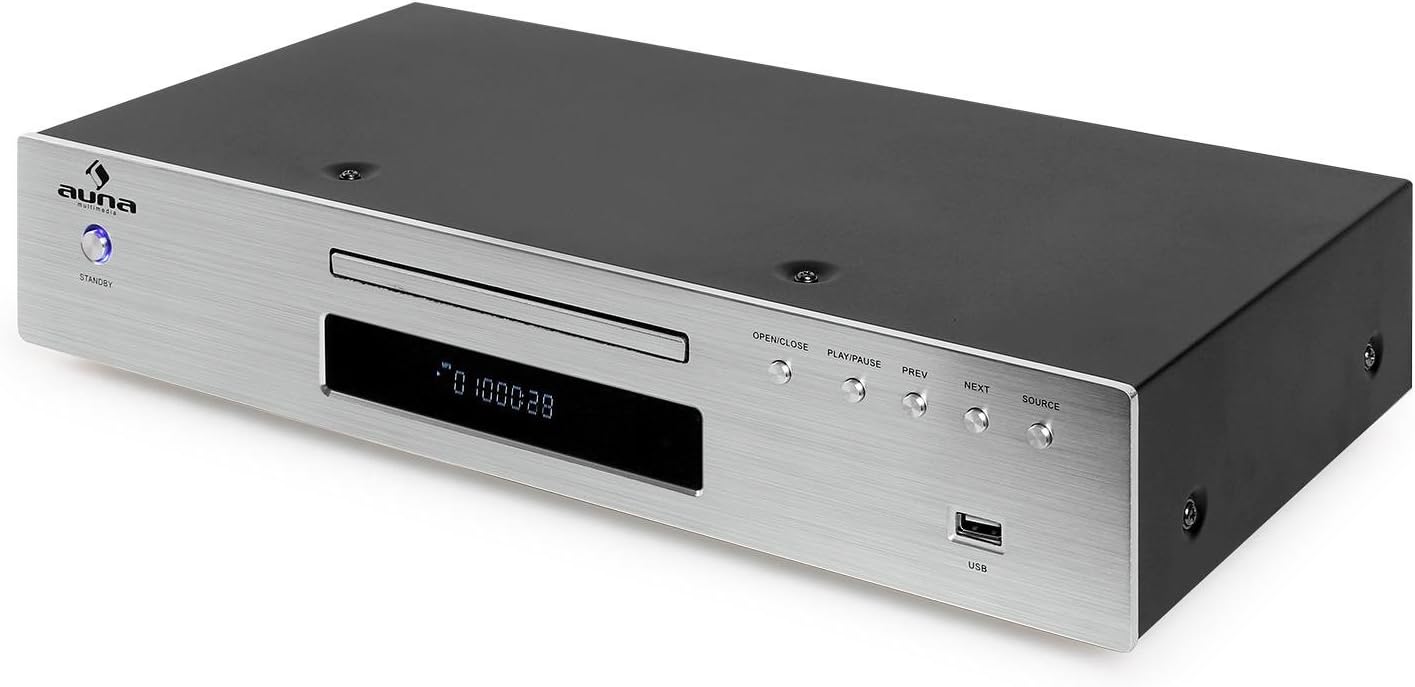
The AUNA Elegance Tower HiFi Set consists of two main units: a stereo amplifier and a CD/MP3 player with radio functionality. Below are illustrations and descriptions of their front and rear panels.
4.1 Overall System View

ภาพที่ 1: The AUNA Elegance Tower Bluetooth 2.0 HiFi Set, with the CD player unit positioned above the amplifier unit. Both units feature a brushed silver finish and blue illuminated standby buttons.
4.2 CD/MP3 Player Front Panel

ภาพที่ 2: Front panel of the CD/MP3 player. Features include a standby button, CD tray, digital display, control buttons (OPEN/CLOSE, PLAY/PAUSE, PREV, NEXT, SOURCE), and a USB input port.
4.3 CD/MP3 Player Rear Panel

ภาพที่ 3: Rear panel of the CD/MP3 player. Connections include Line Output (RCA L/R), FM antenna input, Optical Digital Output (TOSLINK), Coaxial Digital Output (S/P DIF), and the AC power input with an ON/OFF switch.
4.4 Amplifier แผงด้านหน้า
ภาพที่ 4: Front panel of the amplifier. Controls include a standby button, input selector buttons (CD, DVD, AUX, Bluetooth), a large volume knob, bass, treble, and balance adjustment knobs, and a 3.5mm headphone jack.
4.5 Amplifier แผงด้านหลัง

ภาพที่ 5: Rear panel of the amplifier. Connections include speaker terminals (Right/Left), REC.L/R output, and multiple audio input options: AUX (RCA L/R), CD (RCA L/R), DVD (RCA L/R). Also features the AC power input with an ON/OFF switch.
4.6 การควบคุมระยะไกล

ภาพที่ 6: The remote control for the AUNA HiFi system, featuring various buttons for source selection, playback control, volume adjustment, and numerical track selection.
5. การตั้งค่า
Follow these steps to set up your AUNA Elegance Tower HiFi Set:
5.1 การจัดวาง
วาง amplifier and CD player units on a stable, flat surface. Ensure there is sufficient space around the units for proper ventilation.
5.2 Connecting the CD Player to the Ampชีวิต
- Connect an RCA audio cable (not included) from the LINE OUTPUT (RCA L/R) on the rear of the CD player to the CD INPUT (RCA L/R) ที่ด้านหลังของ ampชีวิต.
5.3 การเชื่อมต่อลำโพง
- เชื่อมต่อลำโพงพาสซีฟของคุณเข้ากับ SPEAKER TERMINALS (RIGHT/LEFT) ที่ด้านหลังของ amplifier. Ensure correct polarity (+ to + and - to -) for each speaker. The amplifier supports speakers with an impedance of 8-16 ohms.
5.4 Connecting Other Audio Sources
You can connect additional audio devices to the ampเครื่องฟอก:
- อินพุต AUX: Use an RCA audio cable to connect external devices (e.g., turntable with pre-amp, cassette deck) to the AUX INPUT (RCA L/R).
- DVD Input: Use an RCA audio cable to connect a DVD player or other audio source to the DVD INPUT (RCA L/R).
5.5 การเชื่อมต่อเสาอากาศวิทยุ FM
เชื่อมต่อเสาอากาศ FM ที่ให้มาเข้ากับ to อินพุตเสาอากาศ FM on the rear of the CD player for radio reception.
5.6 การเชื่อมต่อสายไฟ
- ตรวจสอบให้แน่ใจว่าทั้งสองอย่าง amplifier and CD player are switched OFF using their respective rear panel power switches.
- Connect the power cables of both units to a suitable AC 230V ~ 50Hz wall outlet.
6. คู่มือการใช้งาน
6.1 เปิด/ปิดเครื่อง
- Switch on both units using the main power switches on their rear panels.
- กดปุ่ม รอ button on the front panel of each unit to turn them on or put them into standby mode.
6.2 การเลือกแหล่งที่มา
บน amplifier, press the corresponding input button (CD, DVD, AUX, Bluetooth) to select your desired audio source.
6.3 การเล่นแผ่นซีดี
- เลือก CD อินพุตบน ampชีวิต.
- กดปุ่ม เปิด/ปิด button on the CD player (or its remote) to open the disc tray.
- Place a CD (CD, CD-R, CD-RW, MP3 CD) into the tray with the label side up.
- กด เปิด/ปิด again to close the tray. Playback should start automatically.
- ใช้ เล่น/หยุดชั่วคราว, ก่อนหน้า, และ ต่อไป ปุ่มสำหรับควบคุมการเล่น
6.4 การเล่น USB

ภาพที่ 7: A USB flash drive inserted into the USB port on the front panel of the CD player, indicating its readiness for MP3 playback.
- ใส่แฟลชไดรฟ์ USB ที่มี MP3 fileเข้าไปใน ยูเอสบี port on the front of the CD player.
- กดปุ่ม แหล่งที่มา button on the CD player until USB is selected.
- Playback should begin automatically. Use the playback controls (PLAY/PAUSE, PREV, NEXT) to navigate.
6.5 การจับคู่บลูทูธ

ภาพที่ 8: The AUNA amplifier unit with a smartphone nearby, illustrating the wireless Bluetooth connectivity feature.
- เลือก บลูทูธ อินพุตบน amplifier. The Bluetooth indicator will flash.
- เปิดใช้งานบลูทูธบนสมาร์ทโฟน แท็บเล็ต หรือคอมพิวเตอร์ของคุณ
- ค้นหา available devices and select "AUNA Elegance" (or similar) from the list.
- Once paired, the Bluetooth indicator will glow steadily. You can now stream audio wirelessly.
6.6 AUX/DVD Input
- เลือก อ๊อกซ์ or ดีวีดี อินพุตบน amplifier, depending on which input your external device is connected to.
- Start playback on your connected external device.
6.7 การใช้หูฟัง
เชื่อมต่อหูฟังกับ แจ็คหูฟัง 3.5 มม. ที่ด้านหน้าของ amplifier. Speaker output will be muted automatically.
6.8 การควบคุมโทนเสียง
ใช้ BASS, เสียงแหลม, และ สมดุล knobs on the amplifier to adjust the audio output to your preference.
7. การบำรุงรักษา
7.1 การทำความสะอาด
Before cleaning, ensure both units are powered off and disconnected from the mains. Use a soft, dry cloth to wipe the surfaces. Do not use abrasive cleaners, waxes, or solvents as they may damage the finish.
7.2 พื้นที่จัดเก็บ
หากต้องเก็บรักษาเครื่องไว้เป็นเวลานาน ควรตัดการเชื่อมต่อจากแหล่งจ่ายไฟและเก็บไว้ในที่แห้งและเย็น หลีกเลี่ยงแสงแดดโดยตรงและอุณหภูมิที่สูงหรือต่ำเกินไป
8 การแก้ไขปัญหา
If you encounter issues, refer to the following table before contacting support:
| ปัญหา | สาเหตุที่เป็นไปได้ | สารละลาย |
|---|---|---|
| ไม่มีไฟฟ้า | Power cable not connected; Rear power switch off; Standby mode | Check power cable connection; Ensure rear power switch is ON; Press front STANDBY button |
| ไม่มีเสียง | Incorrect input selected; Volume too low; Speakers not connected; Mute activated | Select correct input; Increase volume; Check speaker connections; Deactivate mute on remote |
| ซีดีไม่เล่น | Disc inserted incorrectly; Disc dirty/scratched; Unsupported disc format | Insert disc correctly; Clean or replace disc; Ensure disc is CD, CD-R, CD-RW, or MP3 CD |
| บลูทูธไม่เชื่อมต่อ | Bluetooth input not selected; Device too far; Pairing mode not active | Select Bluetooth input on amplifier; Move device closer; Re-initiate pairing on both devices |
| USB ไม่เล่น | USB source not selected; Unsupported file format; USB drive not formatted correctly | Select USB source on CD player; Ensure files are MP3; Check USB drive formatting |
9. ข้อมูลจำเพาะ
- ยี่ห้อ: อาน่า
- หมายเลขรุ่น: พีแอล-8983-8978
- สี: เงิน
- เทคโนโลยีการเชื่อมต่อ: USB, Bluetooth, RCA, 3.5mm Jack, Optical, Coaxial, FM Antenna
- อุปกรณ์ที่รองรับ: คอมพิวเตอร์ส่วนบุคคล สมาร์ทโฟน แท็บเล็ต
- รูปแบบเสียงที่รองรับ: ซีดี, CD-R, CD-RW, MP3
- จำนวนแผ่น : 1 (CD Player)
- จำนวนช่องสัญญาณ: 2 (สเตอริโอ)
- Amplifier Max. Power: 600 วัตต์
- Amplifier ความต้านทาน: 8-16 โอห์ม
- Amplifier Dimensions (WxHxD): ประมาณ 42 x 8.5 x 25 ซม.
- Ampไลไฟเออร์น้ำหนัก: ประมาณ 3.2 กก.
- CD Player Dimensions (WxHxD): ประมาณ 42.5 x 8.5 x 22.5 ซม.
- CD Player Weight: ประมาณ 3 กก.
- แหล่งจ่ายไฟ: AC 230V ~ 50 เฮิร์ต
10. การรับประกันและการสนับสนุน
This product is covered by a manufacturer's warranty. For detailed warranty terms and conditions, please refer to the documentation provided at the time of purchase or contact your retailer. For technical support or service inquiries, please contact the AUNA customer service department or your local distributor.


