1. สินค้าหมดview
The COOAU 4K Action Camera H9SE-SL is a versatile and durable device designed for capturing high-quality video and photos in various environments, including underwater. Featuring 4K video recording, a 170-degree wide-angle lens, and a Panasonic CMOS sensor, it is suitable for sports, outdoor activities, and everyday use. The camera is waterproof up to 30 meters with its protective case and includes Wi-Fi connectivity for easy sharing and control.
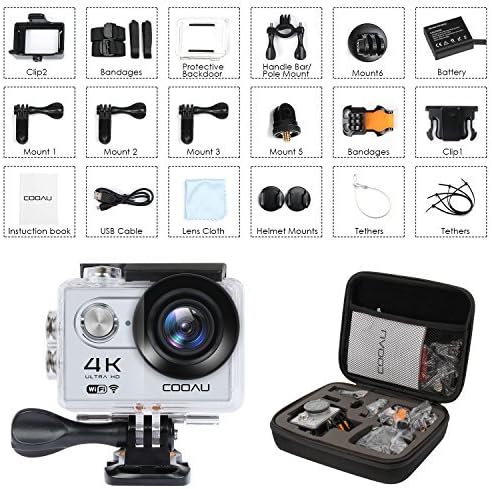
Image 1.1: COOAU 4K Action Camera H9SE-SL with its waterproof housing and a basic mount.
2. เนื้อหาบรรจุภัณฑ์
โปรดตรวจสอบว่ารายการทั้งหมดที่ระบุไว้ด้านล่างมีอยู่ในแพ็คเกจของคุณหรือไม่:
- COOAU 4K Action Camera H9SE-SL
- เคสกันน้ำ
- แบตเตอรี่แบบชาร์จไฟได้
- กระเป๋าใส่อุปกรณ์พกพา
- คู่มือการใช้งาน
- สาย USB
- ผ้าเช็ดเลนส์
- Helmet Mounts (various types)
- แฮนด์บาร์/เสา
- Mounting Clips and Bandages
- ประตูหลังป้องกัน
- พุพอง

ภาพที่ 2.1: จบแล้วview of the camera and included accessories, such as mounts, clips, and cables.

Image 2.2: A comprehensive display of all included accessories and mounting options.

Image 2.3: The camera and its dedicated portable carrying case, illustrating its suitability for various activities.
3. การตั้งค่า
3.1 การชาร์จแบตเตอรี่
Before first use, fully charge the camera battery. Connect the camera to a USB power source using the provided USB cable. The charging indicator light will illuminate during charging and turn off when the battery is full.
3.2 การใส่การ์ด MicroSD
The camera requires a MicroSD card (not included) for storing recordings. For optimal performance, use a Class 10 or UHS-I rated MicroSD card from a reputable brand. Insert the card into the MicroSD slot until it clicks into place. Ensure the card is formatted in the camera's settings before initial use.
3.3 การใช้งานเคสกันน้ำ
The waterproof case allows the camera to be used underwater up to 30 meters. Before placing the camera inside, ensure the rubber seal around the case is clean and free of debris. Close the latch securely. It is recommended to test the waterproof case without the camera submerged in water first to confirm its seal integrity.

Image 3.1: The camera is designed for underwater use with its waterproof housing, enabling clear capture of aquatic scenes.
3.4 การติดตั้งกล้อง
Utilize the various mounts provided to attach the camera to helmets, handlebars, or other surfaces. Ensure the camera is securely fastened to prevent accidental detachment during activity. Refer to the specific mount instructions for proper attachment methods.
4. คู่มือการใช้งาน
4.1 การเปิด/ปิดเครื่อง
- การเปิดเครื่อง: กดปุ่มเปิด/ปิดค้างไว้สักสองสามวินาที
- วิธีปิดเครื่อง: กดปุ่มเปิด/ปิดค้างไว้อีกครั้งจนกว่ากล้องจะปิดลง
การเลือกโหมด 4.2
Press the Power/Mode button repeatedly to cycle through the available modes: Video Recording, Photo Capture, Playback, and Settings.
4.3 การบันทึกวิดีโอ
In Video Recording mode, press the Shutter/OK button to start recording. Press it again to stop. The camera supports 4K resolution video. Additional video functions include loop recording, time-lapse recording, and slow-motion recording, which can be configured in the camera's settings menu.

Image 4.1: The camera offers multiple recording functions including loop recording, time-lapse, slow motion, and burst mode.
4.4 การจับภาพ
In Photo Capture mode, press the Shutter/OK button to take a picture. The camera captures 12-megapixel photos and supports burst mode for rapid photo sequences.

Image 4.2: Key features of the camera include 4K high-definition video, a 170-degree wide-angle lens, and 12-megapixel photo capability.
4.5 การเชื่อมต่อ Wi-Fi
Enable Wi-Fi in the camera's settings. Download the compatible app on your smartphone or tablet. Connect to the camera's Wi-Fi network (SSID and password displayed on the camera screen). This allows for remote control, live preview, and content sharing.

Image 4.3: The camera features Wi-Fi connectivity, enabling seamless sharing of captured content to mobile devices.
4.6 Display and Lens Features
The camera is equipped with a 2-inch screen for easy navigation and playback. Its 170-degree wide-angle lens, combined with a Panasonic CMOS sensor and six layers of HD glass, ensures high-quality image capture with a broad field of view.

Image 4.4: The camera's optical system includes a Panasonic Sensor and a six-layer HD glass lens for superior image clarity.
5. การบำรุงรักษา
5.1 การทำความสะอาดกล้อง
Use a soft, lint-free cloth to clean the camera body and screen. For the lens, use a specialized lens cleaning cloth and solution to avoid scratches. Do not use harsh chemicals or abrasive materials.
5.2 การดูแลรักษาเคสกันน้ำ
After using the waterproof case in saltwater, rinse it thoroughly with fresh water and allow it to air dry. Regularly inspect the rubber seal for any signs of wear or damage. Replace the seal if necessary to maintain waterproof integrity.
5.3 พื้นที่จัดเก็บ
Store the camera and accessories in a cool, dry place away from direct sunlight and extreme temperatures. Remove the battery if the camera will not be used for an extended period.
6. คำแนะนำการแก้ไขปัญหา
- กล้องไม่เปิด: Ensure the battery is fully charged. If the issue persists, try a different battery if available.
- Recording Issues / Poor Image Quality: Verify that a Class 10 or higher MicroSD card is inserted and properly formatted. Ensure the lens is clean and free from smudges or debris. Check camera settings for correct resolution and exposure.
- ปัญหาการเชื่อมต่อ Wi-Fi: Ensure Wi-Fi is enabled on the camera and your mobile device. Restart both devices. Confirm you are connecting to the correct SSID and entering the correct password.
- Water Leakage in Case: Immediately remove the camera from the case. Inspect the rubber seal for damage or debris. Ensure the case is properly closed and latched. Always test the case without the camera before underwater use.
7. ข้อมูลจำเพาะทางเทคนิค
| คุณสมบัติ | ข้อมูลจำเพาะ |
|---|---|
| หมายเลขรุ่น | H9SE-SL |
| ความละเอียดในการจับภาพวิดีโอ | 4K |
| ความละเอียดของภาพ | 12 ล้านพิกเซล |
| เลนส์ | 170° Wide Angle, 6-layer HD glass |
| เซ็นเซอร์ | Panasonic CMOS Sensor |
| ขนาดหน้าจอ | 2 นิ้ว |
| สื่อบันทึกข้อมูล | Micro SD (Class 10/UHS-I recommended) |
| การเชื่อมต่อ | HDMI, Wi-Fi |
| ความต้านทานต่อน้ำ | 30M (with waterproof case) |
| คุณสมบัติพิเศษ | Portable, Waterproof, Loop Recording, Time-Lapse, Slow Motion, Burst Mode |
| ขนาดสินค้า | 2.6 x 1.6 x 1.2 นิ้ว |
| น้ำหนักสินค้า | 1.05 ปอนด์ |
8. การรับประกันและการสนับสนุนลูกค้า
COOAU products are designed for reliability and performance. For warranty information, technical assistance, or any questions regarding your COOAU 4K Action Camera H9SE-SL, please refer to the contact details provided in your product packaging or visit the official COOAU webไซต์สำหรับทรัพยากรการสนับสนุนลูกค้า


