การแนะนำ
Welcome to your Motorola MS352 Outdoor Wave Bluetooth Speaker. This manual provides essential information for setting up, operating, and maintaining your device. Please read it thoroughly before use to ensure proper functionality and safety.
ข้อมูลด้านความปลอดภัยที่สำคัญ
โปรดปฏิบัติตามข้อควรระวังด้านความปลอดภัยต่อไปนี้เพื่อป้องกันความเสียหายต่ออุปกรณ์หรือการบาดเจ็บส่วนบุคคล:
- ห้ามให้ลำโพงสัมผัสกับอุณหภูมิที่สูงหรือต่ำเกินไป แสงแดดโดยตรง หรือความชื้นสูง
- ห้ามพยายามถอดประกอบ ซ่อมแซม หรือดัดแปลงอุปกรณ์ การกระทำเช่นนี้จะทำให้การรับประกันเป็นโมฆะ
- While the speaker is IPX4 water-resistant, avoid submerging it in water or exposing it to heavy jets of water. Ensure all ports are securely closed before exposure to moisture.
- Use only the provided micro-USB charging cable or a certified equivalent.
- Dispose of batteries responsibly according to local regulations. Do not incinerate.
เนื้อหาแพ็คเกจ
ตรวจสอบว่ามีรายการทั้งหมดอยู่ในแพ็คเกจของคุณ:
- Motorola MS352 Outdoor Wave Bluetooth Speaker
- สายชาร์จไมโคร USB
- สายสัญญาณเสียงขนาด 3.5 มม.
- คู่มือการใช้งาน (เอกสารนี้)

Image: The Motorola MS352 speaker packaged in its retail box, showing the product name and brand.
สินค้าเกินview
The Motorola MS352 is a robust portable Bluetooth speaker designed for outdoor environments. It integrates Touch2Share technology, a conference speakerphone, and a backup power bank function.
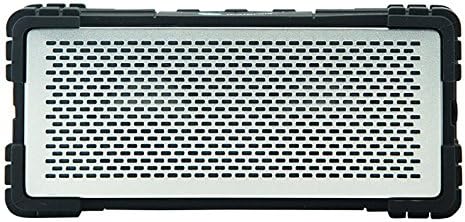
ภาพ: ด้านหน้า view of the Motorola MS352 Outdoor Wave Bluetooth Speaker, highlighting its metallic grille and rugged black casing.
คุณสมบัติหลัก:
- Portable Bluetooth speaker with Touch2Share technology
- Integrated conference speakerphone
- Dual drivers for stereo audio output
- 2,000 mAh Lithium Battery providing up to 8 hours of playback
- Backup power bank functionality for charging other devices
- Durable aluminium housing with rubberized over-mold for protection
- ระดับการป้องกันน้ำ IPX4
- 3.5mm audio input for wired connections

ภาพ: ด้านบน view of the Motorola MS352 speaker, showing the control buttons for power, volume, and playback, along with the Motorola logo.
การตั้งค่า
การชาร์จลำโพง:
- Connect the micro-USB charging cable to the speaker's charging port, typically located under a protective flap.
- Connect the other end of the cable to a USB power adapter (not included) or a powered computer USB port.
- ไฟแสดงสถานะการชาร์จจะสว่างขึ้น โดยทั่วไปการชาร์จจนเต็มจะใช้เวลาประมาณ 3-4 ชั่วโมง
การเปิด/ปิดเครื่อง:
Press and hold the Power button (usually marked with a power symbol) on the top of the speaker for approximately 2-3 seconds to turn it on or off. An audible tone will confirm the action.
คำแนะนำการใช้งาน
การจับคู่บลูทู ธ :
- ตรวจสอบให้แน่ใจว่าลำโพงเปิดอยู่และอยู่ห่างจากอุปกรณ์บลูทูธของคุณไม่เกิน 10 เมตร (33 ฟุต)
- The speaker will automatically enter pairing mode, indicated by a flashing LED light.
- On your mobile device, navigate to Bluetooth settings and search for available devices.
- Select "Motorola MS352" from the list.
- Once paired, the speaker will emit an audible confirmation tone, and the LED light will become solid.
Touch2Share Technology:
The Touch2Share feature allows for seamless music sharing between compatible Motorola devices. Refer to the specific instructions for your other Motorola device to utilize this feature.
Using as a Speakerphone:
When your speaker is connected to a smartphone via Bluetooth, you can use it as a hands-free speakerphone. Incoming calls can be answered or ended by pressing the designated call button on the speaker. The built-in microphone will capture your voice.
การเชื่อมต่อแบบใช้สาย (AUX):
To connect an audio device without Bluetooth, use the provided 3.5mm audio cable. Plug one end into the speaker's AUX input port and the other end into your audio device's headphone jack. The speaker will automatically switch to AUX mode.
ใช้เป็น Power Bank:
The MS352 can provide backup power to charge other devices. Connect your device's charging cable to the speaker's USB output port (if available). This feature will draw power from the speaker's internal battery.
การซ่อมบำรุง
- Clean the speaker's exterior with a soft, dry, lint-free cloth. Do not use liquid cleaners, aerosols, or solvents.
- Ensure all ports and protective flaps are clean and dry before charging or connecting any cables, especially after exposure to water or dust.
- เก็บลำโพงไว้ในที่แห้งและเย็น หลีกเลี่ยงแสงแดดโดยตรงและอุณหภูมิที่สูงหรือต่ำเกินไปเมื่อไม่ได้ใช้งานเป็นเวลานาน
การแก้ไขปัญหา
| ปัญหา | สารละลาย |
|---|---|
| ลำโพงไม่เปิดเครื่อง | Ensure the battery is charged. Connect the speaker to a power source using the micro-USB cable and try again. |
| ไม่สามารถจับคู่ผ่านบลูทูธได้ | Ensure the speaker is in pairing mode (flashing LED). Turn off and on Bluetooth on your device. Move your device closer to the speaker. Clear previous Bluetooth connections on your device if necessary. |
| ไม่มีเสียงจากลำโพง | ตรวจสอบระดับเสียงทั้งบนลำโพงและอุปกรณ์ที่เชื่อมต่อ ตรวจสอบให้แน่ใจว่าได้เลือกโหมดอินพุตที่ถูกต้องแล้ว (บลูทูธหรือ AUX) หากใช้ AUX ตรวจสอบให้แน่ใจว่าเสียบสายแน่นสนิทแล้ว |
| คุณภาพเสียงไม่ดีหรือการเชื่อมต่อไม่เสถียร | Move the speaker and your connected device closer together. Avoid obstacles between the devices. Ensure there are no other strong wireless signals interfering. |
| ลำโพงไม่ชาร์จ | Verify the micro-USB cable is securely connected to both the speaker and the power source. Try a different USB port or power adapter. Ensure the charging port is clean and free of debris. |
ข้อมูลจำเพาะ
- แบบอย่าง: MS352
- การเชื่อมต่อ: บลูทูธ
- แบตเตอรี่: 1 Lithium Ion, 2,000 mAh
- ระยะเวลาการทำงาน: นานถึง 8 ชั่วโมง
- กำลังขับของลำโพง: 8.4 วัตต์ (2 x 4.2 วัตต์)
- ความต้านทานน้ำ: IPX4
- ขนาดสินค้า : 8.6 x 18.6 x 5.6 ซม.
- น้ำหนัก: 640 กรัม
- วัสดุ: Aluminium housing, rubberized over-mold
- คุณสมบัติพิเศษ: Touch2Share, Conference Speakerphone, Backup Power Bank, 3.5mm Audio Input
การรับประกันและการสนับสนุน
สำหรับข้อมูลการรับประกัน การสนับสนุนทางเทคนิค หรือสอบถามเกี่ยวกับบริการ โปรดดูที่เว็บไซต์ทางการของ Motorola website or contact their customer service department. Keep your proof of purchase, such as a receipt or invoice, as it may be required for warranty claims.
ผู้ผลิต: โมโตโรล่า
วันที่เข้าใช้งานครั้งแรก: 14 สิงหาคม 2024
ASIN: B06XZQCCZ7
ยูพีซี: 0843677002737


