สินค้าเกินview
The NEC ST-401 is a versatile tabletop stand designed for use with NEC Pxx4 and Vxx4 series monitors. It provides a stable base and allows for height adjustment to optimize viewมุมการเอียง
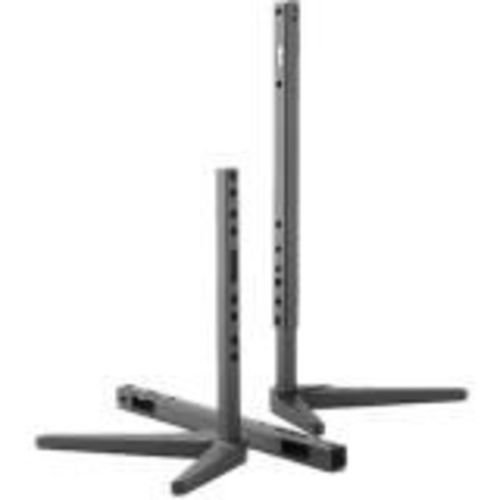
Image: The NEC ST-401 Tabletop Stand, showing its adjustable vertical posts and stable base. The stand is designed to connect to the VESA hole pattern on the back of compatible monitors.
This stand connects directly to the VESA hole pattern on the back of your monitor, offering two distinct height adjustments: 30mm or 50mm from the table surface to the bottom of the monitor.
คำแนะนำการตั้งค่า
- แกะส่วนประกอบ: นำชิ้นส่วนทั้งหมดออกจากบรรจุภัณฑ์อย่างระมัดระวัง ตรวจสอบให้แน่ใจว่ามีชิ้นส่วนครบถ้วน
- Identify VESA Mounting Points: Locate the VESA mounting holes on the back of your compatible NEC Pxx4 or Vxx4 series monitor.
- Attach Stand to Monitor: Align the stand's mounting plate with the VESA holes on the monitor. Secure the stand using the provided screws. Ensure a firm connection.
- ปรับความสูง: The stand allows for 30mm or 50mm adjustment from the table to the bottom of the monitor. Select the desired height by adjusting the vertical posts and securing them in place. Refer to the stand's design for specific locking mechanisms.
- Position Monitor: Place the assembled monitor and stand on a stable, flat tabletop surface.
บันทึก: Always ensure the monitor is securely attached to the stand before placing it on a surface. Refer to your monitor's manual for specific VESA mounting instructions if needed.
การดำเนินงานของบูธ
The NEC ST-401 stand is primarily a static support and height adjustment accessory. Once set up, its operation involves maintaining its position and ensuring stability.
- การปรับความสูง: To change the height (between 30mm and 50mm), carefully lift the monitor slightly, disengage the locking mechanism on the vertical posts, adjust to the desired height, and re-engage the lock. Always support the monitor during adjustment.
- การตรวจสอบเสถียรภาพ: Periodically check that the monitor is stable on the stand and that all connections remain secure.
การซ่อมบำรุง
Proper maintenance ensures the longevity and continued stability of your NEC ST-401 tabletop stand.
- การทำความสะอาด: ใช้ผ้าแห้งนุ่มๆ เช็ดทำความสะอาดขาตั้ง สำหรับคราบฝังแน่น ให้ใช้ผ้าชุบน้ำหมาดๆ เช็ดเบาๆamp สามารถใช้ผ้าชุบสบู่เหลวเช็ดทำความสะอาดได้ จากนั้นเช็ดให้แห้งสนิท หลีกเลี่ยงน้ำยาทำความสะอาดที่มีฤทธิ์กัดกร่อนหรือตัวทำละลาย
- การตรวจสอบ: Regularly inspect the stand for any signs of wear, damage, or loose connections. Ensure all screws are tight.
- พื้นที่จัดเก็บ: หากเก็บขาตั้งแยกต่างหาก ควรเก็บไว้ในที่แห้งและเย็น หลีกเลี่ยงแสงแดดโดยตรงและอุณหภูมิที่สูงหรือต่ำเกินไป
การแก้ไขปัญหา
This section addresses common issues you might encounter with the NEC ST-401 tabletop stand.
- ขาตั้งโคลงเคลง:
- ตรวจสอบให้แน่ใจว่าได้วางขาตั้งบนพื้นผิวเรียบและมั่นคง
- Check that all screws connecting the stand to the monitor and any internal components of the stand are securely tightened.
- Verify that the monitor's weight does not exceed the stand's capacity (though this stand is designed for specific NEC monitors, always ensure compatibility).
- ความยากในการปรับความสูง:
- Ensure the locking mechanism for height adjustment is fully disengaged before attempting to move the posts.
- Do not force the adjustment. If resistance is met, re-check the mechanism.
If issues persist, contact NEC customer support for further assistance.
ข้อมูลจำเพาะ
| คุณลักษณะ | รายละเอียด |
|---|---|
| หมายเลขรุ่น | ST-401 |
| ยี่ห้อ | เอ็นอีซี |
| อุปกรณ์ที่รองรับ | NEC Pxx4 and Vxx4 Series Monitors |
| ประเภทการติดตั้ง | Tabletop, VESA Hole Pattern |
| การปรับความสูง | 30mm or 50mm from table to bottom of monitor |
| วัสดุ | พลาสติก |
| สี | สีดำ |
| ขนาดสินค้า | ขนาด 18.5 x 12.7 x 5.2 นิ้ว (โดยประมาณ เมื่อประกอบเสร็จ) |
| น้ำหนักสินค้า | 1 ปอนด์ (โดยประมาณ) |
| ประเทศต้นกำเนิด | จีน |
การรับประกันและการสนับสนุน
For warranty information and technical support regarding your NEC ST-401 Tabletop Stand, please refer to the official NEC website or contact NEC customer service directly.
ผู้ผลิต: เน็ก
วันที่เข้าใช้งานครั้งแรก: 4 มีนาคม 2017
หากต้องการข้อมูลสนับสนุนล่าสุด โปรดไปที่: www.necdisplay.com


