1. บทนำ
This manual provides essential information for the safe and efficient operation of your DNP DS820A Professional Dye-Sublimation Printer. The DS820A is designed for high-quality photo printing, offering a resolution of 300 x 600 dpi and supporting various print sizes up to 8x32 inches. It features a high-speed print mode, producing 8x10 inch glossy photos in approximately 29.3 seconds, and supports multiple surface options including Glossy, Luster, Matte, and Fine Matte.
Please read this manual thoroughly before using the printer to ensure proper setup, operation, and maintenance.

รูปที่ 1: มุมด้านหน้า view of the DNP DS820A printer.
2. ข้อมูลด้านความปลอดภัย
โปรดปฏิบัติตามข้อควรระวังด้านความปลอดภัยต่อไปนี้เพื่อป้องกันการบาดเจ็บและความเสียหายต่อเครื่องพิมพ์:
- ควรเสียบปลั๊กเครื่องพิมพ์เข้ากับเต้ารับไฟฟ้าที่มีสายดินเสมอ
- Do not block ventilation openings on the printer. Ensure adequate space around the unit for proper airflow.
- ควรเก็บเครื่องพิมพ์ให้ห่างจากน้ำหรือความชื้นสูง
- อย่าพยายามถอดประกอบหรือซ่อมแซมเครื่องพิมพ์ด้วยตนเอง โปรดติดต่อช่างผู้ชำนาญการ
- Use only DNP-approved media and ribbons.
3. เนื้อหาบรรจุภัณฑ์
ตรวจสอบว่ามีรายการทั้งหมดอยู่ในแพ็คเกจ:
- DNP DS820A Printer Unit
- สายไฟ
- สาย USB
- ถาดสื่อ
- คู่มือเริ่มต้นใช้งานฉบับย่อและเอกสารประกอบ
Media (paper and ribbon) is typically sold separately.
4. การตั้งค่า
4.1 การแกะและการจัดวาง
- นำเครื่องพิมพ์ออกจากบรรจุภัณฑ์อย่างระมัดระวัง
- Place the printer on a stable, level surface with sufficient space for ventilation and media loading/unloading.
- Remove all protective tapes and packing materials.
4.2 การเชื่อมต่อเครื่องพิมพ์
- Connect the power cable to the printer's power input and then to a grounded electrical outlet.
- เชื่อมต่อสาย USB เข้ากับพอร์ต USB ของเครื่องพิมพ์และกับคอมพิวเตอร์ของคุณ
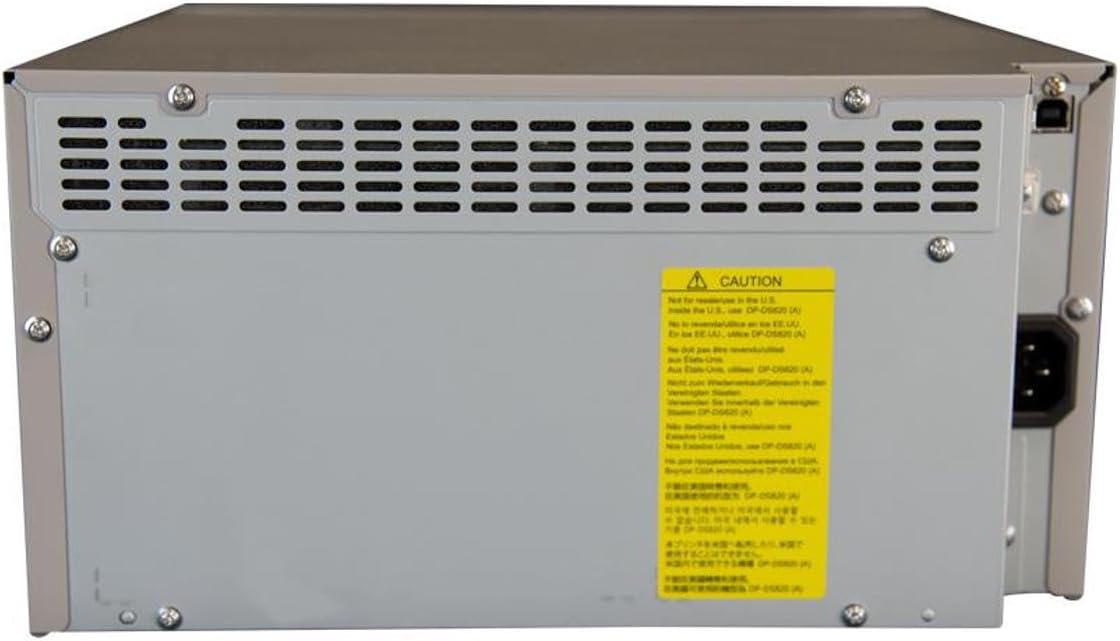
รูปที่ 2: ด้านหลัง view of the DNP DS820A, highlighting connectivity ports.
4.3 การติดตั้งไดรเวอร์
Install the latest printer drivers from the DNP website. The printer is compatible with Windows and Mac OS X/macOS operating systems.
4.4 Loading Media (Paper and Ribbon)
The DS820A uses a roll-fed media system. Refer to the specific instructions provided with your DNP media for detailed loading procedures. Generally, this involves opening the front panel, inserting the ribbon cassette, and then loading the paper roll into its designated slot.
5. คู่มือการใช้งาน
5.1 การเปิด/ปิดเครื่อง
Locate the power switch on the front or side of the printer. Flip the switch to the 'On' position to power on the printer. To power off, flip the switch to the 'Off' position.
ไฟแสดงสถานะ 5.2 ดวง
The printer features several indicator lights on the front panel to communicate its status:
- พลัง: แสดงว่าเครื่องพิมพ์เปิดอยู่
- เปิด/สแตนด์บาย: Indicates operational status or standby mode.
- RIBBON: Illuminates when the ribbon needs replacement or is incorrectly installed.
- กระดาษ: Illuminates when paper needs replacement or is incorrectly loaded.
- ข้อผิดพลาด: Indicates a general error. Refer to the troubleshooting section or driver software for details.

Figure 3: Front control panel with status indicator lights.
5.3 กระบวนการพิมพ์
- โปรดตรวจสอบให้แน่ใจว่าเครื่องพิมพ์เปิดใช้งานอยู่และเชื่อมต่อกับคอมพิวเตอร์ของคุณแล้ว
- เปิดภาพหรือเอกสารที่คุณต้องการพิมพ์บนคอมพิวเตอร์ของคุณ
- Select the DNP DS820A from your printer options.
- Adjust print settings such as print size, resolution (300x600 dpi recommended for color), and surface type (Glossy, Luster, Matte, Fine Matte) in the printer driver settings.
- Initiate the print job. The printer will process and output the photo.
6. การบำรุงรักษา
6.1 การทำความสะอาดเครื่องพิมพ์
การทำความสะอาดอย่างสม่ำเสมอช่วยรักษาคุณภาพการพิมพ์และยืดอายุการใช้งานของเครื่องพิมพ์
- ภายนอก: เช็ดทำความสะอาดภายนอกด้วยผ้าแห้งเนื้อนุ่มที่ไม่เป็นขุย ห้ามใช้สารทำความสะอาดที่มีฤทธิ์กัดกร่อนหรือตัวทำละลาย
- ภายใน: Periodically open the front panel and gently remove any dust or debris from the media path using a soft brush or compressed air.
6.2 การเปลี่ยนสื่อ
When the RIBBON or PAPER indicator lights illuminate, it's time to replace the respective media. Open the front access panel to replace the ribbon cassette and paper roll according to the instructions provided with the DNP media.
7 การแก้ไขปัญหา
หัวข้อนี้จะกล่าวถึงปัญหาทั่วไปที่คุณอาจพบเจอ
| ปัญหา | สาเหตุที่เป็นไปได้ | สารละลาย |
|---|---|---|
| เครื่องพิมพ์ไม่เปิดเครื่อง | สายไฟถูกถอดออก สวิตช์ไฟปิดอยู่ | Check power cable connection; Ensure power switch is ON. |
| RIBBON light on | Ribbon empty or incorrectly installed | Replace ribbon; Reinstall ribbon correctly. |
| PAPER light on | ม้วนกระดาษหมดหรือใส่ไม่ถูกต้อง | Replace paper roll; Re-load paper correctly. |
| ไฟ ERROR ติด | ข้อผิดพลาดทั่วไปของเครื่องพิมพ์ | Turn printer off and on; Check computer for specific error messages; Consult DNP support. |
| คุณภาพการพิมพ์ไม่ดี | Dirty print head; Incorrect driver settings; Low quality image source | Clean printer interior; Verify print settings (DPI, media type); Use high-resolution images. |
If you encounter issues not covered here, or if solutions do not resolve the problem, contact DNP customer support.
8. ข้อมูลจำเพาะ
| คุณสมบัติ | ข้อมูลจำเพาะ |
|---|---|
| ชื่อรุ่น | ดีเอส820เอ |
| เทคโนโลยีการพิมพ์ | การย้อมแบบระเหิด |
| ความละเอียดการพิมพ์สีสูงสุด | 300 x 600 จุดต่อนิ้ว |
| ความละเอียดการพิมพ์ขาวดำสูงสุด | 300 x 300 dpi or 300 x 600 dpi |
| ขนาดสื่อที่รองรับ | 5 x 7 inches, 8 x 10 inches, 8 x 12 inches, up to 8 x 32 inches (panoramic) |
| ประเภทของสื่อสิ่งพิมพ์ | Glossy photo paper, Luster, Matte, Fine Matte |
| Print Speed (8x10 Glossy) | ประมาณ 29.3 วินาที |
| ความจุแผ่นอินพุตสูงสุด | 250 sheets (depending on media type) |
| ความจุของแผ่นเอาต์พุต | 250 แผ่น |
| จำนวนถาด | 2 |
| เทคโนโลยีการเชื่อมต่อ | ยูเอสบี 2.0 |
| ฮาร์ดแวร์อินเตอร์เฟซ | ยูเอสบี |
| วิธีการควบคุม | แอป |
| เอาท์พุตเครื่องพิมพ์ | Color; Monochrome |
| น้ำหนักสินค้า | 36 ปอนด์ (16.33 กก.) |
| ขนาดสินค้า (กว้าง x ยาว x สูง) | 19.25 x 17.25 x 12 นิ้ว (48.9 x 43.8 x 30.5 ซม.) |
| ผู้ผลิต | ดีเอ็นพี |
| ยูพีซี | 650415905867 |
9. การรับประกันและการสนับสนุน
The DNP DS820A printer comes with a full warranty. For specific warranty terms and conditions, please refer to the documentation included with your product or visit the official DNP webเว็บไซต์.
For technical assistance, troubleshooting beyond this manual, or to inquire about service, please contact DNP customer support directly. Contact information can typically be found on the DNP webไซต์หรือในบรรจุภัณฑ์ผลิตภัณฑ์ของคุณ


