การแนะนำ
This manual provides detailed instructions for the setup, operation, and maintenance of your Axess CKRD3803 Digital AM/FM Clock Radio. Please read this manual thoroughly before using the device to ensure proper function and to maximize your user experience.
สินค้าเกินview
The Axess CKRD3803 is a versatile clock radio featuring a 1.2-inch red LED display, digital AM/FM radio, dual alarm settings, and a calendar function. It includes an Aux input jack for external audio devices and a battery backup system to maintain settings during power interruptions.
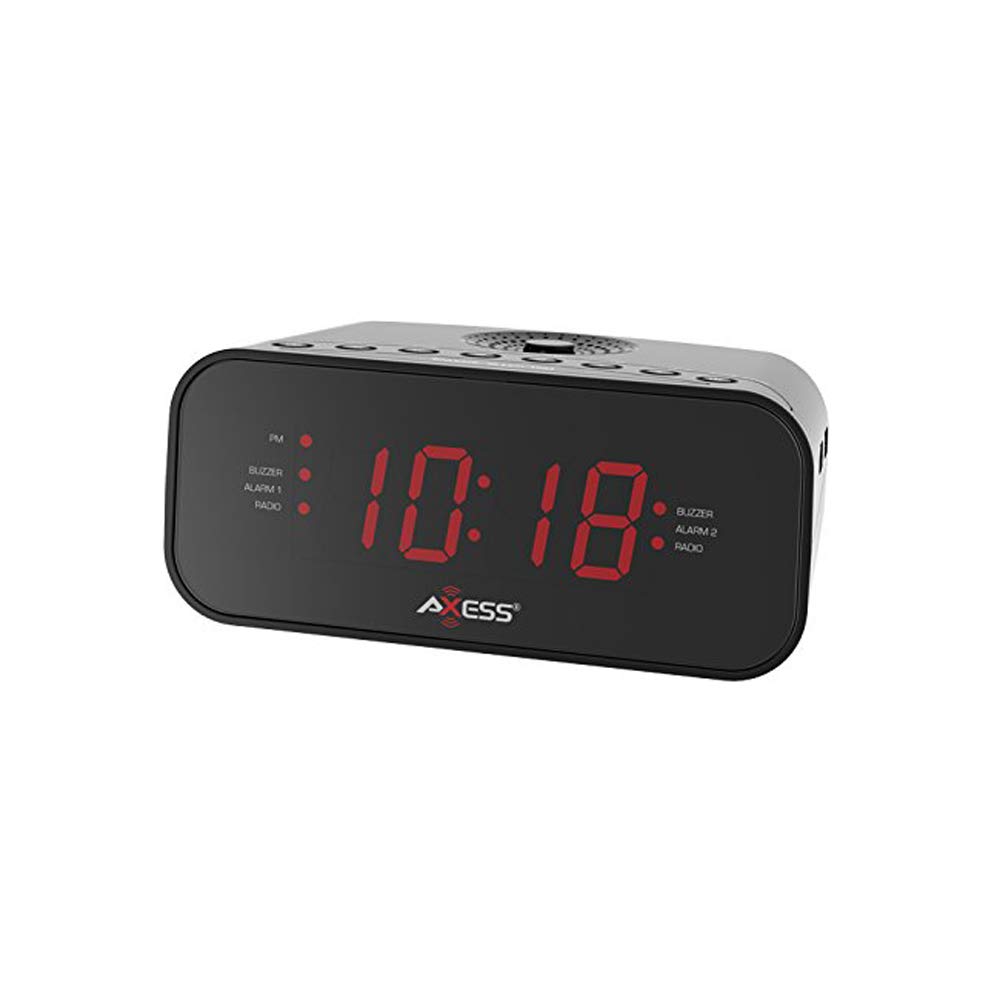
ภาพ: ด้านหน้า view of the Axess CKRD3803 Digital AM/FM Clock Radio. The device is black with a large red LED display showing '10:18'. Indicators for PM, Buzzer, Alarm 1, Radio, and Alarm 2 are visible on either side of the time display.
คุณสมบัติหลัก:
- Large 1.2-inch Red LED Display with two-step dimmer.
- Digital AM/FM Radio.
- Dual Alarm with Buzzer or Radio options.
- Sleep and Snooze Functions.
- Calendar Function.
- Auxiliary Input Jack.
- Battery Backup (2 x AAA batteries, not included) for power outagใช่
การตั้งค่า
การเชื่อมต่อไฟฟ้า:
- Uncoil the built-in power cord (pigtail antenna).
- Plug the power cord into a standard AC wall outlet (120V, 60Hz).
- หน้าจอ LED จะสว่างขึ้น แสดงว่าเครื่องได้รับพลังงานแล้ว
การติดตั้งแบตเตอรี่สำรอง:
For uninterrupted timekeeping during power outages, install backup batteries.
- หาช่องใส่แบตเตอรี่ที่อยู่ด้านล่างของตัวเครื่อง
- เปิดฝาช่องใส่แบตเตอรี่
- Insert two (2) AAA batteries (not included), observing the correct polarity (+ and -) as indicated inside the compartment.
- ปิดฝาช่องใส่แบตเตอรี่ให้แน่น
Note: Batteries are for backup only and will not power the display or radio functions during a power outage. They only preserve time and alarm settings.
คำแนะนำการใช้งาน
การตั้งเวลา:
- กดปุ่มค้างไว้ ตั้งเวลา กดปุ่มค้างไว้จนกว่าตัวเลขชั่วโมงจะเริ่มกะพริบ
- กดปุ่ม ชั่วโมง button repeatedly to adjust the hour. Observe the 'PM' indicator for correct AM/PM setting.
- กดปุ่ม นาที กดปุ่มซ้ำๆ เพื่อปรับนาที
- To switch between 12-hour and 24-hour (military) time format, press the 12/24 ชม. button while the time is flashing.
- กดปุ่ม ตั้งเวลา กดปุ่มอีกครั้งเพื่อยืนยันและออกจากโหมดตั้งเวลา
การตั้งค่านาฬิกาปลุก (นาฬิกาปลุก 1 และ นาฬิกาปลุก 2):
CKRD3803 มีระบบเตือนภัยอิสระสองระบบ
- กดปุ่มค้างไว้ นาฬิกาปลุก 1 ชุด (หรือ นาฬิกาปลุก 2 ชุดกดปุ่มค้างไว้จนกว่าตัวเลขชั่วโมงของนาฬิกาปลุกจะเริ่มกะพริบ
- กดปุ่ม ชั่วโมง button to adjust the alarm hour. Observe the 'PM' indicator.
- กดปุ่ม นาที ปุ่มสำหรับปรับนาทีของนาฬิกาปลุก
- กดปุ่ม นาฬิกาปลุก 1 ชุด (หรือ นาฬิกาปลุก 2 ชุด) button again to confirm the time.
- หลังจากยืนยันเวลาแล้ว ให้กดปุ่มทันที ALARM 1 MODE (หรือ ALARM 2 MODE) button repeatedly to select the alarm source: กริ่ง or วิทยุ. The corresponding indicator light will illuminate.
- หากต้องการเปิดหรือปิดสัญญาณเตือน ให้กดปุ่ม สัญญาณเตือน 1 เปิด/ปิด (หรือ สัญญาณเตือน 2 เปิด/ปิด) button. The alarm indicator will light up when active.
การทำงานของวิทยุ:
- กดปุ่ม เปิด/ปิดวิทยุ ปุ่มเพื่อเปิดวิทยุ
- กดปุ่ม เอเอ็ม/เอฟเอ็ม ปุ่มสำหรับสลับระหว่างคลื่นวิทยุ AM และ FM
- กดปุ่ม จูน + or ทำนอง - ปุ่มสำหรับปรับความถี่ที่ต้องการด้วยตนเอง
- กดค้างไว้ จูน + or ทำนอง - เพื่อการสแกนสถานีอัตโนมัติ
- ปรับระดับเสียงโดยใช้ปุ่ม ปริมาณ + or ปริมาณ - ปุ่ม
- To improve FM reception, extend the pigtail antenna fully. For AM reception, rotate the unit for best signal.
- กดปุ่ม เปิด/ปิดวิทยุ button again to turn the radio off.
ฟังก์ชั่นเลื่อน:
เมื่อสัญญาณเตือนดังขึ้น ให้กดปุ่ม เลื่อน กดปุ่มเพื่อปิดเสียงเตือนชั่วคราวประมาณ 9 นาที เสียงเตือนจะดังขึ้นอีกครั้งหลังจากนั้น
ฟังก์ชั่นการนอนหลับ:
หากต้องการนอนหลับไปพร้อมกับฟังวิทยุ ให้กดปุ่ม นอน button while the radio is playing. Repeatedly press the นอน button to cycle through sleep timer options (e.g., 90, 60, 30, 15 minutes, or OFF). The radio will automatically turn off after the selected time.
จอแสดงผลหรี่:
กดปุ่ม หรี่ไฟ button to adjust the brightness of the LED display between two levels (bright and dim).
อินพุตเสริม:
เชื่อมต่ออุปกรณ์เสียงภายนอก (เช่น เครื่องเล่น MP3, สมาร์ทโฟน) เข้ากับ AUX IN jack on the unit using a 3.5mm audio cable (not included). The audio from the external device will play through the clock radio's speaker.
การซ่อมบำรุง
To ensure the longevity and optimal performance of your Axess CKRD3803, follow these simple maintenance guidelines:
- การทำความสะอาด: เช็ดตัวเครื่องด้วยผ้านุ่มและแห้ง ห้ามใช้น้ำยาทำความสะอาดที่มีฤทธิ์กัดกร่อน แว็กซ์ หรือตัวทำละลาย เพราะอาจทำให้พื้นผิวเสียหายได้
- สายไฟ: Regularly check the power cord for any signs of damage. If damaged, discontinue use and seek professional repair.
- การเปลี่ยนแบตเตอรี่: Replace backup batteries annually or when the unit is stored for extended periods to prevent leakage.
- การจัดวาง: ควรหลีกเลี่ยงการวางเครื่องไว้ในที่ที่มีแสงแดดส่องโดยตรง ใกล้แหล่งความร้อน หรือในบริเวณที่มีความชื้นสูงหรือมีฝุ่นละอองมาก
การแก้ไขปัญหา
If you encounter issues with your Axess CKRD3803, please refer to the following common problems and solutions:
| ปัญหา | สาเหตุที่เป็นไปได้ | สารละลาย |
|---|---|---|
| จอแสดงผลว่างเปล่า | No AC power; Dimmer set to lowest setting. | Ensure power cord is securely plugged in. Press the หรี่ไฟ ปุ่มเพื่อเพิ่มความสว่าง |
| ไม่สามารถตั้งเวลา/นาฬิกาปลุกได้ | Buttons not pressed correctly or in sequence. | Refer to the "Setting the Time" and "Setting the Alarm" sections for precise steps. Ensure you press and hold the SET button until digits flash. |
| สัญญาณเตือนภัยไม่ดัง | Alarm not activated; Volume too low (for radio alarm). | Ensure the alarm is set and the alarm indicator light is on. For radio alarm, increase radio volume. |
| การรับสัญญาณวิทยุไม่ดี | Antenna not positioned correctly; Weak signal. | Fully extend the pigtail antenna for FM. Rotate the unit for optimal AM reception. Try a different location. |
| เวลา/การตั้งค่าจะหายไปหลังจากไฟดับtage. | แบตเตอรี่สำรองไม่ได้ติดตั้งหรือหมดแล้ว | ใส่แบตเตอรี่ AAA ใหม่ลงในช่องใส่แบตเตอรี่ |
| Stuck in 24-hour (military) time. | 12/24H setting not adjusted during time setup. | Enter time setting mode (press and hold ตั้งเวลา). While digits are flashing, press the 12/24 ชม. button to toggle between formats. |
ข้อมูลจำเพาะ
- แบบอย่าง: CKRD3803
- แสดง: ไฟ LED สีแดง ขนาด 1.2 นิ้ว
- แหล่งพลังงาน: AC 120V ~ 60 เฮิร์ต
- แบตเตอรี่สำรอง: แบตเตอรี่ AAA 2 ก้อน (ไม่รวม)
- วงวิทยุ: เอเอ็ม/เอฟเอ็ม
- ขนาด : 2.95 x 6.89 x 4.21 นิ้ว (สูง x กว้าง x ลึก)
- น้ำหนัก: 1 ปอนด์
- วัสดุ: อะคริโลไนไตรล์บิวทาไดอีนสไตรีน
- คุณสมบัติพิเศษ: Dual Alarm, Calendar Function, Aux-in, Sleep/Snooze, Dimmer
การรับประกันและการสนับสนุน
สำหรับข้อมูลการรับประกันหรือการสนับสนุนทางเทคนิค โปรดดูเอกสารที่แนบมากับสินค้าที่ซื้อ หรือเยี่ยมชมเว็บไซต์อย่างเป็นทางการของ Axess webไซต์ โปรดเก็บใบเสร็จรับเงินของคุณไว้เป็นหลักฐานการซื้อสำหรับการเรียกร้องการรับประกันใดๆ


