1. บทนำ
This manual provides comprehensive instructions for the safe and effective use of the FAAC XT2 868SLH2-WHT 787009 two-channel transmitter. The XT2 868SLH2-WHT is designed for remote control applications, featuring SLH (Self-Learning Hopping) technology, where the transmission code changes with each use. This advanced algorithm ensures secure and reliable signal recognition and confirmation.
Please read this manual thoroughly before installation and operation to ensure proper functionality and to prevent damage to the device or property.
2. สินค้าหมดview
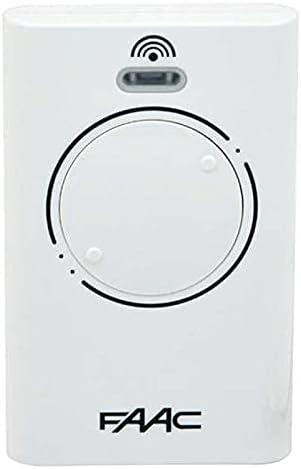
รูปที่ 2.1: ด้านหน้า view of the FAAC XT2 868SLH2-WHT two-channel transmitter. This image shows the primary face of the remote control, highlighting its two main buttons and the FAAC logo at the bottom.
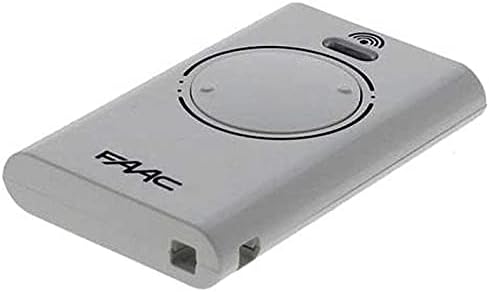
รูปที่ 2.2: มุม view of the FAAC XT2 868SLH2-WHT remote control. This perspective provides a better look at the device's slim profile and the button layout.

รูปที่ 2.3: หลัง view of the FAAC XT2 868SLH2-WHT remote control. The back of the device displays regulatory markings and the model number, "787009 (XT2 868 SLH LR) 868 MHz", along with "Made in IE" and CE certification.
2.1 คุณสมบัติหลัก
- Two-channel transmitter for controlling two separate functions.
- SLH (Self-Learning Hopping) technology for enhanced security.
- Dynamic code changes with each use to prevent unauthorized access.
- Robust design for reliable performance.
- ความถี่ในการทำงาน: 868 เมกะเฮิรตซ์
3. การตั้งค่าและการเขียนโปรแกรม
The FAAC XT2 868SLH2-WHT transmitter typically requires programming to a compatible FAAC receiver. The exact programming procedure may vary depending on the receiver model. Always refer to the receiver's specific instruction manual for detailed programming steps.
3.1 Basic Programming Steps (General Guide)
- เข้าถึงตัวรับสัญญาณ: Locate the programming button or switch on your FAAC receiver unit. This is often found inside the control panel of your gate or garage door opener.
- เข้าสู่โหมดการเขียนโปรแกรม: Press and hold the programming button on the receiver until an indicator light (LED) illuminates or changes its blinking pattern, indicating it is in programming mode.
- Transmit Code from New Remote: While the receiver is in programming mode, press and hold one of the buttons on your new FAAC XT2 868SLH2-WHT transmitter for approximately 2-3 seconds.
- ยืนยันการตั้งโปรแกรม: The receiver's indicator light should change again (e.g., turn solid, blink rapidly, or turn off) to confirm that the code has been successfully learned.
- ออกจากโหมดการเขียนโปรแกรม: Some receivers automatically exit programming mode after a short period, while others may require another press of the programming button.
- ทดสอบรีโมต: After programming, test the transmitter from a short distance to ensure it operates the gate or garage door correctly.
บันทึก: If you are replacing an existing remote, you may be able to clone the code from an old working remote to the new one. Consult your receiver's manual for "remote-to-remote" programming instructions if available.
4. คู่มือการใช้งาน
Once programmed, the FAAC XT2 868SLH2-WHT transmitter is straightforward to operate.
4.1 การใช้ชีวิตประจำวัน
- ฟังก์ชั่นปุ่ม: Each of the two buttons on the transmitter can be programmed to control a different function (e.g., open/close gate, pedestrian opening, garage door).
- การเปิดใช้งาน: To activate the programmed function, simply press the corresponding button on the transmitter. The signal will be sent to the receiver, initiating the action.
- พิสัย: The effective operating range of the transmitter can vary depending on environmental factors, obstacles, and the receiver's antenna. For optimal performance, ensure a clear line of sight if possible.
4.2 SLH (Self-Learning Hopping) Technology
The SLH technology ensures high security by changing the transmission code every time a button is pressed. The receiver is synchronized with the transmitter and recognizes the valid code. This prevents code grabbing and replay attacks, making your system more secure.
5. การบำรุงรักษา
The FAAC XT2 868SLH2-WHT transmitter is designed for low maintenance. Regular care will ensure its longevity and reliable operation.
5.1 การเปลี่ยนแบตเตอรี่
The transmitter is powered by a long-life battery. When the operating range decreases significantly or the indicator light (if present) fails to illuminate, it's time to replace the battery.
- เปิด Casing: เปิดตัวส่งสัญญาณอย่างระมัดระวังasing. This usually involves removing small screws on the back or prying open a seam with a small flat-head screwdriver. Refer to Figure 2.3 for screw locations.
- ระบุประเภทแบตเตอรี่: Note the type and polarity of the existing battery. Most FAAC remotes use a standard coin cell battery (e.g., CR2032).
- เปลี่ยนแบตเตอรี่: Remove the old battery and insert the new one, ensuring correct polarity (+/-).
- ปิด Casing: ปิดตัวส่งสัญญาณให้สนิทasing.
- ทดสอบ: Test the transmitter to ensure it functions correctly after battery replacement.
5.2 การทำความสะอาด
- ใช้ผ้าแห้งนุ่มๆ เช็ดทำความสะอาดภายนอกเครื่องส่งสัญญาณ
- Do not use abrasive cleaners, solvents, or excessive moisture, as these can damage the electronic components.
5.3 พื้นที่จัดเก็บ
- Store the transmitter in a dry place, away from direct sunlight and extreme temperatures.
- ควรหลีกเลี่ยงการทำเครื่องส่งสัญญาณตกหรือทำให้เกิดการกระแทกอย่างรุนแรง
6 การแก้ไขปัญหา
If you experience issues with your FAAC XT2 868SLH2-WHT transmitter, consult the following table for common problems and solutions.
| ปัญหา | สาเหตุที่เป็นไปได้ | สารละลาย |
|---|---|---|
| เครื่องส่งสัญญาณไม่ทำงาน |
|
|
| ระยะการใช้งานลดลง |
|
|
| Transmitter works intermittently. |
|
|
If the problem persists after attempting these solutions, please contact FAAC customer support or a certified technician.
7. ข้อมูลจำเพาะทางเทคนิค
| คุณสมบัติ | รายละเอียด |
|---|---|
| หมายเลขรุ่น | XT2 868SLH2-WHT 787009 |
| ยี่ห้อ | สมาคมฟุตบอลแห่งประเทศไทย |
| ช่องทางการ | 2 |
| ความถี่ | 868 เมกะเฮิรตซ์ |
| เทคโนโลยี | SLH (Self-Learning Hopping) |
| สี | สีขาว |
| การอ้างอิงผู้ผลิต | XT2 868SLH2-WHT 787009 |
| ASIN | B01NC3CDJ5 |
| วันที่พร้อมใช้งานครั้งแรก | June 21, 2022 (on Amazon.com.be) |
8. ข้อมูลการกำจัด
This product contains electronic components and a battery. Do not dispose of it with general household waste. Please follow local regulations for the proper disposal of electronic waste and batteries. Look for designated collection points or recycling facilities.
The symbol of the crossed-out wheeled bin indicates that the product should not be disposed of with unsorted municipal waste but must be collected separately.


