การแนะนำ
The Blackstar ID:CORE 20W Digital Stereo Combo (IDCORE20V2) is a versatile and programmable guitar amplifier designed for both practice and recording. It features a unique control set that allows for custom sound design, including six different voices and 12 Super Wide Stereo effects. This manual provides essential information for setting up, operating, and maintaining your ampชีวิต.
ข้อมูลด้านความปลอดภัย
โปรดอ่านและทำความเข้าใจคำแนะนำด้านความปลอดภัยทั้งหมดก่อนใช้งาน ampไลเออร์ เก็บคู่มือนี้ไว้ใช้อ้างอิงในอนาคต
- อย่าให้เครื่องโดนฝนหรือความชื้น
- ห้ามปิดกั้นช่องระบายอากาศใดๆ
- Ensure the power supply is correctly rated for your region.
- ตัดการเชื่อมต่อไฟฟ้าระหว่างเกิดพายุฝนฟ้าคะนองหรือเมื่อไม่ได้ใช้งานเป็นเวลานาน
- ส่งต่อการบริการทั้งหมดไปยังบุคลากรบริการที่มีคุณสมบัติเหมาะสม
เนื้อหาแพ็คเกจ
ตรวจสอบว่ามีสินค้าทั้งหมดอยู่ในบรรจุภัณฑ์:
- Blackstar ID:CORE 20W Digital Stereo Combo Ampชีวิต
- หน่วยจ่ายไฟ
- สาย USB
- คู่มือการใช้งาน (เอกสารนี้)
- PreSonus Studio One Blackstar Edition DAW Software (download information)
สินค้าเกินview
ด้านหน้า View
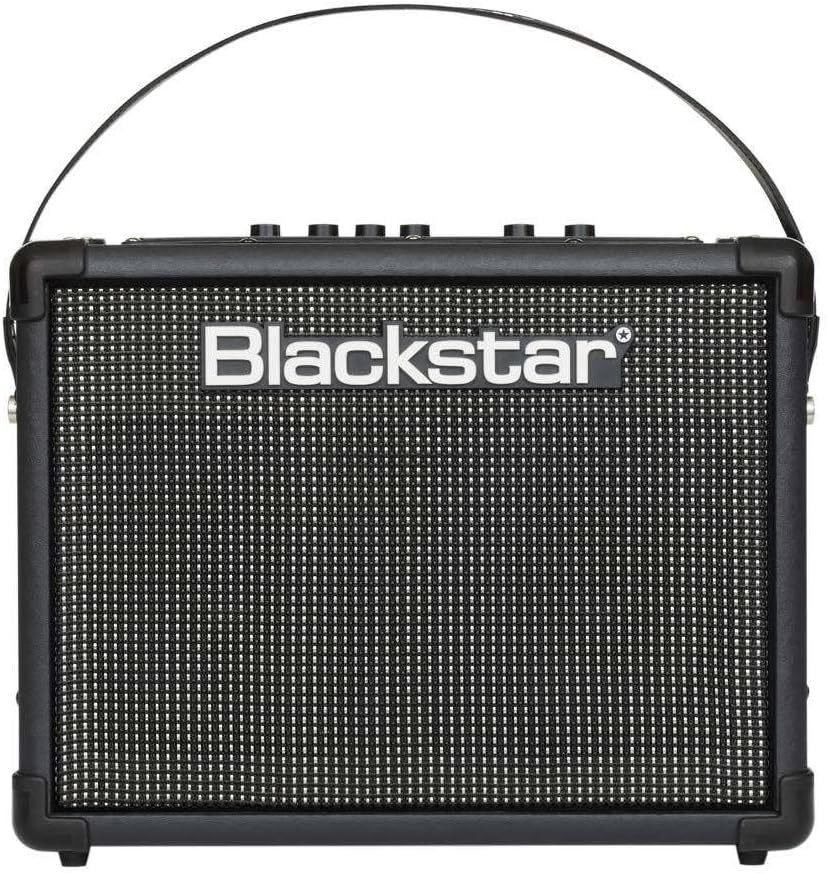
รูปที่ 1 : ด้านหน้า view of the Blackstar ID:CORE 20W Digital Stereo Combo amplifier, showing the Blackstar logo and speaker grille.
ด้านหน้าของ amplifier features the main speaker grille and the Blackstar logo. This compact design houses the stereo speakers that deliver the amplifier's sound.
Top Panel Controls and Rear Connections

Figure 2: Top panel controls and rear connections of the Blackstar ID:CORE 20W Digital Stereo Combo amplifier, detailing input jacks, control knobs, and power switch.
The top panel provides access to all primary controls for shaping your tone and effects. The rear panel includes essential connections for power, USB, and external audio devices.
คำอธิบายการควบคุม:
- แจ็คอินพุต: เชื่อมต่อกีตาร์ของคุณที่นี่
- การควบคุมด้วยเสียง: เลือกหนึ่งในหกตัวเลือกที่แตกต่างกัน amplifier voices: Clean Warm, Clean Bright, Crunch, Super Crunch, OD 1, OD 2.
- ได้รับ: ปรับระดับเสียงโอเวอร์ไดรฟ์หรือเสียงแตกพร่า
- ปริมาณ: ควบคุมระดับเอาต์พุตโดยรวมของ ampชีวิต.
- อีคิว (ISF): Blackstar's patented Infinite Shape Feature control. Rotates from a USA-style tone stack (counter-clockwise) to a UK-style tone stack (clockwise).
- Effects Section (Mod, Dly, Rev): Selects and adjusts the level of modulation, delay, and reverb effects.
- แตะจังหวะ: ตั้งค่าจังหวะสำหรับเอฟเฟ็กต์ที่เกี่ยวข้องกับเวลา เช่น ดีเลย์
- ปุ่มแมนนวล: Engages manual mode, where the amplifier's sound directly reflects the physical knob positions.
- พอร์ต USB: Connects to a computer for recording and using Blackstar's INSIDER software.
- MP3/Line In: Connect external audio devices for playback.
- Em. Out/Phones: Emulated output for headphones or direct recording.
- F.Switch: Footswitch input for optional footswitch control.
- สวิตช์ไฟ: เปลี่ยนเป็น amplifier เปิดหรือปิด
การตั้งค่า
- การเชื่อมต่อไฟฟ้า:
Connect the supplied power supply unit to the 'DC In' jack on the rear of the amplifier and then plug it into a suitable mains power outlet. Ensure the power switch is in the 'Off' position before connecting.
- การเชื่อมต่อกีตาร์:
Plug your guitar into the 'Input' jack on the top panel using a standard 1/4-inch instrument cable.
- Connecting to a Computer (USB):
ใช้สาย USB ที่ให้มาเชื่อมต่อ amplifier's USB port to your computer. This enables direct recording and access to the Blackstar INSIDER software for deeper editing and patch management.
- Connecting External Audio (MP3/Line In):
Connect an MP3 player, phone, or other audio device to the 'MP3/Line In' jack using a 3.5mm stereo cable. The amplifier features Dynamic EQ for enhanced music playback.
- เปิดเครื่องครั้งแรก:
Once all connections are secure, switch the 'Power' button to the 'On' position. The amplifier will power up and be ready for use.
คำแนะนำการใช้งาน
Understanding the Voices
The ID:CORE V2 offers six distinct voices, each providing a different tonal character:
- สะอาด อบอุ่น: A classic, dynamic clean tone.
- สะอาด สว่างสดใส: A boutique-style clean with a tighter bass response.
- กระทืบ: A classic, medium-gain overdrive.
- ซูเปอร์ครันช์: A higher-gain crunch with more aggression.
- OD 1: A hot-rodded overdrive, ideal for lead tones.
- OD 2: A high-gain distortion, perfect for modern metal and heavy rock.
Rotate the 'Voice' knob to select your desired ampประเภทไลไฟเออร์
Gain, Volume, and EQ (ISF)
- ได้รับ: Adjust this to control the amount of saturation and sustain. Higher settings produce more distortion.
- ปริมาณ: This knob controls the overall loudness. Start at a low setting and increase gradually.
- ISF (คุณสมบัติรูปทรงไร้ขีดจำกัด): This unique control allows you to sweep between a classic American tone (counter-clockwise, tight bottom-end, aggressive mids) and a classic British tone (clockwise, woody, less aggressive). Experiment with this control in conjunction with the 'Voice' setting to find your ideal sound.
ส่วนผลกระทบ
The effects section provides studio-quality modulation, delay, and reverb effects. You can select one effect from each category simultaneously.
- Modulation (MOD): Includes Phaser, Flanger, Chorus, and Tremolo. Turn the 'Effects Type' knob to select.
- Delay (DLY): Includes Digital, Analog, Tape, and Multi. Turn the 'Effects Type' knob to select.
- Reverb (REV): Includes Room, Hall, Spring, and Plate. Turn the 'Effects Type' knob to select.
The 'Effects Level' knob adjusts the intensity of the selected effects.
แตะ Tempo
Press the 'Tap' button two or more times in rhythm to set the tempo for time-based effects like delay. The LED will flash to indicate the set tempo.
โหมดแมนนวล
Press the 'Manual' button to enter Manual Mode. In this mode, the amplifier's sound will directly correspond to the physical positions of the knobs on the control panel, bypassing any stored presets.
Using Blackstar INSIDER Software
เชื่อมต่อของคุณ amplifier to a computer via USB to access the Blackstar INSIDER software. This software allows for:
- Deeper editing of amplifier parameters and effects.
- Creating, saving, and loading custom patches.
- Accessing a community for sharing and downloading patches.
- Firmware updates for your ampชีวิต.
Refer to the INSIDER software documentation for detailed instructions on its use.
การซ่อมบำรุง
- การทำความสะอาด: ใช้ผ้าแห้งเนื้อนุ่มทำความสะอาดด้านนอกของตัวเครื่อง ampห้ามใช้สารทำความสะอาดที่มีฤทธิ์กัดกร่อนหรือตัวทำละลาย
- พื้นที่จัดเก็บ: จัดเก็บ ampควรเก็บเครื่องขยายเสียงไว้ในที่แห้งและเย็น หลีกเลี่ยงแสงแดดโดยตรงและอุณหภูมิที่สูงหรือต่ำเกินไป
- การระบายอากาศ : ตรวจสอบให้แน่ใจว่าช่องระบายอากาศไม่ถูกปิดกั้นเพื่อป้องกันความร้อนสูงเกินไป
- การดูแลสายเคเบิล: Always grasp the plug, not the cable, when disconnecting power or instrument cables.
การแก้ไขปัญหา
| ปัญหา | สาเหตุที่เป็นไปได้ | สารละลาย |
|---|---|---|
| ไม่มีเสียงจาก ampชีวิต. | Power not connected, volume too low, guitar cable faulty, guitar volume off. | Check power connection and switch. Increase amplifier and guitar volume. Test with a different cable or guitar. |
| คุณภาพเสียงผิดเพี้ยนหรือไม่ดี | Gain too high, faulty cable, incorrect voice/EQ settings. | Reduce 'Gain' setting. Try a different cable. Adjust 'Voice' and 'ISF' controls. |
| เอฟเฟกต์ไม่ทำงาน | Effects level too low, incorrect effect type selected. | Increase 'Effects Level' knob. Ensure the correct effect type (Mod, Dly, Rev) is selected. |
| Cannot connect to INSIDER software. | USB cable faulty, drivers not installed, software issue. | Try a different USB cable. Ensure Blackstar drivers are installed (available from Blackstar website). Restart computer and ampชีวิต. |
หากปัญหายังคงอยู่หลังจากลองวิธีแก้ปัญหาเหล่านี้แล้ว โปรดติดต่อฝ่ายบริการลูกค้าของ Blackstar หรือช่างเทคนิคบริการที่มีคุณสมบัติเหมาะสม
ข้อมูลจำเพาะ
- แบบอย่าง: IDCORE20V2
- เอาท์พุต วัดtage: 20 วัตต์ (สเตอริโอ)
- น้ำหนักสินค้า: 8.93 ปอนด์ (4.05 กก.)
- ขนาดสินค้า : 18.9 x 9.4 x 16.1 นิ้ว (48 x 23.9 x 40.9 ซม.)
- สี: สีดำ
- แหล่งพลังงาน: สายไฟ
- การเชื่อมต่อ: USB, 3.5mm MP3/Line In, 1/4-inch Guitar Input, 3.5mm Emulated Out/Phones
- เสียง: Clean Warm, Clean Bright, Crunch, Super Crunch, OD 1, OD 2
- ผลกระทบ: 12 Super Wide Stereo effects (Modulation, Delay, Reverb)
การรับประกันและการสนับสนุน
Blackstar products are manufactured to the highest standards and come with a limited warranty. For specific warranty terms and conditions, please refer to the warranty card included with your product or visit the official Blackstar webเว็บไซต์.
For technical support, product registration, or to find authorized service centers, please visit the Blackstar Ampการทำให้บริสุทธิ์ webเว็บไซต์หรือติดต่อฝ่ายบริการลูกค้าของพวกเขา
แหล่งข้อมูลออนไลน์: www.แบล็คสตาร์ampส.คอม


