การแนะนำ
This manual provides detailed instructions for the setup, operation, and maintenance of your Hyperkin Knight Premium Controller. Designed for use with PlayStation 3 (PS3), PC, and Mac systems, this controller offers a versatile gaming experience with its ergonomic design and responsive controls. Please read this manual thoroughly before using the product to ensure optimal performance and longevity.
คุณสมบัติผลิตภัณฑ์
- จอยสติ๊กอนาล็อกคู่: Two wide-spectrum analog joysticks for precise control.
- Pressure-Sensitive D-Pad: An eight-way directional pad with pressure sensitivity.
- Pressure-Sensitive Buttons: Four shoulder buttons and four face buttons with pressure sensitivity for nuanced input.
- บังคับข้อเสนอแนะ: Integrated force feedback for immersive gaming experiences.
- ปุ่มโฮม: Dedicated button for system menu access.
- สายยาว: A 6-foot (1.8 meter) cable for flexible positioning.
- ความเข้ากันได้กับหลายแพลตฟอร์ม: Compatible with all PS3 models, as well as PC and Mac via USB.
เนื้อหาแพ็คเกจ
- Hyperkin Knight Premium Controller (White)
- Integrated USB Cable (6 ft.)
คำแนะนำการตั้งค่า
การเชื่อมต่อกับ PlayStation 3 (PS3)
- Ensure your PS3 console is powered off or in standby mode.
- Locate an available USB port on your PS3 console.
- Plug the USB connector of the Hyperkin Knight Controller into the USB port on your PS3.
- Power on your PS3 console. The controller should be automatically recognized and assigned a player number.
- If the controller does not respond, try a different USB port or restart the console.
การเชื่อมต่อกับพีซี/แมค
- Locate an available USB port on your PC or Mac computer.
- Plug the USB connector of the Hyperkin Knight Controller into the USB port.
- Your operating system (Windows, macOS) should automatically detect and install the necessary drivers. This process may take a few moments.
- Once installed, the controller will be ready for use with compatible games and applications. You may need to configure controller settings within individual games or system preferences.
- บันทึก: Functionality may vary depending on the operating system and specific game titles.
คำแนะนำการใช้งาน
The Hyperkin Knight Premium Controller features a standard layout for intuitive gameplay.
เค้าโครงคอนโทรลเลอร์

ภาพ: ด้านบน view of the Hyperkin Knight Premium Controller, showing the D-pad, analog sticks, face buttons, and central buttons.
- ปุ่มควบคุมทิศทาง (D-Pad): Located on the left, used for directional input.
- แท่งอนาล็อกซ้าย: Below the D-Pad, for precise movement and camera control.
- อนาล็อกสติ๊กขวา: On the right side, typically for camera control or aiming.
- Face Buttons (Triangle, Circle, Cross, Square): On the right, used for actions within games.
- ปุ่มไหล่ (L1, L2, R1, R2): Located on the top edge of the controller, used for various in-game functions.
- ปุ่มเลือก: Typically used for menu access or specific game functions.
- ปุ่มเริ่มต้น: โดยทั่วไปใช้สำหรับหยุดเกมชั่วคราวหรือยืนยันการเลือก
- ปุ่มหน้าแรก: Central button to access the PS3 XMB (CrossMediaBar) or system menus on PC/Mac.
แรงตอบรับ
The controller features force feedback (rumble) functionality, which provides tactile sensations during gameplay, enhancing immersion. This feature is automatically enabled when supported by the game and system. If you wish to disable it, check your game's or system's controller settings.
การซ่อมบำรุง
- การทำความสะอาด: ใช้ผ้านุ่มและแห้งเช็ดคอนโทรลเลอร์ สำหรับสิ่งสกปรกฝังแน่น ให้เช็ดเบาๆampชุบผ้าด้วยน้ำ หลีกเลี่ยงการใช้สารเคมีรุนแรงหรือน้ำยาทำความสะอาดที่มีฤทธิ์กัดกร่อน
- พื้นที่จัดเก็บ: เก็บตัวควบคุมไว้ในที่แห้งและเย็น หลีกเลี่ยงแสงแดดโดยตรงและอุณหภูมิที่สูงหรือต่ำเกินไป หลีกเลี่ยงการพันสายเคเบิลแน่นเกินไปเพื่อป้องกันความเสียหาย
- การดูแลสายเคเบิล: Do not pull the controller by its cable. Always grasp the USB connector when plugging or unplugging.
การแก้ไขปัญหา
คอนโทรลเลอร์ไม่ตอบสนอง
- ตรวจสอบการเชื่อมต่อ: Ensure the USB cable is securely plugged into both the controller and the console/computer.
- ลองใช้พอร์ต USB อื่น: Connect the controller to another USB port on your system.
- เริ่มระบบใหม่: Power cycle your PS3, PC, or Mac.
- Driver Check (PC/Mac): On PC, check Device Manager to see if the controller is recognized and if there are any driver issues. On Mac, check System Information > USB.
Incorrect Button Mapping or Limited Functionality
- การตั้งค่าเกม: Many games allow for custom controller mapping. Check the in-game settings for controller configuration.
- System Settings (PC/Mac): For PC, some games or emulators may require specific controller configurations or third-party software. For Mac, check System Preferences > Game Controllers (if available) or specific application settings.
- ความเข้ากันได้ของ PS3: While compatible with all PS3 models, some older games or specific PS3 system software versions might have unique controller handling. Ensure your PS3 system software is up to date.
Force Feedback Not Working
- การสนับสนุนเกม: Verify that the game you are playing supports force feedback.
- การตั้งค่าในเกม: Check the game's options menu to ensure force feedback (rumble) is enabled.
- การตั้งค่าระบบ: On PC, ensure rumble is enabled in your controller settings.
ข้อมูลจำเพาะ
| หมายเลขรุ่น | M07213-WH |
| ความเข้ากันได้ | PlayStation 3, PC, Mac (via USB) |
| ความยาวสายเคเบิล | 6 ฟุต (ประมาณ 1.8 เมตร) |
| ประเภทอินพุต | Pressure-sensitive buttons and D-pad, dual analog joysticks |
| ข้อเสนอแนะ | Force Feedback (Rumble) |
| ขนาด | 2.99 x 7.99 x 7.01 นิ้ว (ประมาณ 7.6 x 20.3 x 17.8 ซม.) |
| น้ำหนัก | 12.5 ออนซ์ (ประมาณ 354 กรัม) |
| ผู้ผลิต | Hyperkin Inc |
การรับประกันและการสนับสนุน
For warranty information and technical support, please refer to the official Hyperkin webหรือติดต่อฝ่ายบริการลูกค้าโดยตรง โปรดเก็บใบเสร็จรับเงินไว้เป็นหลักฐานการซื้อสำหรับการเรียกร้องการรับประกันใดๆ
ผู้ผลิต: Hyperkin Inc
Webเว็บไซต์: www.hyperkin.com (โปรดเยี่ยมชมเว็บไซต์อย่างเป็นทางการ) website for the most current support information.)
สินค้าเกินview รูปภาพ
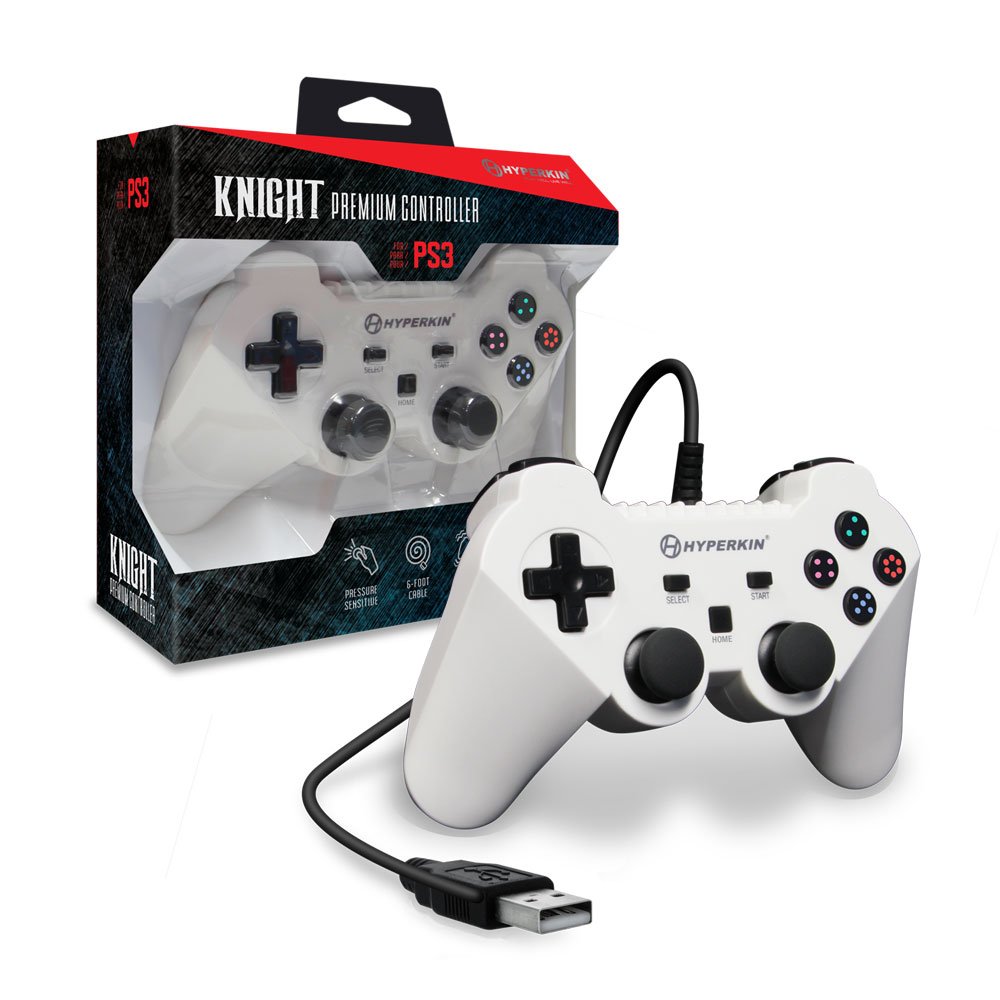
Image: The Hyperkin Knight Premium Controller displayed alongside its retail packaging, highlighting the product's design and branding.

ภาพ: ภาพระยะใกล้ view of the Hyperkin Knight Premium Controller's retail box, showcasinคุณสมบัติหลักและองค์ประกอบการออกแบบ

ภาพ: มุมเอียง view of the Hyperkin Knight Premium Controller, emphasizing its ergonomic shape and button placement.


