1. บทนำ
ขอบคุณสำหรับการซื้อasing the Candy X-Range CMXG20DS Microwave with Grill. This manual provides essential information for the safe and efficient operation of your appliance. Please read these instructions carefully before using the microwave oven and retain them for future reference.
คำแนะนำด้านความปลอดภัยที่สำคัญ
- ห้ามพยายามใช้งานเตาอบโดยที่ประตูเปิดอยู่ เนื่องจากอาจทำให้ได้รับพลังงานไมโครเวฟที่เป็นอันตรายได้
- ห้ามวางวัตถุใดๆ ไว้ระหว่างด้านหน้าเตาอบและประตู และอย่าปล่อยให้มีดินหรือคราบน้ำยาทำความสะอาดสะสมอยู่บนพื้นผิวที่ปิดผนึก
- ห้ามใช้งานเตาอบหากได้รับความเสียหาย สิ่งสำคัญอย่างยิ่งคือต้องปิดประตูเตาอบอย่างถูกต้อง และไม่มีความเสียหายต่อ: (1) ประตู (งอ), (2) บานพับและสลัก (แตกหรือคลาย), (3) ซีลประตูและพื้นผิวการปิดผนึก
- ไม่ควรปรับแต่งหรือซ่อมแซมเตาอบโดยบุคคลใด ยกเว้นบุคลากรบริการที่มีคุณสมบัติเหมาะสมเท่านั้น
- ตรวจสอบให้แน่ใจว่าเครื่องได้ต่อสายดินอย่างถูกต้อง
- ห้ามอุ่นของเหลวหรืออาหารอื่นๆ ในภาชนะที่ปิดสนิท เพราะอาจระเบิดได้
- ใช้เฉพาะภาชนะที่เหมาะกับการใช้งานในเตาไมโครเวฟเท่านั้น
- เมื่ออุ่นอาหารในภาชนะพลาสติกหรือกระดาษ ควรสังเกตเตาอบเนื่องจากมีความเสี่ยงที่จะเกิดการติดไฟได้
2. สินค้าหมดview
The Candy X-Range CMXG20DS is a 20-liter microwave oven with an integrated grill function, designed for versatile cooking. It features a digital display, multiple power levels, and automatic programs.
ส่วนประกอบ
- เตาอบไมโครเวฟ
- แท่นหมุนแก้ว (เส้นผ่านศูนย์กลาง 25.5 ซม.)
- วงแหวนแผ่นเสียง
- ตะแกรงย่าง
- คู่มือการใช้งาน
แผนผังอุปกรณ์
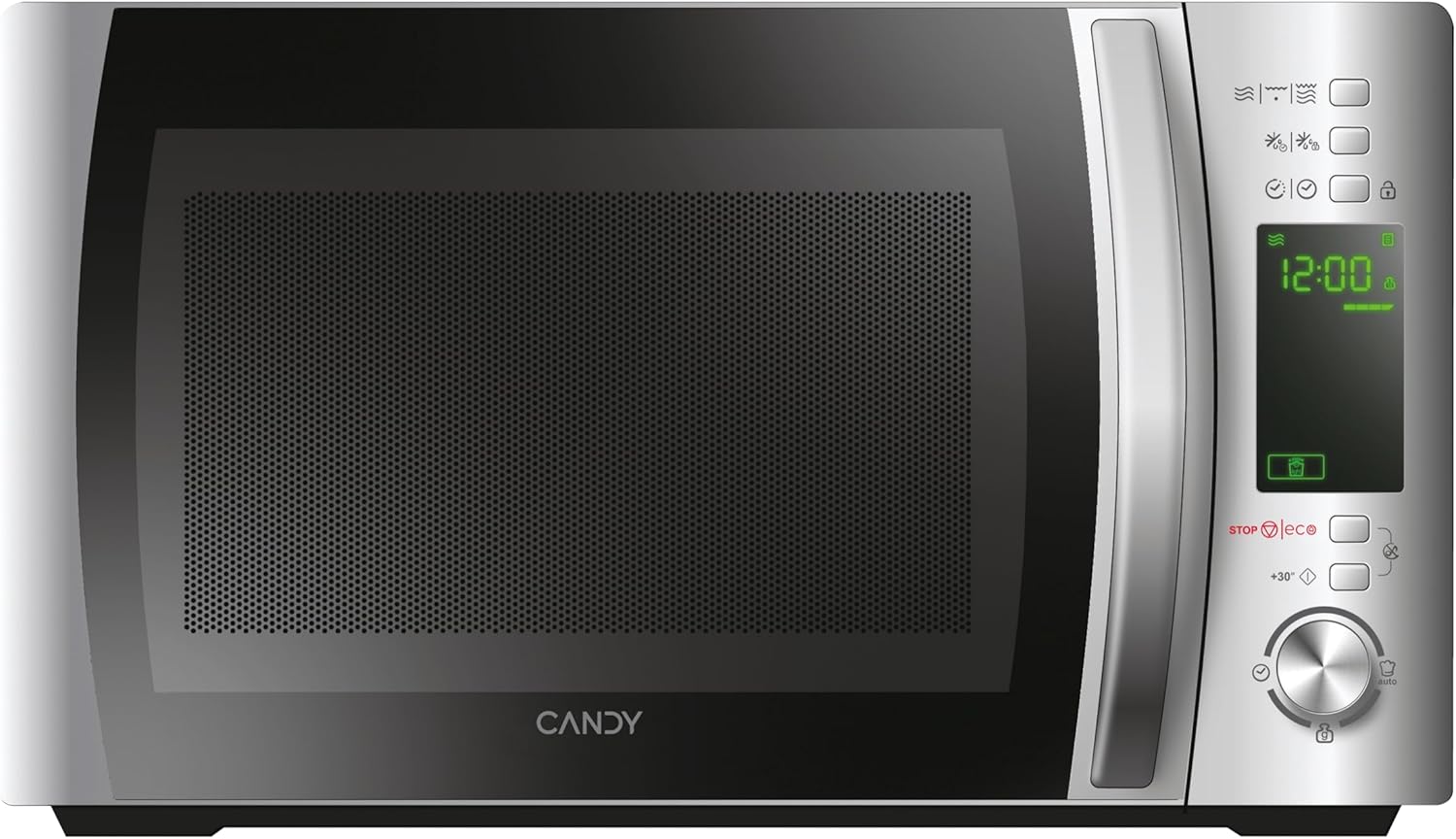

แผงควบคุม
The control panel features a digital display and various buttons and a dial for setting cooking functions, time, and power levels. Specific functions include:
- จอแสดงผลดิจิตอล: แสดงเวลา ระดับพลังงาน และตัวบ่งชี้โปรแกรม
- ปุ่มปรับระดับพลังงาน: Adjust microwave power.
- Grill Function Button: Activates the grill.
- ปุ่มละลายน้ำแข็ง: สำหรับการละลายน้ำแข็งโดยการชั่งน้ำหนักหรือตามเวลา
- Automatic Programs Button: เข้าถึงโปรแกรมทำอาหารที่ตั้งไว้ล่วงหน้า
- ปุ่มล็อคเพื่อความปลอดภัย: Engages/disengages child lock.
- ปุ่ม STOP/ECO: หยุดการปรุงอาหารหรือเปิดใช้งานโหมด Eco
- +30 Seconds Button: Quick start or adds 30 seconds to cooking time.
- แป้นหมุน: Adjusts time, weight, or program selection.
- ปุ่มเริ่มต้น: เริ่มต้นการปรุงอาหาร
3. การตั้งค่า
การเปิดออกและการจัดวาง
- นำวัสดุบรรจุภัณฑ์ทั้งหมดออกจากช่องเตาอบและอุปกรณ์เสริม
- Inspect the oven for any damage such as dents or a misaligned door. Do not operate if damaged.
- Place the microwave oven on a stable, level surface strong enough to hold the oven and the food being cooked.
- Ensure adequate ventilation. Maintain a minimum clearance of 20 cm above the oven, 10 cm at the rear, and 5 cm on both sides. Do not block any ventilation openings.
- อย่าตั้งเตาอบไว้ใกล้แหล่งความร้อนหรือในที่ที่มีความร้อนสูงamp สิ่งแวดล้อม.

การเชื่อมต่อไฟฟ้า
- Plug the power cord into a properly installed and earthed wall socket.
- ให้แน่ใจว่าปริมาตรtage ตรงกับฉลากการจัดอันดับบนเครื่องใช้
Initial Setup: Setting the Clock
- เมื่อเสียบปลั๊กไมโครเวฟครั้งแรก หน้าจอจะแสดง "0:00"
- Press the "Clock" button (if available, otherwise consult specific model instructions for clock setting, often combined with a time setting button).
- Rotate the dial to set the hour. Press the "Clock" button again.
- Rotate the dial to set the minutes. Press the "Clock" button to confirm.
4. คู่มือการใช้งาน
4.1. การปรุงอาหารด้วยไมโครเวฟขั้นพื้นฐาน
- วางอาหารในภาชนะที่ใช้กับไมโครเวฟได้ลงบนจานหมุนแก้ว ปิดประตูไมโครเวฟ
- Press the "Microwave" button (or equivalent power level button) repeatedly to select the desired power level (e.g., 700W, 500W, etc.). The display will show the selected power.
- หมุนปุ่มเพื่อตั้งเวลาในการปรุงอาหาร
- กดปุ่ม "เริ่ม" เพื่อเริ่มการปรุงอาหาร
4.2. ฟังก์ชันย่าง
- Place food on the grill rack, then place the rack on the turntable.
- Press the "Grill" button. The display will show "G".
- หมุนปุ่มเพื่อตั้งเวลาในการย่าง
- กดปุ่ม "เริ่ม"
4.3. การปรุงอาหารแบบผสมผสาน (ไมโครเวฟ + ย่าง)
- Place food in a suitable container on the turntable or grill rack.
- Press the "Combi" button (or press Microwave/Grill buttons in sequence to select a combination mode, e.g., C-1, C-2).
- หมุนปุ่มเพื่อตั้งเวลาในการปรุงอาหาร
- กดปุ่ม "เริ่ม"
4.4. ฟังก์ชั่นละลายน้ำแข็ง
The CMXG20DS offers defrosting by weight or by time.
ละลายน้ำแข็งตามน้ำหนัก:
- วางอาหารแช่แข็งบนจานหมุน
- Press the "Defrost" button once. The display will show "dEF1" (or similar for weight defrost).
- Rotate the dial to set the weight of the food.
- กดปุ่ม "เริ่ม"
ละลายน้ำแข็งตามเวลา:
- วางอาหารแช่แข็งบนจานหมุน
- Press the "Defrost" button twice. The display will show "dEF2" (or similar for time defrost).
- Rotate the dial to set the defrosting time.
- กดปุ่ม "เริ่ม"

4.5. Express Cooking (+30 Seconds)
For quick heating at full power, simply press the "+30 Seconds" button. Each press adds 30 seconds to the cooking time. This function can also be used to extend cooking time during operation.
4.6. Automatic Programs (40 Programs)
The microwave features 40 pre-set automatic cooking programs for various food types. These programs are designed to simplify cooking by automatically setting the optimal time and power.
- Press the "Auto Program" button. The display will show "A-1" (or similar).
- Rotate the dial to select the desired program (e.g., A-1 for pizza, B-1 for vegetables). A list of programs and their corresponding codes is typically found on the inside of the microwave door or in a separate section of this manual.
- กดปุ่ม "เริ่ม"

4.7. ฟังก์ชั่นจับเวลา
The microwave can be used as a kitchen timer without cooking.
- Ensure the oven is not in cooking mode.
- Press the "Timer" button (or a dedicated clock/timer button).
- Rotate the dial to set the desired countdown time.
- Press the "Start" button. The timer will count down without activating the microwave function.
4.8. Safety Lock (Child Lock)
เพื่อป้องกันการใช้งานโดยไม่ตั้งใจ โดยเฉพาะจากเด็ก:
- ในการเปิดใช้งาน: Press and hold the "Safety Lock" button (often indicated by a lock icon) for 3 seconds. A lock indicator will appear on the display.
- วิธีปิดใช้งาน: Press and hold the "Safety Lock" button again for 3 seconds. The lock indicator will disappear.
4.9. โหมดอีโค
The Eco mode turns off the display to save energy when the microwave is not in use.
- ในการเปิดใช้งาน: Press the "STOP/ECO" button once when the microwave is idle. The display will turn off.
- วิธีปิดใช้งาน: Press any button or open the door. The display will reactivate.
4.10. simply-Fi App Integration
The simply-Fi app provides additional functionality, including access to recipes, cooking tips, and product information. Refer to the app's instructions for pairing and usage.

5. การบำรุงรักษาและการทำความสะอาด
การทำความสะอาดและบำรุงรักษาเป็นประจำจะช่วยให้เตาไมโครเวฟของคุณมีอายุการใช้งานยาวนานและมีประสิทธิภาพเหมาะสมที่สุด
การทำความสะอาดทั่วไป
- ถอดปลั๊กเครื่องออกจากเต้ารับก่อนทำความสะอาดทุกครั้ง
- ทำความสะอาดช่องเตาอบหลังการใช้งานทุกครั้งด้วยโฆษณาamp ผ้า สำหรับคราบฝังแน่น สามารถใช้ผงซักฟอกชนิดอ่อนได้
- ควรทำความสะอาดพื้นผิวด้านนอกด้วยโฆษณาamp cloth. Prevent water from seeping into the ventilation openings.
- The door and door seals should be cleaned regularly to ensure proper closing and operation.
อุปกรณ์ทำความสะอาด
- สามารถล้างจานหมุนแก้วและวงแหวนจานหมุนได้ในน้ำสบู่ที่อุ่นหรือในเครื่องล้างจาน
- The grill rack should be cleaned with warm soapy water and a non-abrasive sponge.
- Ensure all parts are completely dry before reassembling and using the microwave.
6 การแก้ไขปัญหา
หากคุณพบปัญหาเกี่ยวกับเตาไมโครเวฟ โปรดดูตารางต่อไปนี้เพื่อดูปัญหาทั่วไปและวิธีแก้ไข
| ปัญหา | สาเหตุที่เป็นไปได้ | สารละลาย |
|---|---|---|
| เตาอบไม่เริ่มทำงาน | สายไฟเสียบไม่แน่น ประตูไม่ได้ปิดสนิท ฟิวส์ขาด หรือเบรกเกอร์ตัดวงจร | Ensure power cord is plugged in. Close door securely. Check household fuse or reset circuit breaker. |
| อาหารไม่ร้อน | ตั้งเวลาทำอาหารหรือระดับกำลังไฟไม่ถูกต้อง ไม่ได้ใช้ภาชนะที่ใช้กับไมโครเวฟได้ | Adjust cooking time and power level. Use appropriate microwave-safe cookware. |
| การเกิดประกายไฟภายในเตาอบ | Metal or foil in the oven. Food residue on cavity walls. | Remove any metal objects. Clean the oven cavity thoroughly. |
| เครื่องเล่นแผ่นเสียงไม่หมุน | Turntable not properly placed on the ring. Obstruction under the turntable. | Ensure turntable and ring are correctly positioned. Remove any obstructions. |
| หน้าจอแสดงรหัสข้อผิดพลาด | ความผิดปกติภายใน | ถอดปลั๊กเตาอบออกสักสองสามนาที แล้วเสียบปลั๊กกลับเข้าไปใหม่ หากข้อผิดพลาดยังคงอยู่ โปรดติดต่อฝ่ายสนับสนุนลูกค้า |
หากปัญหายังคงมีอยู่หลังจากพยายามแก้ไขปัญหาเหล่านี้แล้ว โปรดติดต่อฝ่ายสนับสนุนลูกค้า
7. ข้อมูลจำเพาะทางเทคนิค
- ยี่ห้อ:
- ลูกอม
- หมายเลขรุ่น:
- ซีเอ็มเอ็กซ์จี20ดีเอส
- สี:
- เงิน
- ขนาดสินค้า (ลึก x กว้าง x สูง):
- 44 x 29.5 x 26 ซม.
- ความจุ:
- 20 ลิตร
- กำลังไฟฟ้าของไมโครเวฟ:
- 700 วัตต์
- เล่มที่tage:
- 230 โวลต์
- วัสดุ:
- สแตนเลส
- ระดับเสียง:
- 44 เดซิเบล
- คุณสมบัติพิเศษ:
- Control panel lock, Defrost, Eco mode, Turntable, Programmable, Quick access keys, Timer
- เส้นผ่านศูนย์กลางของจานหมุน:
- 25.5 ซม.
- น้ำหนัก:
- 12.2 กก.
8. การรับประกันและการสนับสนุน
ข้อมูลการรับประกัน
This Candy appliance is covered by a standard manufacturer's warranty. Please refer to the warranty card included with your purchase for specific terms and conditions, including the duration of coverage and what is covered.
การสนับสนุนลูกค้า
For technical assistance, spare parts, or service requests, please contact Candy customer support. Contact details can typically be found on the manufacturer's official webดูได้จากเว็บไซต์หรือเอกสารการรับประกัน
When contacting support, please have your model number (CMXG20DS) and serial number ready.


